Introducing DataSunrise Database Regulatory Compliance Manager
DataSunrise Data Compliance
Recent years have seen the massive data breaches affecting hundreds of millions of people. As result, the legislators around the world are making the data protection requirements more stringent and introducing the new regulations and privacy requirements. Those regulations could be difficult to implement for organizations that must comply with national and international personal data protection legislation. The protection of personal data is a must for any company or organization today.
DataSunrise is making the complicated things easier and simpler. That could be true even for such a complex need as compliance with strict national and international regulations. Users are expecting their database security provider to ensure automating compliance.
Introducing DataSunrise Data Compliance, a built-in feature of DataSunrise Database Security Suite.
How It Works
Data Compliance helps managing, automating and administrating the regulations such as GDPR, PCI DSS, HIPAA or SOX.
Data Compliance is integrated with DataSunrise Database Security Suite to analyze the compliance, configure and apply security policies to protect the data in various SQL and NoSQL databases. DataSunrise enables configuring security policies and rules including dynamic data masking, data auditing, blocking an unauthorized access and preventing the SQL injections.
Just in few simple steps user can select one or more regulations to be compliant with and execute on it right away. DataSunrise Data Discovery will automatically find the sensitive information to be protected and audited in accordance with the chosen regulations. The new security policies will be automated. DataSunrise Data Masking and Database Security will obfuscate sensitive data and/or block suspicious and malicious queries to a database.
Automated Compliance Reports
Moreover, after users have successfully protected personal data they can set the frequency of automatic report generation. The following types of periodic reports will be generated:
- Audit report on sensitive data: a report on all queries to sensitive data.
- Security report on sensitive data: a report on all unauthorized queries and SQL injections to sensitive data.
- Operations error report on sensitive data: a report on failed operations with sensitive data.
In the result not only the databases will be protected and compliant with the security regulations, but DataSunrise will also continuously monitor users’ activity or access to selected database objects. The audit reports will be generated.
Start securing your database now and be in compliance!
GDPR Compliance in a Few Clicks
Let’s review the steps you need to take to be compliant with the personal data protection regulation of your choice.
Before starting the compliance process, review how DataSunrise looks now. In the Configuration section in the left pane click Database Users. Here we have a list of users that have already been added to our system. We can add and delete users, and set up and delete groups of users. Here on the page we also have the groups of users we’ll be using later. These groups are Chief_Information_Officer, Financial_Department, Sales_Department, Third_Party_Contractors and Suppliers. Later these groups will be assigned different roles to access sensitive information. We have the “postgres” user here which will be in the Suppliers group, the group we’re going to assign the lowest access rights.
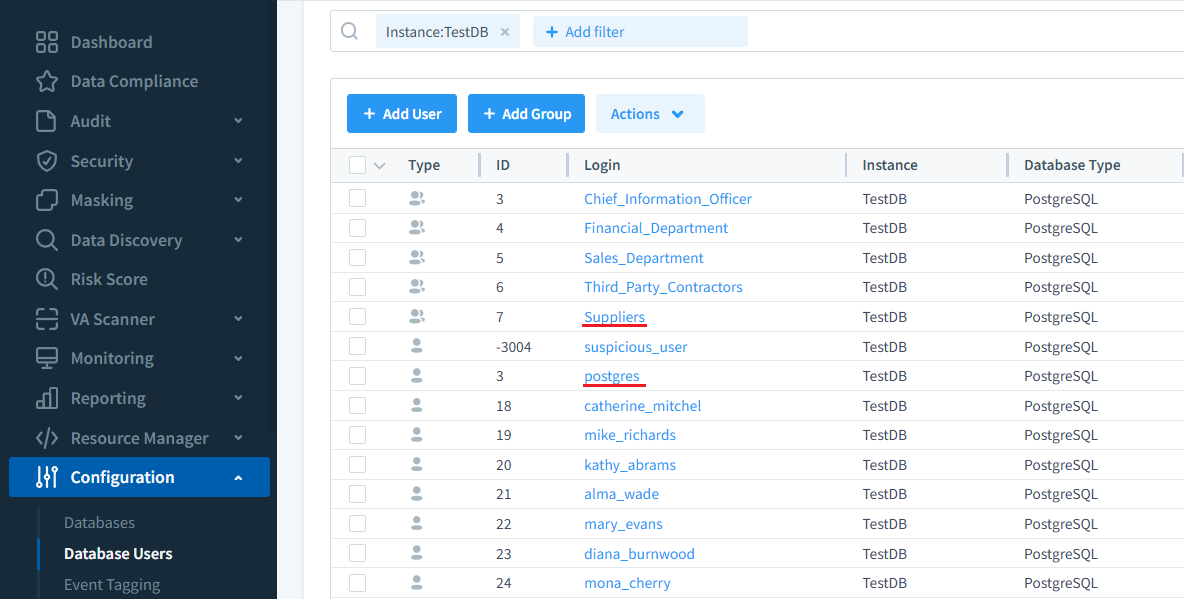
Let’s go inside the Suppliers group.
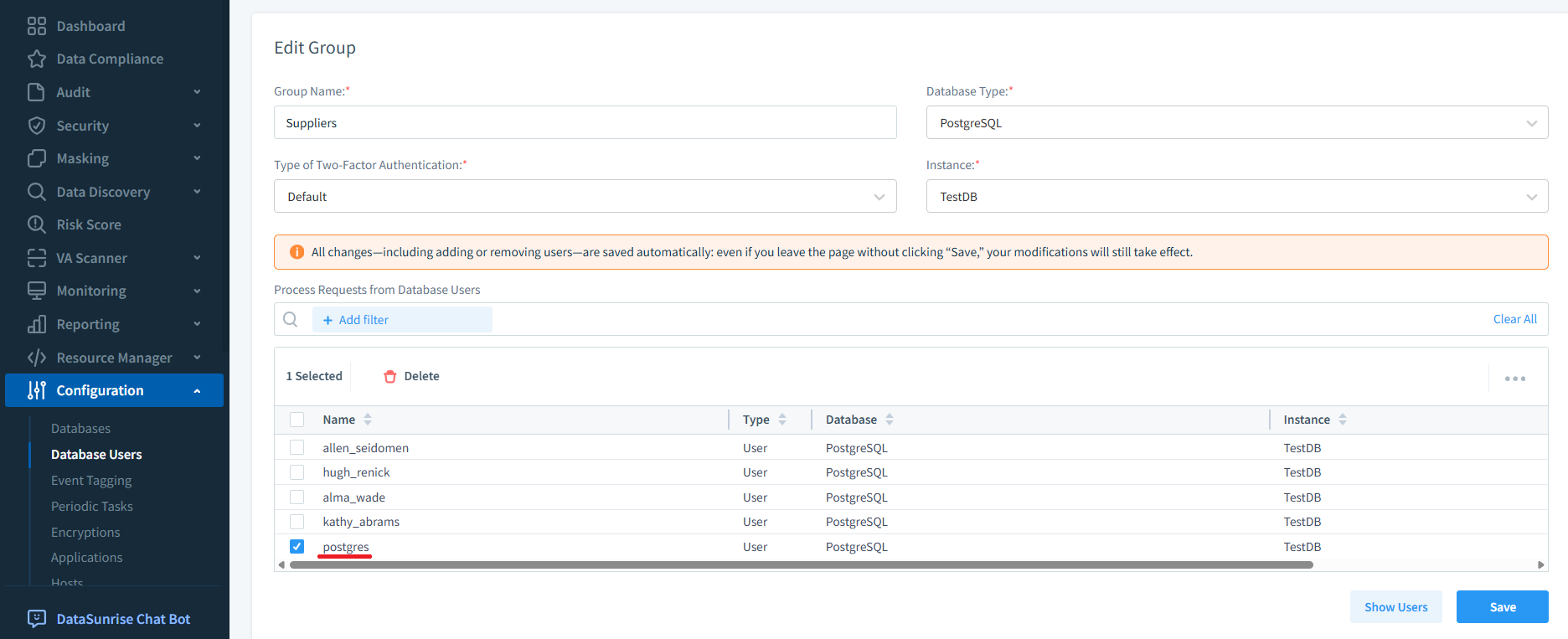
Here you can see our “postgres” user we earlier put in the Suppliers group along with other users, it’s the group we’re later going to give the lowest access rights to sensitive information. Users outside a group will have no access to sensitive information.
Setting Up the Compliance Rule
Now let’s start the GDPR compliance process. You need to do the following very simple steps to be GDPR compliant:
- Go to Data Compliance in the left pane of the DataSunrise GUI.
- Set a Logical Name and the Database Instance you want compliant with the regulation of your choice. The Logical Name will be used as a prefix for your reference when creating Object Groups, Periodic Tasks, Rules & Reports. You can also enable the Generate Reports checkbox to automatically create compliance reports.
- Specify a Database and Schema so that DataSunrise could search for sensitive information. We’ve selected to search the Public schema of the New_DB database. If you don’t specify the Data Discovery Parameters your whole database(s) will be scanned to find sensitive data.
- Then set the Search Settings. You can search by Security Standards or by Information Types. Click Add Security Standard and select the regulations you need. With DataSunrise you can be compliant with GDPR, HIPAA, PCI DSS, ISO27001 and more. In our example we opted to be compliant with the GDPR.
- Then set the Frequency of Discovering sensitive information. DataSunrise will be automatically retrieving newly added sensitive data at set intervals which could be even minutes. The Periodic Discovery feature finds new sensitive data and protects it. In the result your database(s) are protected 24/7 including newly added sensitive data.
- Then click “Save and Discover”.
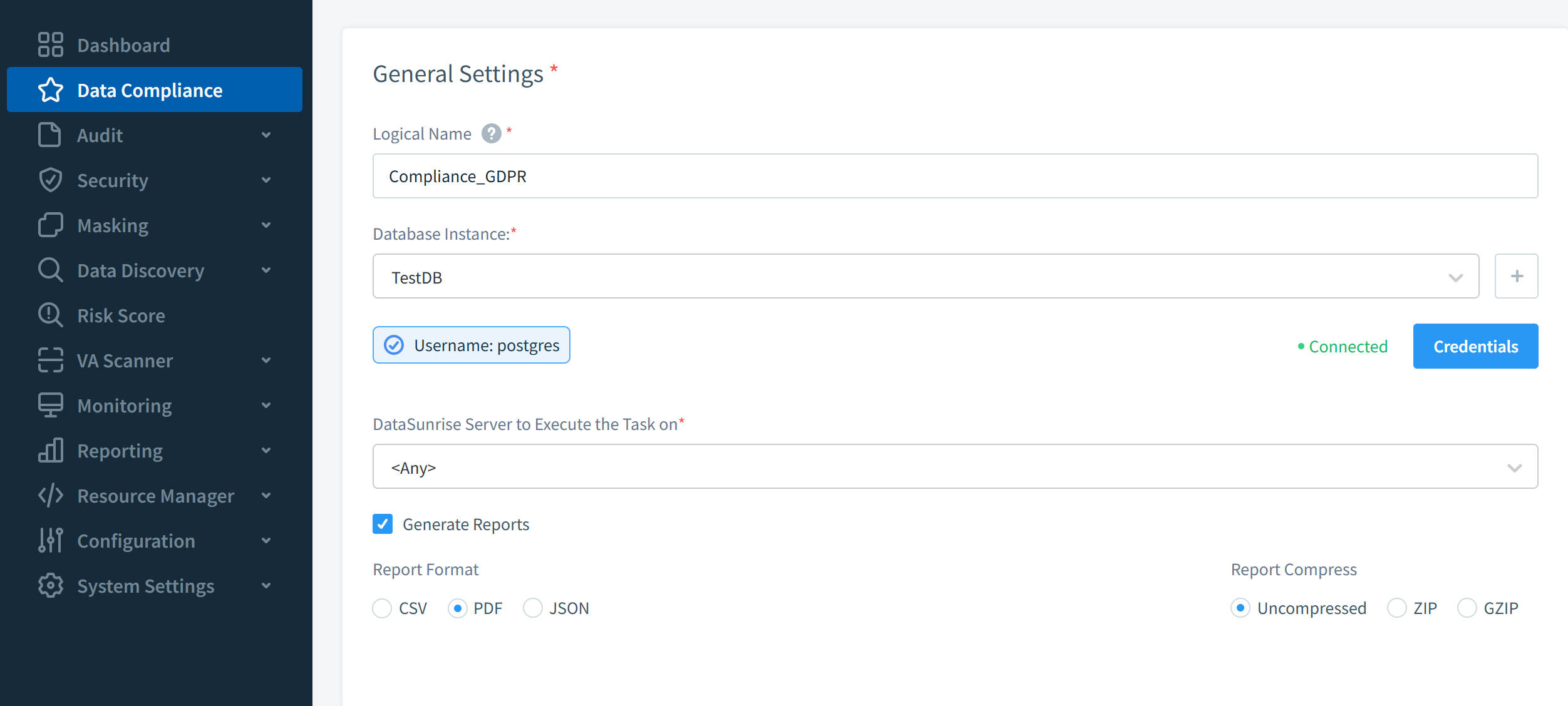
Masking and Role Assignment
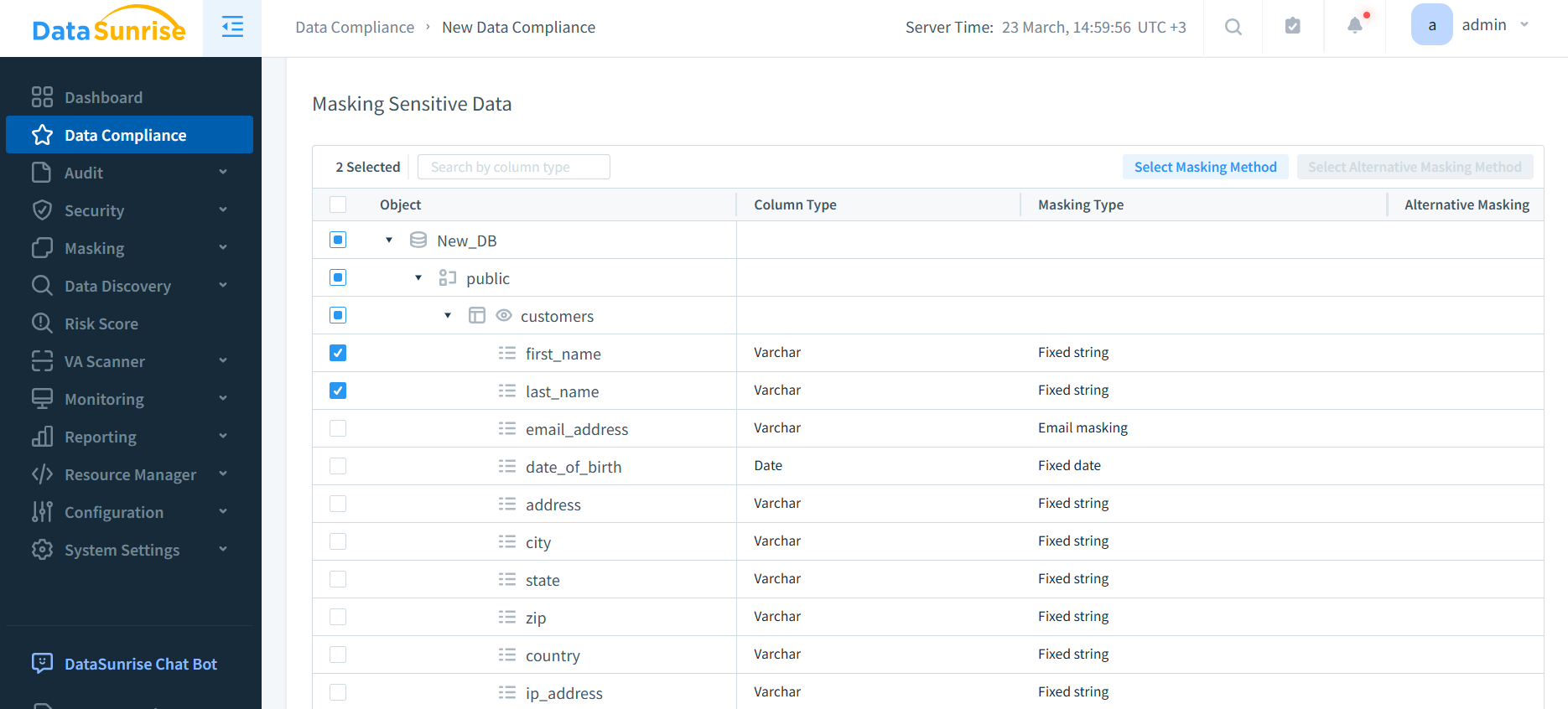
DataSunrise will scan the selected database and display the discovered sensitive data along with the proposed masking methods. You can select specific columns and change the masking method by clicking “Select Masking Method”. Click “Continue” to proceed.
The next step assigns roles for the DS User Groups. Also, you can set up a new user group. For the last two groups Third_Party_Contractors and Suppliers we’ve assigned the lowest access to sensitive information rights (Tester). Users outside a group will have no access to sensitive information.
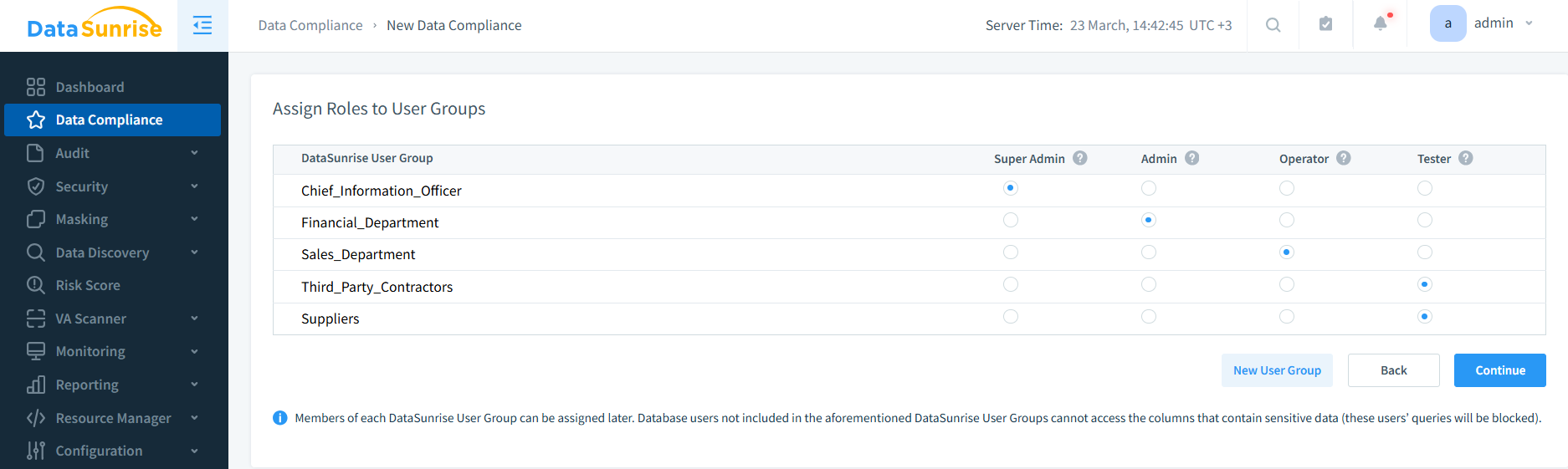
Click Continue and you’re good to go.
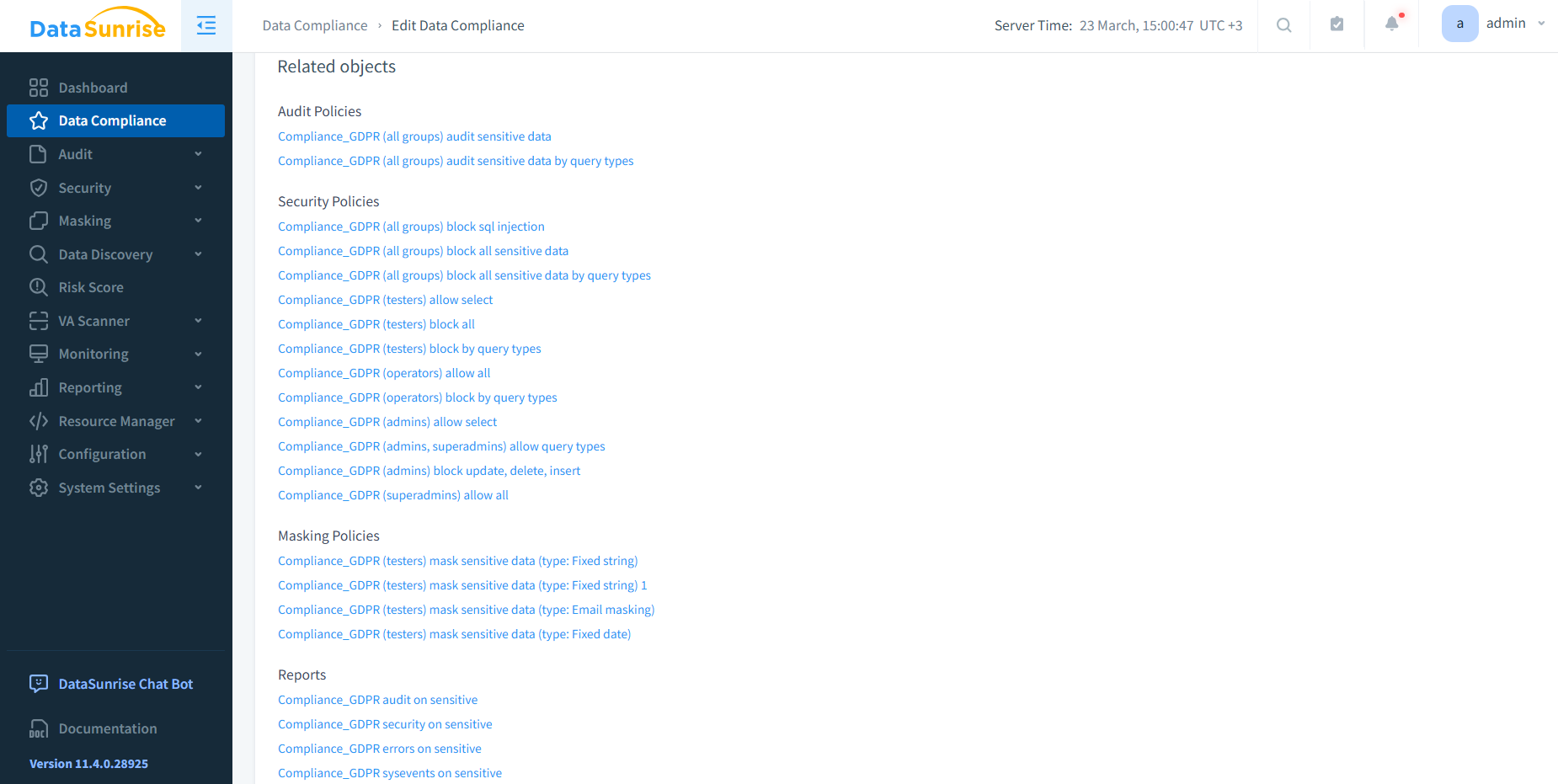
Once the compliance rule is created, you can open it from the Data Compliance list to see all the related objects that were automatically generated — Audit Policies, Security Policies, Masking Policies, and Reports. Just a few clicks and you’re compliant with the GDPR regulation!
Audit and Reporting
Let’s imagine that the “postgres” user was active in our database. And how can we understand what that user was doing and at what time? We can see that in the Audit Events and the Audit Reports.
Now, let’s generate a report. To do that go to the Reporting section in the left pane and then Report Gen. Select the report you want (audit, security or operations). We’ll go for an audit report. Then click “Start Now” to generate the report immediately.
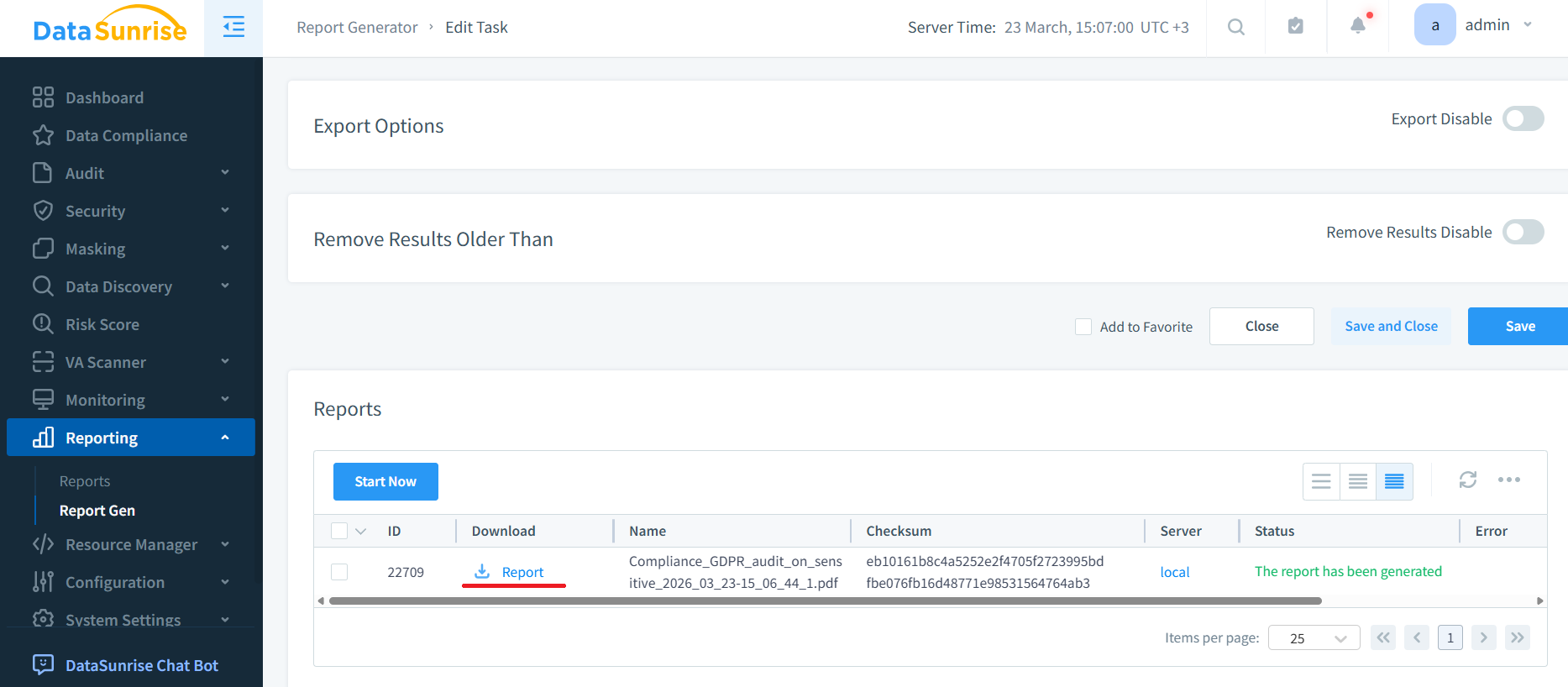
Click the Download link in the Reports section to download the PDF report. Let’s open the PDF report and see what information it contains.
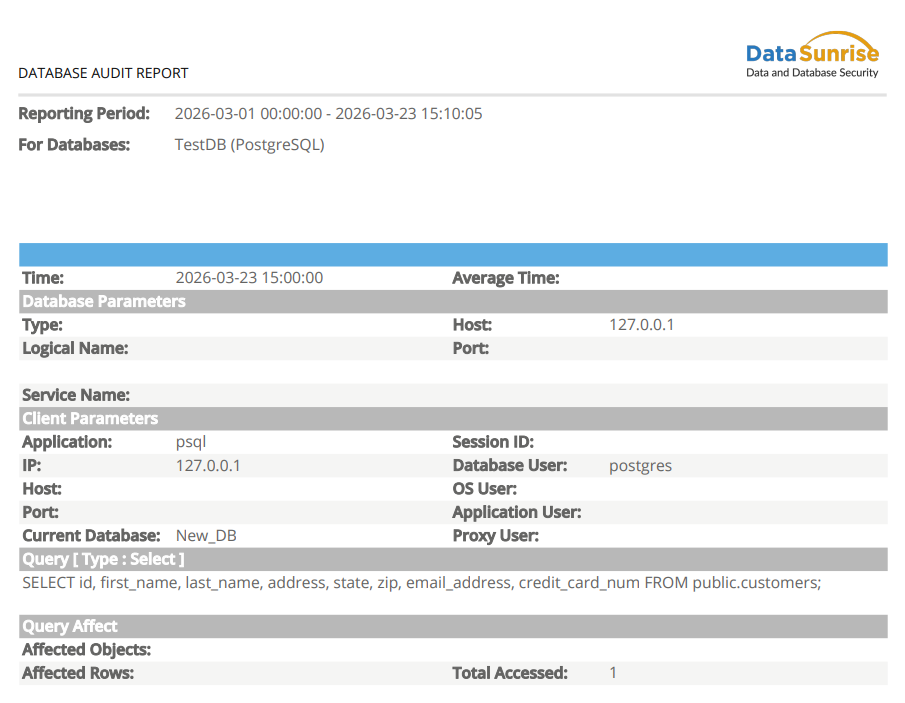
As it is an audit report it shows that “postgres” user has executed a Select query to sensitive data in our database. We assigned the lowest access rights to this user in the DS User Groups, still this user can execute this type of query. But all what this query returns from our PostgreSQL database is just masked data.
In addition to an audit report you can additionally have a security report on all blocked queries to sensitive data and an operations error report on failed operations with sensitive data.
DataSunrise makes sure that you comply with all existing personal data protection legislation (GDPR, PCI DSS, HIPAA or SOX) and it will take you probably less time you have spent to read this post.
Protect Your Data with DataSunrise
Secure your data across every layer with DataSunrise. Detect threats in real time with Activity Monitoring, Data Masking, and Database Firewall. Enforce Data Compliance, discover sensitive data, and protect workloads across 50+ supported cloud, on-prem, and AI system data source integrations.
Start protecting your critical data today
Request a Demo Download Now