DataSunrise Achieves AWS Data & Analytics Competency. Learn more →

Part ofRuntime Visibility

Query Result Cache

Speed up repeated reads by serving saved query results from the DataSunrise proxy. Each cache hit avoids another execution of that query at the database.

When the same request keeps coming back

A dashboard refreshes. A report runs again. An application looks up the same reference data. When requests repeat more often than the data changes, the database can end up doing the same work many times.

Query Result Cache can help with:

  • Dashboards that repeatedly request the same view of data.
  • Recurring reports whose results can be reused between scheduled updates.
  • Reference-data lookups, such as product categories or country lists.

Caching works best for repeated reads of data that changes infrequently. If every request must reflect the latest database updates, leave caching disabled.

How it works

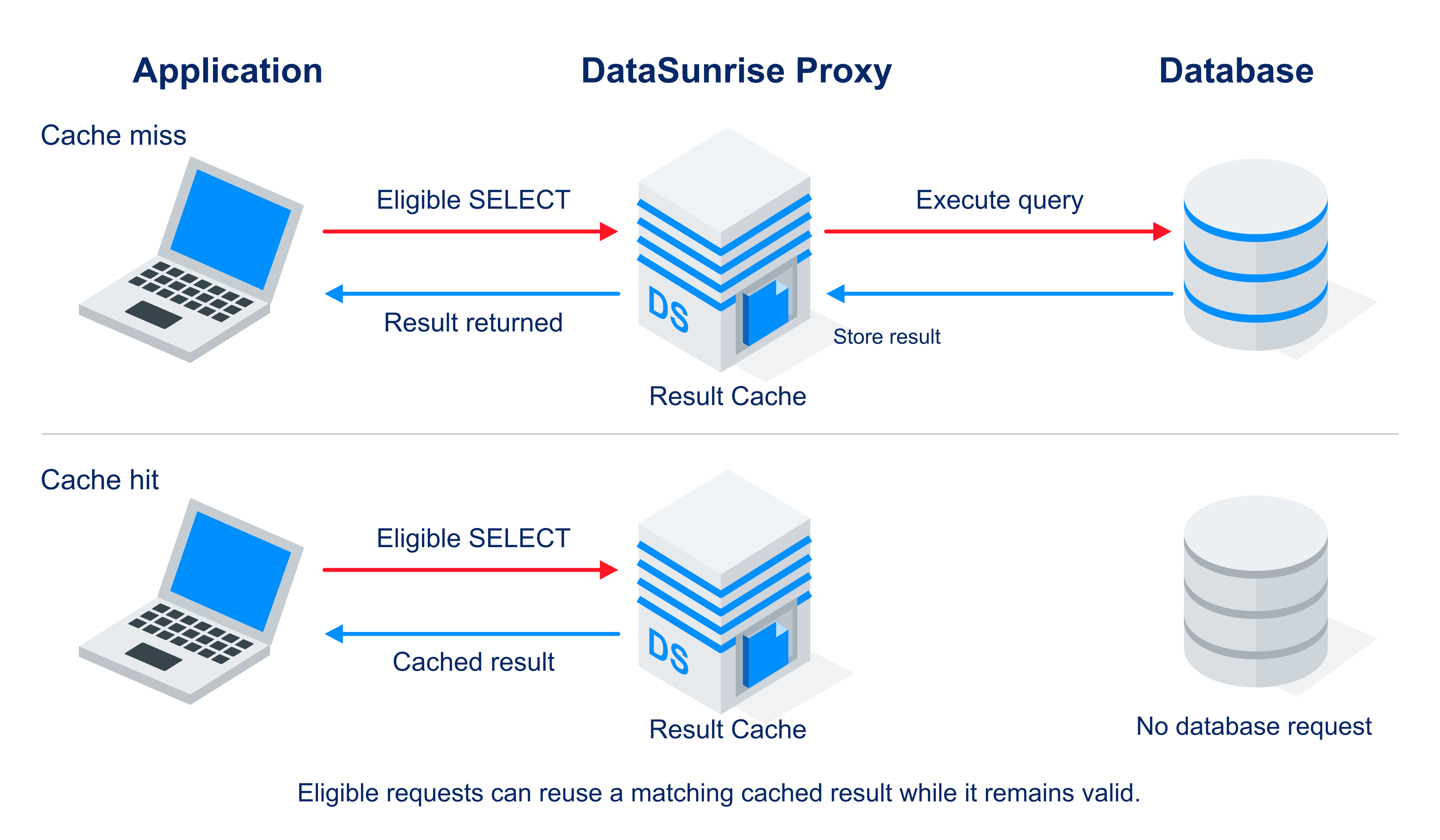
Your application connects through the DataSunrise proxy. If no valid cached result is available for an eligible SELECT, the proxy forwards the query to the database and stores the returned result while passing it to the application. A matching request can then receive that result directly from the proxy while it remains valid, avoiding another database execution and round trip. Requests that are not eligible for caching continue to the database as usual.

Query Result Cache request flow: a cache miss reaches the database; a valid cache hit returns the saved result from the DataSunrise proxy.

See the workflow in DataSunrise

Explore Query Result Cache

1 / 5

Database and client coverage

DatabaseClients
PostgreSQLDBeaver, pgAdmin 4, ODBCQueryTool
Microsoft SQL ServerDBeaver, SSMS, ODBCQueryTool
MySQLmysql CLI, pyodbc
OracleDBeaver, Toad, SQL*Plus
VerticaPython, JDBC, ODBC

Availability depends on your DataSunrise release and application.

Match caching to how fresh the data needs to be

You control the trade-off between reuse and freshness. Set a time to live (TTL) that matches how long your application can use an older result.

Database writes do not automatically refresh cached results. A cached response can remain available until it expires, is evicted, or you clear the cache. Expiry does not trigger a background refresh: the next eligible miss retrieves the result from the database.

In Result Cache Settings, enable caching for a database profile and set the lifetime, cache memory and entry limits, maximum query length, and maximum result size. Clear Cache discards stored results before their lifetime ends.

Large result sets and queries with little reuse may not benefit from caching.

Measured on repeated reads

In a Vertica test, repeated reads returning 200 rows took a median of about 7 ms with caching disabled and 1.98 ms with a warmed cache. The 500-row case also improved:

Median query response time, milliseconds
Rows returned per queryCache OFF median, before / afterCache ON median
2006.94 / 7.04 ms1.98 ms
5008.84 / 9.10 ms3.59 ms

Internal QA test on Vertica, warmed cache. Results vary by workload.

Include masking and auditing in your checks

Before enabling caching alongside masking or security rules, check the responses each user and application receives. Verify that your audit trail captures the events required by your policy on both cache misses and hits. Cache-activity counters show reuse; they do not establish complete audit coverage.

See whether your workload benefits

The Result Cache Rate view shows hit rate, hits, misses, stores, current entries, evictions and invalidations. Use it to see whether requests reuse results before they expire.

Compare application response times with caching off and on under the same workload. A high hit rate alone does not tell you how much faster the application is or how much database CPU it saves.

Considering query result caching?

See whether Query Result Cache can speed up your application's repeated database reads.