Elasticsearch Compliance Management
Organizations leveraging Elasticsearch for analytics, search, and data pipelines face a growing challenge: ensuring compliance across massive, distributed datasets. From GDPR to HIPAA, modern regulations demand complete visibility into who accesses what data and how it’s processed.
While Elasticsearch offers strong index-level security, native compliance features often lack centralized automation and audit consistency. That’s where DataSunrise Compliance Manager delivers — unifying governance, audit, and reporting under one adaptive, zero-touch platform.
This article explains Elasticsearch’s built-in compliance tools and explores how DataSunrise enhances them with autonomous rule orchestration, real-time monitoring, and seamless regulatory alignment.
What is Compliance Management?
Compliance Management refers to the set of processes, tools, and practices organizations use to ensure that their operations and data handling adhere to legal, regulatory, and internal standards.
It involves identifying applicable regulations (like GDPR, HIPAA, and PCI DSS), assessing risks, implementing controls, and continuously monitoring compliance posture.
In the context of Elasticsearch, compliance management ensures that all indexing, querying, and data storage activities are performed securely, transparently, and within the boundaries of privacy frameworks.
Without it, organizations risk fines, data breaches, and reputational damage — especially when handling personal or sensitive information in large-scale search environments.
DataSunrise Compliance Manager simplifies this complex process by automating policy enforcement, audit trail collection, and regulatory alignment across all Elasticsearch instances.
Native Elasticsearch Compliance Features
Elasticsearch includes basic tools to support regulatory compliance by controlling access and maintaining data integrity. Administrators can combine Role-Based Access Control, Audit Logs, and security policies to establish a foundational compliance layer.
1. Role-Based Access Control (RBAC)
Elasticsearch provides granular permission control through roles and role mappings. Example configuration:
# roles.yml
compliance_auditor:
  cluster: [ 'monitor' ]
  indices:
    - names: ['sensitive-*']
      privileges: ['read', 'view_index_metadata']
This setup ensures only auditors can access sensitive indices while regular users see restricted datasets.
2. Field- and Document-Level Security
Using Elasticsearch’s field-level security, sensitive fields such as PII or PHI can be masked or excluded entirely:
GET sensitive-data/_search
{
  "query": { "match_all": {} },
  "_source": {
    "excludes": ["ssn", "credit_card"]
  }
}
This method supports compliance by limiting exposure of protected attributes during searches.
3. Audit and Access Logging
The Audit Logging module records user activity across indices, clusters, and APIs. It captures:
- Authentication events
- Query operations
- Index modifications
Here’s an example of a basic audit log configuration in elasticsearch.yml:
xpack.security.audit.enabled: true
xpack.security.audit.outputs: [ index, logfile ]
xpack.security.audit.logfile.events.include: [ "authentication_success", "authentication_failed", "access_granted", "access_denied", "anonymous_access_denied" ]
xpack.security.audit.logfile.events.ignore_filters:
  - users: [ "elastic" ]
xpack.security.audit.index.events.emit_request_body: true
This configuration enables both file and index-based audit outputs, capturing successful and failed authentications as well as access control events for Elasticsearch. Audit data can then be queried or shipped to external monitoring tools.
Audit data is typically stored in dedicated indices and can be exported to SIEM tools for continuous monitoring.
However, these native capabilities are still manual, siloed, and limited — lacking automated compliance reporting, regulatory intelligence, or cross-database synchronization.

Enhancing Elasticsearch Compliance with DataSunrise
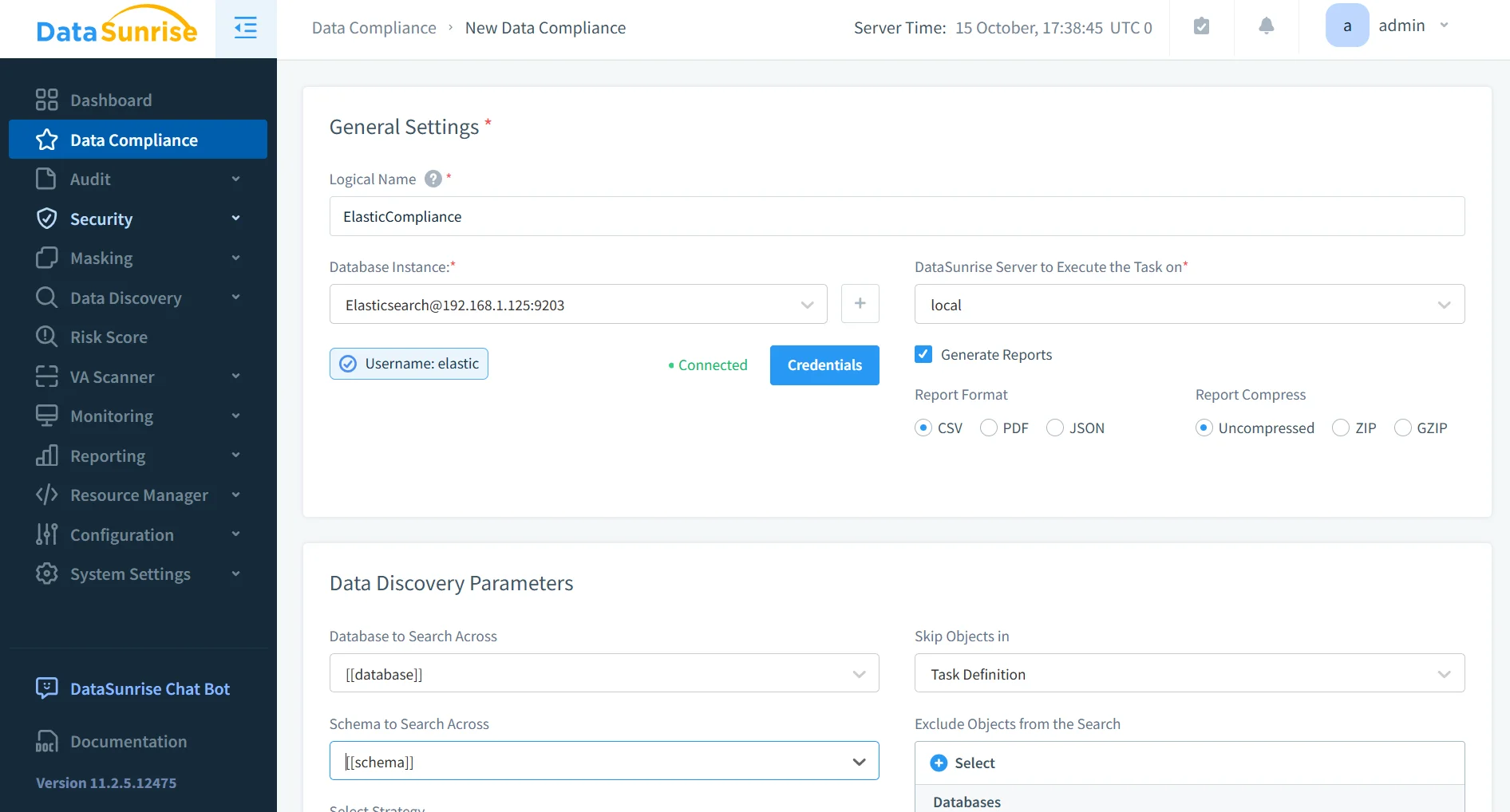
DataSunrise introduces Compliance Autopilot — an AI-driven module that continuously scans Elasticsearch clusters, classifies sensitive data, and enforces regulatory alignment across multi-environment architectures.
1. Unified Compliance Manager
The Compliance Manager consolidates governance across Elasticsearch, SQL, and NoSQL environments. Through a single dashboard, teams can:
track compliance posture in real time, automate reporting for GDPR, HIPAA, PCI DSS, and SOX, and generate audit-ready evidence with one click.
This centralization ensures continuous, consistent enforcement of compliance policies across hybrid data landscapes.
Additionally, the Compliance Manager integrates directly with existing data pipelines and monitoring systems, making it easy to align Elasticsearch’s operational workflow with corporate compliance frameworks.
By correlating user activity, configuration changes, and sensitive data movement across nodes, it provides unified visibility that accelerates audits and strengthens overall governance maturity.
- Provides unified dashboards for compliance insights across databases and storage systems.
- Enables automated remediation of misconfigurations through predefined compliance templates.
- Supports integration with enterprise SIEM, SOAR, and ticketing platforms for incident response.
- Offers customizable workflows for different compliance frameworks to streamline certification readiness.
2. Continuous Regulatory Calibration
Unlike static native configurations, DataSunrise applies Continuous Regulatory Calibration — a feedback-driven mechanism that automatically updates policies as Elasticsearch schemas or regulations change.
Periodic scans detect new indices and fields containing sensitive data (such as personal identifiers or payment details) and automatically assign classification tags. These feed into adaptive masking and audit policies, keeping compliance posture up to date without manual intervention.
- Detects and adapts to schema evolution without administrative overhead.
- Continuously maps data assets to applicable compliance standards.
- Flags non-compliant configurations with real-time alerts and policy recommendations.
- Maintains version history of policy changes for full traceability and audit verification.
3. Dynamic Data Masking and Zero-Trust Access
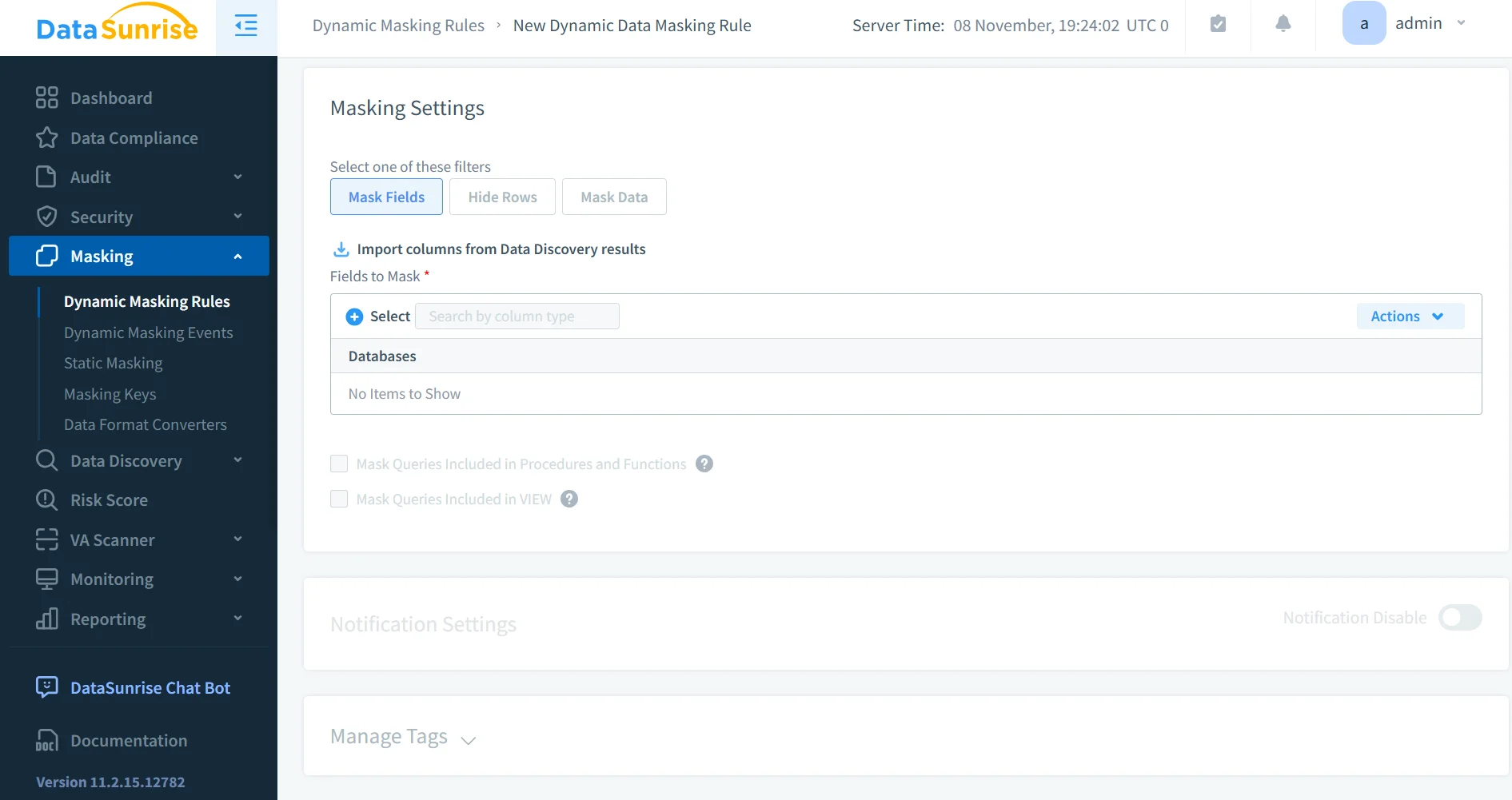
Dynamic Data Masking enables real-time protection of sensitive data within search results, without altering stored documents.
This zero-trust enforcement ensures that sensitive attributes remain obfuscated for unauthorized users — directly supporting privacy-by-design principles.
DataSunrise’s masking engine dynamically evaluates user roles and query context to determine visibility levels, ensuring that even privileged users only access information they are explicitly authorized to see.
It supports both deterministic and randomized masking methods to meet diverse compliance requirements, ensuring that analytics operations remain functional without compromising sensitive data integrity.
The solution also integrates with Elasticsearch’s native access control and logging mechanisms, creating a cohesive, policy-driven environment for secure data handling.
4. Comprehensive Reporting and Automation
DataSunrise automates compliance reporting for frameworks such as GDPR, HIPAA, PCI DSS, and SOX.
It consolidates audit logs, user behavior analytics, and masking summaries into standardized, auditor-friendly reports.
These reports are automatically formatted for easy export to CSV or PDF, simplifying audit preparation and ensuring that all evidence is consistent, verifiable, and ready for regulatory review.
This automation drastically reduces manual overhead, allowing security and compliance teams to focus on strategic governance rather than repetitive documentation tasks.
Business Impact of Compliance Management
| Business Outcome | Benefit |
|---|---|
| Operational Efficiency | Zero-touch automation reduces manual review time and accelerates audit readiness. |
| Reduced Compliance Risk | Continuous policy calibration eliminates gaps caused by schema or regulation drift. |
| Enhanced Data Trust | Consistent enforcement of access controls and masking builds confidence among stakeholders. |
| Simplified Reporting | One-click generation of compliance reports for multiple frameworks. |
| Cross-Platform Visibility | Unified monitoring across Elasticsearch and other data platforms ensures comprehensive protection. |
Conclusion
Elasticsearch provides a powerful foundation for search and analytics — but compliance management requires more than native RBAC or audit logs.
By integrating with DataSunrise Compliance Manager, organizations gain autonomous regulatory alignment, dynamic masking, and real-time audit intelligence — transforming Elasticsearch into a fully compliant, enterprise-grade data platform.
Protect Your Data with DataSunrise
Secure your data across every layer with DataSunrise. Detect threats in real time with Activity Monitoring, Data Masking, and Database Firewall. Enforce Data Compliance, discover sensitive data, and protect workloads across 50+ supported cloud, on-prem, and AI system data source integrations.
Start protecting your critical data today
Request a Demo Download Now