How to Automate Data Compliance for TiDB

Introduction
TiDB is a distributed SQL database optimized for Hybrid Transactional and Analytical Processing (HTAP), widely used in industries like SaaS, fintech, and retail. In this guide, you’ll learn how to automate data compliance for TiDB using native access controls and DataSunrise as an automation layer—helping you meet requirements from GDPR, HIPAA, SOX, and PCI DSS.
Step 1: Discover Sensitive Data
The first step in automating compliance is identifying where sensitive data resides. TiDB does not provide built-in discovery features, so manual queries like the one below are often used to find columns with names suggesting PII:
Code Example:
SELECT table_name, column_name
FROM information_schema.columns
WHERE column_name REGEXP 'email|name|address|card|phone';
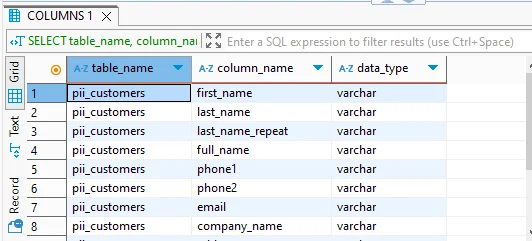
While this approach is functional, it’s limited to naming patterns and does not scale well across large or changing schemas.
DataSunrise’s discovery engine automates this process by scanning the TiDB database structure and analyzing metadata and sample values (where permitted). It uses a combination of:
- Pattern-based rules (e.g., regex for SSNs, emails, card numbers)
- Dictionary matching (e.g., for names, job titles, country lists)
- Custom tags (e.g., for industry-specific fields like medical codes or account numbers)
Once a scan is complete, DataSunrise:
- Classifies and labels columns as PII, PHI, financial data, etc.
- Summarizes findings in a compliance report
- Allows exporting results for documentation or downstream use
- Feeds identified columns into masking and alerting rules automatically
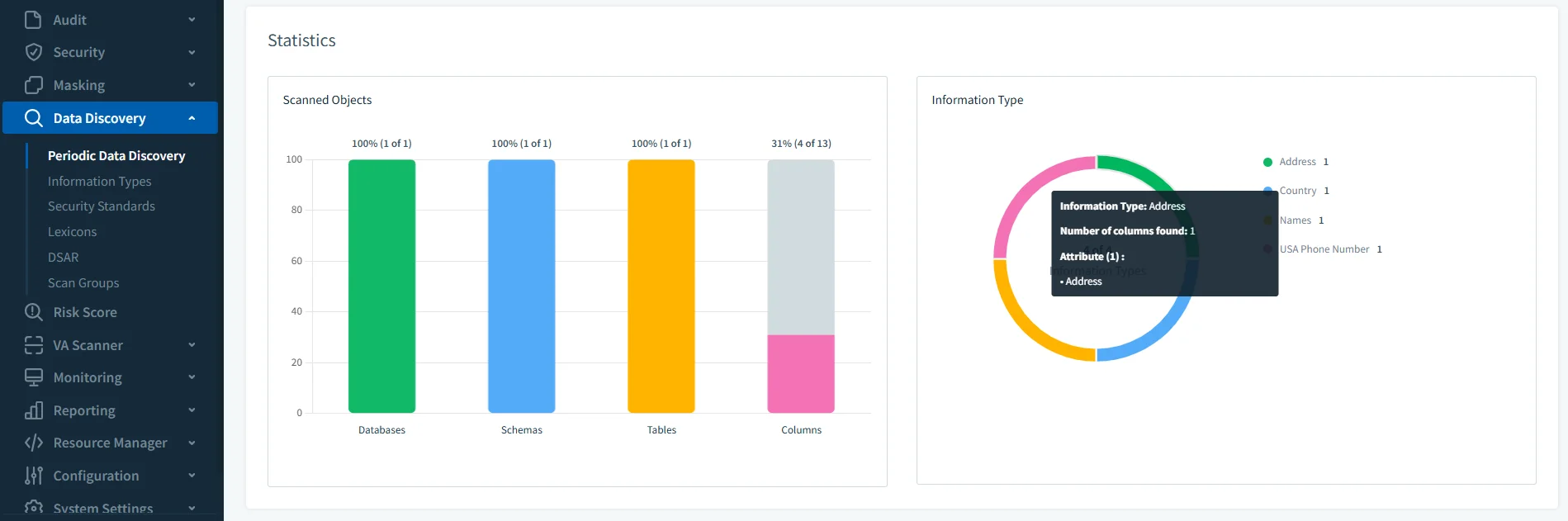
You can schedule discovery scans to run regularly—ensuring that newly added columns or schema changes are continuously evaluated without manual effort. This brings your compliance process from ad hoc to fully proactive.
By using automated scans, you reduce human error and automate data compliance for TiDB in a scalable, repeatable way.
Step 2: Define Access Rules
TiDB supports user creation and privilege assignment in a MySQL-compatible way. You can create users and grant schema-level or table-level permissions as shown below.
Code Example:
CREATE USER 'auditor'@'%' IDENTIFIED BY 'SecurePass123!';
GRANT SELECT ON customer_data.* TO 'auditor'@'%';
To reduce risk and maintain compliance, follow the principle of least privilege. Users should only be able to access the data they need, and nothing more. TiDB also supports basic role inheritance, which you can inspect using:
Code Example:
SELECT * FROM mysql.role_edges;
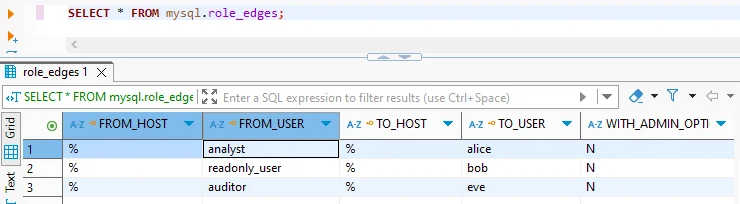
While this allows for foundational access control, it lacks enforcement based on session context, location, or behavior. That’s where DataSunrise adds critical value.
DataSunrise enforces access policies dynamically at the proxy level, offering finer control without modifying TiDB itself:
- Mask or block data for users or roles based on login origin, time of day, or even the type of client (e.g., BI tool vs CLI)
- Apply masking rules based on combinations of user, IP address, schema, or table
- Enforce multi-tenant isolation in shared environments by restricting cross-schema queries
- Use policies to detect misuse, such as a data analyst trying to SELECT entire user tables
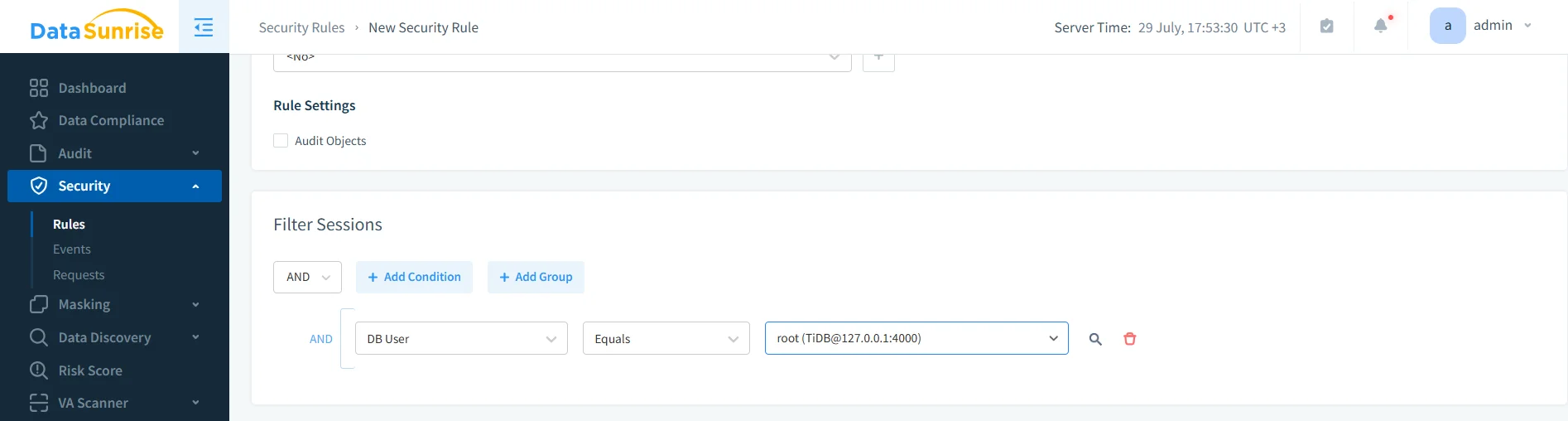
These access controls are configured through a web interface or API, making it easier for security teams to review and modify rules without relying on SQL alone. Combined with masking and alerting, this forms a robust control layer for access governance.
Step 3: Enable Audit Logging
Audit logging is essential for tracking user activity, detecting unauthorized access, and satisfying audit trail requirements under regulations like SOX and GDPR. If you want to automate data compliance for TiDB, audit trails must include not just access logs but also context-aware policies and alerts.
If you're using TiDB Enterprise Edition v7.1+, you can configure audit filters and rules to log DML or connection events:
Code Example:
SET GLOBAL tidb_audit_enabled = 1;
SET GLOBAL tidb_audit_log_format = 'json';

SET @filter = '{
  "filter": [
    { "class": ["DML"], "status_code": [0] }
  ]
}';
SELECT audit_log_create_filter('dml_events', @filter);
SELECT audit_log_create_rule('dml_events', 'user@%', true);
These logs are stored locally in JSON or text files and must be parsed manually or ingested into external platforms for analysis. Additionally, this feature is unavailable in TiDB Community Edition.
DataSunrise provides a centralized audit logging engine for all TiDB editions—Community and Enterprise alike. It captures SQL traffic in real-time without requiring changes to the database.
Key features include:
- Full SQL query capture, including statement text, user, IP, timestamp, and affected tables
- Bind variable logging, allowing visibility into the actual values passed in parameterized queries
- Real-time alerting for suspicious activity, triggered by customizable policies
- Searchable and exportable logs in JSON, CSV, or PDF formats
- Integration with SIEM tools or compliance dashboards via API or Webhook
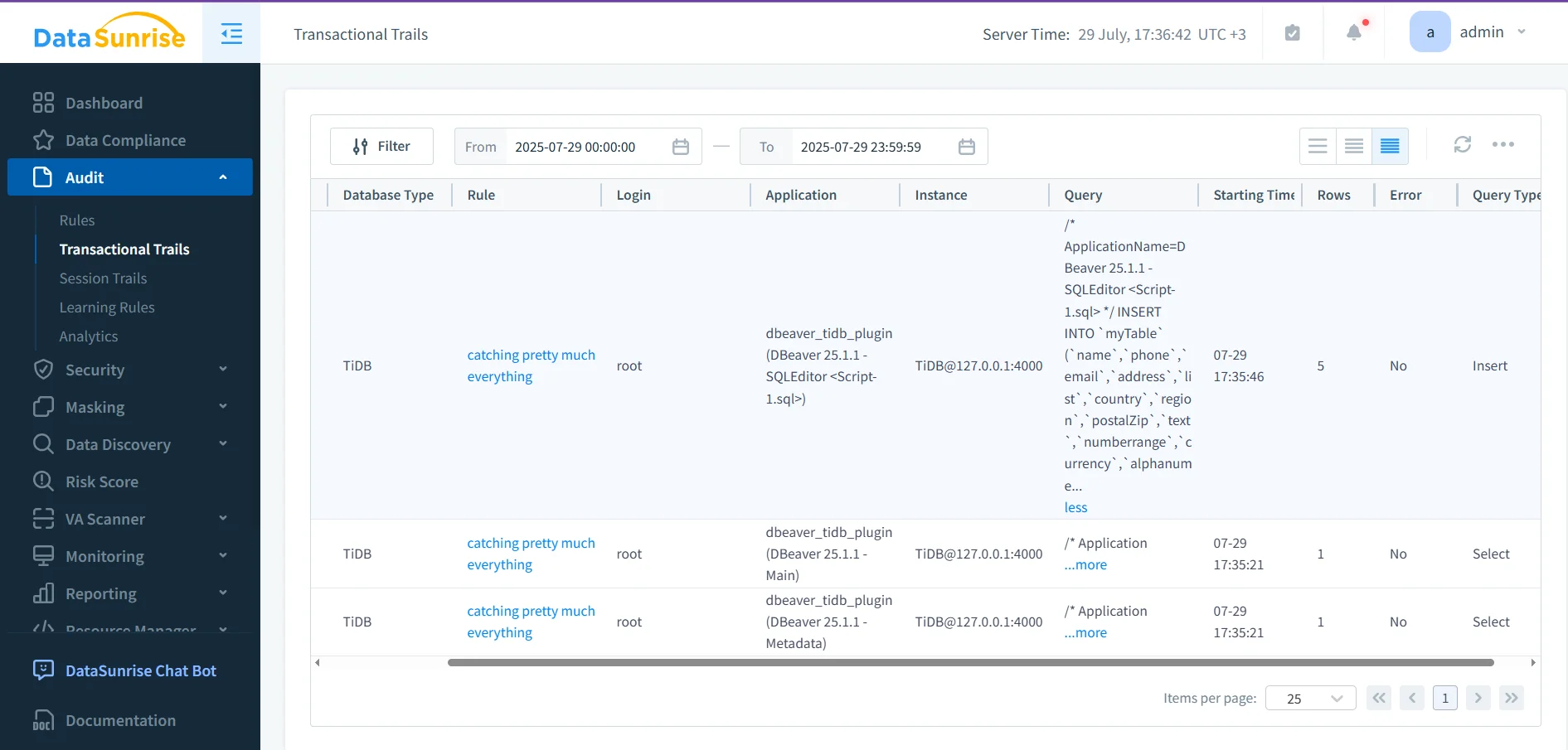
Because DataSunrise operates at the proxy layer, it sees all query traffic consistently—even across multiple TiDB clusters—making it ideal for distributed or hybrid environments that need uniform audit coverage.
Step 4: Apply Data Masking
Many data protection regulations require sensitive fields—like personal identifiers or payment information—to be masked or anonymized during access, especially for users who don’t need to see full values. TiDB, while powerful for query performance and scalability, does not provide native support for dynamic or static data masking.
DataSunrise fills this compliance gap by applying masking policies at the proxy level. Because it sits between your applications and TiDB, DataSunrise can modify query results in real time—without altering the database schema or query logic.
Supported masking options include:
- Full masking, replacing values entirely (e.g., with
****) - Partial masking, such as showing only the last 4 digits of a card number
- Regex-based redaction, to handle structured data like emails or phone numbers
- Random or null substitution, to support safe test and analytics environments
- Conditional masking, based on session context (user, IP, schema, role)
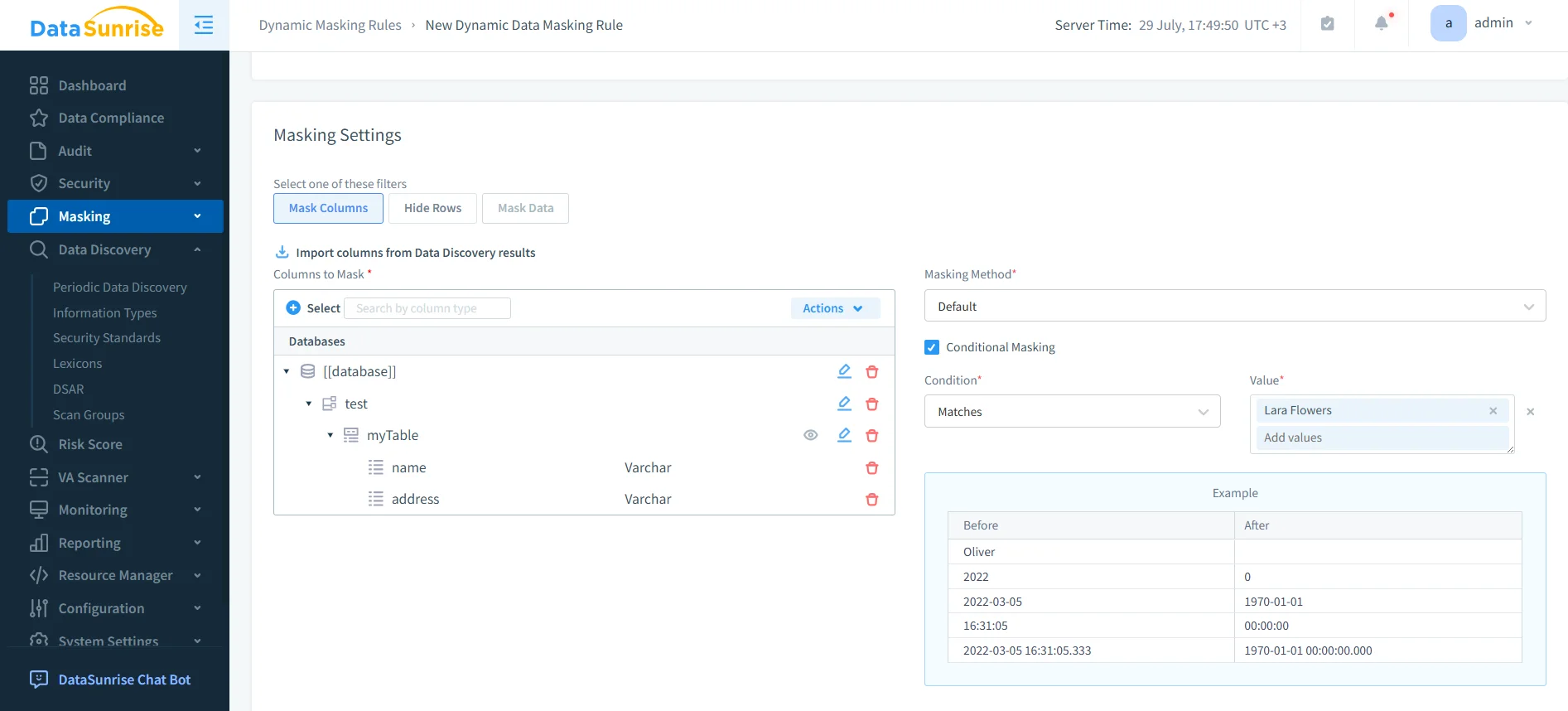
Masking rules are defined in a GUI and take effect immediately, allowing you to test changes and monitor impact in real time. This enables teams to meet masking requirements from frameworks like GDPR, HIPAA, and PCI DSS—without needing to modify their TiDB instance or client applications.
Step 5: Schedule Reports and Alerts
Once your access policies and masking rules are in place, maintaining compliance becomes an ongoing monitoring task. DataSunrise supports this by allowing you to generate scheduled reports and configure real-time alerting based on policy violations or suspicious activity.
With just a few clicks, you can:
- Automate daily or weekly compliance reports covering user activity, masking coverage, and audit trails
- Export data in PDF, CSV, or JSON formats for external audits or internal reviews
- Set up flexible alert rules for instant notifications via Slack, Teams, email, or webhook
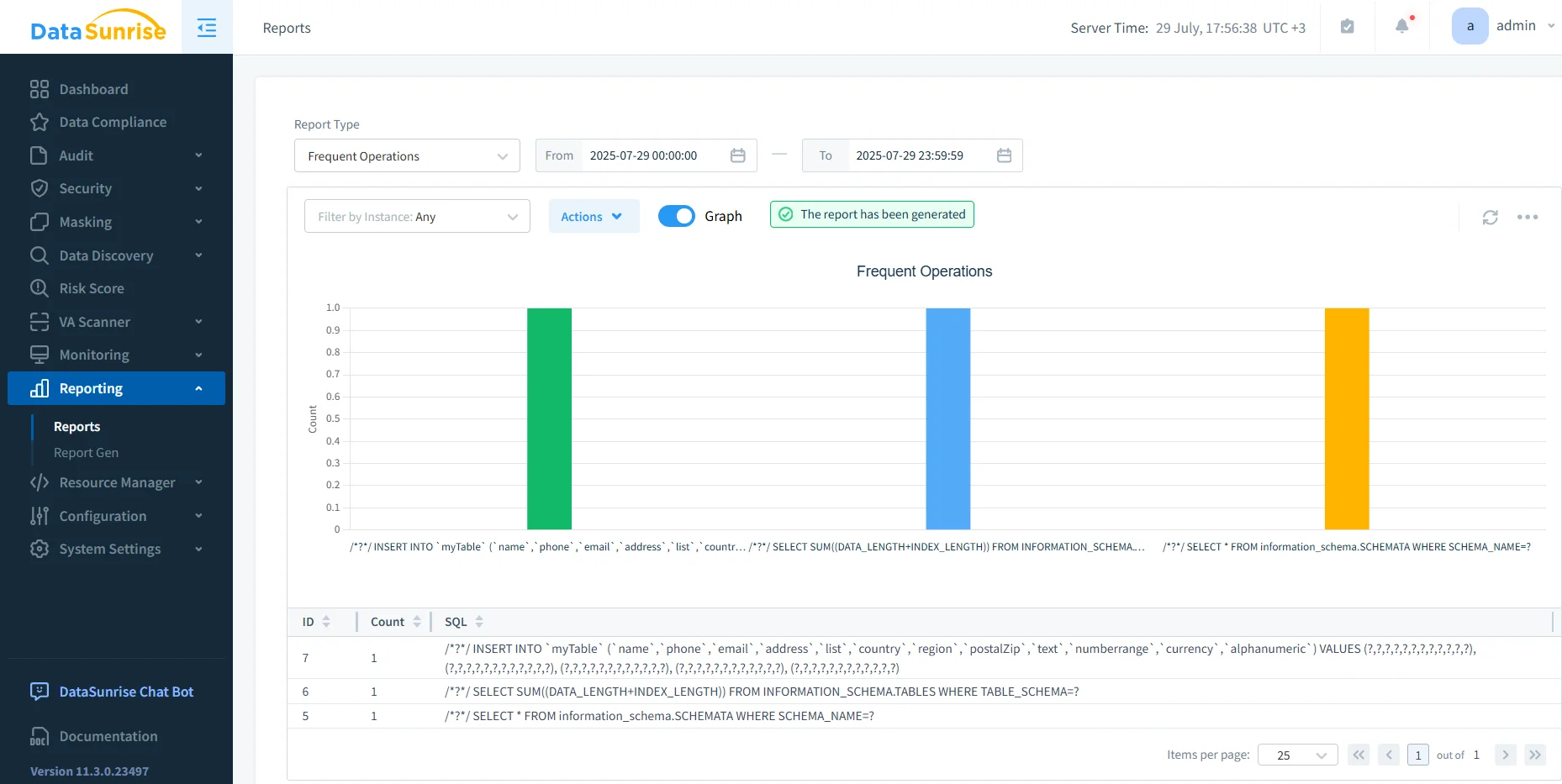
Scheduling reports and configuring alert rules helps you automate data compliance for TiDB with minimal manual oversight.
Summary Table
| Task | TiDB Native | DataSunrise Advantage |
|---|---|---|
| Discover sensitive fields | Manual SQL | ✅ Automated + exportable |
| Define access rules | ✅ Basic GRANT | ✅ + Masking by user/IP/context |
| Enable audit logging | Enterprise only | ✅ All editions, real-time alerts |
| Apply data masking | ❌ | ✅ Dynamic, non-intrusive |
| Schedule compliance reports | ❌ | ✅ With risk scores + filters |
Conclusion: Automate Data Compliance for TiDB End-to-End
Automating compliance in TiDB starts with discovery and access control, but it doesn’t stop there. Features like dynamic masking, real-time alerting, and scheduled reporting are essential for meeting modern data privacy regulations.
DataSunrise adds these capabilities without requiring changes to your applications or TiDB configuration—making it a powerful compliance automation layer.
Protect Your Data with DataSunrise
Secure your data across every layer with DataSunrise. Detect threats in real time with Activity Monitoring, Data Masking, and Database Firewall. Enforce Data Compliance, discover sensitive data, and protect workloads across 50+ supported cloud, on-prem, and AI system data source integrations.
Start protecting your critical data today
Request a Demo Download Now