IBM Db2 Data Compliance Automation
Regulations such as GDPR, HIPAA, PCI DSS, and SOX set strict expectations for how organizations manage and protect data. Meeting these standards requires more than secure storage: teams must track who accessed information, prove that access was legitimate, and enforce masking or restriction of sensitive fields when necessary.
IBM Db2 provides native features for auditing, monitoring, and role-based access control that support these goals. Yet in practice, administrators often find the tools manual and fragmented—logs are dispersed across views, reporting requires custom scripting, and privileges become hard to validate as databases scale.
This article examines Db2’s built-in compliance capabilities, explains where they fall short, and shows how DataSunrise helps automate compliance in Db2 environments.
Understanding Db2 Compliance Challenges
Db2’s architecture introduces several compliance hurdles:
- Granular Monitoring Needs – Every SELECT, INSERT, or DELETE must be traceable.
- Sensitive Data Exposure – Personally identifiable information (PII) and financial records must be masked or restricted.
- Role and Privilege Management – Privilege drift and inconsistent role assignment complicate audits.
- Audit Complexity – Native audit logs require manual parsing and lack centralized reporting.
Yes — right now it’s a bit overloaded. You’ve got six subsections with multiple SQL examples, which may dilute the focus. For compliance storytelling, you don’t need every system view spelled out.
Here’s a leaner rewrite that keeps the most relevant native Db2 features (audit, monitoring, privileges) while trimming some of the extra detail:
Native Db2 Compliance Features
Db2 includes monitoring and auditing tools that help form the foundation of compliance programs. The most useful features are audit trails, activity monitoring, and privilege checks.
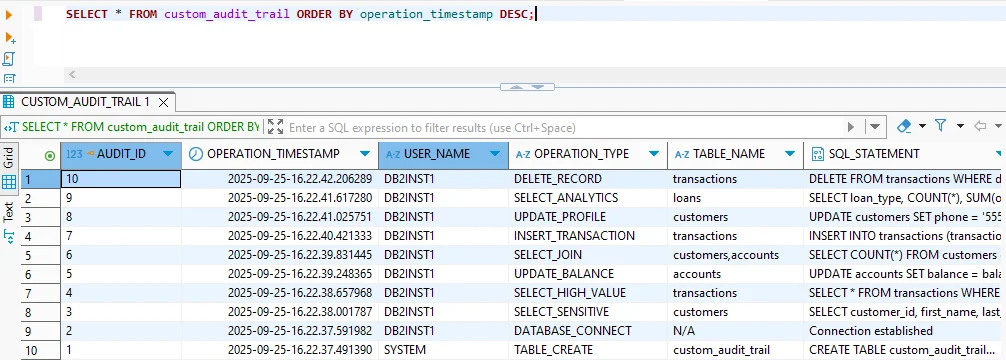
1. Custom Audit Trail
Custom audit tables can record sensitive operations for later review:
SELECT * FROM custom_audit_trail
ORDER BY operation_timestamp DESC;
Administrators can filter by event type to isolate critical actions such as sensitive queries or financial transactions.
2. Activity & Application Monitoring
Db2 provides monitoring views that link database activity to specific users and applications:
SELECT APPLICATION_NAME, SESSION_AUTH_ID, TOTAL_APP_COMMITS
FROM SYSIBMADM.MON_CONNECTION_SUMMARY;
For live session tracing:
SELECT APPL_NAME, AUTHID, APPL_STATUS
FROM SYSIBMADM.APPLICATIONS;
This visibility is essential when proving accountability during an audit.
3. Privilege and Authorization Checks
Db2 stores user-level authorizations in system catalogs, allowing quick reviews of access rights:
SELECT GRANTEE, DBADMAUTH, SECURITYADMAUTH, DATAACCESSAUTH
FROM SYSCAT.DBAUTH
WHERE GRANTEETYPE = 'U';
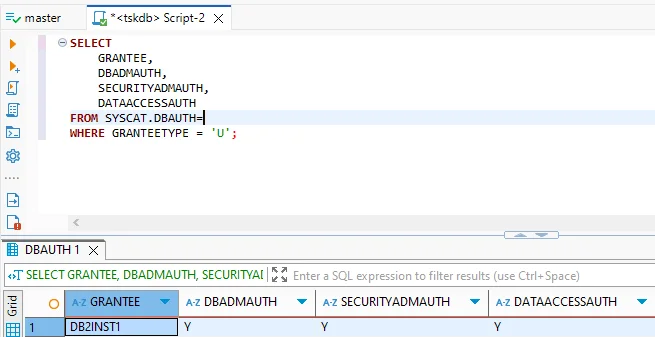
Regularly validating this output ensures privileges remain aligned with compliance requirements.
Limitations of Native Compliance Approaches
While these tools cover the basics, they have notable gaps:
| Limitation | Impact | Risk Level |
|---|---|---|
| Manual configuration of audit rules | Human error and inconsistency | High |
| No automated data discovery | Sensitive data may remain unprotected | Critical |
| Limited reporting capabilities | Extra manual effort during audits | Medium |
| Complex privilege management | Hard to validate role sprawl at scale | High |
Automating Db2 Compliance with DataSunrise
DataSunrise extends Db2’s capabilities by automating compliance controls:
- Automated Sensitive Data Discovery – Scans Db2 schemas for regulated data (PII, PCI, PHI).
- Dynamic Data Masking – Masks sensitive values at query time, no schema changes required.
- Centralized Audit & Monitoring – Consolidates logs and provides real-time dashboards.
- Compliance Autopilot – Automatically adjusts policies when new data or roles appear.
- Auditor-Ready Reports – Generate one-click reports for GDPR, HIPAA, PCI DSS, and SOX.
Step-by-Step Compliance Automation with DataSunrise
-
Deploy DataSunrise
Connect DataSunrise to your Db2 instances using the deployment option that fits your setup — proxy mode for inline enforcement, sniffer mode for passive monitoring, or log trailing where inline access isn’t possible. -
Add a Data Compliance Rule
In the Data Compliance section, click + Add Data Compliance. Here you define compliance objects by choosing the Db2 instance, specifying the search criteria, and linking the rule to audit or masking actions. Instead of pre-baked GDPR/HIPAA/PCI templates, you create policies aligned to whichever regulations apply to your environment.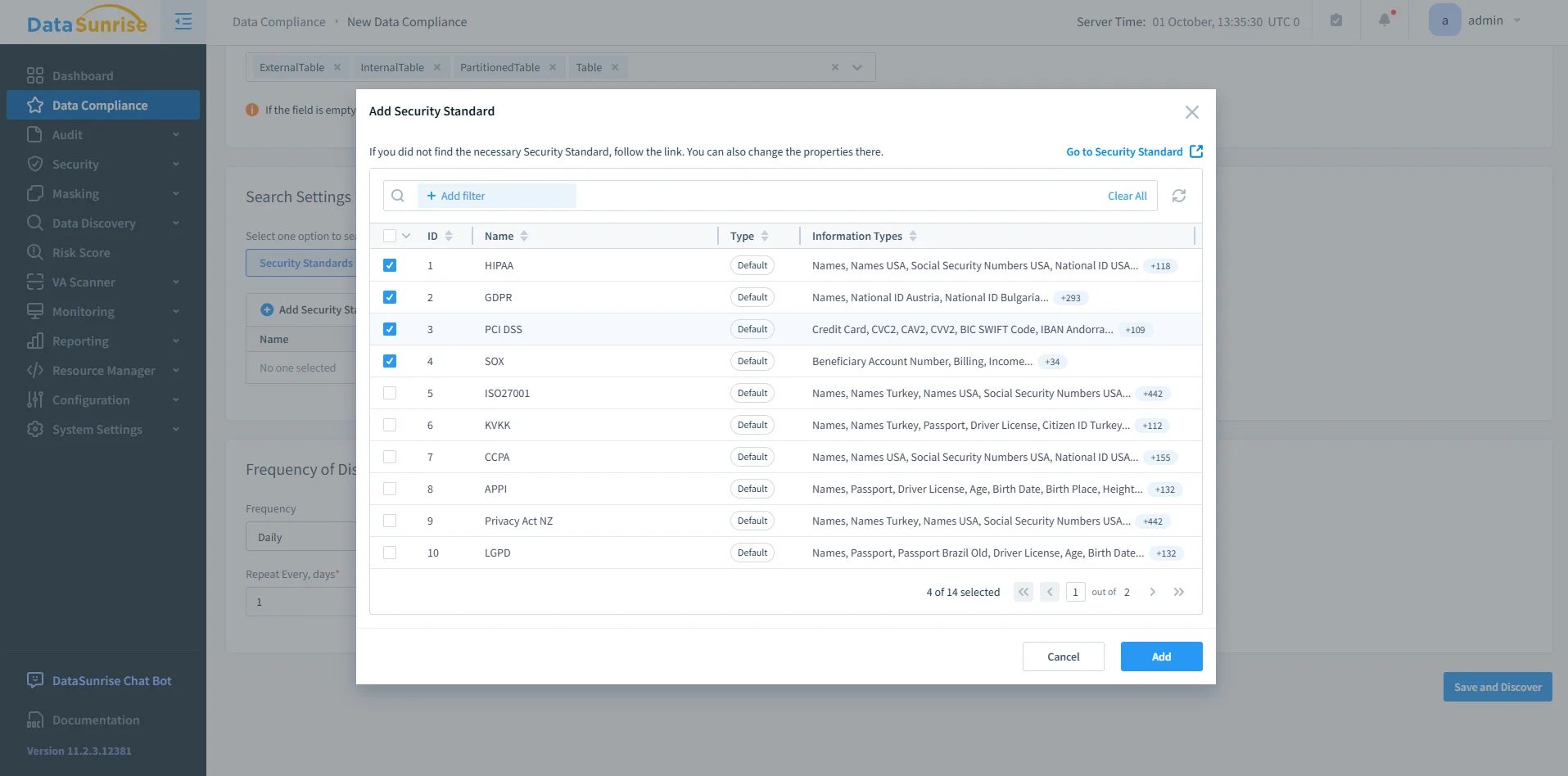
DataSunrise Security Standards Selection – Adding a compliance rule by choosing standards like HIPAA, GDPR, PCI DSS, and SOX. -
Run Sensitive Data Discovery
Use the Sensitive Data Discovery module to scan Db2 schemas and detect regulated fields like SSNs, credit card numbers, or PHI. The discovery results can feed directly into your compliance rules.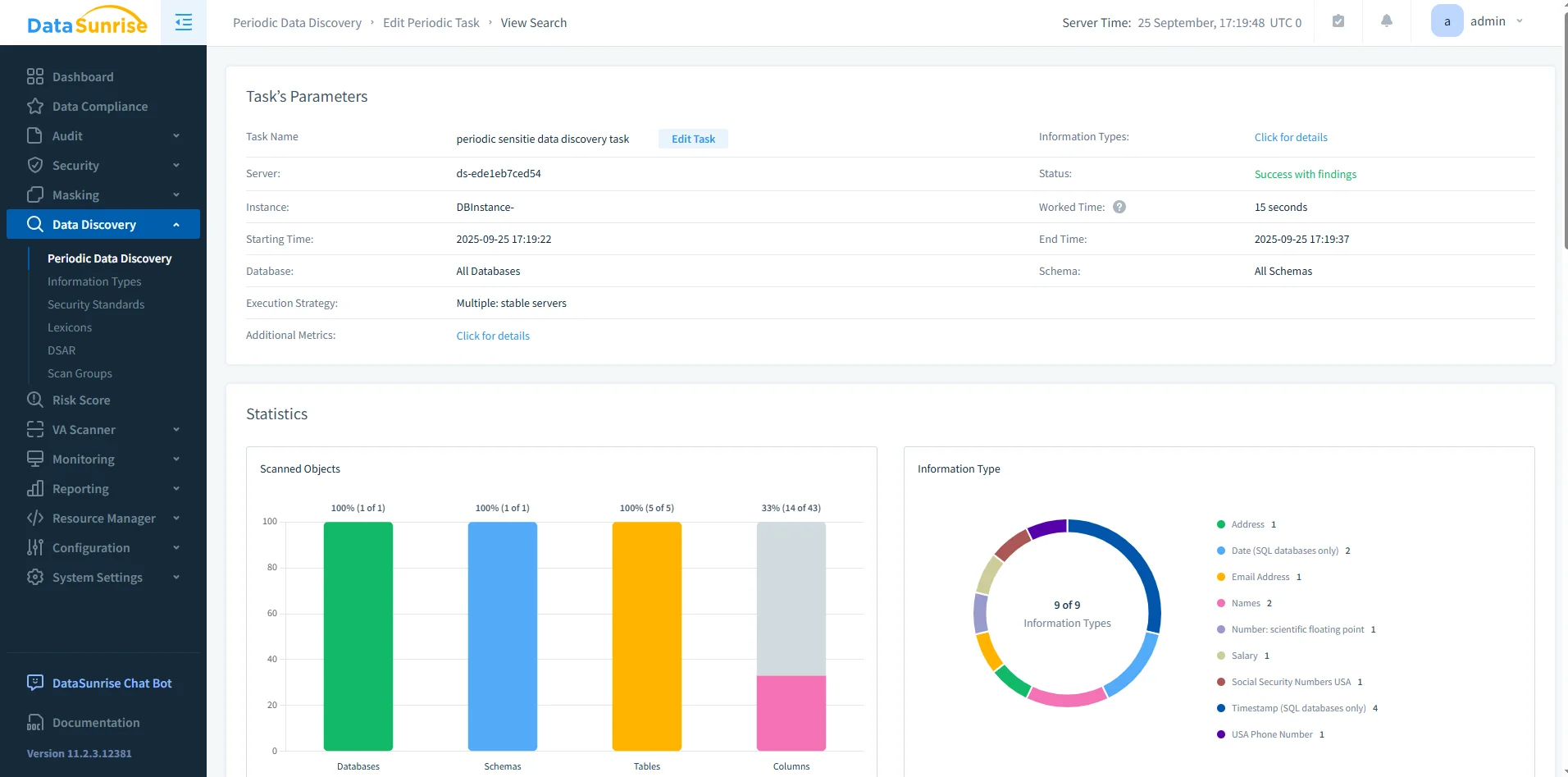
DataSunrise Periodic Data Discovery Dashboard – Results of a discovery task with statistics on scanned databases, schemas, tables, and sensitive columns. -
Configure Protection Policies
Apply enforcement via dynamic data masking, database firewall, or monitoring alerts. These policies make sure sensitive data is controlled at query time.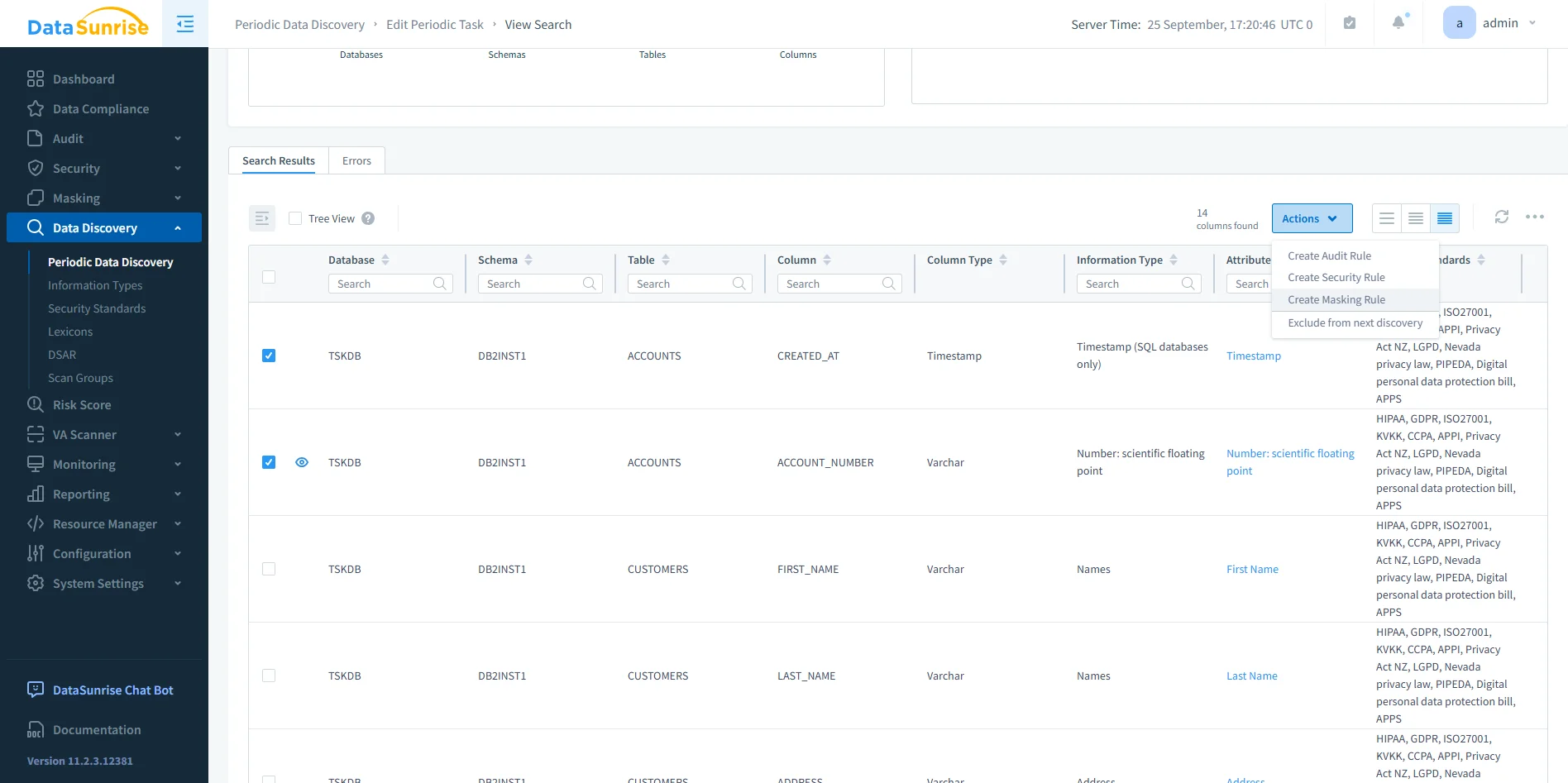
DataSunrise Data Discovery Results – Detailed list of Db2 tables and columns with identified sensitive data types, linked to applicable regulations. -
Generate Audit Reports
Use the Reporting module to create auditor-ready evidence. Reports can be scheduled or generated on demand, avoiding the need for manual log reviews.
Benefits of Automated Compliance
Organizations adopting DataSunrise with Db2 experience measurable improvements across several areas:
| Benefit | Description |
|---|---|
| 80–90% workload reduction | Automated discovery, masking, and reporting dramatically cut manual effort. |
| Real-time enforcement | Security and compliance policies are applied instantly across Db2 queries. |
| Consistent reporting | Unified reports provide a single source of truth for auditors and teams. |
| Future-proof regulatory alignment | Policies adapt automatically as compliance frameworks evolve. |
Conclusion
IBM Db2 provides strong compliance building blocks through audit trails, monitoring views, and privilege checks. However, these tools remain manual and fragmented.
With DataSunrise, Db2 environments gain automated discovery, masking, centralized monitoring, and real-time compliance reporting. This combination transforms compliance from a resource-intensive burden into an adaptive, automated framework.
Protect Your Data with DataSunrise
Secure your data across every layer with DataSunrise. Detect threats in real time with Activity Monitoring, Data Masking, and Database Firewall. Enforce Data Compliance, discover sensitive data, and protect workloads across 50+ supported cloud, on-prem, and AI system data source integrations.
Start protecting your critical data today
Request a Demo Download Now