
MariaDB Audit Log

Modern organisations collect terabytes of operational data every day, but nothing is more revealing—or more sensitive—than the MariaDB Audit Log. Done right, audit logging transforms from a regulatory checkbox into a living security sensor, continuously surfacing misuse, insider threats, and compliance drift. In the era of generative AI (GenAI), the value of that sensor grows exponentially: large‑language models can now triage events, spot anomalies, and even recommend automated counter‑measures. This article explores how to shape a robust, future‑proof audit strategy for MariaDB, covering real‑time analytics, dynamic masking, data discovery, native logging, and the extra visibility you gain from a specialised platform such as DataSunrise—all while keeping the focus squarely on the MariaDB Audit Log.
Why the MariaDB Audit Log matters more than ever
Regulators demand proof that you know who touched which row and when, but the business imperative is broader. A well‑tuned audit stream underpins Zero‑Trust architecture, fuels behavioural analytics, and accelerates incident forensics. As threat actors increasingly automate reconnaissance, defenders must counter with intelligent telemetry. The MariaDB Audit Log provides that telemetry, capturing login attempts, DDL, DML, and—when configured correctly—query text. Its granularity rivals PostgreSQL’s pgaudit, yet performance overhead stays modest when you filter to high‑risk events.
Real‑time audit meets data discovery and dynamic masking
Storing logs is not enough; speed of interpretation makes the difference between containment and compromise. Pair MariaDB’s server‑side audit plugin with streaming pipelines (for example, rsyslog -> Fluent Bit -> Apache Kafka) to achieve sub‑second detection. Once the firehose is flowing, two practices amplify its value:
- Data discovery automatically classifies which tables contain PII or payment data. Knowing the data domain lets you prioritise alerts. A concise primer can be found in DataSunrise’s overview on data discovery.
- Dynamic masking shields sensitive fields at query time, thwarting lateral movement even after credential theft. The concept is explained in the DataSunrise page on dynamic data masking.

By interleaving discovery and masking metadata with the MariaDB Audit Log, you elevate each row from “what happened” to “why it matters now.”
GenAI for smart security analytics
Large‑language models excel at pattern extraction across noisy, semi‑structured text—the exact shape of an audit record. Feeding logs into GenAI enables:
- Risk scoring: A model can label events as low, medium, or critical based on contextual cues (off‑hours admin, mass deletions, etc.).
- Threat hunting playbooks: Chat‑based summaries accelerate SOC workflows.
- Auto‑remediation hints: LLMs can propose new firewall or least‑privilege rules.
Below is a minimalist example that loads the latest 500 audit events, prompts an LLM, and prints a risk‑ordered summary:
import os, openai, pandas as pd
from sqlalchemy import create_engine

conn = create_engine(os.getenv("DB_DSN"))

df = pd.read_sql(
    'SELECT event_time, user_host, command_type, query_text '\
    'FROM security.audit_log ORDER BY event_time DESC LIMIT 500',
    conn
)

prompt = (
    "Classify these MariaDB audit events by risk level and suggest a single mitigation for the top three high‑risk items:\n" +
    df.to_json(orient='records')[:3900]  # respect token limits
)

openai.api_key = os.getenv("OPENAI_API_KEY")
response = openai.ChatCompletion.create(
    model="gpt-4o-mini",
    messages=[{"role": "user", "content": prompt}]
)
print(response.choices[0].message.content)
The same technique works when logs are stored in MariaDB itself or exported to a warehouse—GenAI remains agnostic to the backend.
Tip: DataSunrise’s article on LLM and ML tools for database security offers design pointers for scaling this approach.
Enabling native audit in MariaDB (almost like PostgreSQL)
Setting up server‑side auditing in MariaDB feels familiar to administrators who have configured PostgreSQL’s pgaudit. Add the audit plugin and define what you want to record:
Locate or create the MariaDB option file (for example
/etc/my.cnfor/etc/mysql/mariadb.conf.d/50-server.cnf).Under the
[mysqld]section, add:plugin_load_add=server_audit server_audit_logging=ON server_audit_events=QUERY,CONNECT log_output=FILE # or TABLE for in‑database storage # Optional fine‑tuning server_audit_file_path=/var/log/mysql/audit.log server_audit_excl_users=backup server_audit_incl_users=app_userRestart the service:
systemctl restart mariadb(orservice mysql restarton older systems).Verify:
SHOW VARIABLES LIKE 'server_audit%';and tail the log to confirm entries appear.
Admins who prefer additional guidance can refer to external tutorials such as the MariaDB documentation on Audit Plugin Configuration, the Severalnines guide Using the MariaDB Audit Plugin for Database Security, Virtual‑DBA's pragmatic Easy Guide to MariaDB Auditing, and Tunnelix's hands‑on walkthrough Activating MariaDB Audit Log. These deep dives illustrate alternative installation paths—such as using INSTALL PLUGIN at runtime—, tips for log rotation, and real‑world performance benchmarks.
Under the hood, this is the same server audit plugin documented in the official MariaDB knowledge base. Because configuration lives in standard option files, you can version‑control it alongside Infrastructure‑as‑Code and apply it consistently across on‑prem and cloud VMs.
Extending visibility with DataSunrise Audit
Native audit captures a wealth of signals, but sometimes you need cross‑platform correlation, policy‑aware masking, or long‑term retention that outlives platform limits. The DataSunrise proxy adds these layers without touching the application code.
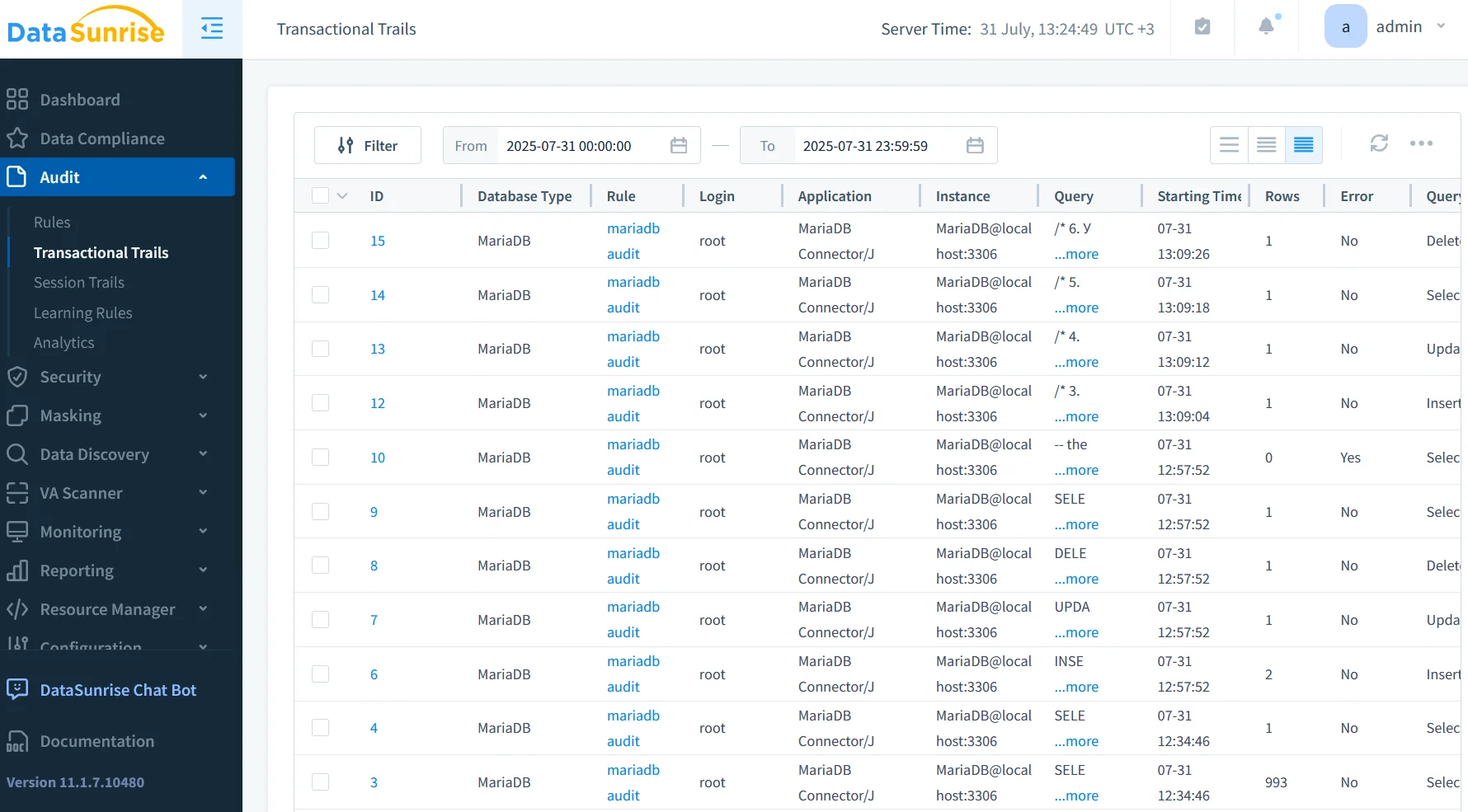
- Unified audit trail: MariaDB events are merged with PostgreSQL, Snowflake or MongoDB in the DataSunrise audit log, enabling central analytics.
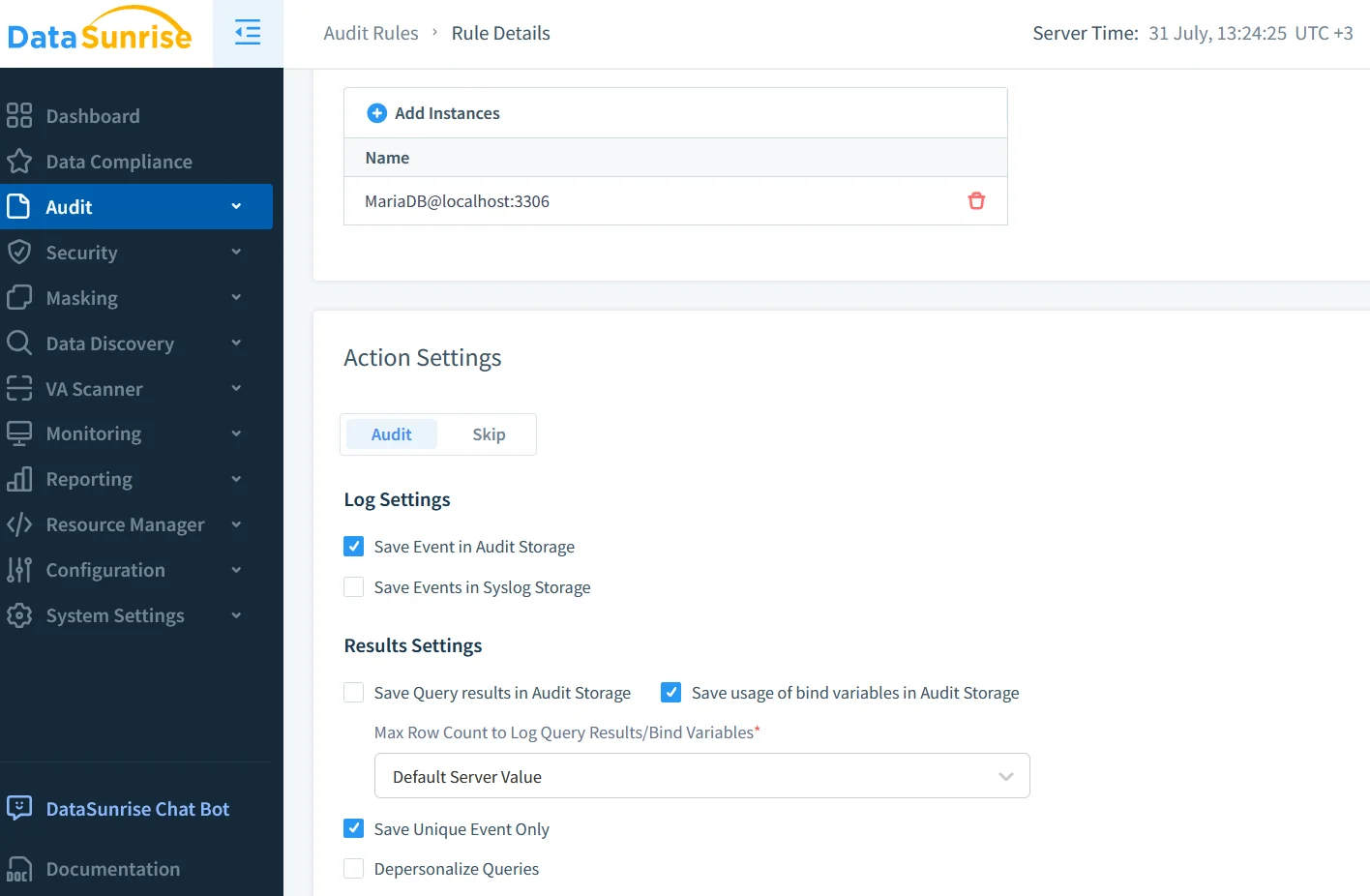
- Contextual policies: Fine‑grained rules enforce least privilege, described in the Audit Rules guide.
- Compliance dashboards aligned with GDPR and other regulations display heat‑maps that map exactly to MariaDB object names.
A typical deployment inserts the DataSunrise reverse proxy between application and database, either as a side‑car container, a physical appliance, or a VM in your preferred orchestration stack. Update the database connection string to point at the proxy and let DataSunrise relay traffic while enriching events with context.
Staying compliant without slowing down
Performance testing shows that with server_audit_events limited to QUERY and CONNECT, overhead stays below 5 %. Where sub‑millisecond latency is mandatory, consider logging to the FILE handler and off‑loading collection via a log shipper such as Filebeat or rsyslog. DataSunrise’s research on database performance for audit storage discusses I/O strategies that maintain throughput even under bursty workloads.
Finally, remember that logs alone do not equal compliance. Regulators look for preventive controls such as dynamic masking, detective controls such as real‑time alerting, and corrective controls like automatic session termination. Combining the MariaDB Audit Log with discovery, masking, and GenAI‑powered triage closes that loop.
Conclusion
The MariaDB Audit Log has evolved from a simple record of statements into a high‑resolution security camera—one that sees in real time, labels what it sees via GenAI, and provides the proof boards demand. Whether you rely on native logging alone or route traffic through DataSunrise, the path is the same: collect rich events, enrich them with context, and let intelligent systems turn them into action. With dynamic masking shielding data at the moment of access and data discovery keeping you aware of where risks reside, compliance shifts from reactive burden to proactive advantage. Now is the moment to embrace that advantage and let the audit log work smarter, not just harder.
Protect Your Data with DataSunrise
Secure your data across every layer with DataSunrise. Detect threats in real time with Activity Monitoring, Data Masking, and Database Firewall. Enforce Data Compliance, discover sensitive data, and protect workloads across 50+ supported cloud, on-prem, and AI system data source integrations.
Start protecting your critical data today
Request a Demo Download Now