TiDB Compliance Management
Introduction
Compliance management refers to the ongoing process of ensuring that a system or organization aligns with legal and regulatory standards—particularly those involving data privacy and security. For databases, this means tracking activity, enforcing access controls, safeguarding sensitive information, and ensuring recoverability from incidents.
TiDB is an open-source, distributed SQL database designed for high availability and horizontal scalability. It supports Hybrid Transactional and Analytical Processing (HTAP) workloads and is MySQL compatible, making it well-suited for modern real-time applications.
With increasing pressure from regulations such as GDPR, HIPAA, SOX, and PCI DSS, organizations need not only to protect data but also to demonstrate how it’s being monitored, accessed, and restored when needed.
This article explains how TiDB supports these compliance needs natively and how DataSunrise extends those capabilities with automation, data discovery, masking, and reporting.
Why Compliance Management Matters
Compliance isn't just about avoiding fines—it's about building trust, minimizing risk, and enabling secure operations. Failing to protect sensitive data can lead to reputational damage, legal penalties, and loss of customer confidence.
For engineering and data teams, strong compliance management provides clarity on who can access what data, when, and how. It also ensures that sensitive operations are logged, monitored, and recoverable—core principles of secure and resilient data systems.
Native TiDB Compliance Capabilities
TiDB Enterprise Edition (v7.1+) introduces native audit logging—an essential component of TiDB compliance management. It’s used to track SQL events, connection attempts, user activity, and more. These logs can be output in JSON or text and support redaction of sensitive values. Configuration is done via SQL filters and system variables. For full setup details, see the TiDB Database Auditing Guide.
Audit logging can be enabled with system variables and configured via SQL:
-- Enable audit logging
SET GLOBAL tidb_audit_enabled = 1;

-- Create a filter for failed logins
SET @filter = '{
  "filter": [
    { "class": ["CONNECT"], "status_code": [0] }
  ]
}';
SELECT audit_log_create_filter('failed_logins', @filter);
SELECT audit_log_create_rule('failed_logins', 'user@%', true);

-- Optional format and redaction
SET GLOBAL tidb_audit_log_format = 'json';
SET GLOBAL tidb_audit_log_redacted = ON;
These logs can be queried cluster-wide:
SELECT * FROM INFORMATION_SCHEMA.CLUSTER_LOG
WHERE MESSAGE LIKE '%DROP%' AND TYPE='tidb';
This provides visibility into DDL activity, failed operations, or suspicious access patterns.
Point-in-Time Recovery (PITR)
Point-in-Time Recovery allows you to roll back the database to a specific state using a combination of full backups and log backups. This is crucial in case of accidental deletes, data corruption, or malicious tampering. TiDB provides this via the br (Backup & Restore) tool. For detailed steps, refer to the TiDB PITR Guide.
# Start background log backup
tiup br log start --task-name=pitr --pd="${PD_IP}:2379" \
  --storage='s3://backup/logs'

# Restore to a specific time
tiup br restore point \
  --pd="${PD_IP}:2379" \
  --storage='s3://backup/logs' \
  --full-backup-storage='s3://backup/full' \
  --restored-ts '2025-07-09 12:00:00+0000'
PITR is available in both Community (v6.3+) and Enterprise editions.
View Database Users and Their Privileges
TiDB stores user access information in the mysql.user system table. Use this to audit access rights.
-- List all database users and their login hosts
SELECT user, host FROM mysql.user;

-- View privilege grants for a specific user
SHOW GRANTS FOR 'auditor'@'%';
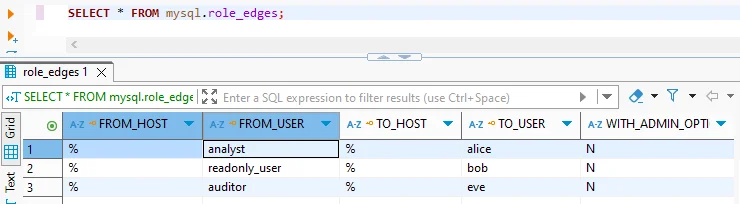
This can help identify over-privileged accounts or stale user definitions that should be reviewed.
Enable Slow Query Logging
Slow queries may indicate performance bottlenecks or inefficient access patterns, which could impact auditability.
-- Enable slow query logging
SET GLOBAL slow_query_log = 'ON';
SET GLOBAL long_query_time = 1;  -- Log queries slower than 1s
You can then analyze logs directly or view them via TiDB Dashboard (available even in Community Edition).
What is DataSunrise?
DataSunrise is a security and compliance platform that works as a proxy or sniffer between applications and databases. It enables organizations to enforce data protection policies across multiple systems—including TiDB—without altering their application logic or database schema.
DataSunrise is purpose-built to address areas where native tools fall short: real-time masking, automatic data classification, centralized audit policy management, and compliance reporting.
How DataSunrise Boosts TiDB Compliance Management
1. Dynamic Masking
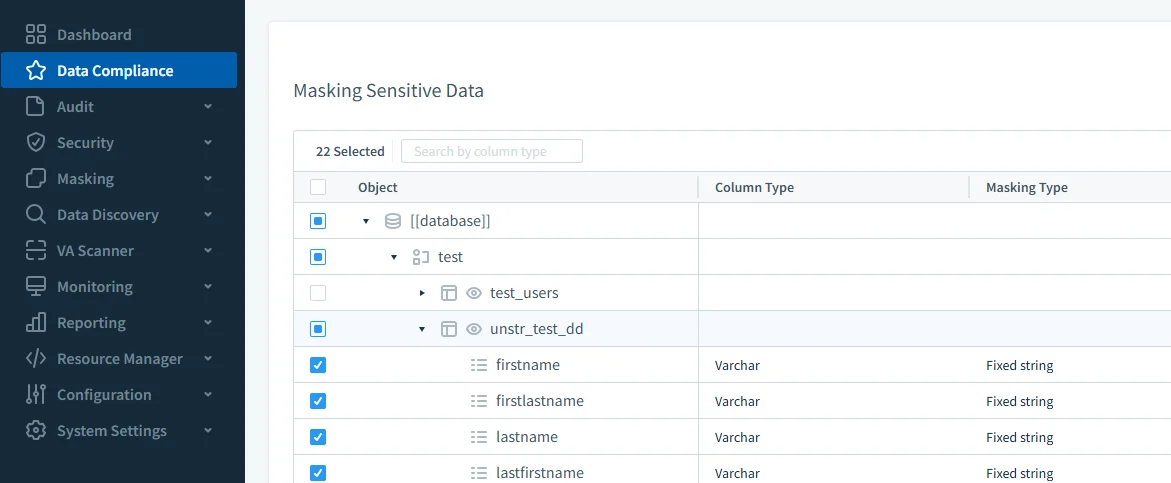
DataSunrise masks sensitive fields (e.g., names, phone numbers, card data) based on the user’s role, IP, or query context. The real data stays intact in TiDB but is replaced in query results for unauthorized sessions.
- Supports full, partial, regex, or random substitutions
- Applied in real time via proxy
- Configurable via web interface (no SQL required)
2. Sensitive Data Discovery
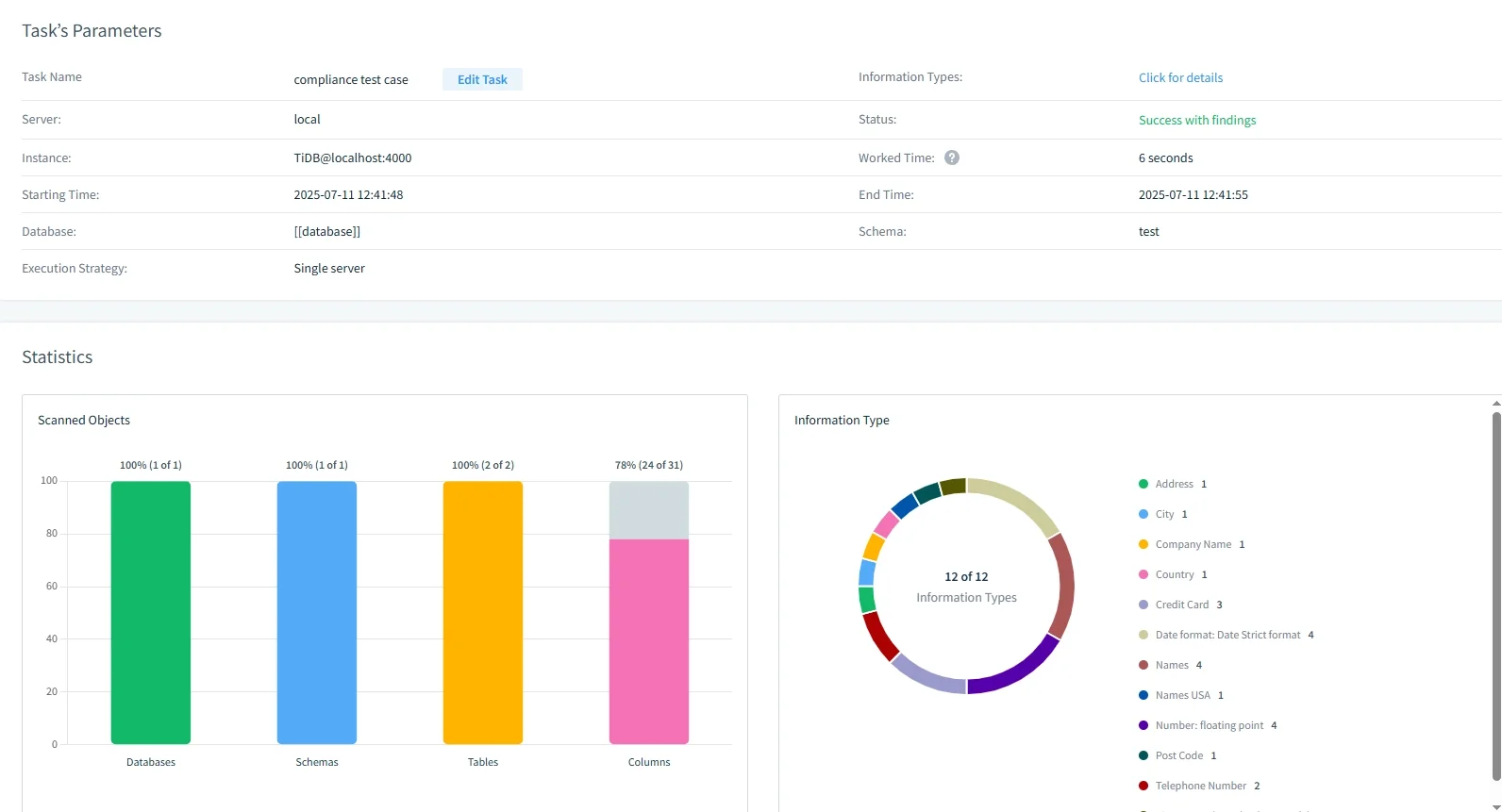
Knowing where sensitive data lives is a prerequisite to securing it. DataSunrise automatically scans your TiDB database for PII or PHI fields using pattern recognition and dictionaries.
3. Audit Trail Management
DataSunrise strengthens TiDB compliance management by augmenting native audit logging with granular audit trails:
- Bind-variable capture (e.g., see
id = 42, not?) - Fine-grained filters by user, table, or IP
- Slack, Teams, webhook alerts for anomalies
- Exportable logs (PDF, CSV, JSON)
4. Compliance Reporting
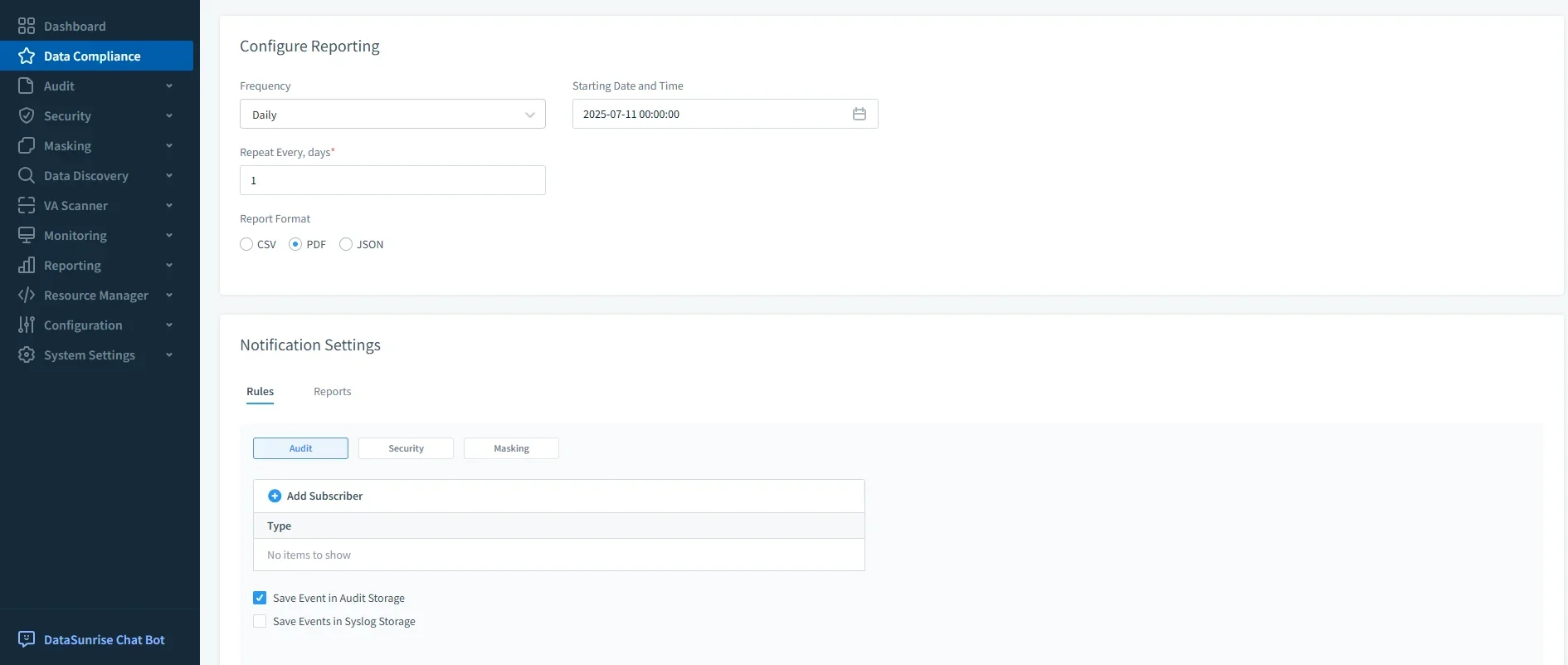
Generate scheduled reports for GDPR, HIPAA, PCI DSS, or SOX compliance needs. These reports include event histories, policy coverage, and risk-level summaries.
Compliance Comparison Table
The following table summarizes which compliance features are available natively in TiDB and which require an external platform like DataSunrise.
| Feature | TiDB Enterprise | DataSunrise |
|---|---|---|
| Structured Audit Logging | ✅ (v7.1+ only) | ✅ Real-time with alerts |
| Dynamic Masking | ❌ | ✅ Role-aware engine |
| Sensitive Data Discovery | ❌ | ✅ Automated scanning |
| Real-Time Alerts | ❌ | ✅ Slack, Teams, Webhook support |
| Visual Rule Manager | ❌ | ✅ Browser-based policy editor |
| Policy-Based Reports | ❌ | ✅ Exportable (PDF/CSV/JSON) |
| Cross-DB Compliance | ❌ | ✅ Works with 40+ data platforms |
This side-by-side view helps clarify which features may already be covered in your TiDB deployment and which would benefit from DataSunrise integration.
Conclusion
TiDB offers a strong starting point for compliance—with structured logging and recovery features built into its Enterprise edition. However, advanced requirements like masking, data classification, real-time alerting, and centralized audit management are best handled by a platform like DataSunrise.
If your organization needs to meet frameworks such as GDPR, HIPAA, SOX, or PCI DSS, DataSunrise can help ensure that TiDB becomes a fully compliant, audit-ready environment.
Protect Your Data with DataSunrise
Secure your data across every layer with DataSunrise. Detect threats in real time with Activity Monitoring, Data Masking, and Database Firewall. Enforce Data Compliance, discover sensitive data, and protect workloads across 50+ supported cloud, on-prem, and AI system data source integrations.
Start protecting your critical data today
Request a Demo Download Now