What Is Databricks SQL Audit Trail
Databricks SQL is widely used as an analytical query engine in lakehouse architectures, supporting dashboards, ad-hoc analytics, and automated reporting at scale; therefore, a Databricks SQL audit trail becomes essential for proving who accessed data, which queries were executed, and when those actions occurred. In modern data platforms, a single SQL warehouse often serves dozens or even hundreds of users, BI tools, and backend services simultaneously. As access expands, organizations must reconstruct database activity accurately and demonstrate how data was accessed over time.
An audit trail provides a chronological, evidence-based record of SQL activity. Unlike basic logging, it preserves execution order, session context, and relationships between queries. Consequently, in distributed environments where queries run in parallel across elastic compute, an audit trail becomes a foundational control for security investigations, governance enforcement, and regulatory compliance.
This article explains how auditing works in Databricks SQL, clarifies the difference between logs, trails, and activity history, reviews native visibility, and shows how DataSunrise builds a centralized, transaction-aware audit trail suitable for enterprise environments.
Databricks SQL Audit Trail Meaning and Scope
An audit trail in Databricks SQL represents a sequential record of SQL operations executed against the database. It captures each statement together with execution metadata such as timestamps, query type, user identity, session identifier, execution duration, and execution outcome.
The defining characteristic of an audit trail is chronology. Instead of simply recording events, the system orders and contextualizes them. As a result, reviewers can follow database activity step by step and understand how individual queries relate to one another within a single session or workflow.
For example, an audit trail can show that a user first read data from a table, then updated a subset of rows, and finally deleted specific records within the same session. This contextual continuity becomes critical when teams analyze incidents or respond to audit requests.
Audit trails are mandatory in regulated environments governed by frameworks such as GDPR, HIPAA, PCI DSS, and SOX. In these cases, organizations must demonstrate continuous oversight of database access rather than point-in-time snapshots.
Audit Log vs Audit Trail vs Activity History
Although teams often use these terms interchangeably, they represent different layers of visibility and serve distinct operational purposes.
An audit log captures individual events. Each entry corresponds to a single SQL statement and its metadata. In other words, audit logs answer the question: “What happened?”
By contrast, an audit trail organizes those log entries into a chronological sequence with preserved execution order and session context. Therefore, audit trails answer: “In what order did things happen, and how are they related?”
Database activity history focuses on behavior over time. It aggregates activity to show patterns, trends, and recurring access. Over weeks or months, it answers: “How is the database being used?”
In practice, auditing in Databricks SQL sits between raw logs and long-term behavioral analysis. It provides the evidentiary layer required for forensics, investigations, and compliance validation.
Native Databricks SQL Audit Trail Visibility
Databricks SQL provides a native query history interface that displays executed SQL statements together with basic execution metadata such as start time, duration, and execution status. Administrators typically use this interface to review recent activity or troubleshoot failed queries.
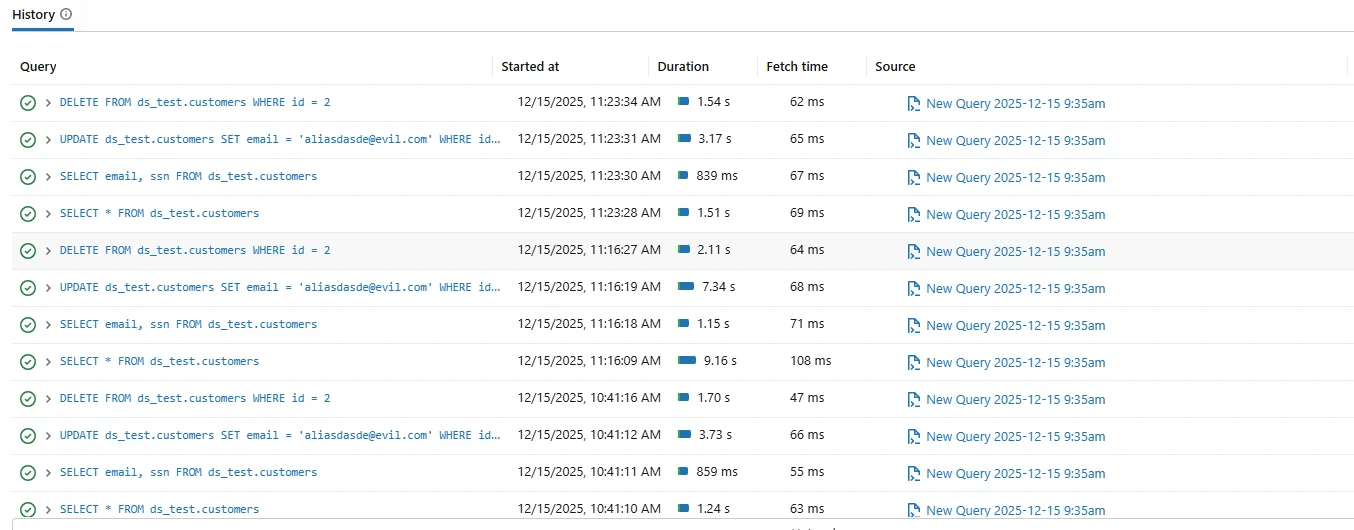
Native query history offers immediate operational visibility. However, it does not function as a complete audit trail. Retention remains limited, correlation across sessions stays minimal, and long-term reconstruction of execution order often proves difficult.
In practice, teams frequently export native logs to external systems such as Azure Log Analytics or Amazon CloudWatch. Nevertheless, these exports still require manual analysis to reconstruct complex workflows.
Why Native Query History Is Not a Databricks SQL Audit Trail
However, native Databricks SQL history records individual query execution events but does not consistently preserve relationships between related operations. Queries executed within the same session may appear as independent entries without an explicit link.
Consider the following sequence:
SELECT email, ssn FROM ds_test.customers;
UPDATE ds_test.customers SET email = '[email protected]' WHERE id = 2;
DELETE FROM ds_test.customers WHERE id = 2;
Although each statement appears in native history, proving that they occurred in this exact order and within the same session requires manual correlation. Consequently, this approach remains insufficient for formal audits.
A proper audit trail must preserve execution order automatically and associate each statement with its session and execution context.
Databricks SQL Audit Trail Architecture
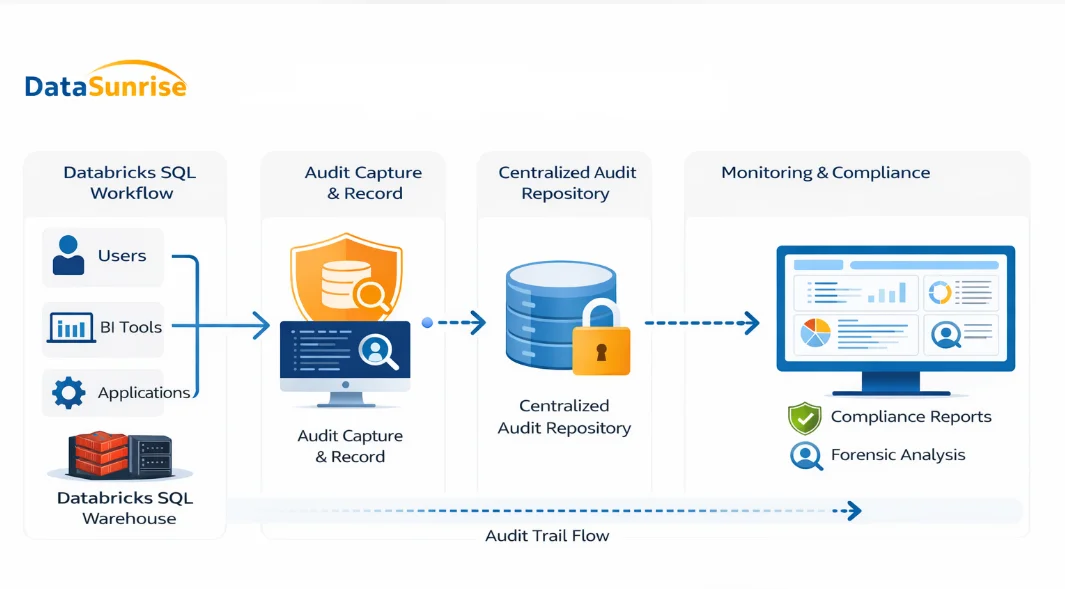
The diagram illustrates how an audit trail for Databricks SQL is constructed. Queries originate from users, BI tools, and applications and execute inside the SQL warehouse.
As queries run, the system captures audit-relevant events in real time. These events include SQL text, execution timestamps, query type, user identity, session identifier, and execution result.
Instead of remaining fragmented across native logs, the platform forwards these events to a centralized audit layer. This layer preserves chronology, enriches context, and stores records securely for later analysis.
Centralized Databricks SQL Audit Trail with DataSunrise
DataSunrise extends Databricks SQL auditing by capturing SQL activity in real time and consolidating it into a centralized audit trail. Rather than relying on short-lived native logs, DataSunrise records activity continuously and preserves execution order across sessions.
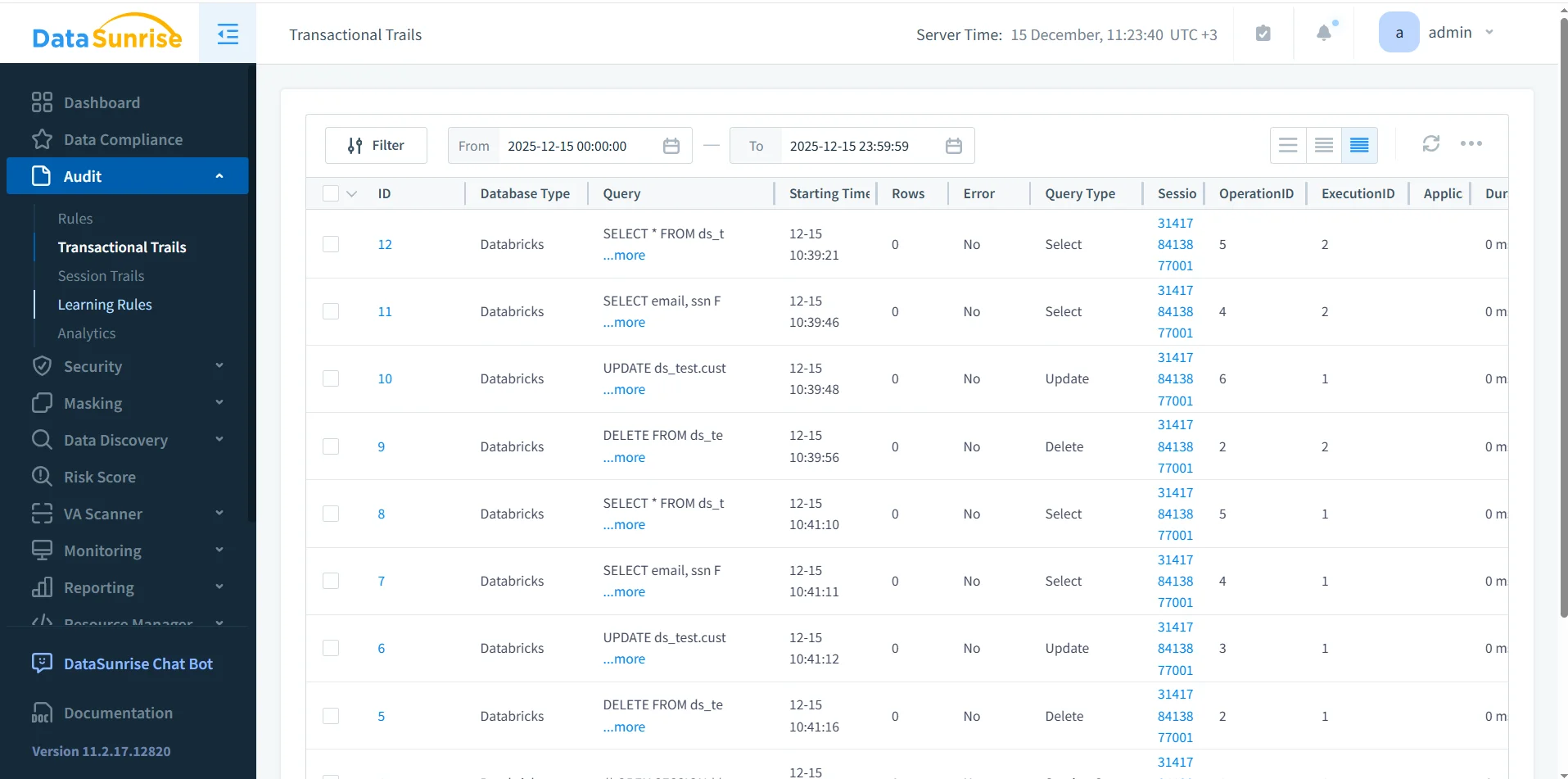
Audit rules define which databases, schemas, tables, and query types enter the audit trail. Therefore, organizations can focus auditing on sensitive or regulated data while avoiding unnecessary noise.
Transactional View of the Databricks SQL Audit Trail
Once audit rules are active, DataSunrise records SQL activity in a transactional audit trail. This view preserves exact execution order and associates each event with its session and execution context.
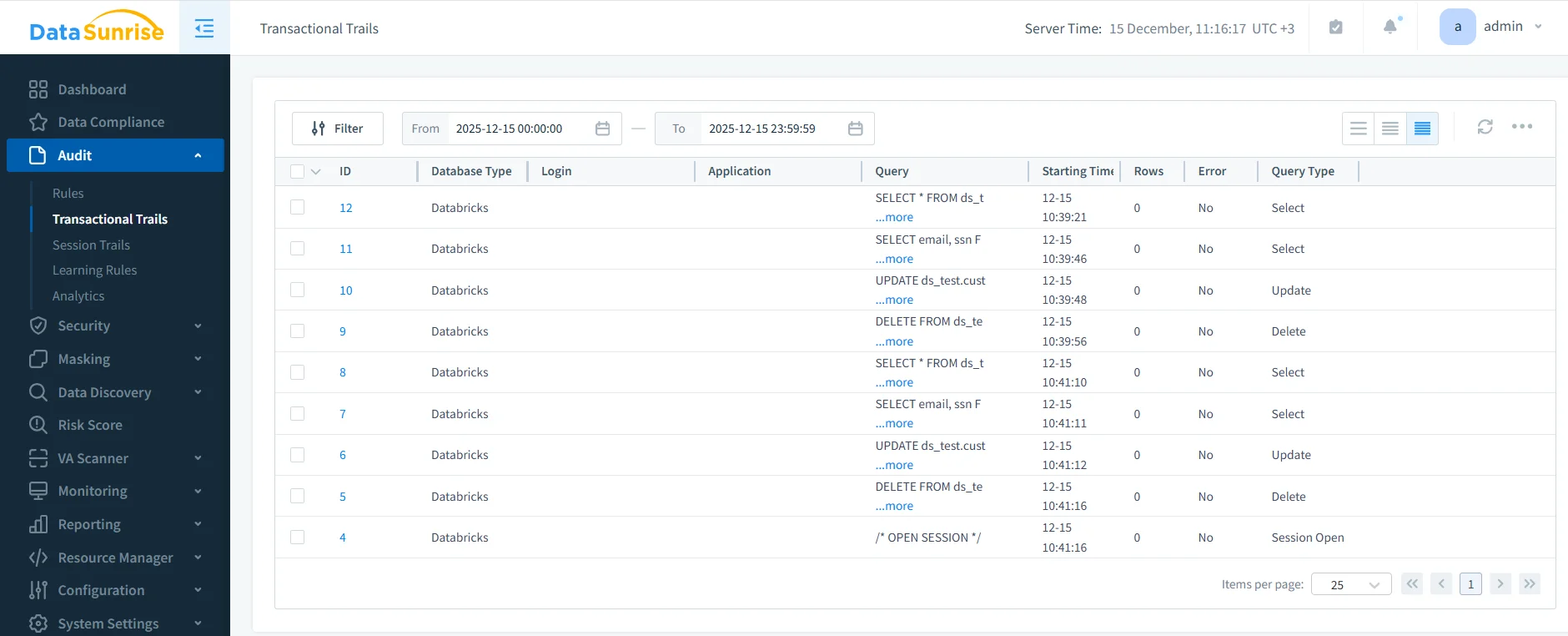
Each audit record includes query text, execution time, query type, session identifier, execution status, and error details when applicable. As a result, the audit trail supports both real-time monitoring and post-incident investigation.
Audit Trail Integrity and Retention
For an audit trail to remain trustworthy, it must resist tampering and follow defined retention policies. DataSunrise stores audit records centrally, enforces access controls, and applies retention rules automatically.
As regulatory requirements evolve, organizations can align retention periods with compliance mandates without redesigning their auditing workflow.
Audit Trail Use Cases
| Use Case | Audit Trail Value |
|---|---|
| Security investigations | Reconstructs exact query sequences |
| Regulatory audits | Provides verifiable evidence of access |
| Incident response | Supports timeline-based analysis |
| Access control validation | Shows how data is actually used |
Audit Log vs Audit Trail
| Aspect | Audit Log | Audit Trail |
|---|---|---|
| Granularity | Individual events | Ordered sequence of events |
| Context | Limited | Session-aware |
| Chronology | Implicit | Explicit and preserved |
| Primary use | Logging | Forensics and compliance |
Conclusion
Databricks SQL provides native query history, yet this visibility alone does not satisfy the requirements of a true audit trail. An audit trail must preserve execution order, context, and completeness across sessions and users.
A centralized audit trail built with DataSunrise captures SQL activity in real time, correlates events automatically, and produces transaction-aware records suitable for investigations and compliance.
With a robust auditing architecture in place, organizations can operate Databricks SQL with confidence, transparency, and strong governance.
Protect Your Data with DataSunrise
Secure your data across every layer with DataSunrise. Detect threats in real time with Activity Monitoring, Data Masking, and Database Firewall. Enforce Data Compliance, discover sensitive data, and protect workloads across 50+ supported cloud, on-prem, and AI system data source integrations.
Start protecting your critical data today
Request a Demo Download Now