Audit Guide
Data auditing provides real-time database activity monitoring and records details about every query sent to the database, including data modifications, retrieval, and deletions. DataSunrise continuously tracks user activity, as well as changes to database configuration and system parameters. In this guide, we explain how to set up DataSunrise to audit all queries executed against a selected target database.

The audit logs are stored in the DataSunrise-integrated SQLite database or in an external database. Logged data helps to comply with requirements of regulatory standards such as SOX, HIPAA, PCI DSS, and other regulators and acts.
Data Audit function is available in Sniffer mode and in Proxy mode. You can create new Data Audit Rules or edit existing ones in the Data Audit section. Rules can be set to audit transaction on a certain database or from certain database users, IP addresses and client applications.
To enhance your understanding of data auditing, we highly recommend visiting our YouTube channel to watch our videos on this topic. These videos not only showcase our auditing solution but also familiarize you with alternative data auditing methods using native DBMS features.
Why Database Auditing Matters
Database auditing plays an essential role in identifying unauthorized access, tracking administrator activity, and maintaining a clear record of operations performed on sensitive data. This capability becomes particularly important for organizations operating under regulations such as GDPR, SOX, HIPAA, and PCI DSS, where maintaining visibility over data access is a mandatory requirement.
When granular auditing rules are implemented through platforms like DataSunrise, security teams gain the ability to detect suspicious behavior, investigate incidents more efficiently, and produce verifiable audit records for compliance reviews. Without reliable auditing controls, unauthorized actions or insider misuse may remain unnoticed, increasing both financial exposure and reputational damage.
What is DataSunrise Data Audit?
DataSunrise Data Audit is a key component of the platform designed to record database activity with high precision. It continuously monitors user interactions with the database and logs queries, data modifications, and connection attempts in real time through proxy or sniffer deployment modes.
With this level of visibility, organizations can enforce least-privilege access policies, closely monitor privileged accounts, and meet the auditing requirements defined by regulatory frameworks such as HIPAA, SOX, and PCI DSS. Advanced filtering and alerting capabilities further allow the auditing system to function both as an investigation tool and a mechanism for maintaining regulatory compliance.
Creating an Audit Rule
Let’s assume that you’ve already created the target database profile. Then to audit our test database, it is necessary to create and configure an Audit Rule. In this case, the sequence of actions is the following:
- Navigate to Audit → Rules. Then click Add Rule to create a new Audit Rule.
- Configure your Audit Rule to log all queries to the database (see notes below).
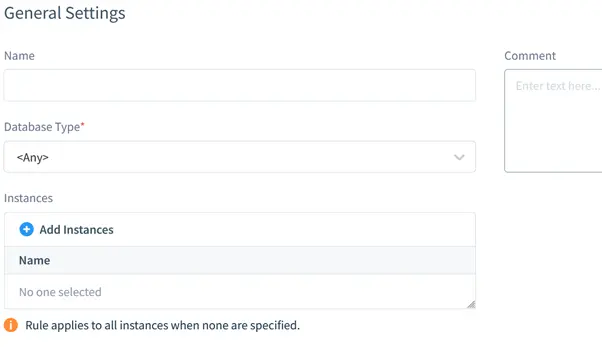
In the Main section subsection, the target database information is specified. It includes database type (PostgreSQL), database instance (as the target database entry is named in the Configurations) and the Rule’s logical name.
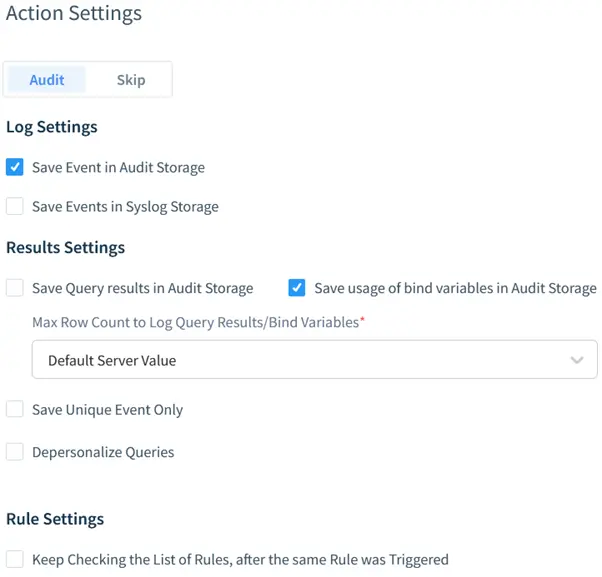
By default, the “Audit” action is selected. It means that DataSunrise will audit user queries when the rule is triggered. To log database responses (the output), the Log Data checkbox is checked.

Since the current scenario requires all user queries to be audited, Filter Sessions are left as by default. Thus, any query to the database regardless of its source IP address will trigger the rule.
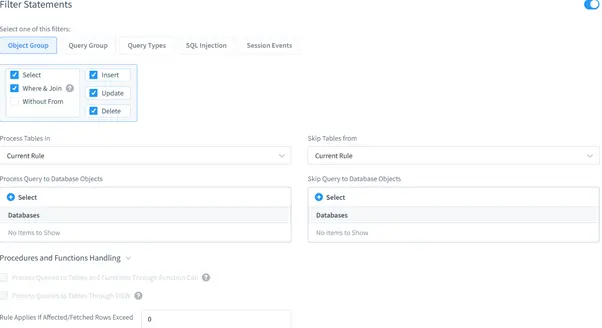
Filter Statements settings are as by default as well. Thus, DataSunrise will audit all queries directed to all database objects.
Viewing Database Audit Results
This stage includes demonstration of auditing results. The Audit Rule which was created at the previous stage is configured to be triggered by any incoming user query. Here’s what happens when DataSunrise receives a user query.
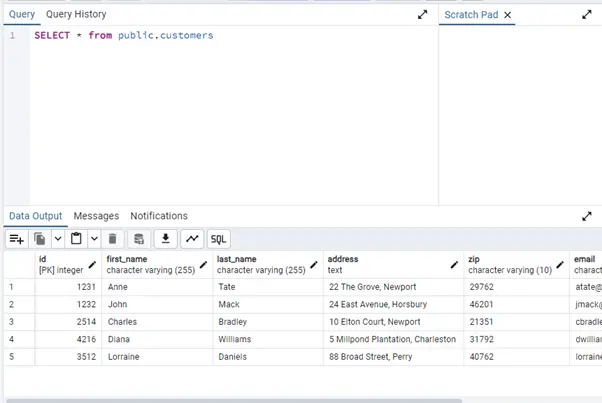
- Let’s send the following query via PGAdmin:
- The database outputs the table contents:
- Now let’s check the auditing results in the DataSunrise’s Web Console. Navigate to the Data Audit → Transactional Trails subsection.
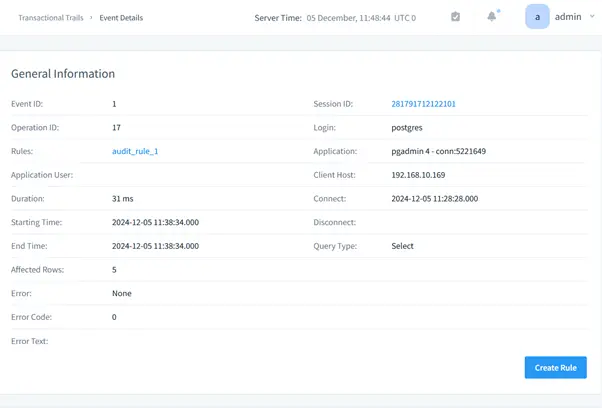
- To view detailed information about some event, click event’s ID. In a new tab, the event’s details will be displayed: code of the query, basic information, session information, database objects involved in the query and the query results.
SELECT * FROM public.customers;
Each event logs comprehensive metadata including IP addresses, application names, timestamps, and execution details.
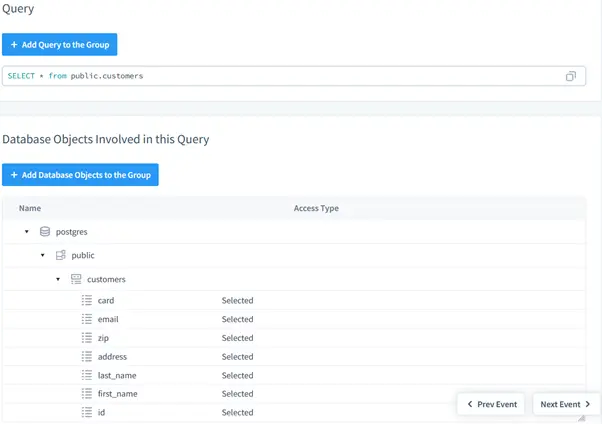
Scrolling down reveals additional event details, including the complete SQL query statement and database objects the query touches. The query accessed sensitive data fields including credit card numbers, email addresses, and ZIP codes.
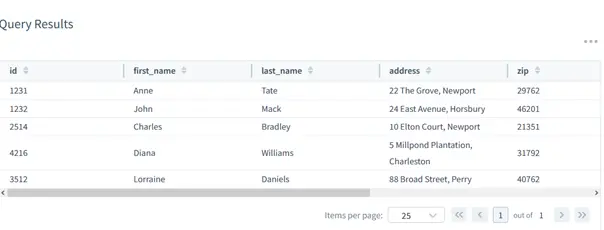
Query results can be displayed, but enabling this feature significantly impacts audit database storage consumption.
Real-World Use Cases: Applying DataSunrise Data Audit
The DataSunrise Data Audit engine isn’t just a logging tool—it’s a compliance enabler and incident response ally. Here’s how organizations use it to meet regulatory and operational requirements in live environments:
| Use Case | How DataSunrise Helps |
|---|---|
| SOX Compliance | Tracks privileged user activity on financial systems and logs changes to critical configurations. Supports external audit reviews with detailed transaction histories. |
| HIPAA Monitoring | Audits all queries involving PHI, including read access to medical records. Captures session metadata for accountability and breach investigation. |
| PCI DSS Enforcement | Monitors credit card data access in real time and logs queries that touch PAN fields. Supports alerting on unauthorized access attempts. |
| Data Exfiltration Detection | Flags suspicious query volumes, DUMP statements, and unapproved exports—especially from new IPs or clients. |
| Insider Threat Visibility | Captures admin actions, schema modifications, and unusual object access—all correlated with user identities and timestamps. |
Because DataSunrise works at the proxy layer, it can enforce auditing even when the database’s native logging is disabled or bypassed. This makes it an essential part of modern data security and governance strategies.
Conclusion
Robust database auditing is essential for detecting unusual behavior, supporting regulatory compliance, and maintaining accountability in modern data infrastructures. DataSunrise enables organizations to implement fine-grained, real-time monitoring of database queries and transactions while maintaining stable performance and avoiding disruption to business applications.
Capabilities such as role-aware access policies, proxy-based traffic analysis, and detailed session logging provide clear insight into who accessed specific data, when the access occurred, and through which connection. This creates a unified audit trail that accelerates investigations, simplifies adherence to regulations like SOX, HIPAA, and PCI DSS, and helps reduce the likelihood of unauthorized data exposure.
Whether organizations need to monitor a few critical tables or supervise activity across an entire production environment, DataSunrise offers the scalability, flexibility, and precision required to safeguard sensitive information and support ongoing compliance efforts.