Data Masking in Vertica
Data masking in Vertica is all about letting analysts work with real data structures while hiding the values that should never be exposed in clear text. Vertica is a high-performance analytical database frequently used for BI dashboards, customer analytics, ML feature stores, and ad-hoc exploration across large, columnar datasets. That flexibility is valuable for the business, but it also means regulated fields like card numbers, national IDs, and medical attributes can easily leak into queries, exports, or training datasets if no protection layer is applied.
Trying to solve this purely with manual permissions, copied tables, or hand-written SQL views gets painful fast. Schemas change, new projections appear, ETL jobs create derivative tables, and suddenly nobody is sure which column is actually safe to expose. Instead of chasing every query, teams need a masking layer that works automatically for every Vertica workload.
Data masking with DataSunrise gives Vertica users that layer. DataSunrise sits between Vertica and client tools, detects sensitive fields, and rewrites query results on the fly so that confidential values are hidden, tokenized, or partially revealed according to policy. Vertica keeps doing what it does best—fast analytics—while masking logic, audit trails, and compliance rules live in a separate, dedicated control plane.
Why Vertica Needs a Dedicated Masking Layer
Vertica’s architecture makes it powerful and tricky at the same time. Data is stored in columnar ROS containers, recent changes live in WOS, and projections offer multiple physical layouts for the same logical table, as described in the Vertica architecture documentation. This design is ideal for performance, yet it complicates questions such as “Where exactly do customer card numbers live?” or “Which workloads touch PHI today?”
Common pain points include:
- Wide analytical tables that bundle dozens of attributes (including PII and PHI) into a single structure.
- Multiple projections that physically replicate sensitive columns across the cluster.
- Shared clusters used by BI, ETL, notebooks, and ML frameworks simultaneously.
- Ad-hoc SQL from power users and data scientists, bypassing curated reporting layers.
- Scattered logs that make it hard to reconstruct who saw what, and when.
Vertica role-based access control (RBAC) controls who can connect and which objects they can query. It does not, however, understand whether a given query is exporting card numbers, joining HR and CRM data in unsafe ways, or populating a non-production environment with live customer details. To close those gaps, organizations deploy an external masking and policy engine that understands column sensitivity and user context.
How DataSunrise Delivers Data Masking in Vertica
DataSunrise acts as a transparent proxy in front of Vertica. BI tools, SQL clients, schedulers, and data science platforms connect to DataSunrise instead of talking directly to Vertica. For each query, DataSunrise analyzes the SQL, checks which columns are sensitive, evaluates masking policies, and then either passes the query through unchanged or rewrites the result set so that confidential values never leave the database in plain form.
Under the hood, this masking engine combines several capabilities:
- Sensitive Data Discovery to identify columns containing PII, PHI, or financial identifiers.
- Dynamic Data Masking that alters result sets in real time based on user, application, or network context.
- Static data masking for generating safe non-production datasets.
- Audit logging that records every masked query as compliance evidence.
The screenshots below walk through a typical Vertica masking setup: defining a masking rule, choosing which columns to protect, and verifying that queries are masked and audited correctly.
Defining a Vertica Masking Rule
The first step is to create a masking rule and tie it to the appropriate Vertica instance. In the example below, the rule named Vertica_Masking targets a Vertica database reachable on port 5433. The rule also specifies what should happen when masking triggers—here, every masking event is written both to the DataSunrise audit store and to external syslog, which simplifies integration with SIEM platforms.
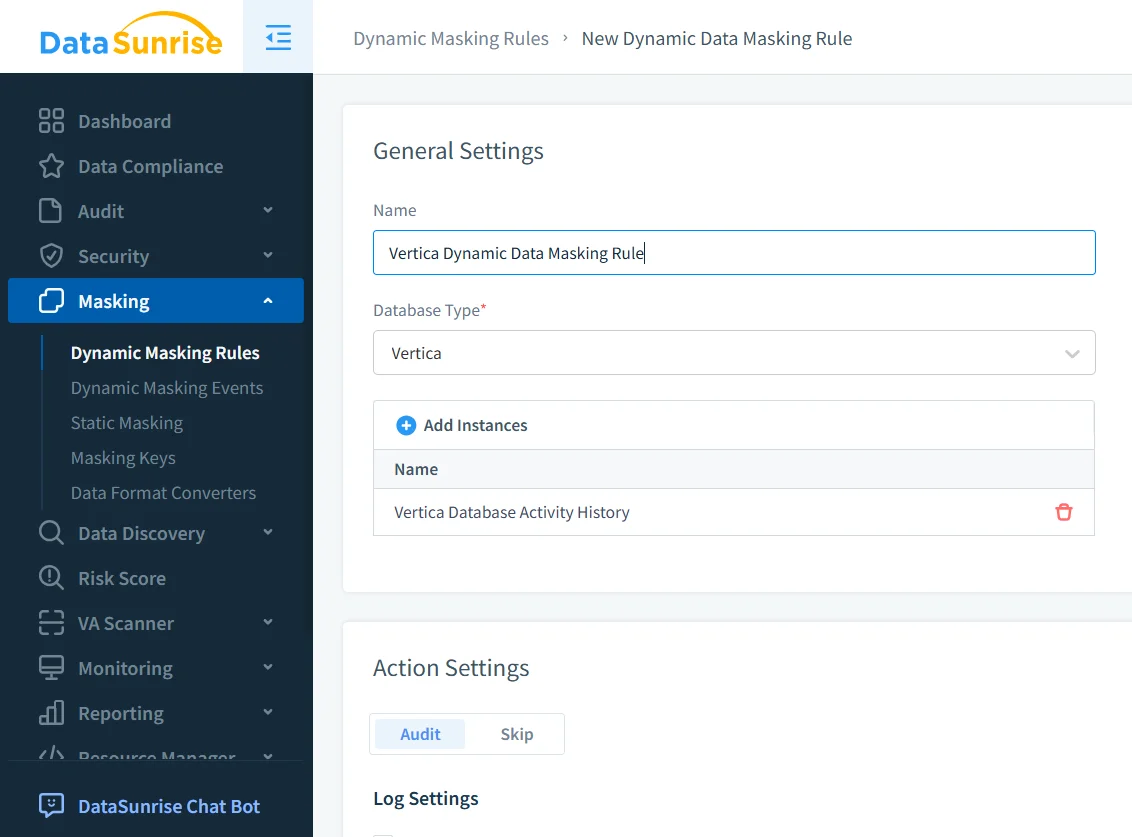
At this stage you define high-level behavior:
- Which Vertica instances the rule applies to.
- Whether masking events should be audited, skipped, or forwarded to external systems.
- Any global filters, such as limiting the rule to production environments.
This separation allows you to maintain one logical “Vertica_Masking” policy even if you later add more nodes or clusters. The masking logic lives in DataSunrise, not in Vertica schemas.
Selecting Columns and Conditions for Masking
Once the rule exists, you choose which Vertica columns to mask and under which conditions. DataSunrise can import column lists directly from discovery results so administrators do not have to maintain them manually.
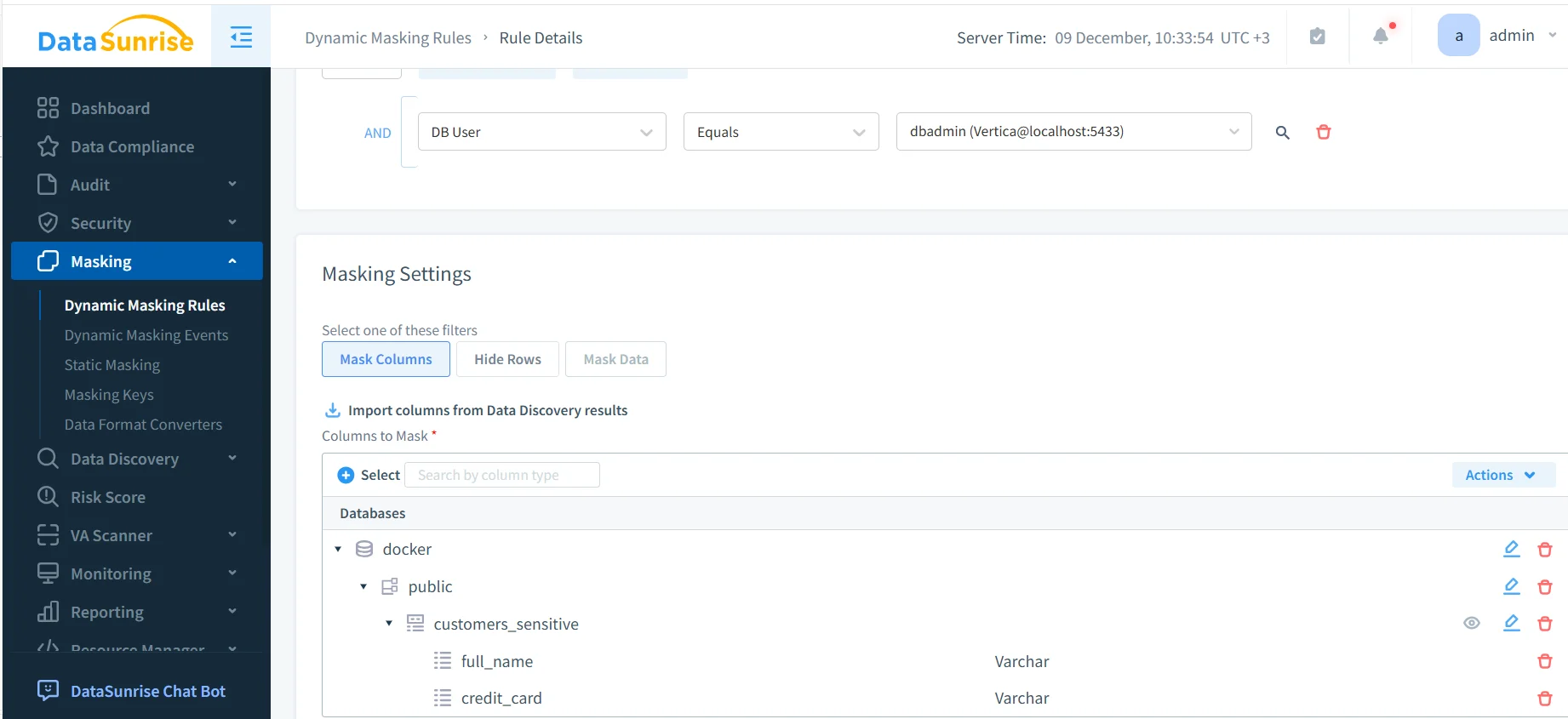
Masking functions can be customized per column. Card numbers might show only the last four digits, phone numbers can drop the country code, and names may be fully replaced or shortened to initials. The exact behavior depends on internal security policies and the masking profiles defined in DataSunrise.
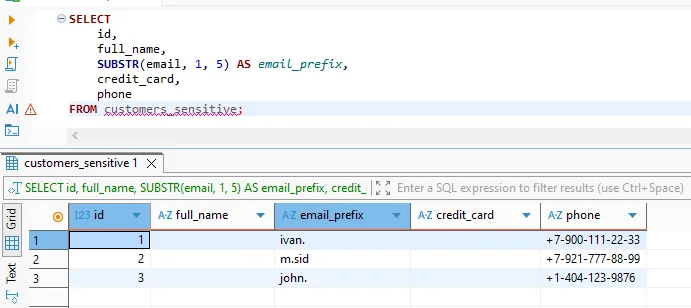
A typical query issued from a SQL client or notebook might look like this:
SELECT
    id,
    full_name,
    SUBSTR(email, 1, 5) AS email_prefix,
    credit_card,
    phone
FROM customers_sensitive;
Without masking, this query would return real customer names, card numbers, and phone details. With the rule enabled, non-privileged users see pseudonymized values while the rest of the result set remains intact.
Auditing Masked Queries in Vertica
Masking alone is not sufficient for regulatory compliance. Organizations must also prove that masking was applied consistently. DataSunrise records every query that triggered masking, along with information about the user, application, rule name, and execution time. These records support audits under regulations such as GDPR, HIPAA, and SOX.
From the audit console you can:
- Filter by Vertica rule, user, or application to investigate incidents.
- Export logs to SIEM or GRC platforms.
- Correlate masking events with alerts from Database Activity Monitoring.
Because all queries pass through the same gateway, compliance teams gain a single, normalized audit trail instead of stitching together multiple Vertica system tables.
Common Vertica Masking Scenarios
Data masking in Vertica appears across multiple operational and analytical scenarios. The table below summarizes common use cases and how organizations typically apply DataSunrise masking controls.
| Scenario | Risk | Masking Approach |
|---|---|---|
| BI dashboards and ad-hoc analytics | Exposure of PII in reports and exports | Dynamic masking based on user roles and BI service accounts |
| Data science and notebooks | Use of real customer data during exploration | Partial or full masking for non-production and analyst roles |
| ETL and data pipelines | Propagation of sensitive data into downstream systems | Masking applied at query time before data leaves Vertica |
| ML feature stores and model training | Leakage of identifiers into training datasets | Pseudonymization and tokenization via dynamic masking rules |
| Regulatory audits and investigations | Inability to prove data protection was enforced | Masked query results combined with centralized audit trails |
Conclusion
Done right, data masking in Vertica lets organizations continue using the platform as a high-speed analytics engine while dramatically reducing the risk of exposing sensitive information. By offloading masking logic, discovery, and auditing to DataSunrise, teams replace fragile manual solutions with consistent, automated protection.
Whether supporting BI self-service, powering ML workloads, or preparing for regulatory audits, a dedicated masking gateway gives Vertica the guardrails it needs—without slowing data access.
Protect Your Data with DataSunrise
Secure your data across every layer with DataSunrise. Detect threats in real time with Activity Monitoring, Data Masking, and Database Firewall. Enforce Data Compliance, discover sensitive data, and protect workloads across 50+ supported cloud, on-prem, and AI system data source integrations.
Start protecting your critical data today
Request a Demo Download Now