Data Masking Tools and Techniques for Vertica
Data masking tools and techniques for Vertica play a central role in protecting sensitive information in modern analytical environments. Vertica is widely used for high-volume analytics, reporting, data science, and machine learning workloads. These use cases require flexible and often broad access to data, which increases the likelihood that confidential values—such as personal identifiers, financial attributes, or healthcare information—appear in query results.
Unlike transactional databases, Vertica environments prioritize performance and analytical throughput. As a result, data is frequently denormalized, replicated across projections, and accessed by many tools simultaneously. In this context, masking must be both efficient and consistent, ensuring that sensitive values are protected without disrupting analytics.
This article explores practical data masking techniques for Vertica and the tools organizations use to implement them effectively, including centralized approaches aligned with DataSunrise Data Compliance and modern data privacy requirements.
Why Data Masking Is Critical in Vertica Environments
Vertica’s architecture introduces unique data protection challenges. Columnar storage, ROS/WOS memory layers, and projection-based optimization allow Vertica to process large datasets quickly. However, these same features make it difficult to rely on traditional protection methods.
Common challenges include:
- Wide analytical tables that mix metrics with sensitive attributes.
- Multiple projections storing the same columns in different layouts.
- Shared clusters accessed by BI tools, ETL jobs, notebooks, and ML pipelines.
- Ad-hoc SQL queries that bypass curated reporting views.
Vertica’s native role-based access control limits who can query objects, but it does not control which column values appear in results. Once a query executes, Vertica returns all selected data in clear form. To address this gap, organizations apply masking techniques at query time, often combined with advanced access controls.
For additional background on Vertica’s execution model, see the official Vertica architecture documentation.
Common Data Masking Techniques for Vertica
Several masking techniques are commonly used in Vertica environments. Each approach offers different trade-offs between security, flexibility, and maintenance effort.
- Static masking: Creates masked copies of tables for non-production use. While useful for development or testing, static masking introduces data duplication and ongoing maintenance, often addressed through static data masking tools.
- View-based masking: Uses SQL views to hide or transform sensitive columns. This method is fragile because users can bypass views with direct table access.
- Application-layer masking: Applies masking logic in BI tools or applications. This approach lacks consistency and does not protect all access paths.
- Dynamic data masking: Masks values at query time, based on policy, without modifying stored data.
Among these techniques, dynamic data masking offers the best balance for Vertica analytics. It protects sensitive values in real time while preserving analytical accuracy and performance, especially when paired with dynamic data masking engines.
Data Masking Tools for Vertica
Effective masking in Vertica requires tooling that understands both SQL semantics and column sensitivity. Many organizations implement masking using DataSunrise, which provides a centralized masking layer in front of Vertica and integrates tightly with database activity monitoring.
DataSunrise integrates multiple capabilities into a single platform:
- Sensitive Data Discovery to identify PII, PHI, and financial data.
- Dynamic Data Masking to protect values at query time.
- Database Activity Monitoring to track access and behavior.
- Audit Logs to support compliance reporting.
This combination allows organizations to apply masking consistently across all Vertica access paths while also supporting Compliance Manager workflows.
Configuring a Masking Rule for Vertica
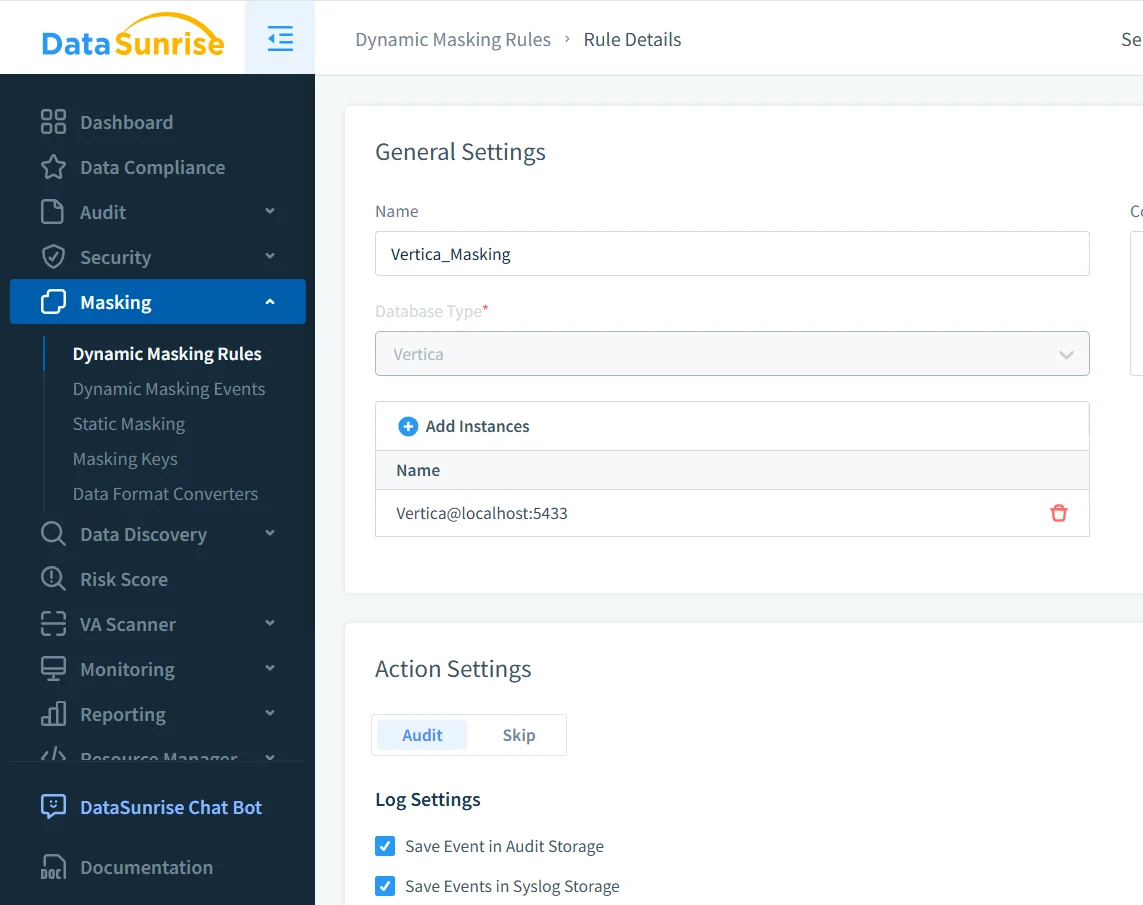
Dynamic masking rules define how and when sensitive data is protected. A typical rule specifies the Vertica instance, target schemas or tables, and the columns that require masking.
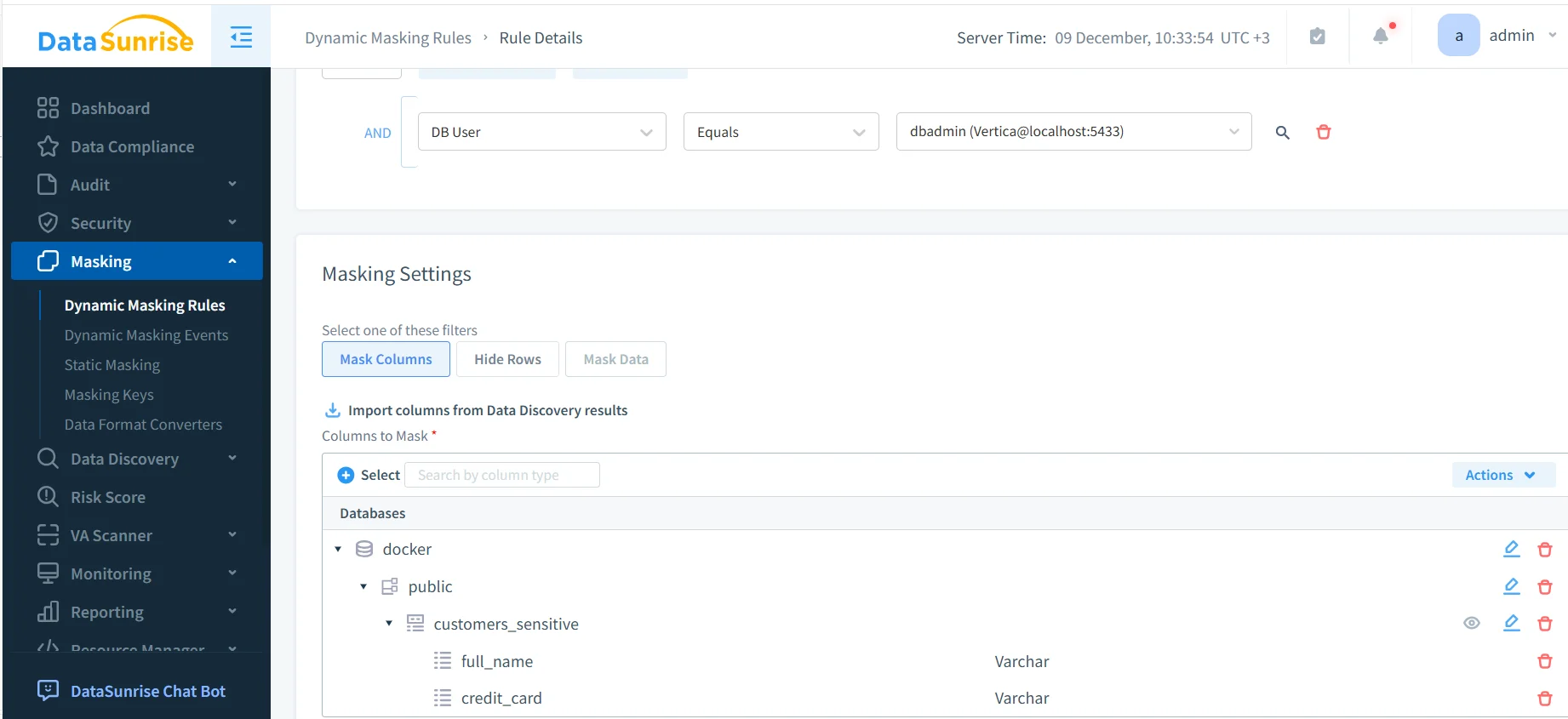
Dynamic masking rule configuration for Vertica.
Once enabled, the rule applies automatically to every matching query. Administrators can also define conditions based on database users, applications, or environments, and correlate events using audit trail capabilities.
For best results, combine masking rules with automated data discovery. This ensures new sensitive columns inherit masking automatically as schemas evolve.
Masked Query Results in Analytical Workflows
From the end user’s perspective, dynamic masking does not change how queries are written. Analysts continue using standard SQL, and Vertica executes queries normally. The difference appears only in the returned values.
Masked query results returned to the client.
With masking enabled, non-privileged users see anonymized or partially hidden values, while aggregates, joins, and filters continue to function correctly. This makes dynamic masking suitable for BI dashboards, exploratory analysis, and ML feature engineering governed by data governance policies.
This approach supports privacy and data minimization requirements under regulations such as GDPR, HIPAA, and PCI DSS.
Comparing Masking Techniques for Vertica
| Technique | Description | Operational Impact |
|---|---|---|
| Static masking | Creates permanently masked copies of data | High maintenance, data duplication |
| View-based masking | Uses SQL views to hide sensitive columns | Easily bypassed by direct queries |
| Application-layer masking | Masking logic inside BI or apps | Inconsistent coverage |
| Dynamic masking | Masks values at query time | Centralized, scalable protection |
Best Practices for Data Masking in Vertica
- Start with discovery to identify sensitive columns.
- Apply masking at the query layer instead of copying data.
- Test masking using real analytical workloads.
- Review audit logs regularly to detect unexpected access.
- Align masking policies with broader data security strategies.
Conclusion
Data masking tools and techniques for Vertica enable organizations to protect sensitive information while preserving the flexibility and performance of analytical workloads. By combining dynamic masking with centralized policy enforcement and auditing, teams avoid fragile workarounds and gain consistent protection across all access paths.
With the right masking tools in place, Vertica remains a powerful analytics platform while sensitive data stays protected throughout BI, ETL, and machine learning pipelines.
Protect Your Data with DataSunrise
Secure your data across every layer with DataSunrise. Detect threats in real time with Activity Monitoring, Data Masking, and Database Firewall. Enforce Data Compliance, discover sensitive data, and protect workloads across 50+ supported cloud, on-prem, and AI system data source integrations.
Start protecting your critical data today
Request a Demo Download Now