Database Audit in YugabyteDB

Introduction
In today’s digital landscape, implementing robust database audit trails is crucial for maintaining security and compliance in database operations. Moreover, YugabyteDB, a distributed SQL database, offers built-in capabilities for tracking database activities. At the same time, it supports enhanced monitoring through third-party solutions.
Native Audit Capabilities in YugabyteDB
YugabyteDB utilizes the PostgreSQL Audit Extension (pgaudit) to provide comprehensive audit logging. This integration, therefore, enables detailed session and object audit logging through YB-TServer logging, which is essential for meeting various compliance requirements.
Setting Up Native Audit Logging
To enable audit logging in YugabyteDB, administrators can configure several approaches. Below are the key steps for setup:
-
Cluster Startup Configuration – You can configure audit logging using YB-TServer flags. For example:
--ysql_pg_conf_csv="pgaudit.log='all, -misc',pgaudit.log_parameter=on,pgaudit.log_relation=on" -
Enable pgaudit Extension – In your YSQL session, you can create the extension with the following command:
CREATE EXTENSION IF NOT EXISTS pgaudit; -
Configure Audit Logging Parameters – Set specific audit logging options. For instance:
-- Enable DDL logging
SET pgaudit.log = 'DDL';
-- Log parameters with statements
SET pgaudit.log_parameter = ON;
-- Enable client-side logging
SET pgaudit.log_client = ON;
SET pgaudit.log_level = notice;
Sample Native Audit Log Output Examples
Once pgaudit is configured and active, YugabyteDB logs key activities to the YB-TServer logs. These logs can then be parsed or viewed using monitoring tools. Below are two sample output table examples that demonstrate typical audit log entries:
Example 1: General Activity Log
This table captures a variety of operations (SELECT, INSERT, UPDATE, DELETE) across different sessions.
| Log Time | User | Database | Session ID | Command | Object Type | Object Name | Details |
|---|---|---|---|---|---|---|---|
| 2025-02-11 10:15:23 | admin | yugadb | 8a1b2c3d | SELECT | table | customer_data | Executed SELECT on table customer_data |
| 2025-02-11 10:17:45 | admin | yugadb | 8a1b2c3d | INSERT | table | orders | Inserted a new order record |
| 2025-02-11 10:20:11 | analyst | yugadb | d4e5f6g7 | UPDATE | table | orders | Updated order status to ‘shipped’ |
| 2025-02-11 10:22:05 | analyst | yugadb | d4e5f6g7 | DELETE | table | obsolete_data | Deleted record with id 123 |
Example 2: Detailed DDL and Write Operations Log
This output is focused on Data Definition Language (DDL) and data-modification operations, including extra parameters and relation details as configured with pgaudit. Here are some sample entries:
| Log Time | User | Database | Session ID | Command | Object Type | Object Name | Query Parameters |
|---|---|---|---|---|---|---|---|
| 2025-02-11 11:05:10 | dba | yugadb | f7g8h9i0 | CREATE | table | sensitive_data | CREATE TABLE sensitive_data ( … ) |
| 2025-02-11 11:06:50 | dba | yugadb | f7g8h9i0 | ALTER | table | sensitive_data | ALTER TABLE sensitive_data ADD COLUMN … |
| 2025-02-11 11:10:32 | app_user | yugadb | j1k2l3m4 | INSERT | table | sensitive_data | INSERT INTO sensitive_data (username, email, …) |
| 2025-02-11 11:15:44 | app_user | yugadb | j1k2l3m4 | UPDATE | table | sensitive_data | UPDATE sensitive_data SET email = ‘…’ WHERE … |
Advanced Auditing with Detailed Examples
Comprehensive Audit Rule Example
-- Create a sample table to audit
CREATE TABLE sensitive_data (
 user_id SERIAL PRIMARY KEY,
 username TEXT,
 email TEXT,
 credit_card_last4 TEXT
);
-- Configure extensive auditing
SET pgaudit.log = 'all';
SET pgaudit.log_parameter = ON;
SET pgaudit.log_relation = ON;
-- Perform some sample operations
INSERT INTO sensitive_data (username, email, credit_card_last4)
VALUES ('johndoe', '[email protected]', '1234');
UPDATE sensitive_data
SET email = '[email protected]'
WHERE username = 'johndoe';
Enhanced Auditing with DataSunrise
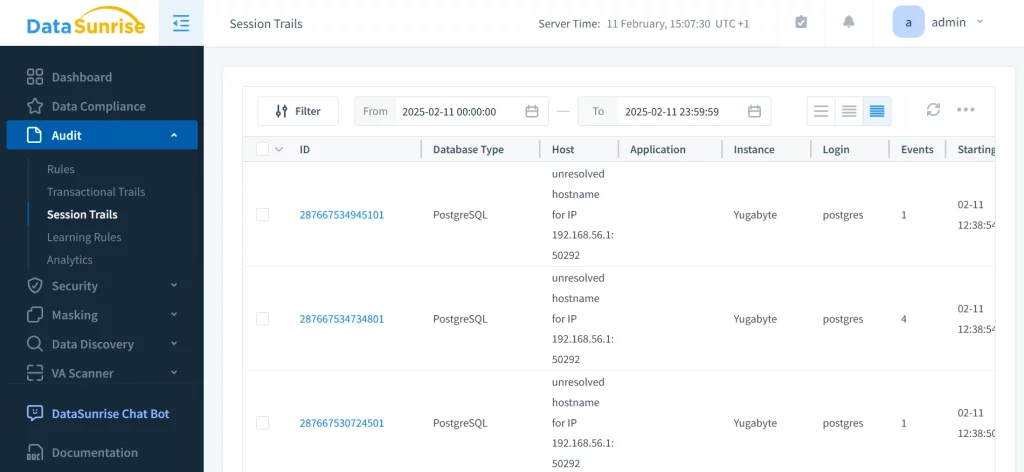
While native capabilities provide basic auditing, DataSunrise’s database activity monitoring solution offers advanced features specifically designed for distributed databases like YugabyteDB. Thus, it provides a more comprehensive solution.
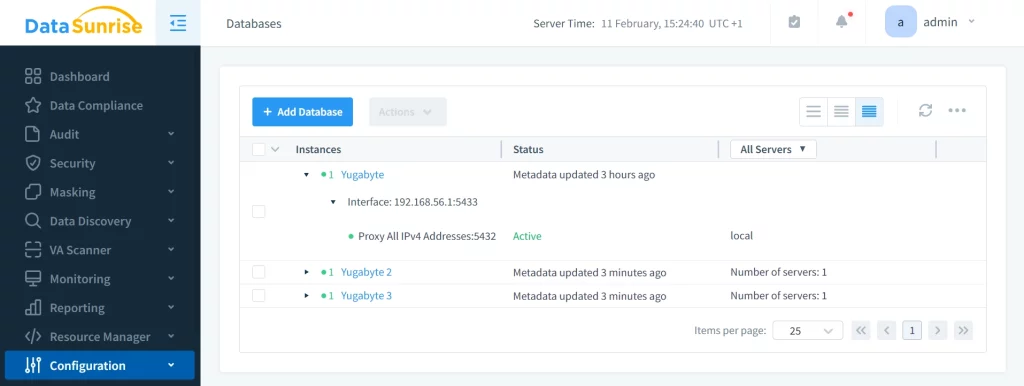
Key Features:
- Real-time activity monitoring
- Comprehensive audit trails
- Dynamic data masking
- Advanced security policies
- Automated compliance reporting
Best Practices for YugabyteDB Auditing
- Performance Optimization – In order to optimize performance, it is crucial to implement selective audit rules. For instance:
- Use targeted logging configurations
- Monitor the system’s performance impact
-- Example of selective logging SET pgaudit.log = 'DDL, WRITE'; -- Only log DDL and write operations SET pgaudit.log_catalog = OFF; -- Reduce noise from system catalog logs - Security Considerations – Additionally, it is important to protect audit logs, implement granular access controls, and regularly review and rotate logs. These measures are essential for maintaining the security of your audit data.
Conclusion
In conclusion, effective database auditing in YugabyteDB requires a balanced approach between native capabilities and enhanced solutions. While native pgaudit provides essential logging features, organizations with complex compliance requirements may greatly benefit from the advanced monitoring and security features offered by specialized solutions like DataSunrise.
For more information about implementing comprehensive database auditing in YugabyteDB, consult the YugabyteDB security documentation.
If you want to learn more about comprehensive database audit in YugabyteDB with DataSunrise, we highly recommend scheduling our online demo or downloading the tool to explore it yourself.