How to Apply Data Governance for Google Cloud SQL
Data governance ensures that cloud-hosted databases like Google Cloud SQL remain secure, compliant, and well-managed. With sensitive workloads running on Cloud SQL, organizations must align regulatory compliance, operational efficiency, and security. This article explores how to apply data governance to Google Cloud SQL by combining native features with advanced tools like DataSunrise. It covers real-time auditing, dynamic data masking, data discovery, and compliance, with examples and configuration insights.
Why Data Governance Matters in Google Cloud SQL
Google Cloud SQL hosts mission-critical data for industries such as healthcare, finance, and retail. Without proper governance, organizations risk breaches, compliance violations, and service disruptions. Applying governance strengthens protection against unauthorized access, maintains audit-ready logs of operations, and ensures policies align with GDPR, HIPAA, PCI DSS, and SOX requirements.
Native Data Governance Features in Google Cloud SQL
Google Cloud SQL offers governance capabilities through access management, logging, and encryption. The effectiveness of these tools depends on careful configuration.
Real-Time Audit with Cloud SQL
Native auditing uses Cloud Audit Logs. Administrators can enable logging of queries, logins, and schema modifications.
Example: enabling audit logs with gcloud
gcloud sql instances patch my-sql-instance \
  --database-flags=cloudsql.enable_pgaudit=on
Audit logs are stored in Cloud Logging, where they can be analyzed or exported. Administrators often forward these logs to SIEM tools for correlation and alerting.
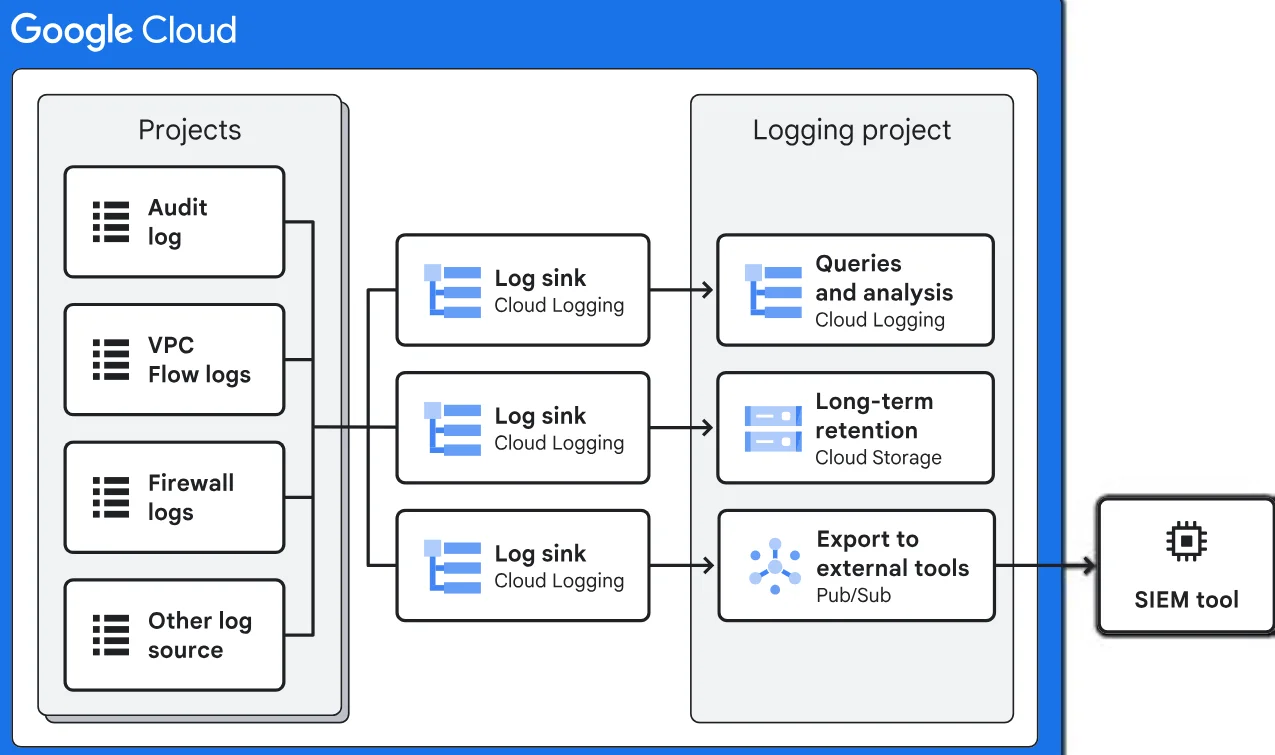
Example query in BigQuery to detect failed logins:
SELECT protoPayload.methodName, COUNT(*) as attempts
FROM `my_project_id.cloudaudit_googleapis_com_data_access`
WHERE protoPayload.status.code != 0
GROUP BY methodName;
Dynamic Data Masking with Cloud SQL
Google Cloud SQL does not include built-in dynamic masking. A common workaround is role-based access with views.
Example SQL masking through views:
CREATE VIEW masked_customers AS
SELECT id,
       CONCAT('XXXX-', RIGHT(card_number, 4)) as masked_card,
       name
FROM customers;
This approach limits data exposure but requires ongoing maintenance.
Data Discovery and Classification
Google Cloud provides Cloud DLP to identify sensitive fields such as credit card numbers or national IDs. Regular scans help classify data and support governance policies.
Security and Compliance
Cloud SQL integrates with IAM authentication and enforces encryption at rest and in transit. Combined with audit logs and DLP scans, these features help align with standards like GDPR and HIPAA.
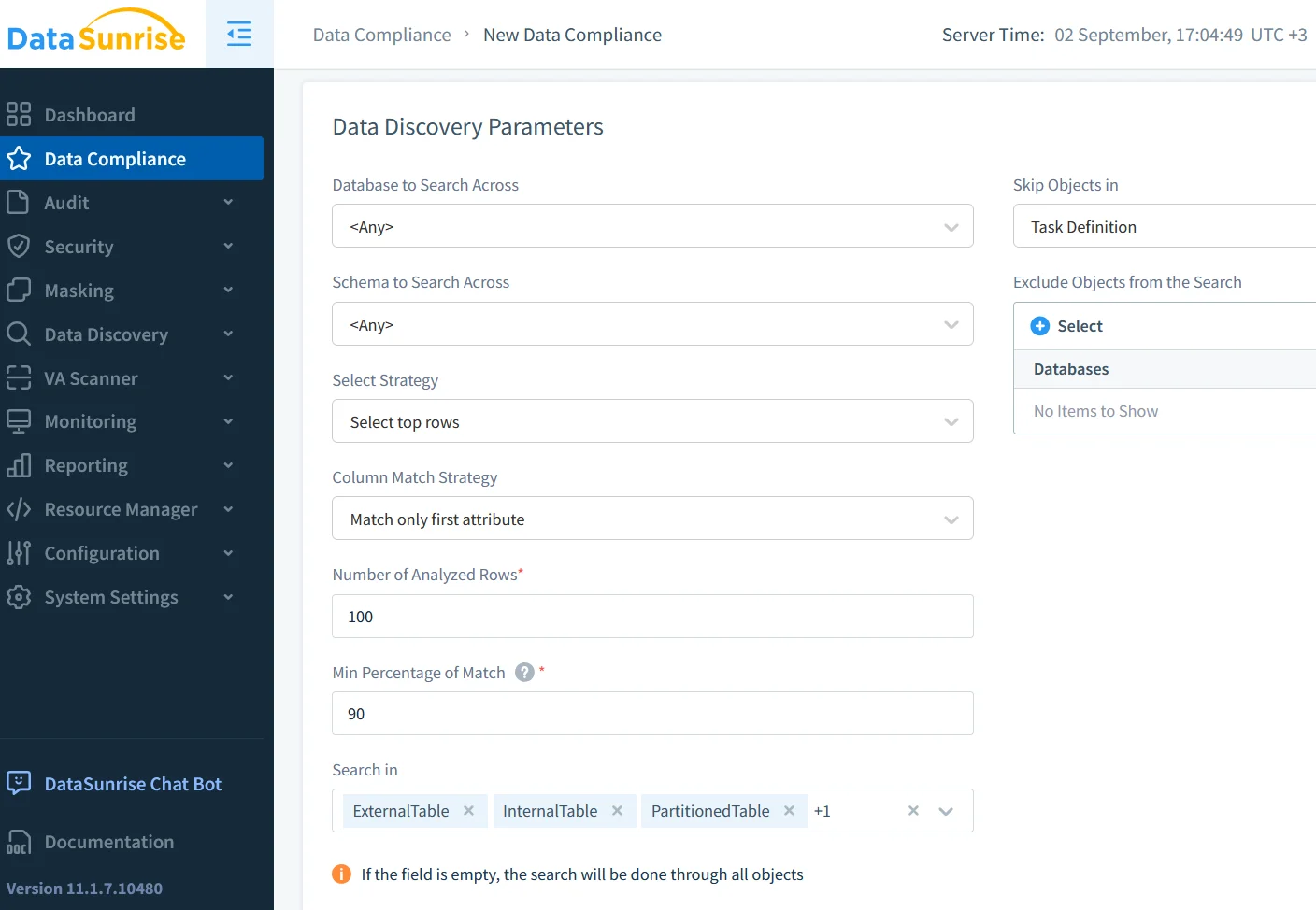
Applying DataSunrise for Advanced Governance
Native tools are helpful but limited in real-time masking, unified auditing, and automated compliance reporting. DataSunrise extends Google Cloud SQL governance with advanced functionality.
Real-Time Audit with DataSunrise
DataSunrise provides database activity monitoring and audit logs that capture queries, schema changes, and logins in tamper-proof storage. Logs can be correlated across environments and linked to compliance dashboards.
Example of an audit rule:
Audit Rule: Capture all SELECT queries on `payments`
Condition: WHERE user_role != 'compliance_officer'
Action: Log event, send real-time alert
Dynamic Data Masking with DataSunrise
DataSunrise applies dynamic data masking at the proxy layer. Masking rules adapt to user roles and session context, removing the need to rewrite queries.
Example masking rule:
Policy: Mask PAN (Primary Account Number)
Format: XXXX-XXXX-XXXX-####
Scope: All users except payment_admin
Data Discovery and Security
With data discovery, DataSunrise scans Cloud SQL to locate sensitive columns. Once identified, policies such as role-based access controls and masking can be enforced automatically.
Automated Compliance Reporting
DataSunrise provides compliance reporting aligned with GDPR, HIPAA, PCI DSS, and SOX. Reports can be generated on demand, offering ready-to-use audit evidence.
Business Impact
Applying strong governance to Google Cloud SQL results in improved compliance readiness, reduced insider risk, and streamlined oversight. Organizations gain better visibility into data access, while auditors receive standardized reports without manual effort.
Conclusion
Data governance in Google Cloud SQL benefits from both native and extended solutions. Cloud Audit Logs, IAM, and Cloud DLP create a strong baseline, but integrating DataSunrise adds real-time masking, advanced auditing, and compliance automation. This layered approach ensures that databases remain secure, compliant, and prepared for evolving regulations.
External references worth reviewing include Google Cloud compliance resources and NIST data security guidelines, which can help shape governance strategies in regulated industries.
Protect Your Data with DataSunrise
Secure your data across every layer with DataSunrise. Detect threats in real time with Activity Monitoring, Data Masking, and Database Firewall. Enforce Data Compliance, discover sensitive data, and protect workloads across 50+ supported cloud, on-prem, and AI system data source integrations.
Start protecting your critical data today
Request a Demo Download Now