How to Apply Data Governance for Sybase
Sybase Adaptive Server Enterprise (ASE) remains a trusted choice in banking, telecommunications, and government for mission-critical workloads. These systems store sensitive records such as financial transactions, personal data, and confidential business information, making data governance an essential component of their security and compliance strategy.
In Sybase, data governance refers to the policies, procedures, and tools that ensure the accuracy, integrity, and security of data throughout its lifecycle. Sybase ASE offers built-in capabilities for access control, auditing, and schema management, but integrating with DataSunrise can take these capabilities further—centralizing policy enforcement, automating repetitive tasks, and delivering deep analytics.
Why Data Governance Matters
Effective data governance ensures compliance with regulations such as GDPR, HIPAA, SOX, and PCI DSS.
Without proper governance, organizations risk data breaches, compliance fines, and reputational damage. Well-designed governance policies also improve transparency, enabling teams to track who accessed what data, when, and why.
Native Sybase Data Governance Capabilities
1. Role-Based Access Control (RBAC)
-- Step 1: Create a role for compliance officers
sp_addrole 'compliance_officer'

-- Step 2: Grant the role permission to read data in a specific schema
grant select on sensitive_schema.* to compliance_officer

-- Step 3: Assign the role to a specific user
sp_addrolemember 'compliance_officer', 'auditor_user'

-- Step 4: Verify role membership
sp_helprolemember 'compliance_officer'
RBAC allows you to assign permissions to roles instead of individual users, simplifying administration and reducing the risk of unauthorized access.
2. Auditing Features
-- Enable auditing for SELECT operations on a sensitive table
sp_audit 'select', 'sensitive_table', 'all', 'on'

-- Audit all failed login attempts
sp_audit 'logins', 'all', null, 'fail'

-- Optionally audit INSERT and UPDATE operations
sp_audit 'insert', 'sensitive_table', 'all', 'on'
sp_audit 'update', 'sensitive_table', 'all', 'on'

-- View the list of active audit events
sp_displayaudit
The native audit system records activity such as data access and failed logins, helping verify compliance and investigate incidents.
3. Enforcing Data Integrity
-- Add a CHECK constraint to validate email format
ALTER TABLE customer_data
ADD CONSTRAINT chk_email_format
CHECK (email LIKE '_%@_%._%')

-- Add a FOREIGN KEY to enforce relationship with the orders table
ALTER TABLE orders
ADD CONSTRAINT fk_customer_id
FOREIGN KEY (customer_id) REFERENCES customer_data(id)

-- Add a NOT NULL constraint to require phone numbers
ALTER TABLE customer_data
MODIFY phone_number VARCHAR(15) NOT NULL
Constraints prevent invalid or incomplete data from entering critical systems and maintain relational integrity.
4. Encryption and Security Controls
-- Step 1: Create an encryption key
CREATE ENCRYPTION KEY secure_key
WITH ALGORITHM = AES_256
ENCRYPTION BY PASSWORD 'StrongKeyPass123'

-- Step 2: Encrypt the credit card column in the payment_info table
ALTER TABLE payment_info
MODIFY credit_card
ENCRYPT WITH secure_key

-- Step 3: Decrypt data (only for authorized users)
SELECT decrypt(credit_card, 'StrongKeyPass123') AS decrypted_card
FROM payment_info
Column-level encryption protects sensitive data at rest and helps meet standards such as PCI DSS and HIPAA.
Extending Governance with DataSunrise
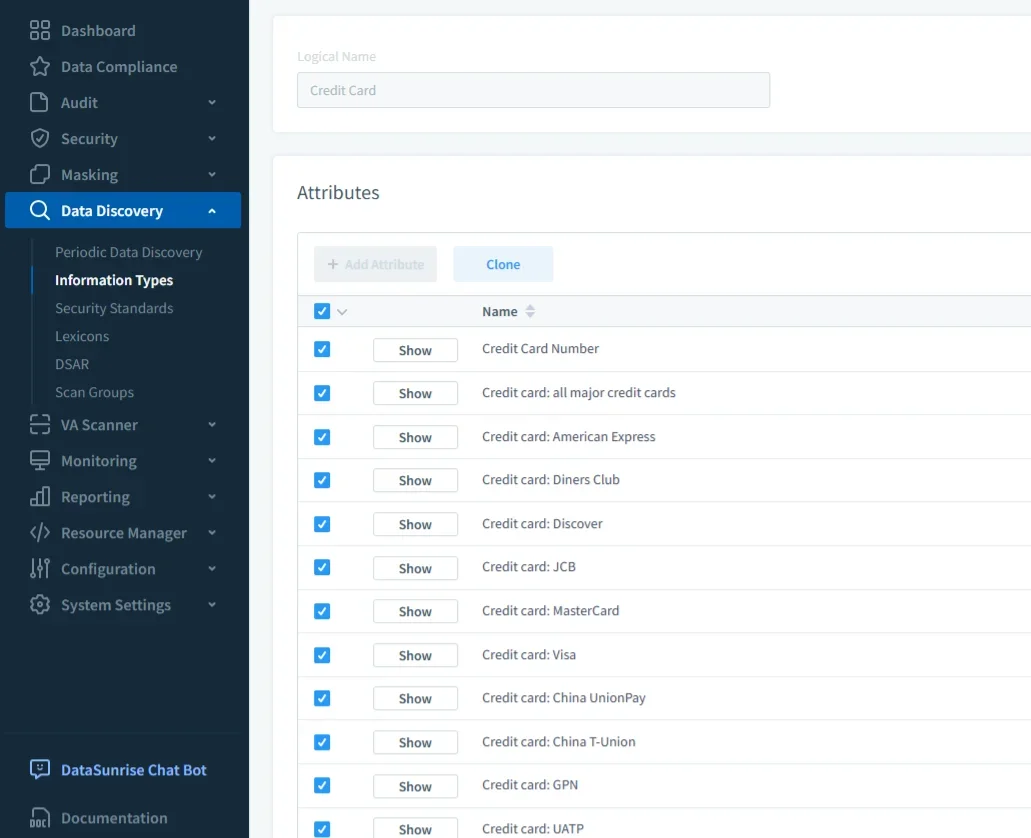
Automated Sensitive Data Discovery
Scans Sybase instances to find PII, PHI, and financial fields such as names, SSNs, and account numbers. Data is classified and tagged so you can automatically apply audit, masking, or security rules. This eliminates blind spots and reduces reliance on manual checks.
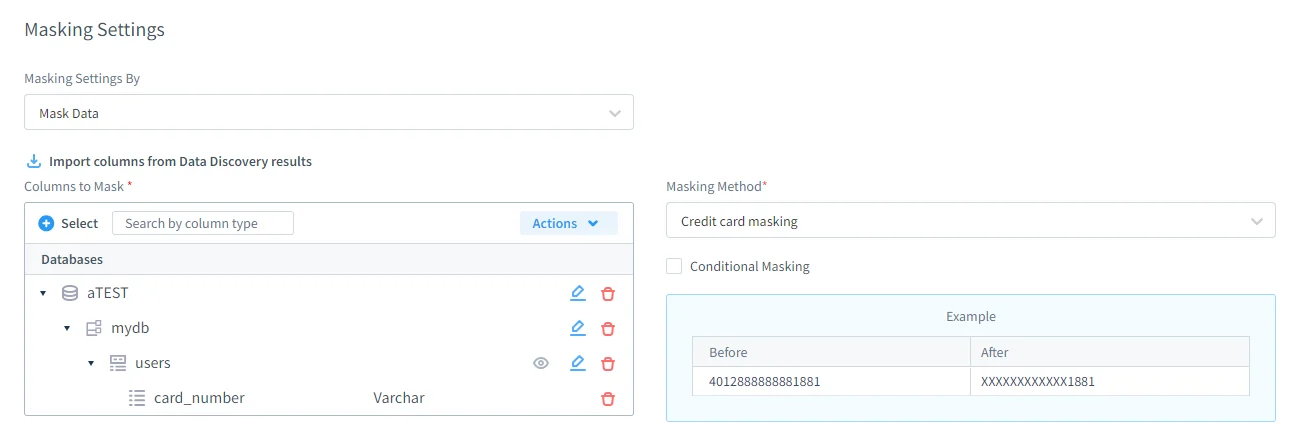
Dynamic Data Masking
Masks sensitive values in query results based on user roles or attributes, without changing the stored data. Implemented through the DataSunrise proxy, it applies in real time and requires no application changes.
Centralized Policy Management
Create governance rules once and deploy them across multiple Sybase servers. The unified console ensures consistent enforcement, prevents drift between environments, and supports both on-premises and cloud-based deployments.
Real-Time Alerts & User Behavior Analytics
Profiles normal user activity and detects anomalies—such as unusual query patterns, large data exports, or after-hours access. Sends alerts via email, Slack, Microsoft Teams, or webhooks for SIEM/SOAR integration.
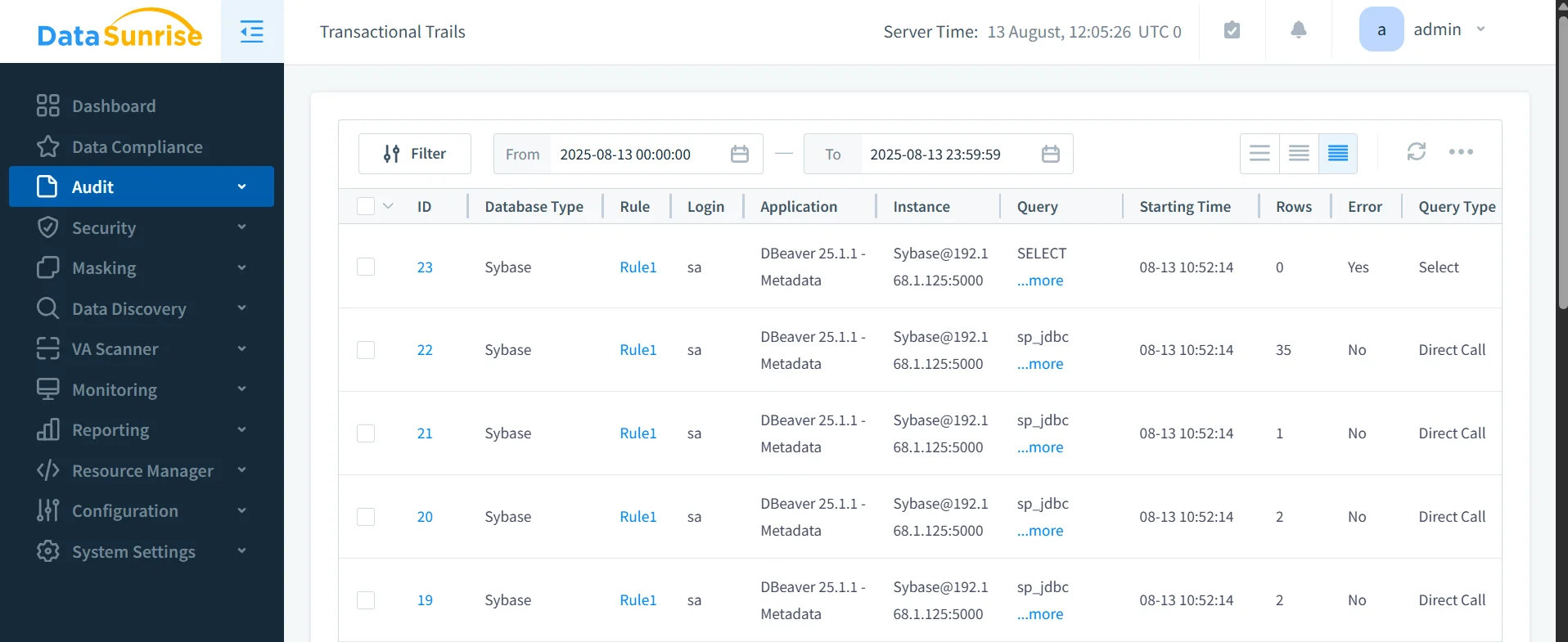
Audit-Ready Compliance Reporting
Generates export-ready evidence for GDPR, HIPAA, PCI DSS, and SOX in one click. Reports include sensitive data tags, active rules, access logs, and remediation timestamps in PDF or CSV format.
Business Impact
| Benefit | Description |
|---|---|
| Lower compliance costs | Automation reduces time and effort for preparing audits and reports |
| Faster incident response | Real-time alerts and analytics enable immediate action |
| Consistent policy enforcement | Centralized governance prevents drift and gaps across environments |
| Improved data trustworthiness | Higher data quality and reduced risk of unauthorized changes |
| Reduced operational overhead | Less manual configuration and monitoring effort for DBAs |
| Enhanced audit readiness | Always-on compliance reporting means no scramble before audits |
| Improved regulatory standing | Demonstrates proactive compliance to auditors and regulators |
| Stronger security posture | Integrated threat detection and behavior analytics reduce breach risk |
| Increased business agility | Faster policy deployment supports quick adaptation to new regulations |
| Better cross-team collaboration | Single governance framework streamlines work between compliance, security, and DBA teams |
Conclusion
Sybase ASE’s built-in features provide a solid foundation for governance, but pairing them with DataSunrise creates a centralized, automated, and proactive compliance framework.
Schedule a live demo to see how DataSunrise strengthens data governance for Sybase and streamlines security across your environment.
Protect Your Data with DataSunrise
Secure your data across every layer with DataSunrise. Detect threats in real time with Activity Monitoring, Data Masking, and Database Firewall. Enforce Data Compliance, discover sensitive data, and protect workloads across 50+ supported cloud, on-prem, and AI system data source integrations.
Start protecting your critical data today
Request a Demo Download Now