How to Apply Dynamic Masking in Vertica
How to apply dynamic masking in Vertica is a common question for organizations that use Vertica as a high-performance analytics platform while handling sensitive or regulated data. Vertica is frequently deployed for business intelligence, customer analytics, data science, and machine learning workloads. As a result, these use cases require broad access to data, which significantly increases the risk of exposing personally identifiable information (PII), payment details, or contact data through query results.
In analytics-driven environments, traditional data protection techniques quickly become insufficient. For example, static permissions or manually created SQL views struggle to keep pace with changing schemas, evolving projections, and a growing number of users. Consequently, organizations need a protection mechanism that adapts automatically and applies consistently across all Vertica workloads. Dynamic data masking addresses this challenge by protecting sensitive values at query time rather than modifying stored data.
Organizations commonly implement dynamic masking using DataSunrise Data Compliance together with dynamic data masking. This approach introduces a centralized control layer in front of Vertica. The layer evaluates every query, applies masking rules dynamically, and records audit evidence without requiring changes to Vertica schemas or client applications. For additional context, see regulatory compliance fundamentals.
Why Dynamic Masking Is Necessary in Vertica
Vertica prioritizes analytical performance. It stores data in columnar ROS containers, manages recent updates in WOS, and uses projections to optimize query execution. However, this architecture also complicates data protection.
Several factors therefore increase the need for dynamic masking:
- Wide analytical tables often combine metrics with sensitive attributes.
- Multiple projections may replicate the same sensitive columns.
- Shared clusters serve BI tools, ETL pipelines, notebooks, and ML jobs simultaneously.
- Ad-hoc SQL queries frequently bypass curated reporting layers.
- Role-based access control does not provide column-level redaction.
Vertica access controls determine who can query a table; however, they do not control which values appear in query results. Once a query executes, Vertica returns all selected columns in clear form. Therefore, organizations apply dynamic masking outside the database engine to reduce exposure.
For additional technical background, consult the official Vertica architecture documentation and the overview of Vertica analytics capabilities.
How Dynamic Data Masking Works with Vertica
Dynamic data masking in Vertica typically relies on a proxy-based approach. Client applications connect to a masking gateway instead of connecting directly to the database. As a result, every SQL request passes through this gateway, where masking policies are evaluated before execution.
The masking workflow follows a consistent sequence:
- The masking engine parses and analyzes the SQL statement.
- The engine checks referenced columns against a sensitivity catalog.
- Masking rules are evaluated based on user, application, or environment.
- The gateway rewrites query results so sensitive values appear masked.
The system leaves underlying Vertica tables and projections unchanged. Because masking occurs only in the returned result set, this approach preserves performance and avoids data duplication. Moreover, it aligns with data security best practices and modern privacy requirements.
Configuring a Dynamic Masking Rule in Vertica
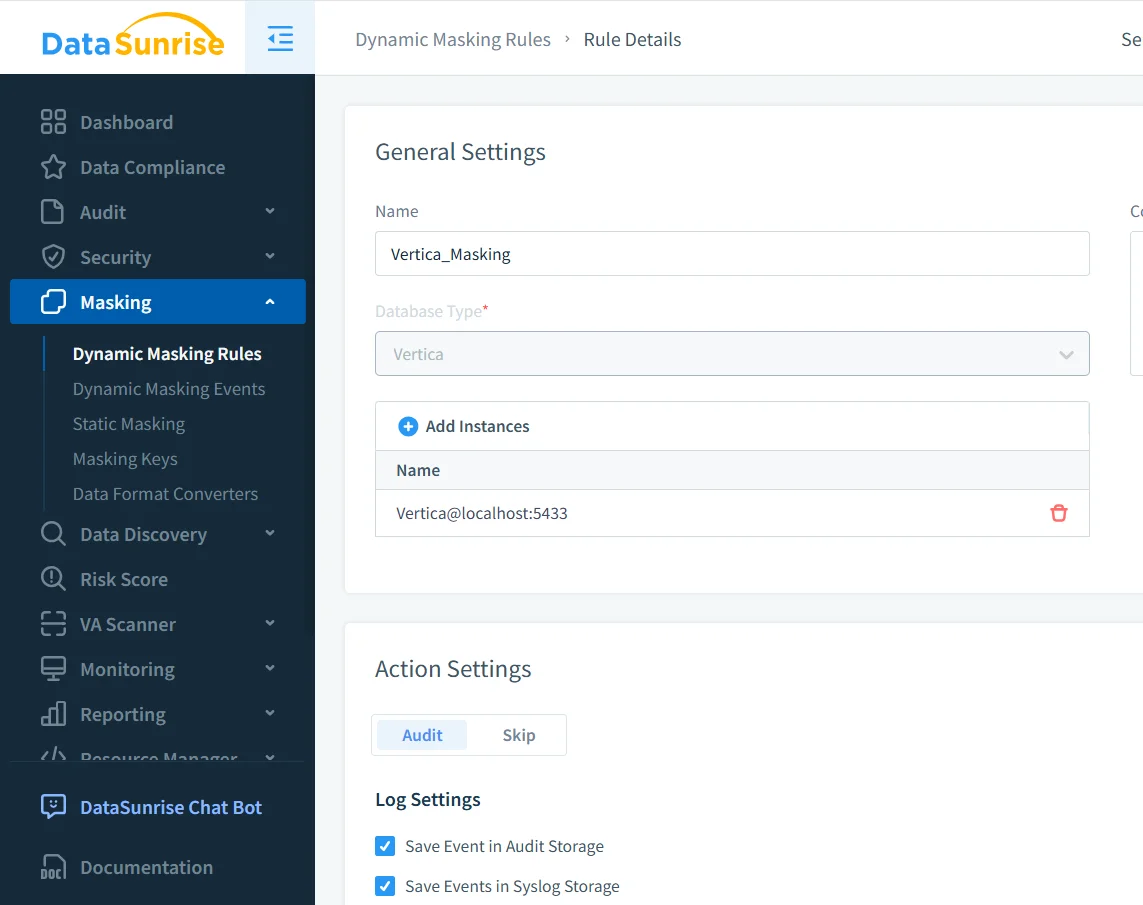
The first practical step in understanding how to apply dynamic masking in Vertica involves defining a dynamic masking rule. This rule specifies which Vertica instance to protect, which tables contain sensitive data, and how masking should behave.
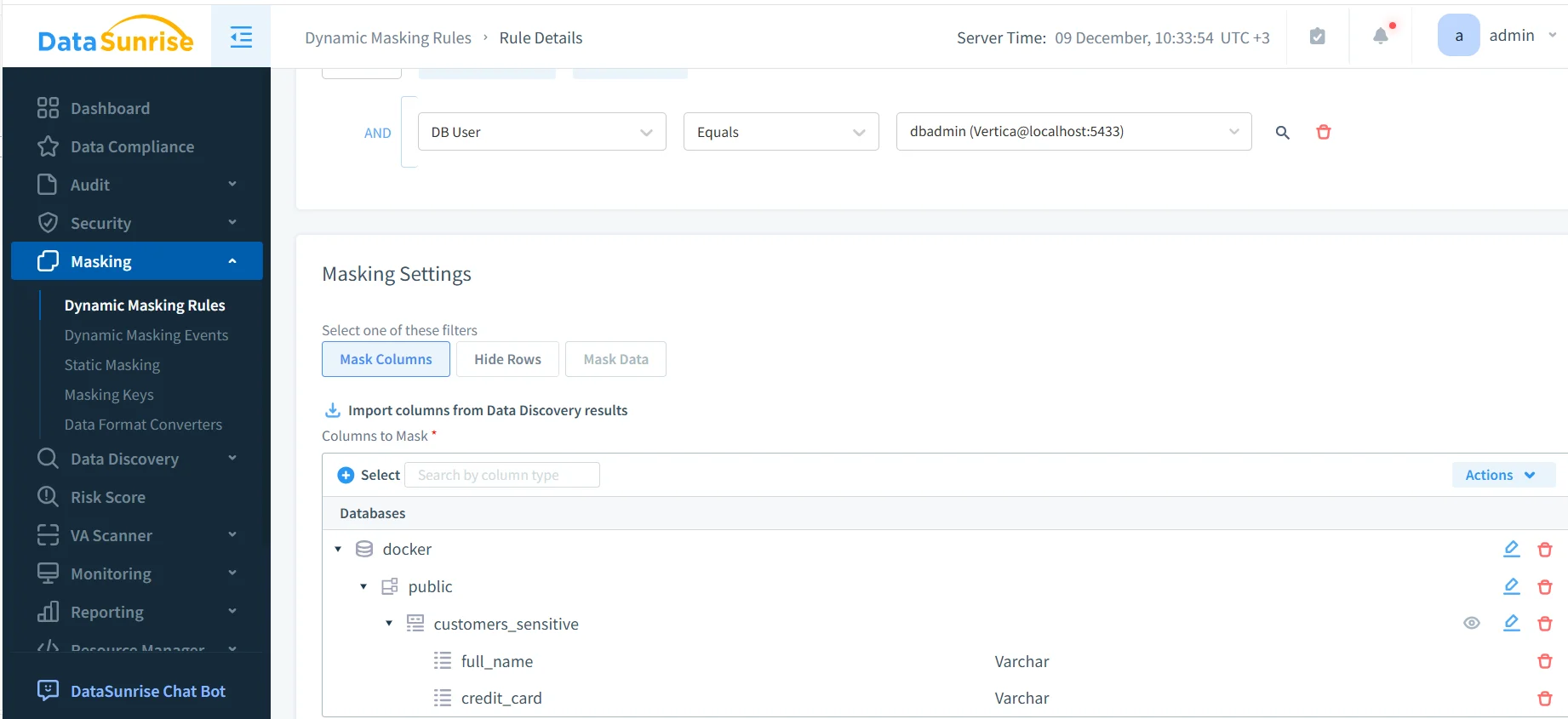
In this configuration, the administrator selects the Vertica instance and enables auditing for masking events. Sensitive columns such as full_name and credit_card are added explicitly. Once enabled, the rule applies automatically to every matching query.
To reduce manual effort, import sensitive columns directly from Sensitive Data Discovery. In addition, this approach ensures that new columns automatically inherit masking policies as schemas evolve.
Administrators can further refine masking rules using conditions such as:
- Database user or role
- Client application type
- Network location or environment
Because the rule operates outside Vertica, it remains effective even when schemas evolve or projections change.
Masked Query Results in Practice
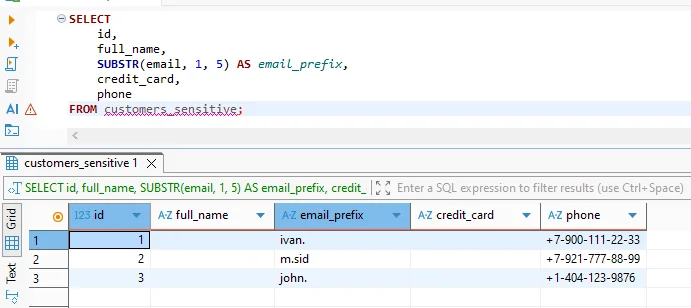
From the user’s perspective, dynamic masking does not change how queries are written. Analysts and applications issue the same SQL statements they always have. However, the difference becomes visible in the returned values.
Without masking, query results would include real names, card numbers, or phone details. With dynamic masking enabled, non-privileged users receive anonymized or partially hidden values. At the same time, joins, filters, and aggregations continue to work correctly, preserving analytical workflows.
This behavior supports privacy principles defined in GDPR, HIPAA, and PCI DSS.
Auditing Dynamic Masking Events in Vertica
Dynamic masking must remain auditable to support compliance. Each masked query generates an audit record that captures who accessed the data, which rule was applied, and when the action occurred.
These audit records form a centralized trail that compliance teams can review during internal checks or external audits. Consequently, teams no longer need to parse multiple Vertica system tables. Instead, they gain a single, normalized view of data access and protection events.
Dynamic masking audits integrate naturally with Database Activity Monitoring and support evidence requirements for SOX as well as internal governance policies.
Dynamic Masking Compared to Other Protection Approaches
| Approach | How It Works | Limitations |
|---|---|---|
| Static masked tables | Pre-generated masked copies of data | High maintenance, data duplication |
| SQL views | Masked columns exposed via views | Bypassed by ad-hoc queries |
| RBAC only | Table-level permissions | No column-level protection |
| Dynamic data masking | Mask values at query time | Centralized, scalable protection |
Conclusion
How to apply dynamic masking in Vertica ultimately comes down to enforcing protection at the point where data is returned to users and applications. By masking sensitive values dynamically at query time, organizations preserve the power of Vertica analytics while reducing the risk of unauthorized exposure.
With a centralized masking gateway, sensitive data remains protected across dashboards, scripts, and pipelines. As a result, analysts continue working productively, while compliance teams gain visibility and control. This balance makes dynamic data masking a foundational capability for secure analytics in Vertica.
Protect Your Data with DataSunrise
Secure your data across every layer with DataSunrise. Detect threats in real time with Activity Monitoring, Data Masking, and Database Firewall. Enforce Data Compliance, discover sensitive data, and protect workloads across 50+ supported cloud, on-prem, and AI system data source integrations.
Start protecting your critical data today
Request a Demo Download Now