How to Apply Static Masking in Vertica
Static masking in Vertica is the core technique described in this guide on how to apply static masking in Vertica for protecting sensitive analytical data outside production environments. Vertica commonly supports large-scale analytics, reporting, and data science workloads. As a result, production datasets often include personal, financial, or otherwise regulated information.
However, once teams copy production data into development, testing, or shared analytics environments, traditional access controls lose much of their effectiveness. At that point, irreversible data transformation becomes the only dependable method for preventing exposure while still preserving schema integrity and analytical value.
This article explains how to apply static masking in Vertica using DataSunrise. It walks through configuration, execution, and validation using real interface screenshots, while also highlighting operational and compliance considerations.
When Static Masking in Vertica Is Necessary
In practice, Vertica environments serve many consumers at the same time. Analysts, developers, QA engineers, and external contractors all require access to realistic datasets that mirror production structures.
Nevertheless, sharing raw production data introduces serious security and compliance risks. For that reason, static masking in Vertica becomes mandatory when data is:
- Copied into development or QA environments
- Shared with external teams or service providers
- Used for analytics outside regulated production zones
- Subject to privacy regulations such as GDPR or HIPAA
Unlike runtime controls, static masking removes original values entirely. Consequently, sensitive information no longer exists anywhere in the dataset.
Limitations of Native Vertica Masking Techniques
Vertica does not include built-in static masking functionality. Because of this limitation, teams often fall back on manual SQL updates, export pipelines, or custom scripts.
Initially, these approaches may appear sufficient. Over time, however, they introduce several structural problems:
- Manual column selection that breaks as schemas evolve
- Inconsistent masking logic across environments
- No audit trail proving that masking actually occurred
- High operational overhead during recurring refresh cycles
As datasets grow larger and refresh frequency increases, these workarounds become fragile. Eventually, governance degrades and audit readiness suffers.
Configuring Static Masking in Vertica with DataSunrise
DataSunrise addresses these limitations by introducing a centralized interface for defining and managing static masking tasks for Vertica. Instead of embedding masking logic into SQL scripts, DataSunrise applies static masking in Vertica externally, without changing database schemas or application code.
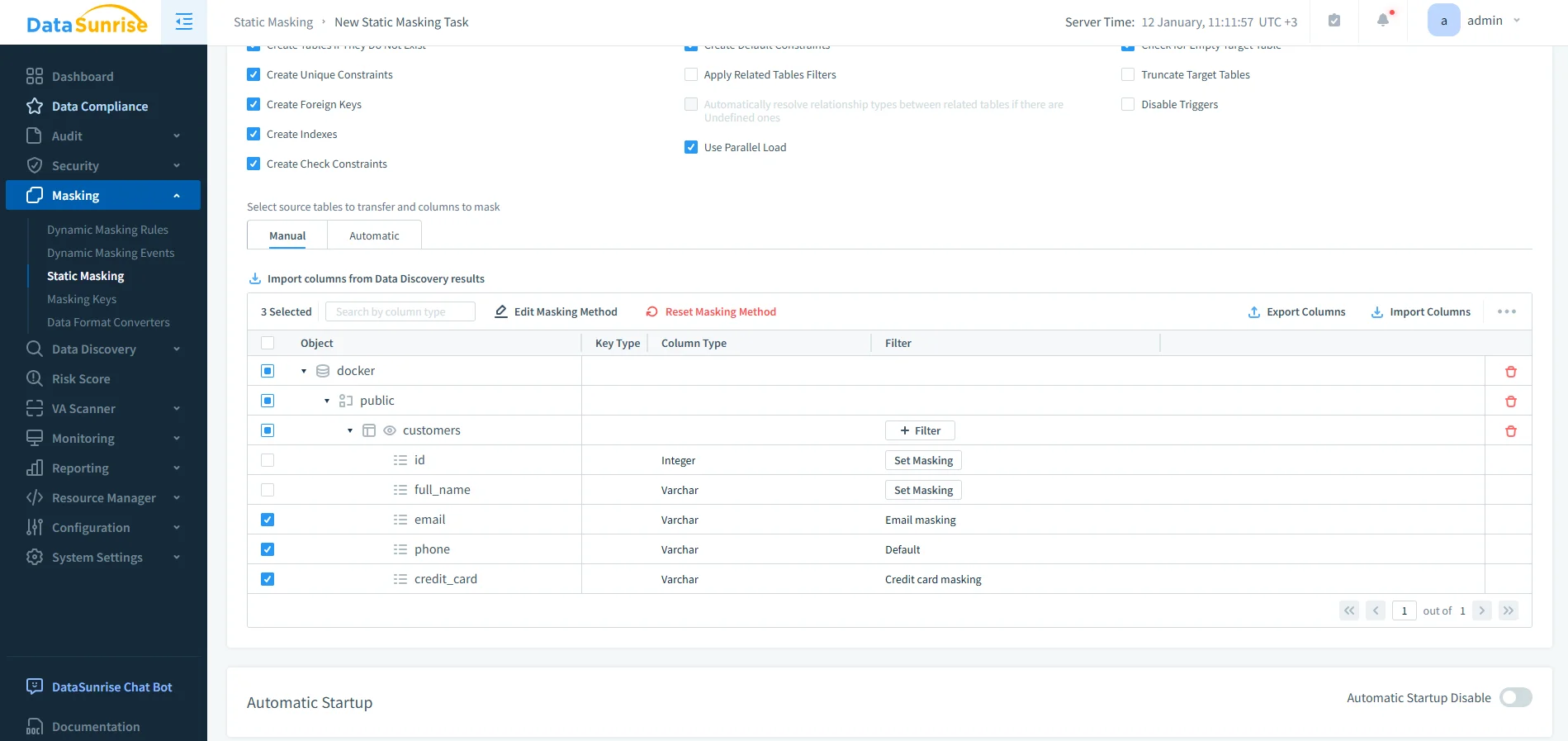
At this stage, administrators define the source and target Vertica instances, select the database and schema, and choose which tables and columns require masking. DataSunrise displays sensitive fields such as email addresses, phone numbers, and credit card data alongside predefined masking methods.
Selecting Columns and Masking Methods in Vertica
Rather than relying on manual identification, DataSunrise integrates with data discovery to detect sensitive data automatically.
After discovery completes, teams can apply masking methods consistently across schemas. Common irreversible transformations include:
- Synthetic email substitution
- Phone number tokenization
- Credit card masking with preserved format
- Irreversible hashing for identifiers
Importantly, these transformations preserve analytical structure while completely eliminating real values.
Defining Source and Target Vertica Instances for Static Masking
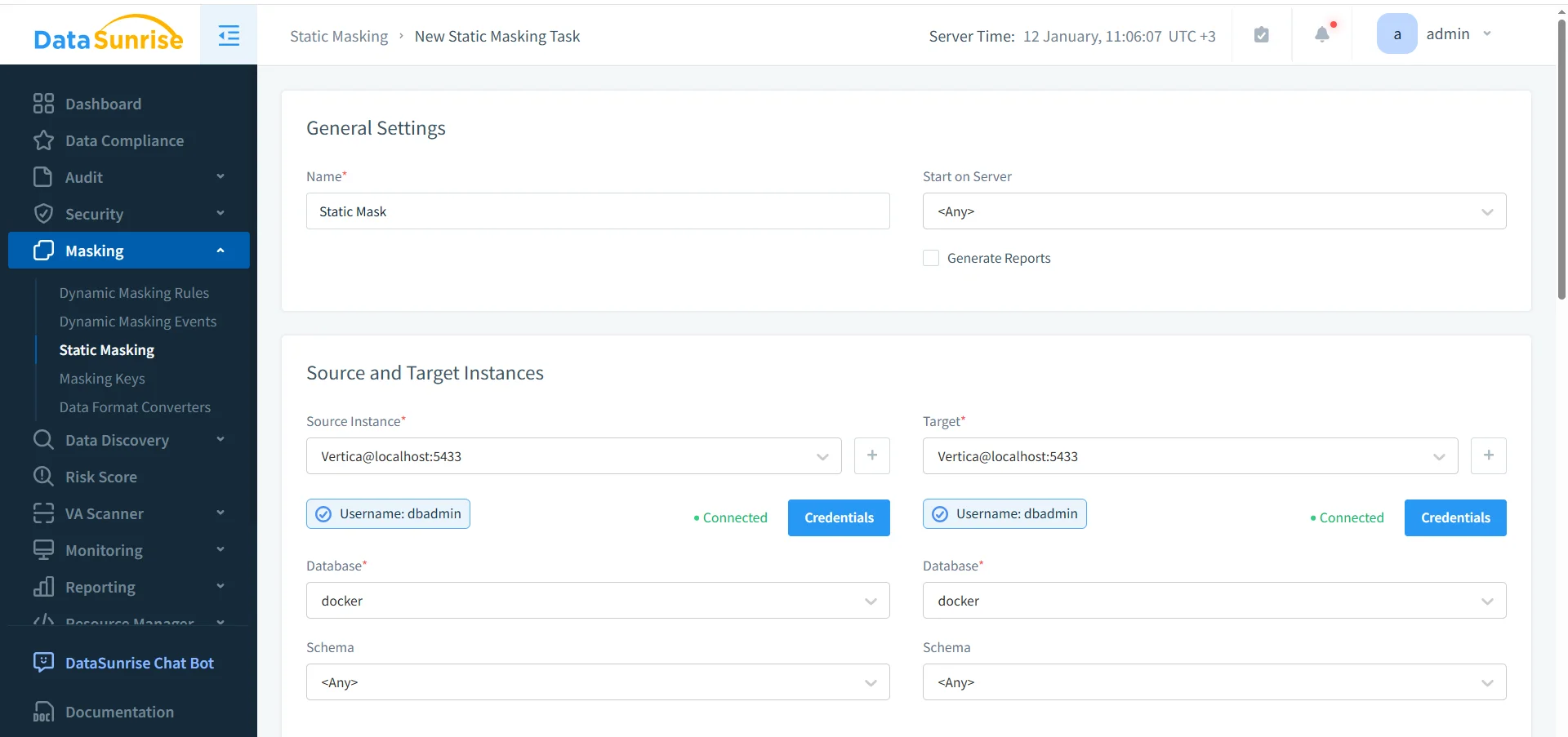
Static masking tasks always require a source and a target instance. In most deployments, both point to the same Vertica database. However, masking is applied to a refreshed copy or snapshot rather than to live production data.
Meanwhile, DataSunrise stores credentials securely and reuses them across workflows. As a result, repeated executions remain predictable and operationally efficient.
Executing the Static Masking Task in Vertica

After configuration, administrators execute the static masking task as a controlled operation. When performance matters, they can enable parallel execution to accelerate processing on large Vertica datasets.
Each run produces a clear status indicator, execution duration, and timestamp. Consequently, teams can immediately confirm that static masking in Vertica completed successfully.
Always apply static masking to refreshed copies or snapshots of Vertica production data. Avoid irreversible transformations on live analytical datasets unless rollback is explicitly unnecessary.
Validating Static Masking Results in Vertica
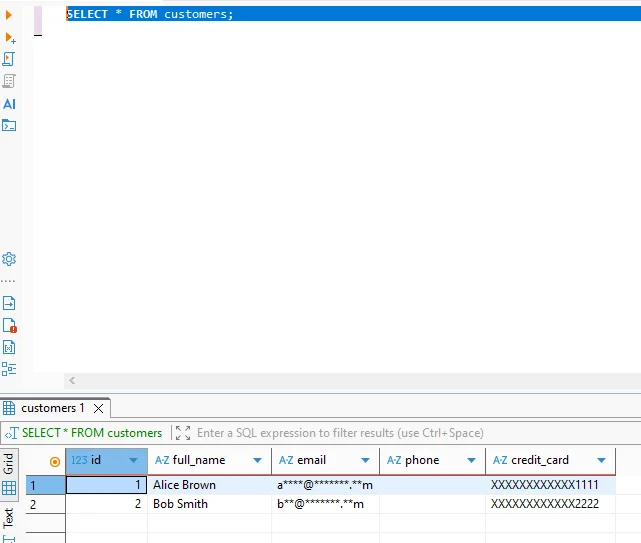
Once the task completes, the system permanently transforms sensitive values. Therefore, queries return masked data even for privileged users.
The following query illustrates how masked data appears in Vertica:
SELECT * FROM customers;
Because the transformation is irreversible, teams can safely reuse the dataset for analytics, QA, and external sharing.
Operational and Compliance Impact of Static Masking in Vertica
| Area | Without Static Masking | With Static Masking |
|---|---|---|
| Data exposure risk | High when data is copied | Eliminated through irreversible transformation |
| Audit readiness | Manual evidence collection | Automatic task and execution records |
| Operational effort | Script-based and fragile | Centralized and repeatable |
| Compliance alignment | Difficult to prove | Built-in traceability |
Static Masking vs Dynamic Masking in Vertica
Static masking and dynamic masking address different exposure scenarios.
Static data masking permanently alters stored values. In contrast, dynamic data masking applies transformations at query time.
Therefore, static masking in Vertica fits best when data leaves production environments or must meet irreversible anonymization requirements.
Conclusion: Making Static Masking a Standard Control
Applying static masking in Vertica is not a cosmetic security measure. Instead, it serves as a foundational control for protecting analytical data once it leaves production boundaries.
By using DataSunrise, organizations centralize masking logic, reduce operational risk, and align data handling practices with modern data compliance regulations.
If your Vertica environment supports analytics beyond a single trusted team, static masking should already be part of your workflow. Anything less creates unmanaged exposure.
Protect Your Data with DataSunrise
Secure your data across every layer with DataSunrise. Detect threats in real time with Activity Monitoring, Data Masking, and Database Firewall. Enforce Data Compliance, discover sensitive data, and protect workloads across 50+ supported cloud, on-prem, and AI system data source integrations.
Start protecting your critical data today
Request a Demo Download Now