How to Audit Databricks SQL
Auditing Databricks SQL is not a checkbox exercise; therefore, learning how to audit Databricks SQL properly matters in real-world lakehouse environments. In real-world lakehouse environments, Databricks SQL often becomes a shared analytical surface for dozens of teams, automated pipelines, and external BI tools. As a result, organizations must design auditing as a continuous process rather than a one-time configuration.
This guide explains how to audit Databricks SQL properly: starting with native visibility, identifying its limits, and then implementing a structured, investigation-ready audit workflow using DataSunrise. The focus is on practical decisions, control points, and evidence quality rather than theoretical definitions.
What Auditing Means in Databricks SQL
Auditing Databricks SQL means maintaining reliable and verifiable evidence of how the SQL warehouse is used. This includes tracking who executed queries, which operations were performed, when they occurred, and whether those actions aligned with internal policies and regulatory requirements.
In practice, auditing must answer operational and forensic questions such as:
- Who accessed sensitive tables and through which tools?
- Were data modification operations expected and authorized?
- Can query execution order be reconstructed during an investigation?
- Is audit evidence protected from tampering and retained correctly?
Without clear answers to these questions, audit data has little practical value. Over time, mature teams combine this approach with database activity monitoring to keep investigations and compliance reviews consistent across environments.
Step 1: Review Native Databricks SQL Audit Capabilities
Databricks SQL provides native query history that shows executed statements along with timestamps, duration, and execution status. Administrators often rely on this interface for short-term troubleshooting and operational visibility.
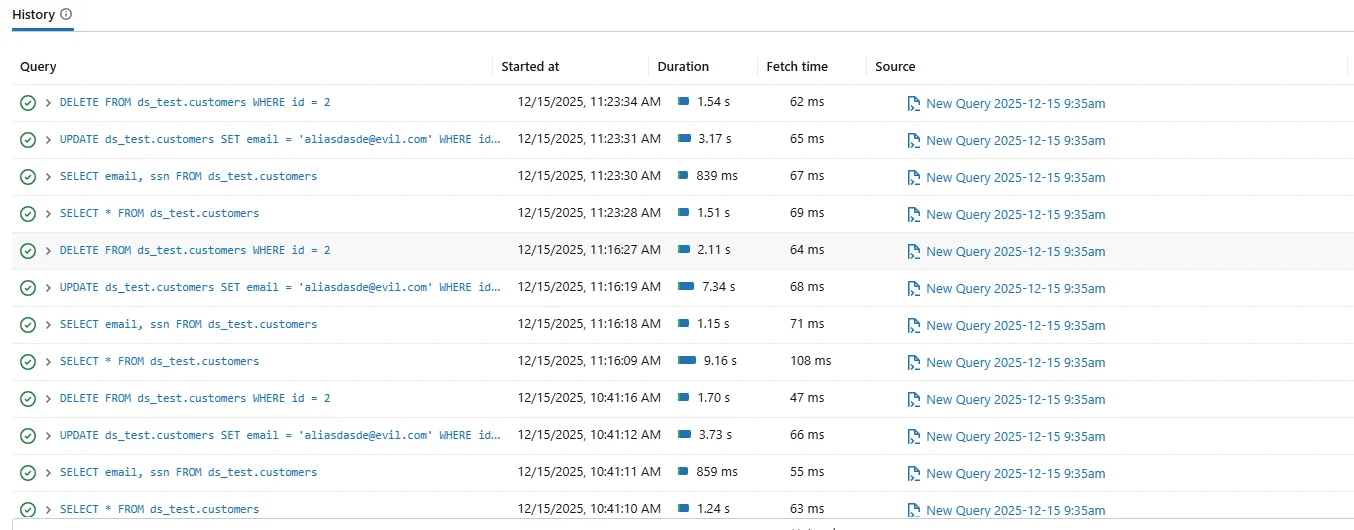
Native Databricks SQL query history used for basic operational auditing.
Although native query history is useful, it was not designed for formal audits. Retention is limited, session correlation is weak, and evidence integrity is not guaranteed.
Use native Databricks SQL query history only as a diagnostic tool. Treat it as a convenience layer, not as a source of audit evidence.
To extend retention, teams often export logs to external platforms such as Azure Log Analytics or Amazon CloudWatch. However, these systems still require significant manual effort to correlate sessions and reconstruct timelines. For structured evidence collection, many organizations rely on dedicated audit logs that retain consistent metadata across users and workloads.
Step 2: Define Audit Scope Before Collecting Data
One of the most common auditing mistakes is capturing everything without defining scope. Excessive logging creates noise and slows investigations.
| Audit Dimension | Key Questions |
|---|---|
| User activity | Which users and service accounts ran queries? |
| Query types | Were SELECT, UPDATE, or DELETE statements executed? |
| Data objects | Which schemas and tables were accessed? |
| Execution order | Can actions be reconstructed chronologically? |
Start auditing with UPDATE and DELETE statements. These operations create irreversible data impact and carry the highest compliance and security risk.
Step 3: Understand the Audit Architecture
Effective auditing follows a layered architecture. SQL queries originate from users, BI tools, and applications, execute in the Databricks SQL warehouse, and then generate audit-relevant events.

Audit architecture showing capture, centralization, and analysis of Databricks SQL activity.
The critical design decision is where events are captured. Native logging records events locally, while centralized auditing platforms capture, normalize, and store events in real time. In practice, teams combine centralized storage with database security controls to reduce audit gaps and speed up investigations.
Step 4: Centralize Auditing with DataSunrise
DataSunrise audits Databricks SQL by capturing SQL activity in real time and storing it in a centralized audit repository. Instead of relying on fragmented logs, it builds structured audit records enriched with session context.
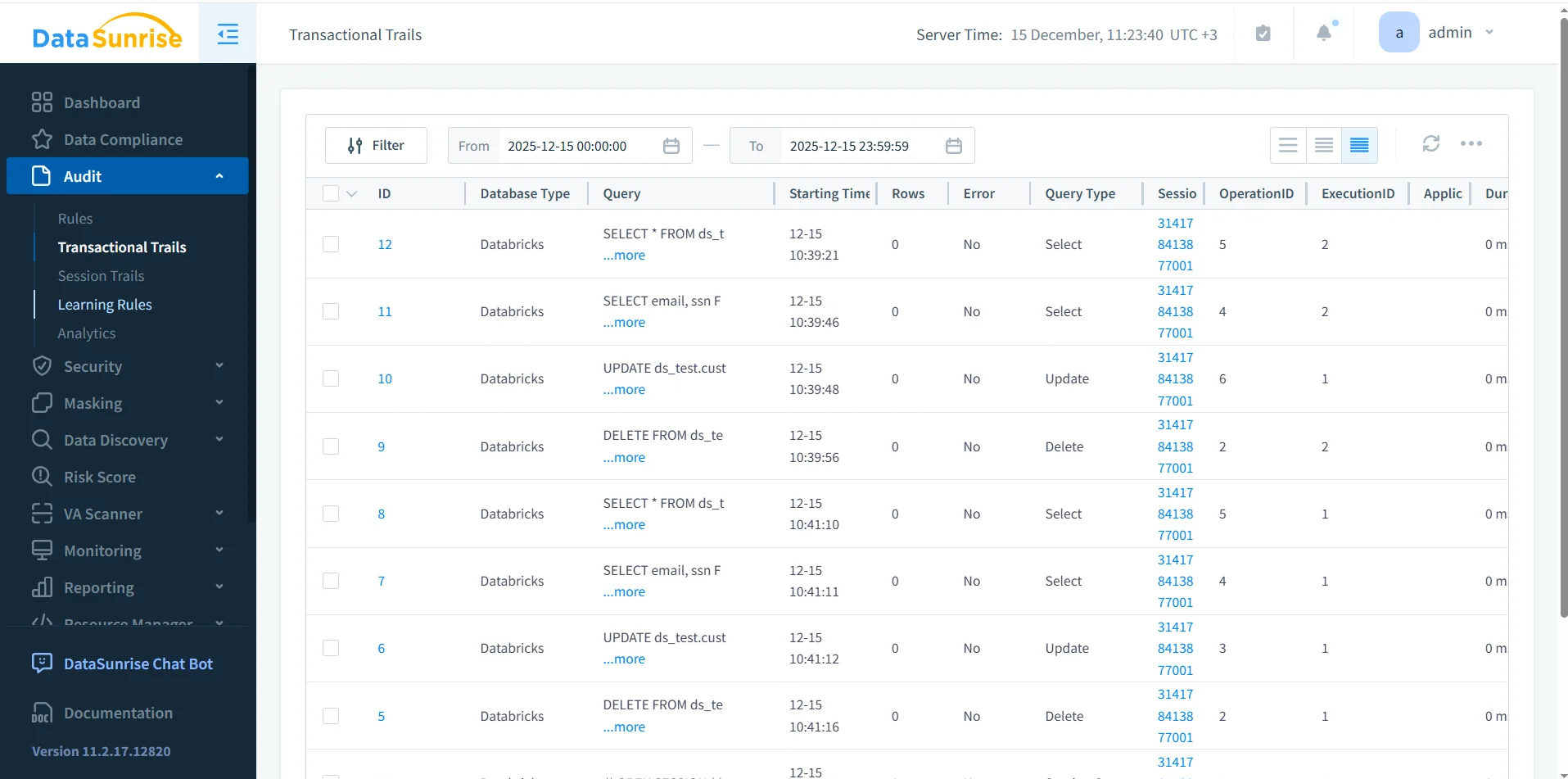
DataSunrise Transactional Trails showing a centralized view of Databricks SQL audit records.
Each audit record includes SQL text, query type, user identity, session identifier, execution status, and timing information. This structure supports both real-time monitoring and post-incident investigation.
Verify that audit records include a stable session identifier. Without session context, reconstructing multi-step workflows becomes unreliable.
Step 5: Validate Audit Coverage with Real Queries
After configuring auditing, validate coverage by executing representative queries and confirming they appear in the audit system in the correct order.
SELECT email, ssn FROM ds_test.customers;
UPDATE ds_test.customers SET email = '[email protected]' WHERE id = 2;
DELETE FROM ds_test.customers WHERE id = 2;
A reliable audit setup records each statement, preserves execution order, and associates all operations with the same session context.
Step 6: Common Audit Failure Scenarios
In practice, audit implementations often fail in predictable ways. One common issue occurs when audit logs capture queries but omit session context, making it impossible to reconstruct workflows. Another failure appears when retention policies delete records before audits occur.
Additionally, exporting logs without normalization creates inconsistent evidence. Investigators may struggle to align timestamps or user identities across systems.
Periodically simulate an audit request. If you cannot reconstruct a complete timeline within minutes, your audit design needs adjustment.
Step 7: Retention, Integrity, and Chain of Custody
Audit evidence is only useful if it remains trustworthy. Organizations must ensure that audit records cannot be modified and remain available for the required retention period.
DataSunrise enforces centralized storage, access controls, and retention policies. As a result, audit evidence maintains integrity and supports chain-of-custody requirements during investigations and regulatory reviews. For broader governance alignment, teams often connect this workflow to data compliance programs to keep retention and evidence processes consistent.
Native vs Centralized Auditing: Practical Differences
| Capability | Native Databricks SQL | DataSunrise Auditing |
|---|---|---|
| Retention | Short-term | Configurable long-term |
| Session correlation | Minimal | Full session tracking |
| Audit evidence quality | Operational | Investigation-ready |
| Compliance reporting | Manual | Structured and automated |
Conclusion: Auditing Databricks SQL the Right Way
Auditing Databricks SQL requires more than enabling query history. It demands clear scope, reliable capture, centralized storage, preserved execution order, and protected retention.
By combining native Databricks SQL visibility with centralized auditing through DataSunrise, organizations gain audit evidence that supports investigations, compliance audits, and long-term governance.
When implemented correctly, Databricks SQL auditing becomes an operational asset rather than a compliance burden.
Protect Your Data with DataSunrise
Secure your data across every layer with DataSunrise. Detect threats in real time with Activity Monitoring, Data Masking, and Database Firewall. Enforce Data Compliance, discover sensitive data, and protect workloads across 50+ supported cloud, on-prem, and AI system data source integrations.
Start protecting your critical data today
Request a Demo Download Now