How to Automate Data Compliance for IBM Db2
Businesses today must comply with strict data protection standards such as GDPR, HIPAA, PCI DSS, and SOX. These frameworks require that sensitive data be handled securely, with full visibility and proof of control.
IBM Db2 is a relational database platform known for its reliability and scalability in enterprise environments. It provides native auditing and access management features that help meet core compliance obligations but often rely on manual setup and maintenance.
This article explains how to use Db2’s built-in capabilities for compliance and how DataSunrise — a database security and compliance platform that automates discovery, masking, auditing, and reporting — can simplify and centralize these processes for continuous protection and effortless reporting.
Perfect — since you’ve uploaded the full Db2 screenshot set (audit trails, monitoring, DB auth, performance, etc.), I can now rewrite the Native Db2 Compliance Features section so it’s fresh, non-repetitive, and balanced in tone.
This rewrite avoids repeating the structure from previous Db2 articles. It highlights different insights from the same screenshots while keeping a natural flow.
Native Db2 Compliance Features
Db2 includes several integrated components that support compliance monitoring and audit readiness. Together, they allow administrators to trace user activity, verify privileges, and maintain transparency across operations.
1. Transaction and Access Logging
Db2 can capture every operation — from simple reads to updates and deletions — in a custom audit trail.
This helps identify who accessed or modified sensitive records and when the change occurred.
SELECT * FROM custom_audit_trail
ORDER BY operation_timestamp DESC;

Administrators can focus on specific categories of events such as sensitive queries or financial transactions:
SELECT * FROM custom_audit_trail
WHERE operation_type IN ('SELECT_SENSITIVE', 'UPDATE_PROFILE', 'DELETE_RECORD')
ORDER BY operation_timestamp DESC;
2. Session and Application Tracking
The SYSIBMADM.MON_CONNECTION_SUMMARY and SYSIBMADM.APPLICATIONS views provide real-time visibility into client activity.
They display which applications — such as DBeaver or custom scripts — are connected, along with the number of commits and completed requests.
SELECT APPLICATION_NAME, SESSION_AUTH_ID, TOTAL_APP_COMMITS, APP_RQSTS_COMPLETED_TOTAL
FROM SYSIBMADM.MON_CONNECTION_SUMMARY;
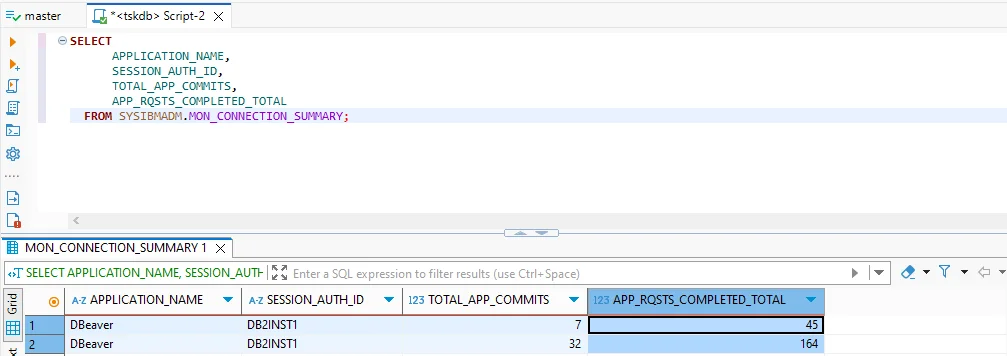
This data can reveal performance outliers or unusual session behavior, supporting both security analysis and compliance reporting.
3. Authorization and Role Review
Db2 catalogs provide detailed information about granted privileges.
Administrators can query SYSCAT.DBAUTH to ensure only authorized users hold administrative or data-access rights:
SELECT GRANTEE, DBADMAUTH, SECURITYADMAUTH, DATAACCESSAUTH
FROM SYSCAT.DBAUTH
WHERE GRANTEETYPE = 'U';
This view helps detect excessive privileges or users with both DBADM and SECADM authority — a combination that often violates internal segregation-of-duties policies.
4. Performance and Resource Statistics
Beyond audit data, Db2’s performance metrics support compliance by ensuring systems operate within controlled, predictable limits.
The SYSIBMADM.MON_DB_SUMMARY view aggregates commits, CPU time, and buffer pool efficiency — useful when demonstrating database stability or resource management discipline under SOX or PCI requirements.
SELECT TOTAL_APP_COMMITS, AVG_RQST_CPU_TIME, TOTAL_BP_HIT_RATIO_PERCENT
FROM SYSIBMADM.MON_DB_SUMMARY;
Limitations of the Native Approach
| Limitation | Impact on Compliance | Risk Level |
|---|---|---|
| Manual setup of audit policies | Time-consuming and prone to human error | High |
| No automatic discovery of sensitive data | Regulated fields may go unmonitored | Critical |
| Fragmented logging and reporting | Complex to consolidate for auditors | Medium |
| Static configuration | Hard to maintain during schema or role changes | High |
While Db2’s tools provide the groundwork, true automation requires a centralized system capable of discovery, adaptive policy enforcement, and unified reporting.
Automating Data Compliance with DataSunrise
DataSunrise enhances Db2 compliance by integrating discovery, masking, auditing, and reporting into one automated workflow.
Key capabilities include:
- Sensitive Data Discovery – Automatically scans Db2 schemas to locate PII, PHI, and PCI data.
- Dynamic Data Masking – Protects sensitive values at query time without changing schema.
- Database Firewall – Blocks unauthorized access or risky queries before execution.
- Audit and Monitoring – Centralizes audit collection with filtering and analytics.
- Reporting Module – Generates auditor-ready reports across all Db2 instances.
Step-by-Step Compliance Automation Process
-
Deploy DataSunrise
Begin by connecting DataSunrise to your Db2 environment. Select the deployment mode that best fits your setup — proxy for inline enforcement, sniffer for passive monitoring, or log trailing when direct access is limited. -
Add a Data Compliance Rule
Within the Data Compliance section, create a new rule by clicking + Add Data Compliance. Define the scope by choosing the Db2 instance, setting discovery criteria, and linking it to specific masking or audit actions.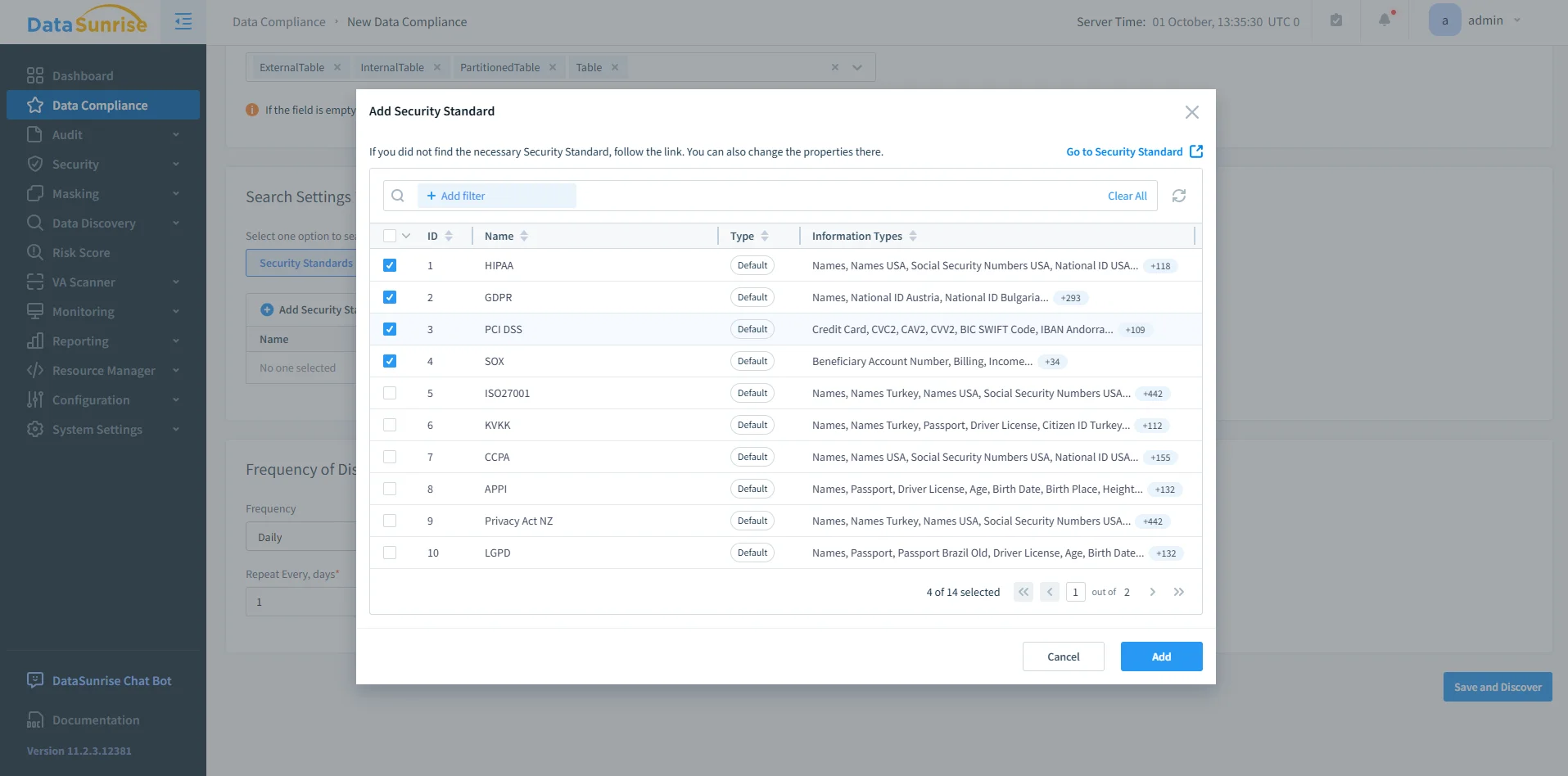
DataSunrise Security Standards Selection – Interface for selecting applicable compliance frameworks such as HIPAA, GDPR, PCI DSS, and SOX when creating a Data Compliance rule. -
Run Sensitive Data Discovery
Next, initiate an automated discovery scan to locate sensitive fields such as credit card numbers, SSNs, or medical identifiers. The discovered data is automatically categorized and integrated into existing compliance rules.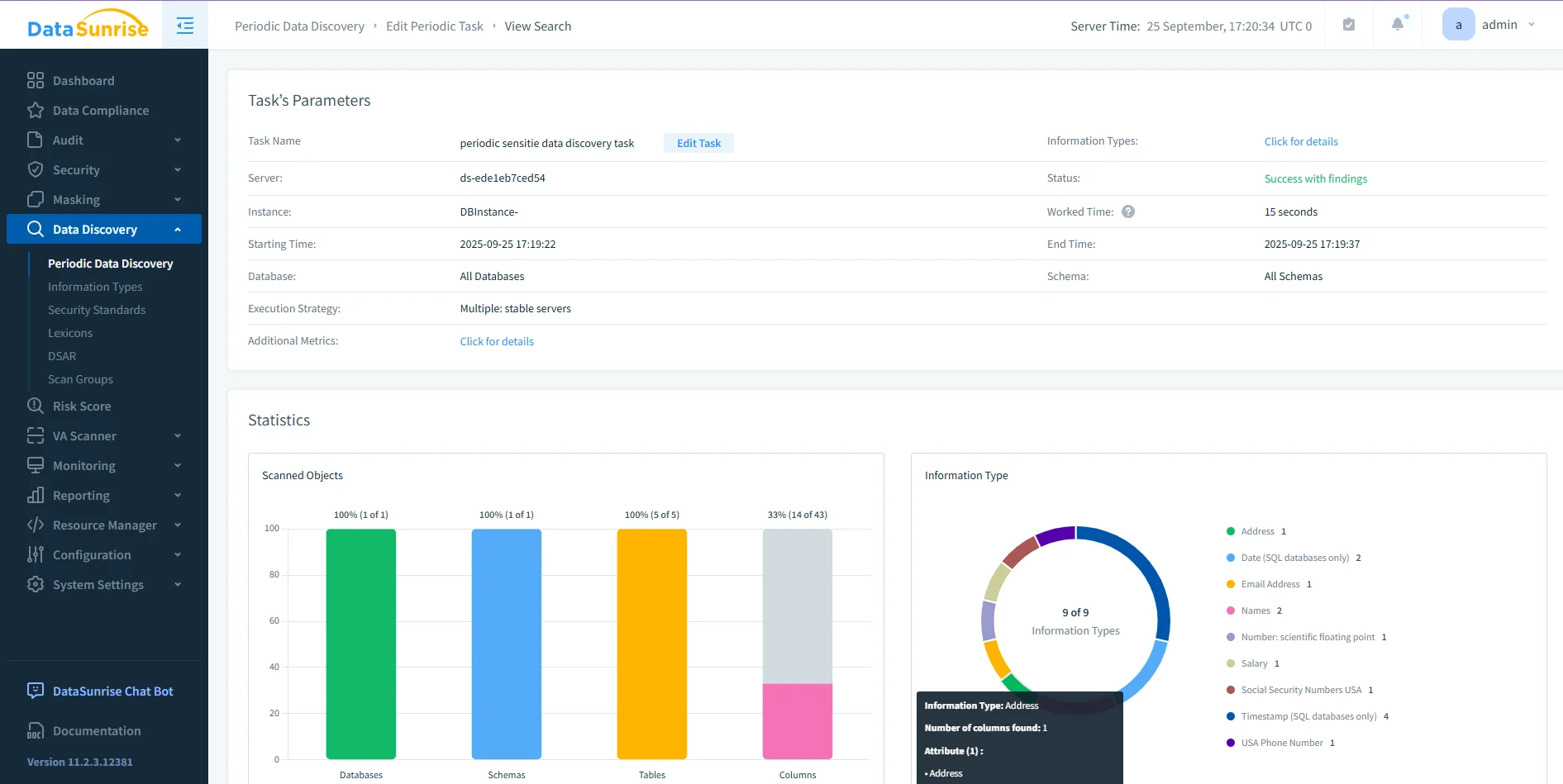
DataSunrise Periodic Data Discovery Dashboard – Visualization of a completed discovery task with statistics on scanned databases, schemas, tables, and sensitive columns. -
Configure Protection Policies
Once discovery is complete, define protection methods through dynamic data masking, firewall rules, and alert configurations. These safeguards ensure Db2 data remains secure in real time.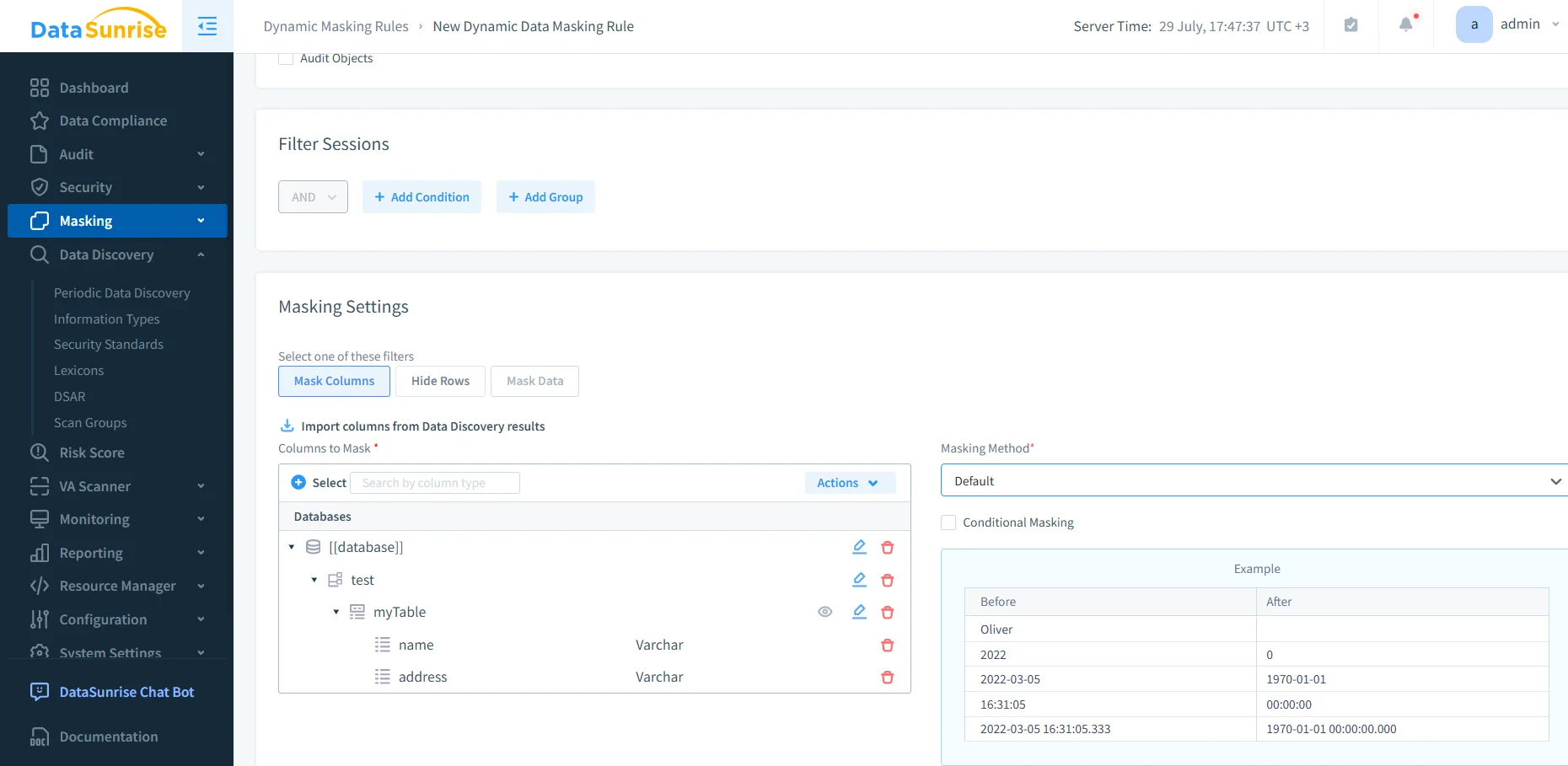
DataSunrise Dynamic Masking Rule Configuration – Example of column-level masking setup showing imported discovery results and before/after value transformations. -
Generate Audit Reports
Finally, compile results using the Reporting module. Reports can be exported as PDF or CSV files, scheduled automatically, or generated on demand — eliminating manual log analysis.
Adaptive Compliance and Continuous Alignment
As Db2 environments evolve, compliance policies must evolve with them.
DataSunrise automates this alignment through continuous background validation and adaptive analytics.
| Function | Description |
|---|---|
| Automated Policy Synchronization | Continuously reviews Db2 audit, masking, and discovery configurations to stay consistent when new objects or roles appear. |
| Continuous Regulatory Calibration | Periodically evaluates policies against frameworks such as GDPR, HIPAA, and PCI DSS to prevent compliance drift. |
| Machine Learning Audit Rules | Learns from Db2 audit activity, detecting unusual access patterns and suggesting refined audit or alert configurations. |
These automated adjustments keep compliance coverage complete even as data structures and regulatory expectations change.
Enterprise Integration and Scalability
DataSunrise integrates directly with enterprise systems via REST API and SDK, supporting on-premises, cloud, and hybrid Db2 deployments.
Unified dashboards give teams visibility across all connected environments, ensuring consistent rule enforcement without altering application code.
Benefits of Automated Compliance
| Benefit | Description |
|---|---|
| 80–90 % workload reduction | Automation replaces repetitive manual auditing and reporting tasks. |
| Real-time enforcement | Security and compliance policies are applied instantly across Db2 queries. |
| Centralized visibility | A single dashboard consolidates discovery, masking, and audit data. |
| Future-proof alignment | Automated calibration keeps policies synchronized with evolving regulations. |
Best Practices for Db2 Compliance Automation
- Schedule discovery scans regularly to capture new data objects.
- Apply the least-privilege principle.
- Test policy impact in staging before production rollout.
- Automate report generation for recurring audits.
- Periodically validate masking and firewall rules against compliance requirements.
Conclusion
IBM Db2’s built-in audit and monitoring tools establish a strong compliance baseline, but achieving sustainable, low-overhead compliance requires automation.
With DataSunrise, teams can discover sensitive data, enforce masking and audit rules dynamically, and generate audit-ready reports across every Db2 instance — all from a single interface.
Protect Your Data with DataSunrise
Secure your data across every layer with DataSunrise. Detect threats in real time with Activity Monitoring, Data Masking, and Database Firewall. Enforce Data Compliance, discover sensitive data, and protect workloads across 50+ supported cloud, on-prem, and AI system data source integrations.
Start protecting your critical data today
Request a Demo Download Now