How to Ensure Compliance for Vertica
How to ensure compliance for Vertica is not just a legal question; it is an operational one. Vertica often sits at the center of BI dashboards, data marts, and analytical workloads, which means that large volumes of personal, financial, and operational data pass through the platform every day. To avoid regulatory issues and security incidents, teams must know where sensitive data lives, control who can see it, monitor how it is used, and prove that these controls work over time.
This guide describes a practical approach to ensuring compliance for Vertica using a combination of native Vertica features and the DataSunrise platform. We will walk through five key steps: discovering sensitive data, designing access controls, masking regulated columns, monitoring Vertica activity, and automating compliance checks. Along the way, we reference frameworks such as GDPR, HIPAA, and PCI DSS, which commonly apply to Vertica environments.
Understand Compliance Requirements for Vertica
Before configuring any tools, it helps to clarify what regulators and security policies expect from a Vertica deployment. Across GDPR, HIPAA, PCI DSS, and similar standards, four recurring themes appear:
- Data visibility: organizations must know which tables contain personal or regulated data.
- Access control: only authorized users and applications should see sensitive fields.
- Monitoring and auditability: administrators need to trace who accessed which records and when.
- Evidence and reporting: teams must demonstrate that controls operate consistently over time.
Vertica provides part of this picture through role-based access control and system logs. However, to fully ensure compliance for Vertica, teams usually extend these capabilities with automated discovery, masking, and centralized auditing.
Step 1 – Classify Sensitive Data in Vertica
Compliance begins with data classification. If you do not know where regulated data resides, you cannot reliably protect it. In Vertica, sensitive columns may span many schemas and hundreds of tables, so manual inspection quickly becomes unmanageable.
DataSunrise simplifies this work through its Sensitive Data Discovery module. The platform scans Vertica schemas and identifies patterns that match personal identifiers, contact information, financial numbers, and other regulated attributes.
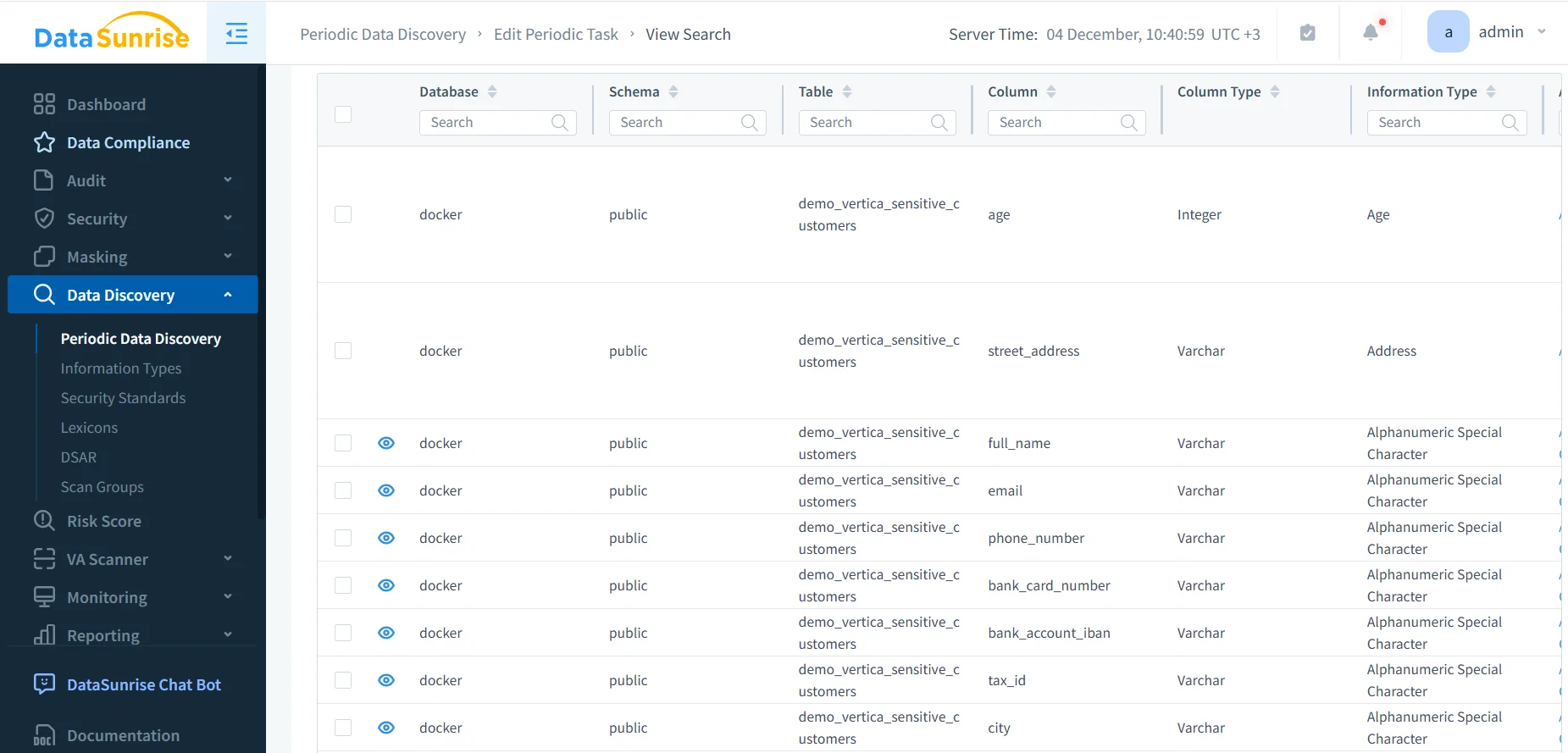
Discovery results in DataSunrise highlighting sensitive Vertica columns such as street address, full name, email, phone number, card data, and tax identifiers.
Once discovery completes, you know exactly which Vertica tables contain regulated information. From there, you can decide which columns require masking, which schemas deserve stricter access controls, and which objects must appear in compliance reports.
Step 2 – Design Access Controls for Vertica
The next step is to enforce least-privilege access. Vertica supports role-based access control (RBAC), so you can grant privileges on schemas, tables, and views to specific roles rather than directly to users. Application accounts can have read-only access to reporting views, while administrative roles handle maintenance and ETL operations.
To ensure compliance for Vertica, teams should also verify that privileges match business needs. For example, BI tools often connect with high-privilege service accounts; tightening these privileges and routing queries through curated views reduces exposure. DataSunrise can observe this traffic and provide additional enforcement using security policies and masking rules.
Step 3 – Mask Regulated Vertica Columns
Most regulatory frameworks require that sensitive data appear in masked or pseudonymized form outside strictly controlled contexts. In Vertica, this usually means masking PII or cardholder fields before they reach development environments, testing systems, or broader analytics audiences.
DataSunrise offers flexible masking policies through its Data Masking module. Policies can hide entire values, partially mask them (for example, reveal only the last four digits of a card number), or substitute them with realistic-looking but synthetic data. Because DataSunrise operates as a proxy or sniffer around Vertica, it can apply these masking rules without changing application code or underlying tables.
Step 4 – Monitor Vertica Activity and Build an Audit Trail
Even with good access control and masking, compliance still requires evidence. Auditors typically ask questions such as: “Who viewed this table last month?” or “Which user executed a particular DDL statement?” Answering these questions reliably requires a structured audit trail.
Vertica exposes useful monitoring data through internal views such as v_monitor.query_requests and v_monitor.sessions, but these views are cluster-local and require custom queries. DataSunrise extends this capability with centralized audit logs and Database Activity Monitoring.
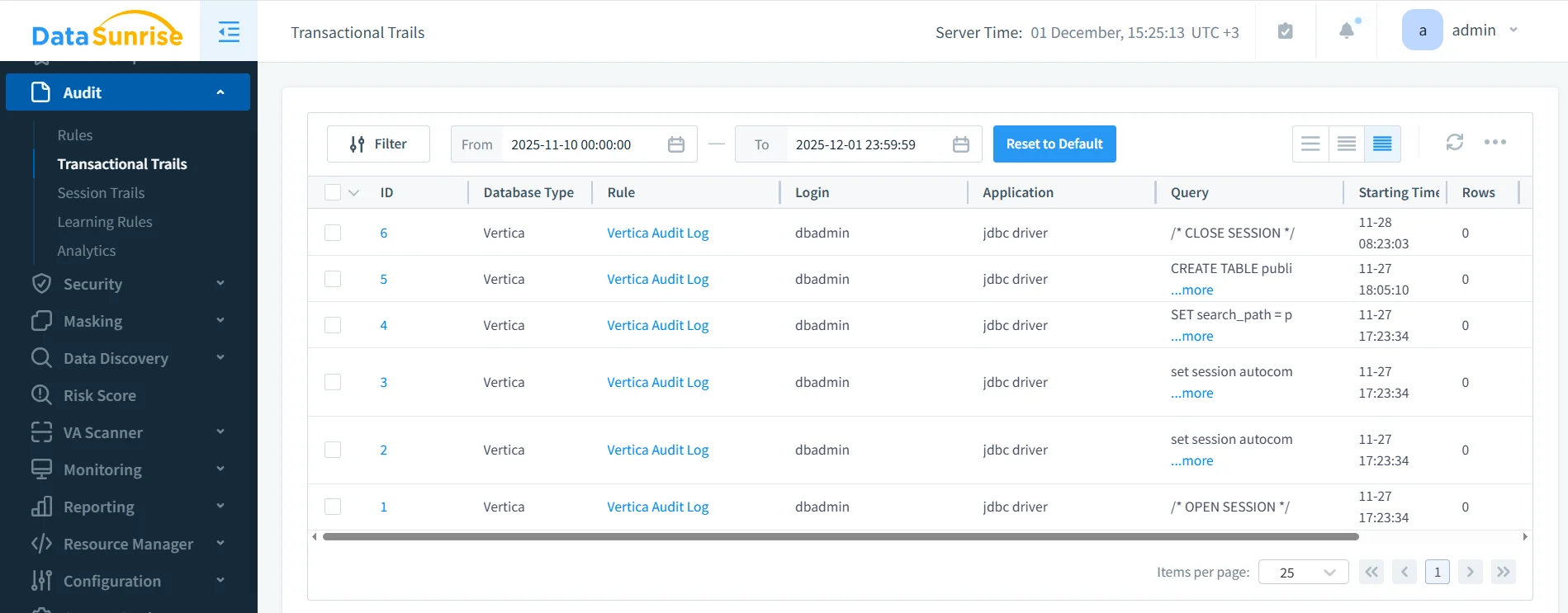
Transactional Trails in DataSunrise displaying Vertica audit events, including session commands and DDL statements, associated with the Vertica Audit Log rule.
In this view, you can filter by Vertica instance, rule name, login, application, or time range. This makes it straightforward to investigate unusual activity and to generate evidence for auditors without manually querying system tables.
Step 5 – Automate Compliance Checks for Vertica
Manual reviews are useful, but they do not scale. To ensure compliance for Vertica on an ongoing basis, organizations should automate discovery, monitoring, and reporting wherever possible. DataSunrise enables this with periodic discovery tasks, audit rules, and compliance tasks that combine results into centralized reports.
The diagram below summarizes how Vertica and DataSunrise components interact to enforce compliance controls and deliver audit evidence.
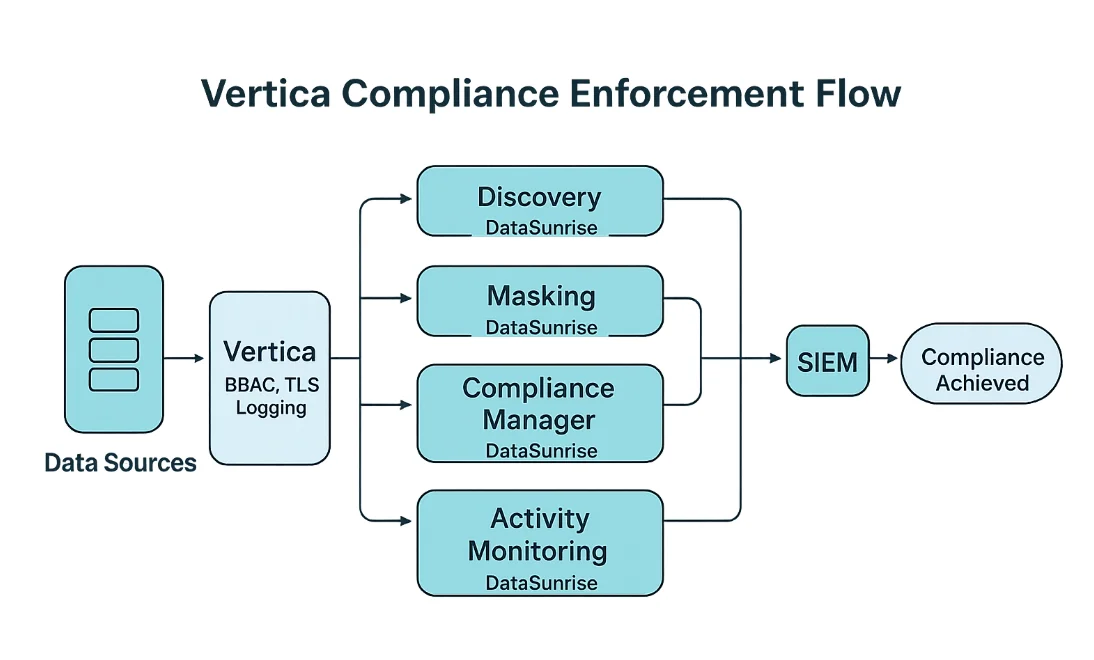
Vertica Compliance Enforcement Flow: native Vertica controls (RBAC, TLS, logging) combined with DataSunrise Discovery, Masking, Compliance Manager, and Activity Monitoring, with optional SIEM integration for additional alerting.
Using this architecture, teams can schedule regular scans, verify that masking rules remain in place, watch for suspicious access patterns, and push important events into SIEM platforms for further correlation. Over time, this automated loop becomes the backbone of a Vertica compliance program.
Vertica Compliance Control Matrix
The table below summarizes how the steps above map to concrete compliance controls and how native Vertica features and DataSunrise work together.
| Control Area | Native Vertica Capability | DataSunrise Enhancement |
|---|---|---|
| Data classification | Manual review of schemas and column names | Automated sensitive data discovery across Vertica schemas |
| Access control | RBAC for roles, users, tables, and views | Policy-based monitoring and context-aware enforcement |
| Data minimization & masking | Views and application logic | Dynamic and static masking for PII, PCI, and PHI fields |
| Audit trail | v_monitor views and engine logs |
Centralized audit repository and Transactional Trails UI |
| Ongoing compliance verification | Custom scripts and manual checks | Scheduled discovery and compliance tasks with consolidated reports |
Operational Best Practices
To make compliance sustainable in Vertica, consider the following practical recommendations:
- Separate environments clearly. Use dedicated Vertica clusters or schemas for development, testing, and production, and apply stricter masking outside production.
- Favor curated views over raw tables. Expose only the columns required by BI tools or applications, and avoid granting broad access to base tables.
- Review high-privilege accounts regularly. Keep an inventory of service accounts and administrative roles and ensure their privileges remain aligned with current needs.
- Enable multi-layered monitoring. Use both Vertica logs and DataSunrise Transactional Trails so you can correlate engine-level events with application-level activity.
- Document decisions. Keep notes on why certain columns are masked, which roles can see unmasked data, and how compliance tasks are scheduled; auditors appreciate this context as much as the logs themselves.
Conclusion
Ensuring compliance for Vertica is an ongoing process rather than a single configuration change. By classifying sensitive data, enforcing least-privilege access, masking regulated fields, monitoring database activity, and automating compliance checks, organizations can reduce risk and simplify audits. DataSunrise provides the discovery, masking, auditing, and compliance task capabilities that complement native Vertica features and help teams maintain continuous alignment with regulations such as GDPR, HIPAA, and PCI DSS.
Protect Your Data with DataSunrise
Secure your data across every layer with DataSunrise. Detect threats in real time with Activity Monitoring, Data Masking, and Database Firewall. Enforce Data Compliance, discover sensitive data, and protect workloads across 50+ supported cloud, on-prem, and AI system data source integrations.
Start protecting your critical data today
Request a Demo Download Now