ScyllaDB Audit Trail: Implementing Secure and Compliant Database Auditing
In today’s digital landscape, ensuring data integrity, security, and compliance is more critical than ever. For databases, implementing an audit trail is a key measure in monitoring and protecting sensitive data. ScyllaDB, a high-performance NoSQL database, offers built-in features for auditing data, providing an essential layer of oversight for administrators.
In this article, we’ll explore ScyllaDB’s native data audit features using SQL language capabilities like views and stored procedures. We’ll also dive into how to configure ScyllaDB’s audit trail, view the audit results, and briefly touch on the role of DataSunrise for advanced data auditing in ScyllaDB.
What is ScyllaDB’s Audit Trail?
An audit trail refers to the detailed logs of all database operations, such as data manipulation and access. ScyllaDB’s native audit trail functionality allows administrators to monitor and log user interactions with the database, enabling them to track changes, queries, and other critical activities. These logs can be crucial for ensuring accountability and meeting regulatory requirements.
Key Features of ScyllaDB’s Native Data Audit
- Granular Auditing: Allows administrators to specify exactly which events should be logged, from data manipulation (insert, update, delete) to login events.
- Customizable Storage: Auditing data can either be stored in a system log (Syslog) or directly in a Scylla table, depending on the configuration.
- Comprehensive Coverage: ScyllaDB can audit multiple event types, such as DML (Data Manipulation Language), DDL (Data Definition Language), and DCL (Data Control Language).
Advanced Auditing with ScyllaDB
ScyllaDB provides auditing features to monitor database activities, log queries, and ensure data security. This feature is only available in Scylla Enterprise, allowing administrators to store audit logs in Syslog or Scylla tables.
Enabling Auditing
Auditing is configured in the scylla.yaml file using the audit parameter. Options include:
- none – Audit is disabled (default).
- table – Logs are stored in a Scylla table.
- syslog – Logs are sent to Syslog.
Example:
# Enable audit logs to syslog
audit: "syslog"
# Audit categories: AUTH, DML, DDL, DCL, QUERY, ADMIN
audit_categories: "DCL,DDL,AUTH"
# Keyspaces and tables to audit
audit_keyspaces: "mykeyspace"
audit_tables: "mykeyspace.mytable"
Restart Scylla to apply changes:
sudo systemctl restart scylla-server
Audit Categories
- AUTH: Logs login events.
- DML: Tracks INSERT, UPDATE, and DELETE operations.
- DDL: Captures schema changes like CREATE, ALTER, and DROP.
- DCL: Logs permissions and role management activities.
- QUERY: Records all queries executed.
- ADMIN: Audits service-level operations.
Storing Audit Logs in Syslog
Audit logs are directed to Syslog by default: Example Syslog output for a DROP TABLE operation:
Mar 18 09:53:52 ip-10-143-2-108 scylla-audit[28387]: "10.143.2.108", "DDL", "ONE", "team_roster", "nba", "DROP TABLE nba.team_roster ;", "127.0.0.1", "anonymous", "false"
To store Syslog audit logs in a file (CentOS example):
- Install rsyslog:
- Update /etc/rsyslog.conf:
- Restart rsyslog:
sudo dnf install rsyslog
if $programname contains 'scylla-audit' then /var/log/scylla-audit.log
systemctl start rsyslog
systemctl enable rsyslog
Storing Audit Logs in a Table
Audit messages can also be saved to a Scylla table named audit.audit_log:
CREATE TABLE IF NOT EXISTS audit.audit_log (
date timestamp,
node inet,
event_time timeuuid,
category text,
consistency text,
table_name text,
keyspace_name text,
operation text,
source inet,
username text,
error boolean,
PRIMARY KEY ((date, node), event_time));
Enable table-based auditing in scylla.yaml:
audit: "table"
audit_categories: "DCL,DDL,AUTH"
audit_keyspaces: "mykeyspace"
Restart Scylla:
sudo systemctl restart scylla-server
Example query to retrieve audit logs:
SELECT * FROM audit.audit_log;
Result:
| Date | Node | Event Time | Category | Consistency | Error | Keyspace Name | Operation | Source | Table Name | Username |
|---|---|---|---|---|---|---|---|---|---|---|
| 2018-03-18 00:00:00+00 | 10.143.2.108 | 3429b1a5-2a94-11e8-8f4e-000000000001 | DDL | ONE | False | nba | DROP TABLE nba.team_roster | 127.0.0.1 | team_roster | Scylla |
DataSunrise: A Flexible Security Suite for ScyllaDB
While ScyllaDB’s native auditing features provide basic auditing capabilities, DataSunrise offers a more comprehensive, centralized solution for monitoring and auditing database activities.
Setting Up DataSunrise for ScyllaDB Auditing
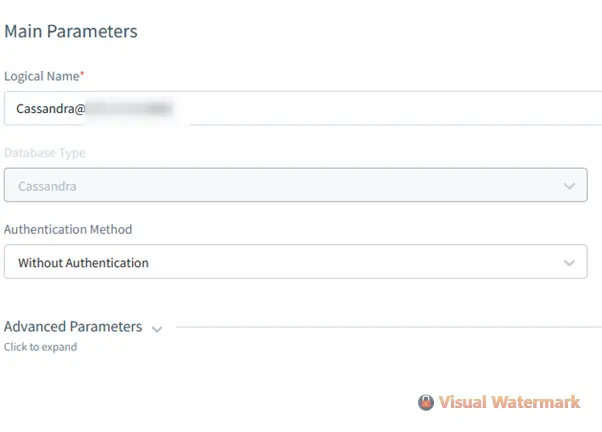
- Create a DataSunrise Instance: Launch a new instance for ScyllaDB auditing through the DataSunrise management interface.
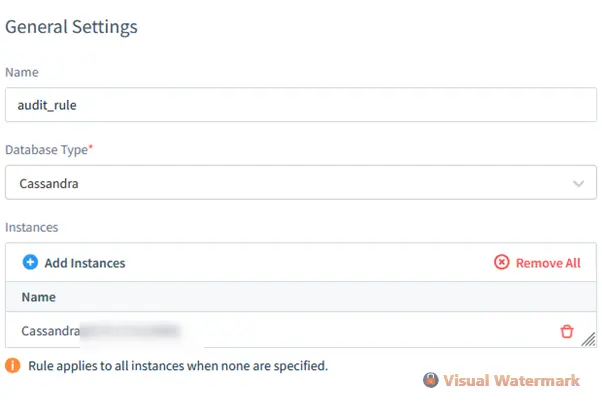
- Configure Audit Rules: Define the audit rules, including which tables, keyspaces, and events to monitor
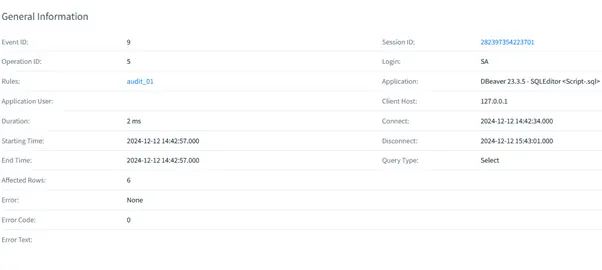
- View Audit Results: Access the detailed audit logs through the DataSunrise page.
Benefits of Using DataSunrise for ScyllaDB Auditing
- Centralized Control: DataSunrise enables centralized management of auditing rules across multiple ScyllaDB instances.
- Advanced Features: Includes real-time alerts, compliance reporting, and data masking.
- Ease of Use: The intuitive interface and detailed reports allow administrators to quickly identify and respond to suspicious activities.
By integrating DataSunrise with ScyllaDB, you gain an enhanced auditing system that simplifies compliance and provides better control over your data security.
Conclusion
Native ScyllaDB data audit features offer a reliable way to track database activities and ensure security. By configuring audit settings for specific tables, keyspaces, and events, you can monitor and log crucial operations. Additionally, DataSunrise enhances these capabilities by providing a centralized platform for managing audit rules and ensuring compliance.
For organizations looking to implement comprehensive data security strategies, integrating ScyllaDB’s audit features with DataSunrise offers a powerful solution for monitoring and protecting sensitive data.
For more information on ScyllaDB auditing or to explore DataSunrise’s advanced database security tools, visit the official DataSunrise website for an online demonstration.