ScyllaDB Audit Log
Introduction
Database Audit Logs have become a critical concern for organizations handling sensitive data. As cyber threats evolve, implementing robust security measures is essential to protect valuable information from breaches and unauthorized access. High-performance NoSQL databases such as ScyllaDB are widely used for their scalability and efficiency, but securing them requires additional tools and configurations.
Ensuring proper database security involves strategies like encryption, access controls, and comprehensive audit logging. With increasing regulatory requirements and growing concerns about data security, maintaining thorough audit trails has become essential for compliance and risk management.
Native ScyllaDB Audit Log
ScyllaDB Enterprise Edition provides built-in audit logging functionality configurable via the scylla.yaml file. The system captures database activities including authentication, data changes, and schema operations.
audit: "table"
audit_categories: "DCL,DDL,AUTH,ADMIN"
audit_keyspaces: "my_keyspace"
audit_tables: "my_keyspace.sensitive_table"
Audit logs can be sent to Syslog or stored in a ScyllaDB table with a structure like:
CREATE TABLE audit.audit_log (
    date timestamp,
    node inet,
    event_time timeuuid,
    category text,
    consistency text,
    table_name text,
    keyspace_name text,
    operation text,
    source inet,
    username text,
    error boolean,
    PRIMARY KEY ((date, node), event_time)
);
Example Audit Log Output
| date | node | category | operation | username |
|---|---|---|---|---|
| 2024-02-18 10:15:22+00 | 10.0.1.100 | DDL | CREATE TABLE users | admin |
| 2024-02-18 10:16:45+00 | 10.0.1.100 | AUTH | LOGIN | analyst |
| 2024-02-18 10:17:30+00 | 10.0.1.101 | DML | INSERT INTO users | app_user |
ScyllaDB Audit Log with DataSunrise
While ScyllaDB’s native audit capabilities are useful, DataSunrise enhances audit logging for enterprise use cases. It offers real-time monitoring, advanced filtering, and compliance-grade reporting.
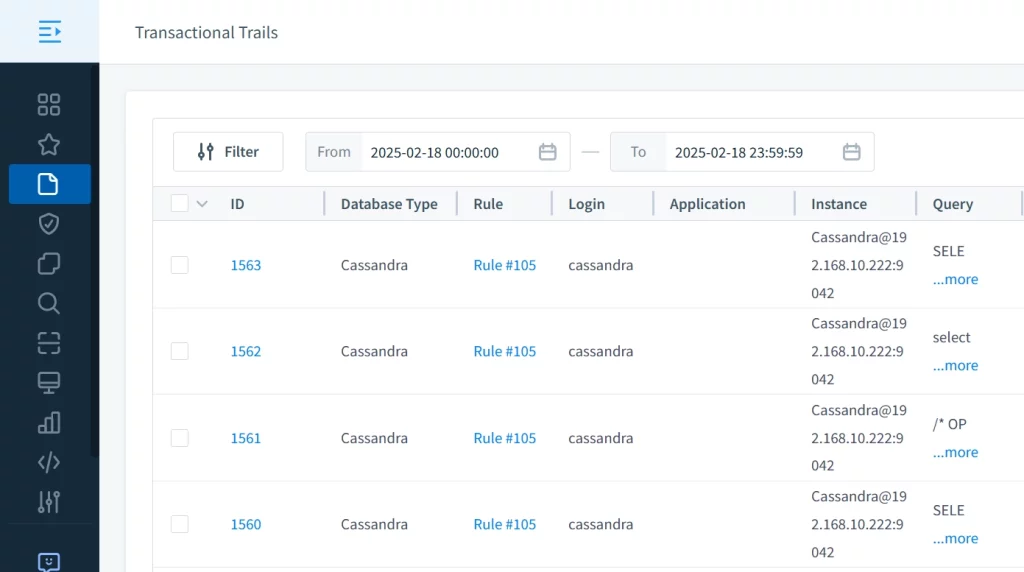
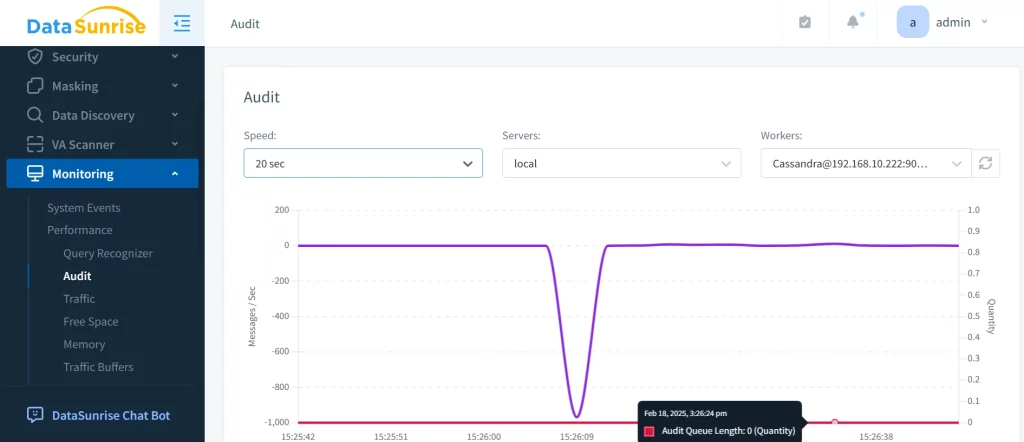
DataSunrise uses a proxy-based architecture to capture every interaction with ScyllaDB, ensuring complete operational visibility. Its built-in performance analytics tool also provides valuable insights into system behavior.
ScyllaDB Audit Log Best Practices
To maximize the effectiveness of audit logs in ScyllaDB while minimizing overhead, follow these key best practices:
1. Selective Auditing
Focus on critical events like AUTH, DDL, and ADMIN to avoid overwhelming the system with unnecessary log entries.
2. Granular Keyspace and Table Configuration
Specify audit_keyspaces and audit_tables for sensitive data only. Avoid broad logging across the entire cluster.
3. Performance Monitoring
Use ScyllaDB metrics and DataSunrise dashboards to ensure audit logging doesn’t impact latency or throughput.
4. Secure Log Storage
Encrypt audit data and restrict access to log storage whether you’re using internal tables or Syslog streams.
5. Regular Log Review
Establish scheduled reviews of audit entries. Use alerting to highlight anomalies or unauthorized access attempts.
These practices ensure your audit logs are both meaningful and efficient—supporting compliance without adding unnecessary load.
Conclusion
Implementing a robust ScyllaDB audit log strategy is essential for data security and regulatory compliance. While native logging provides core functionality, DataSunrise delivers enhanced visibility, alerting, and reporting features for enterprises.
To explore its full capabilities, schedule a demo or download a free trial of DataSunrise today.
