What Is Amazon S3 Audit Trail
An Amazon S3 audit trail goes beyond mere logs—it’s an enriched, searchable timeline of object-level activity, access control changes, replication events, and lifecycle transitions. Unlike raw logs or API call streams, a proper audit trail adds context, compliance awareness, and security intelligence.
This article explores what an S3 audit trail is, why it matters, how native AWS tooling helps (and where it falls short), and how DataSunrise fills in the critical gaps—especially for organizations managing sensitive or regulated data.
Here’s a new intermediate section you can place between the Introduction and Why You Need an S3 Audit Trail:
So What Is an Amazon S3 Audit Trail?
At its core, an Amazon S3 audit trail is a structured record of who accessed what object, when, from where, and under what context. It’s not just about capturing API calls—it’s about correlating those calls with business relevance, data sensitivity, and internal policy.
A well-constructed audit trail for S3 includes:
- Identity context: IAM role, assumed user, federated session info
- Object metadata: Bucket, key, size, classification tags
- Access type:
GetObject,PutObject, permission changes - Timing and origin: Timestamps, region, source IP
- Policy state: Was access compliant or anomalous?
Think of it as a narrative timeline, not just a log. The difference lies in how well the story is told—are you just collecting facts, or are you building actionable, compliance-ready visibility across your storage layer?
Why You Need an S3 Audit Trail
Storing data in Amazon S3 is easy. Tracking who accessed that data, how, when, and whether it complied with policy—that’s the hard part.
A complete S3 data audit trail helps teams:
- Detect unauthorized access or misconfigurations
- Monitor usage for compliance frameworks like GDPR, HIPAA, or PCI DSS
- Reconstruct event sequences during incident response
- Prove access restrictions and controls to auditors
Whether you're running analytics on financial documents, hosting regulated data, or archiving customer logs—audit visibility is a baseline security requirement.
Anatomy of a Native S3 Audit Trail
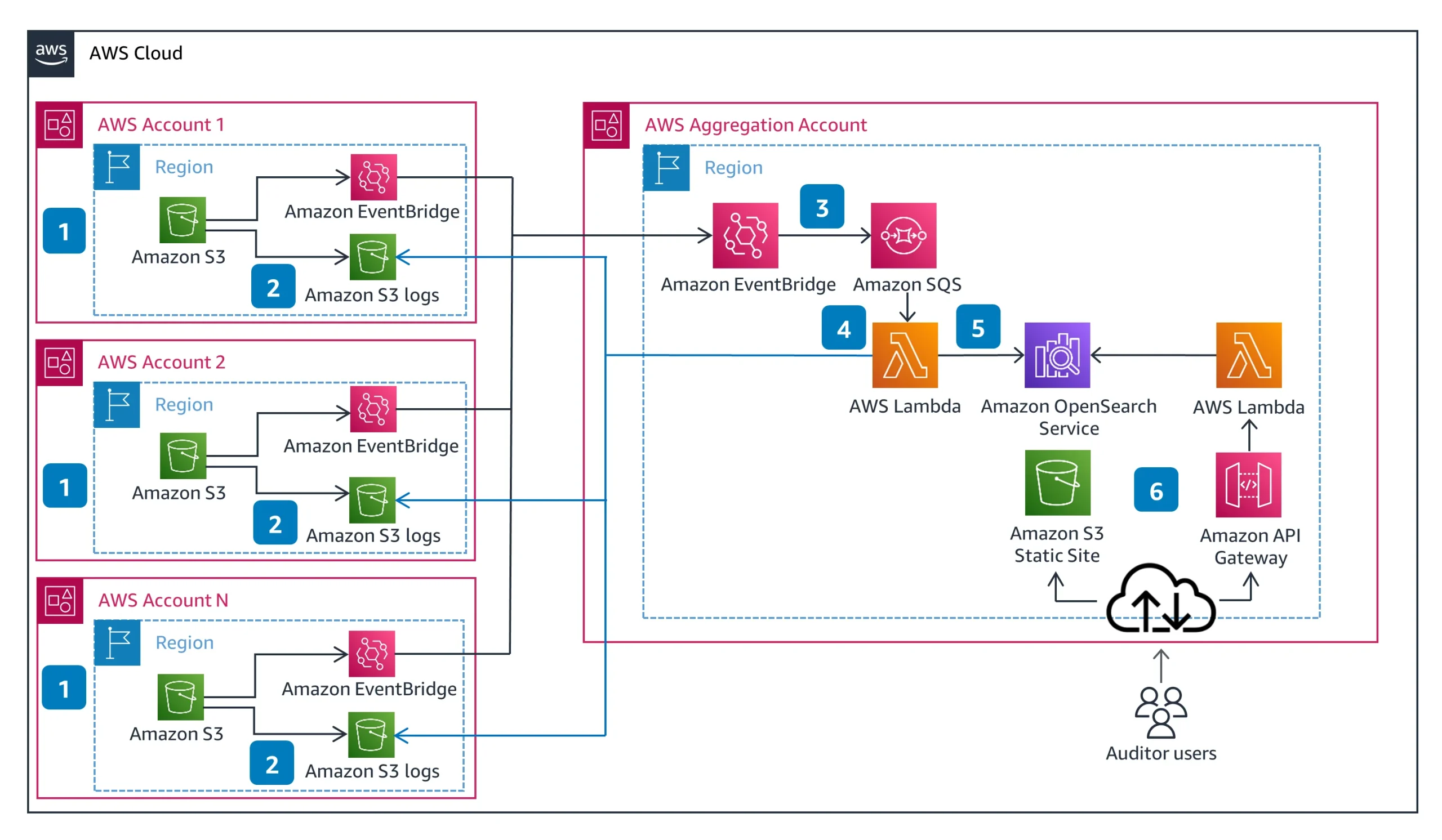
AWS provides foundational telemetry through:
1. CloudTrail Data Events
CloudTrail logs all S3 object-level API calls like GetObject, PutObject, DeleteObject. These logs include:
- Identity (user, role, service)
- Source IP and region
- Timestamp
- Request parameters
They're stored in JSON and delivered to a logging bucket. CloudTrail setup guide →
2. Server Access Logs
Legacy-style logs in an HTTP request format. Less structured, but useful for tracking referrer headers, user agents, status codes.
3. S3 Inventory and Storage Lens
Offer insights into storage configurations, object encryption status, and access frequency. However, they don’t record real-time access or unauthorized activity.
What an Audit Trail Should Contain (But Native Logs Don’t)
To qualify as a true audit trail, your system must answer:
- What happened? (API call type)
- Who did it? (IAM role or assumed identity)
- When and from where? (timestamp, source IP, region)
- What data was accessed? (bucket/key, data classification)
- Was access allowed? (policy, masking, context)
- Should it have happened? (risk score, anomaly detection)
CloudTrail provides the first three. For the rest—you need enrichment, tagging, and compliance-layer logic.
Enter DataSunrise: Context-Aware Audit Trails
DataSunrise converts basic AWS logs into true compliance-grade audit trails with actionable metadata, alerts, and dashboards.
Here’s how it enhances your S3 audit trail:
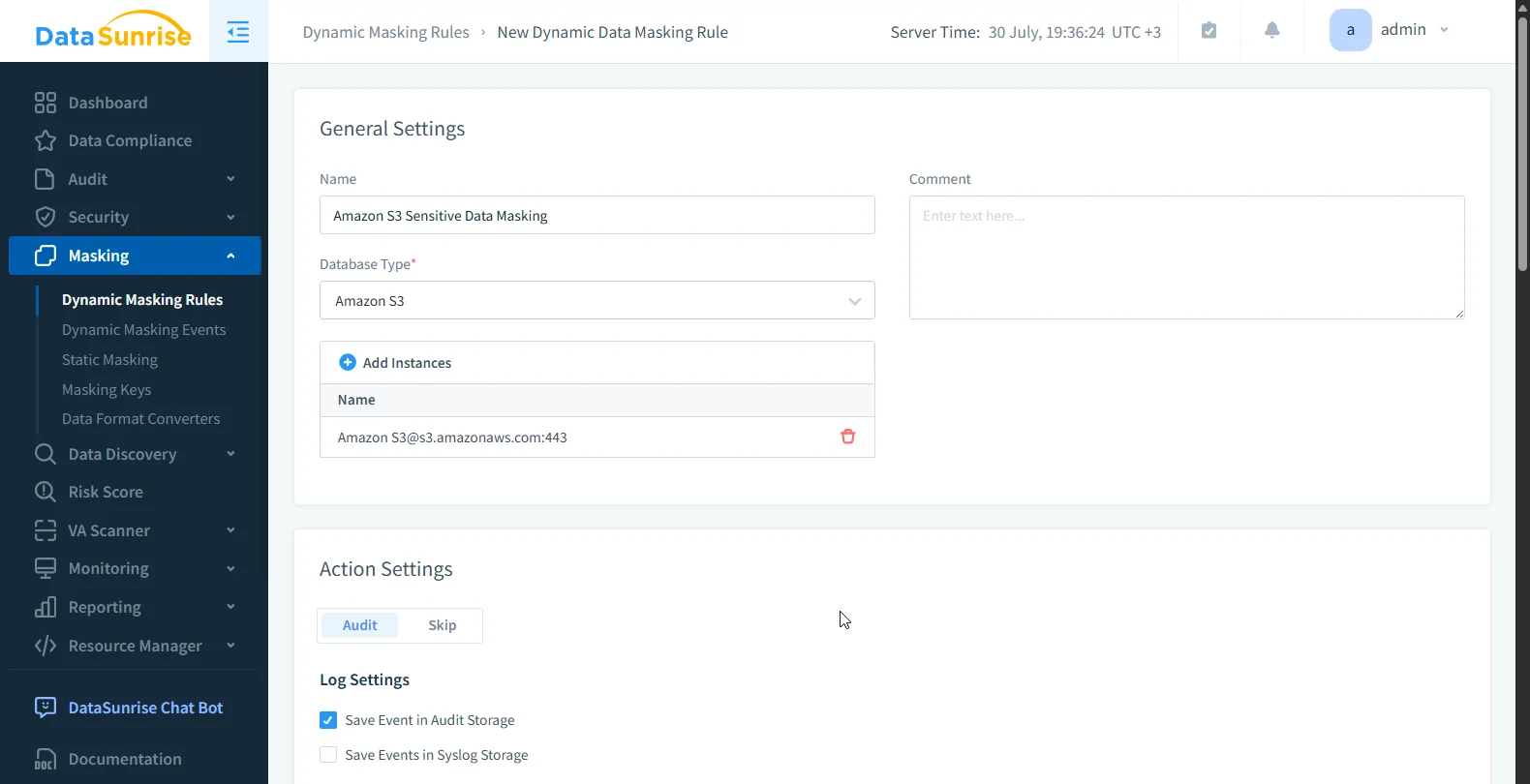
✅ Sensitive Data Discovery
DataSunrise scans S3 buckets to detect PII, PHI, PCI using NLP, pattern matching, and OCR on image-based files.
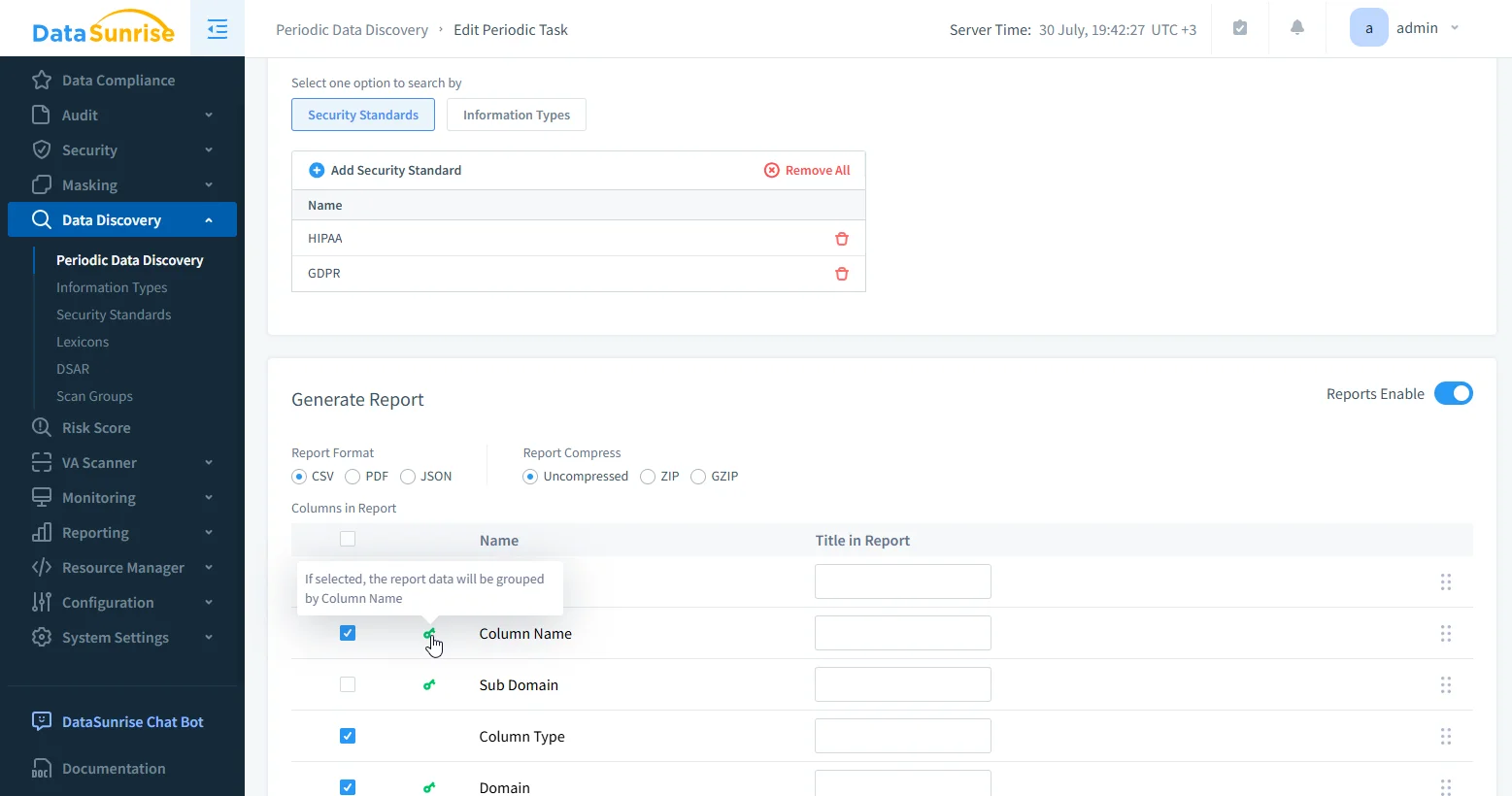
✅ Dynamic Data Masking
Enforce role-based masking at query or access time. Prevent overexposure by obfuscating content for unauthorized users.
✅ Unified Search Interface
With DataSunrise, audit trails are fully searchable through a built-in visual filter panel—no SQL required. You can filter and drill down by:
| Audit Filter Fields | More Filter Fields |
|---|---|
| Transaction State | Query |
| Application User | Rule |
| Application | Query Types |
| Instance | Error |
| Interface | Rows |
| Proxy | Depersonalized Query |
| Login | Touched Databases |
| Data | Event ID / Duration |
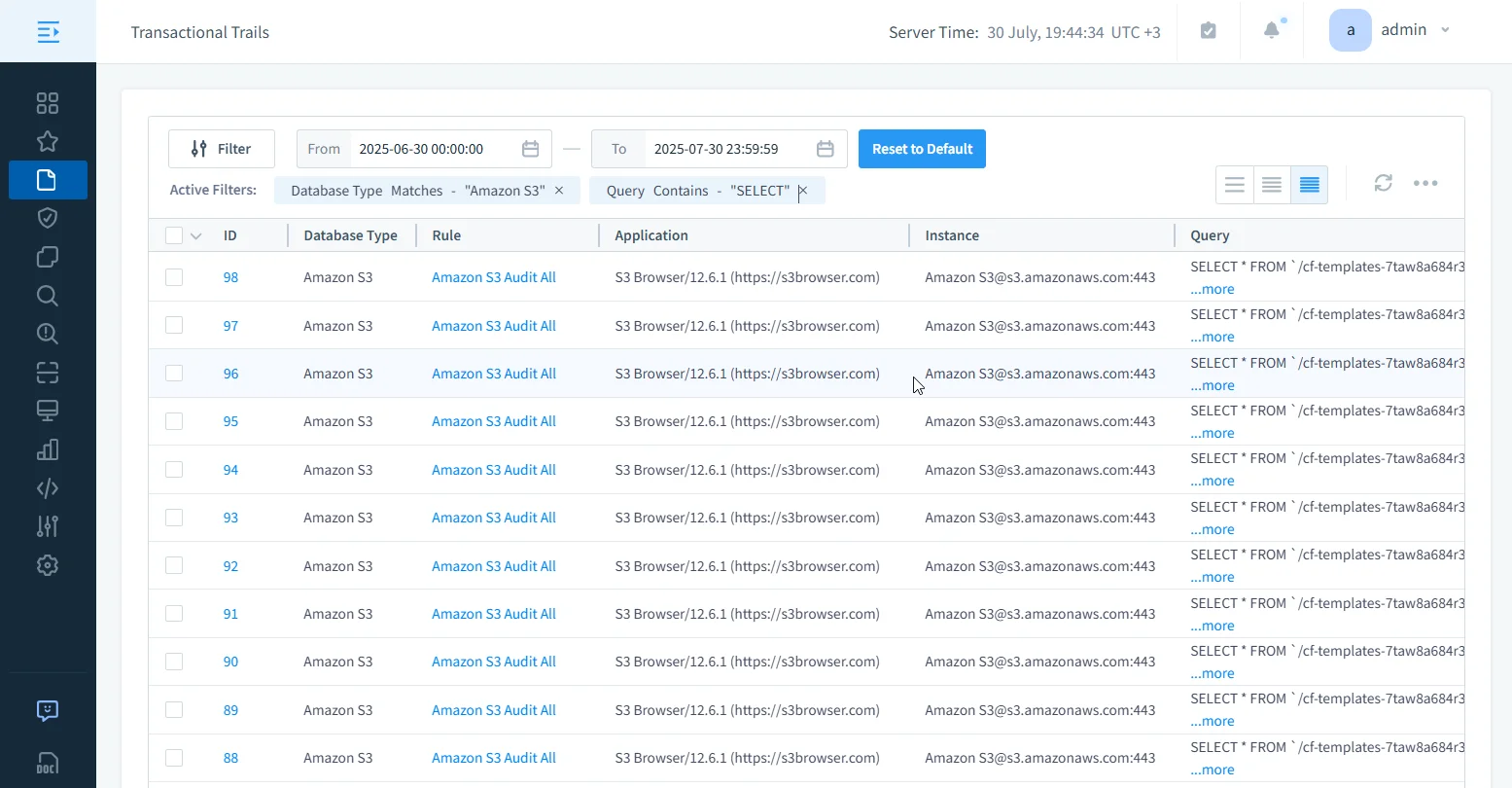
Architecture Snapshot
An S3 audit trail architecture with DataSunrise typically includes:
- CloudTrail logs from all S3 buckets across accounts
- EventBridge routing into a central audit account
- DataSunrise engine for enrichment, policy enforcement, masking
- Audit log export to Athena, OpenSearch, or SIEM
- Compliance dashboard & alerts via Slack, email, or Teams
You can run DataSunrise in proxy mode or ingest-only log mode for lower latency impact.
Here’s a code block example you can add under the Unified Search Interface or directly after Architecture Snapshot, depending on whether you want to emphasize queryability or downstream analysis.
Sample Athena Query: Find Non-Compliant Object Accesses
Once logs are enriched by DataSunrise and exported to Amazon Athena or OpenSearch, you can query them to detect policy violations or suspicious behavior. Here’s an example that surfaces GetObject events where access was denied by policy or required masking:
SELECT
  event_time,
  user_identity.principalId AS user,
  requestParameters.bucketName AS bucket,
  requestParameters.key AS object_key,
  datasunrise_flags.masking_applied,
  datasunrise_flags.policy_allowed,
  datasunrise_labels.sensitivity,
  sourceIPAddress,
  region,
  datasunrise_risk.anomaly_score
FROM
  s3_audit_trail
WHERE
  eventName = 'GetObject'
  AND datasunrise_flags.policy_allowed = false
  AND datasunrise_labels.sensitivity IS NOT NULL
ORDER BY
  event_time DESC
LIMIT 100;
This gives you an actionable list of non-compliant access attempts involving sensitive data (e.g., PII, PHI), enriched with classification and anomaly scores—ready for export, alerts, or dashboards.
Conclusion
An Amazon S3 audit trail isn’t just a compliance checkbox—it’s your organization’s memory. A well-built trail shows who did what, on what data, under which policy, and why it matters.
Native tools give you the raw pieces. DataSunrise turns those pieces into a coherent, searchable, policy-aware story.
Want to build a smarter data audit trail for S3? Try DataSunrise and secure your data in hours—not weeks.
Protect Your Data with DataSunrise
Secure your data across every layer with DataSunrise. Detect threats in real time with Activity Monitoring, Data Masking, and Database Firewall. Enforce Data Compliance, discover sensitive data, and protect workloads across 50+ supported cloud, on-prem, and AI system data source integrations.
Start protecting your critical data today
Request a Demo Download Now