What Is Vertica Audit Trail
A Vertica audit trail is the complete, chronological record of security-relevant activity inside the database. It connects individual audit log entries into a story: who connected, which SQL statements they executed, which objects they touched, whether those actions succeeded, and when everything happened. This trail is essential when you need to investigate an incident, prove that access controls work as intended, or satisfy regulatory requirements such as GDPR, HIPAA, or PCI DSS.
Vertica provides the raw ingredients for an audit trail through system views and engine log files. DataSunrise turns those ingredients into a consolidated database audit trail that spans multiple clusters and data platforms. This article explains how native Vertica history looks in tools like DBeaver and how DataSunrise builds on top of it to create a complete Vertica audit trail.
Native Vertica Audit Trail Building Blocks
At the native level, Vertica exposes activity history through the v_monitor schema and engine log files. The most audit-relevant view is v_monitor.query_requests, which tracks every request Vertica executes. You can query this view directly from DBeaver to see who ran what, when, and how it behaved.
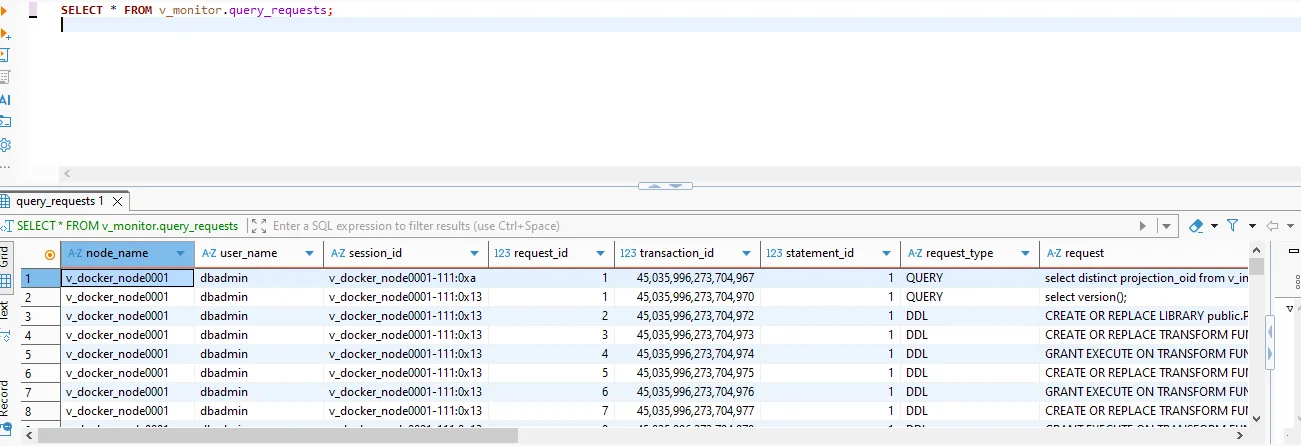
v_monitor.query_requests in DBeaver. Each row shows node name, Vertica user, session ID, request type, and SQL text, forming the native baseline for a Vertica audit trail.
Other v_monitor views add additional context, such as session duration, client host, or resource consumption. However, Vertica stores this information on each cluster separately, and retention depends on local log rotation settings. Turning this into a long-term audit trail that supports forensics and compliance usually requires an external audit layer.
Vertica Audit Trail Architecture with DataSunrise
DataSunrise captures SQL traffic as it flows between client applications and Vertica. It can operate as a transparent proxy or in sniffer mode, reconstructing SQL from network packets. Every request passes through the DataSunrise audit engine, which applies rules, enriches events with metadata, and writes them to a centralized repository. The diagram below illustrates this flow.
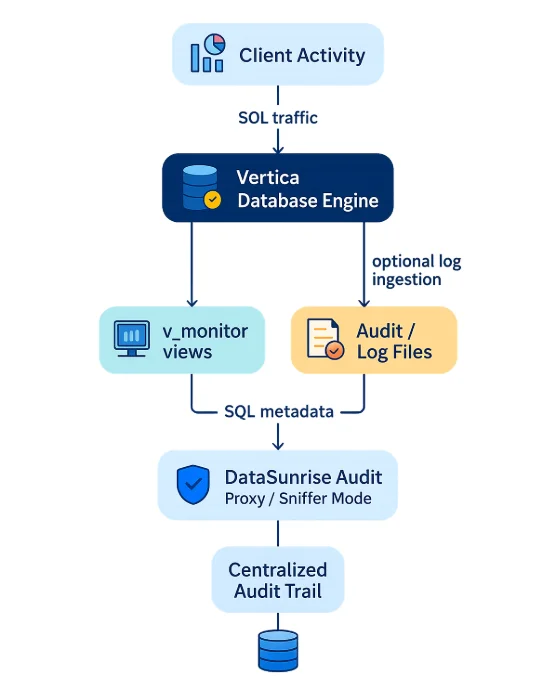
Vertica audit trail architecture: client activity generates SQL traffic, Vertica records it in v_monitor views and log files, and DataSunrise Audit ingests SQL and metadata to build a centralized audit trail.
Because DataSunrise sits at the network boundary, it sees every request and response, including statements that may not end up in a specific Vertica log file. It also normalizes events across platforms, so Vertica, PostgreSQL, and cloud data warehouses can share the same audit format. This makes it much easier to investigate cross-system incidents and generate consistent reports.
Comparing Native Logs and a Vertica Audit Trail
The following table highlights the difference between raw native logging and a full Vertica audit trail as implemented with DataSunrise.
| Aspect | Native Vertica Logs | Vertica Audit Trail with DataSunrise |
|---|---|---|
| Scope | Single cluster, local views and engine log files | Multiple Vertica clusters and other databases in one repository |
| Event detail | SQL text, timestamps, and engine-level metadata in separate views | Unified events containing user, app, SQL, object, rule, and risk context |
| Retention | Controlled by Vertica log rotation and housekeeping | Configurable long-term retention for audits and investigations |
| Consumption | Manual queries in DBeaver or custom scripts | Web UI (Transactional Trails), APIs, and SIEM/SOAR integrations |
Native logs are crucial as a source of truth inside Vertica. The audit trail adds structure, context, and reach, turning those logs into something that security, risk, and compliance teams can consume daily.
Viewing the Vertica Audit Trail in DataSunrise
Once DataSunrise audit rules are enabled for Vertica, every matching operation appears in the Audit → Transactional Trails view. Here you can filter by database type, rule name, user, application, time range, error status, or query text. The screenshot below shows a simple Vertica audit rule capturing session open/close commands, DDL statements, and configuration changes from a JDBC driver.
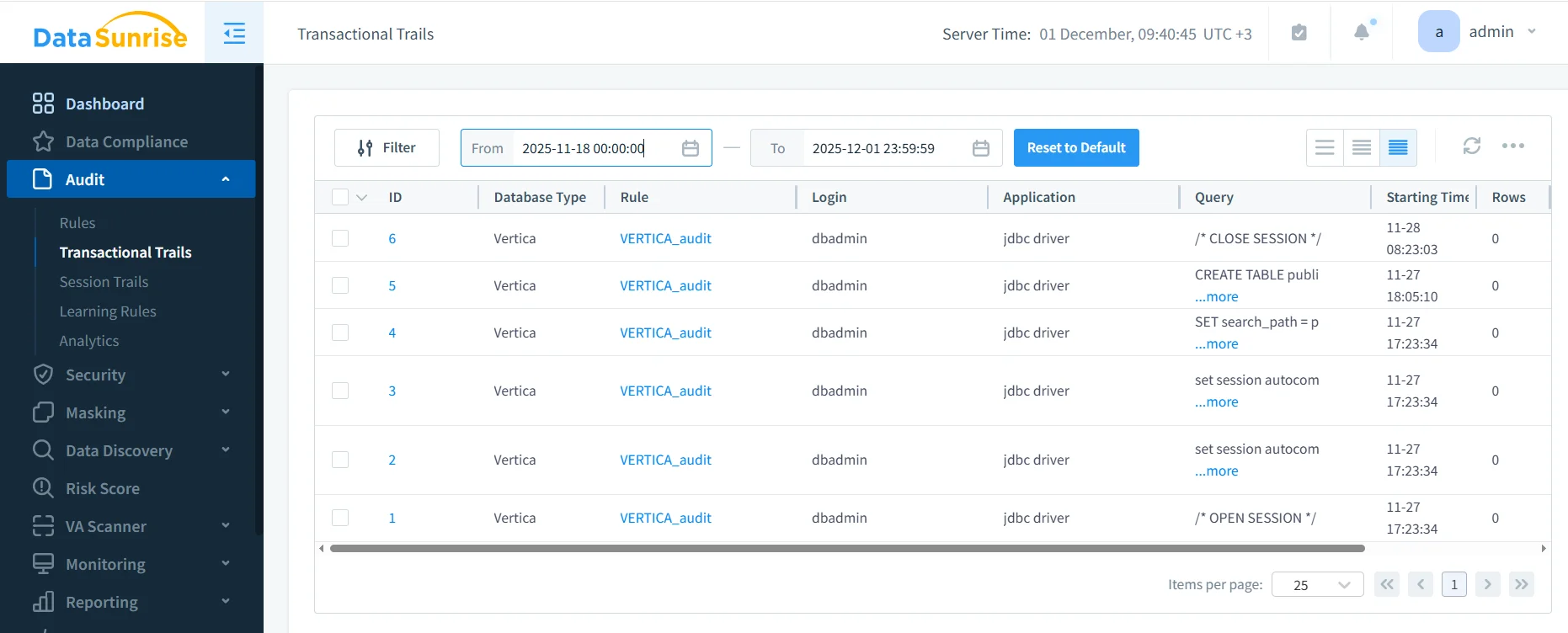
DataSunrise Transactional Trails showing Vertica audit events. The VERTICA_audit rule logs session commands and DDL operations issued by the JDBC driver, including timestamps and SQL text.
Unlike ad-hoc queries against v_monitor, this view offers a ready-made Vertica audit trail: rows can be exported, forwarded to SIEM, or used as input for automated reports. You can also switch to Session Trails to see how a user session unfolded chronologically, or use Database Activity Monitoring analytics to identify unusual behavior.
When Do You Need a Vertica Audit Trail?
A formal audit trail becomes essential in several situations:
- Security incidents – tracing which accounts accessed or modified sensitive tables during a breach window.
- Change management – verifying that all schema and role changes followed approved workflows.
- Compliance evidence – demonstrating to auditors that access to regulated data is logged and reviewable.
- Shared environments – separating responsibilities when multiple teams or tenants use the same Vertica cluster.
In each case, a clear Vertica audit trail lets you reconstruct events confidently instead of relying on incomplete log fragments.
Conclusion
In Vertica, a true audit trail is more than a set of log files—it is the end-to-end chain of evidence that links user activity, SQL statements, database objects, and timestamps in a way that supports investigation and compliance. Native v_monitor views provide the raw data, but platforms like DataSunrise transform that data into a readable, centralized audit trail with flexible retention and reporting.
By combining native Vertica logging with DataSunrise audit capabilities, organizations gain a durable record of database activity that aligns with data compliance regulations and internal security policies. That, in turn, makes it easier to detect problems early, respond to incidents with confidence, and prove that sensitive information stored in Vertica remains under control.
Protect Your Data with DataSunrise
Secure your data across every layer with DataSunrise. Detect threats in real time with Activity Monitoring, Data Masking, and Database Firewall. Enforce Data Compliance, discover sensitive data, and protect workloads across 50+ supported cloud, on-prem, and AI system data source integrations.
Start protecting your critical data today
Request a Demo Download Now