Amazon DynamoDB Data Activity History
Tracking and analyzing data activity history in Amazon DynamoDB is crucial for maintaining accountability, transparency, and compliance across distributed NoSQL environments. Unlike relational databases, DynamoDB’s architecture emphasizes scalability and high availability, which makes monitoring data access and change events a challenge without a centralized auditing mechanism.
Amazon provides native tools such as AWS CloudTrail, DynamoDB Streams, and Amazon CloudWatch to help record and observe data activity. However, combining and interpreting these logs efficiently can become complex as the database scales.
This article explains how to access, analyze, and extend DynamoDB data activity history using both native AWS tools and the DataSunrise platform for unified visibility and compliance automation.
What is Data Activity History?
Data activity history is a chronological record of all operations performed within a database or data storage system. It includes information about who accessed the data, what actions were taken, when they occurred, and through which interfaces or APIs the actions were executed.
For Amazon DynamoDB, data activity history captures actions such as PutItem, GetItem, UpdateItem, and DeleteItem operations, along with metadata like user identity, IP address, and timestamps.
Maintaining this historical record serves several key purposes:
- Accountability: Enables organizations to track user actions and changes for transparency.
- Security: Helps detect unauthorized access, data manipulation, or privilege misuse.
- Compliance: Supports adherence to standards like GDPR, HIPAA, and PCI DSS by providing auditable records of data handling.
- Forensics: Assists in post-incident investigations and root-cause analysis by reconstructing data access events.
By maintaining a reliable data activity history, DynamoDB administrators can ensure that all database actions are traceable and verifiable, forming the backbone of secure data governance.
Accessing Data Activity History with Native DynamoDB Tools
DynamoDB captures detailed event data using CloudTrail and Streams. Together, they record every access and modification event, creating a foundational audit trail for forensic and compliance purposes.
1. Enable DynamoDB Streams
Streams capture item-level changes in real time. Enabling Streams allows DynamoDB to record insert, update, and delete operations with both old and new images of affected items.
aws dynamodb update-table \
  --table-name CustomerRecords \
  --stream-specification StreamEnabled=true,StreamViewType=NEW_AND_OLD_IMAGES
Once enabled, the stream stores change records, which can then be processed or analyzed downstream by services such as Lambda or Kinesis Data Firehose.
2. Use AWS CloudTrail for Operational History
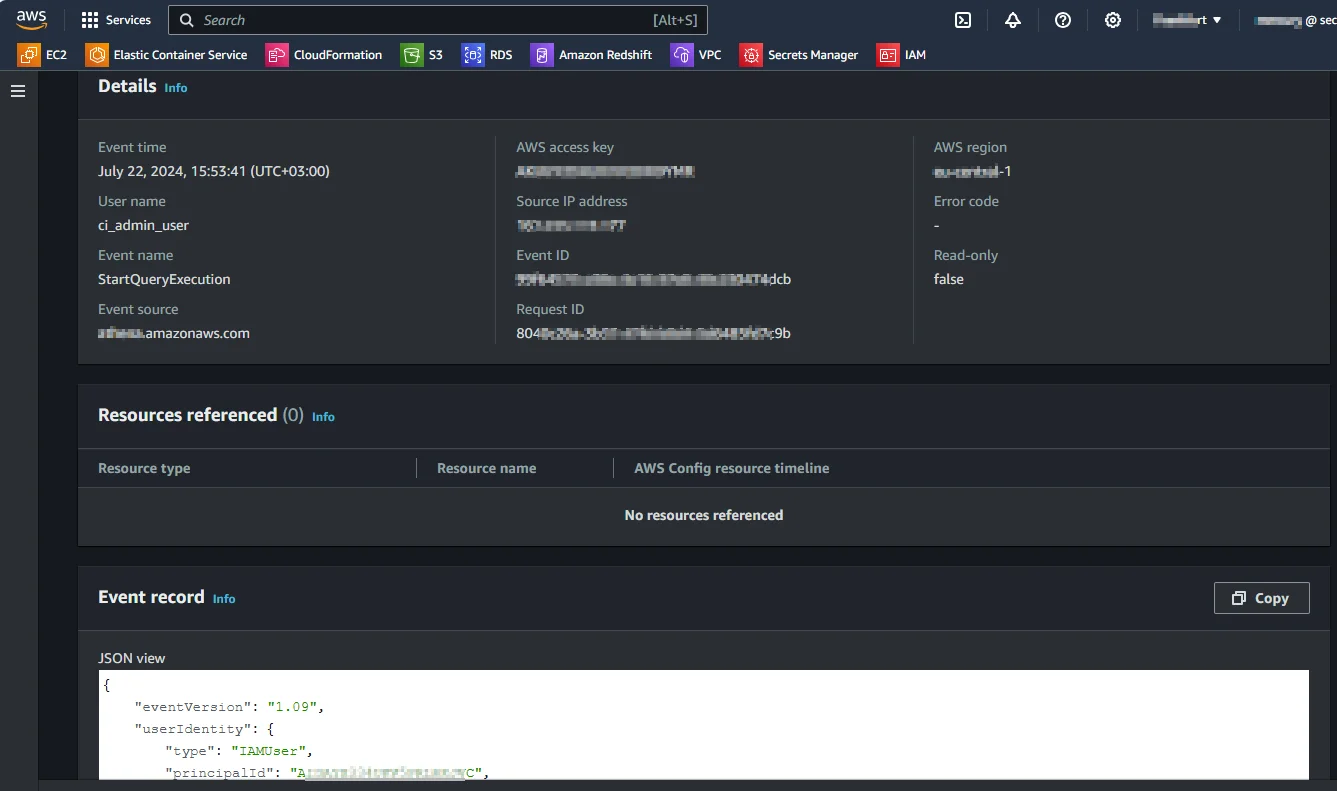
CloudTrail logs every API call made to DynamoDB, including requests from the AWS Management Console, SDKs, and CLI.
Each CloudTrail entry contains the identity of the caller, request parameters, and the source IP address.
To locate specific DynamoDB events:
aws cloudtrail lookup-events --lookup-attributes AttributeKey=EventSource,AttributeValue=dynamodb.amazonaws.com
You can refine queries using attributes such as EventName (PutItem, UpdateItem, DeleteItem) or specific user ARNs to trace individual user actions.
3. Analyze Metrics in Amazon CloudWatch
CloudWatch provides performance and operational insights into DynamoDB’s behavior. It tracks table read/write capacity units, throttled requests, and latency, complementing CloudTrail’s access-level monitoring.
For continuous visibility, create a custom metric filter:
aws logs put-metric-filter \
  --log-group-name "CloudTrail/DynamoDB" \
  --filter-name "SensitiveAccess" \
  --filter-pattern '{($.eventName = "GetItem") && ($.userIdentity.userName != "admin")}'
This filter identifies non-admin GetItem actions for further review in compliance or security dashboards.
Limitations of Native Monitoring
While CloudTrail, Streams, and CloudWatch collectively provide detailed visibility, they each cover different layers of data activity:
| Tool | Primary Focus | Limitation |
|---|---|---|
| CloudTrail | API-level activity tracking | Limited insight into actual data values changed |
| Streams | Item-level data changes | No user identity or context of API call |
| CloudWatch | Performance metrics | Lacks object-level access history |
Integrating and correlating logs across these systems is time-consuming and often requires custom scripting or external SIEM tools.
Enhanced DynamoDB Data Activity History with DataSunrise
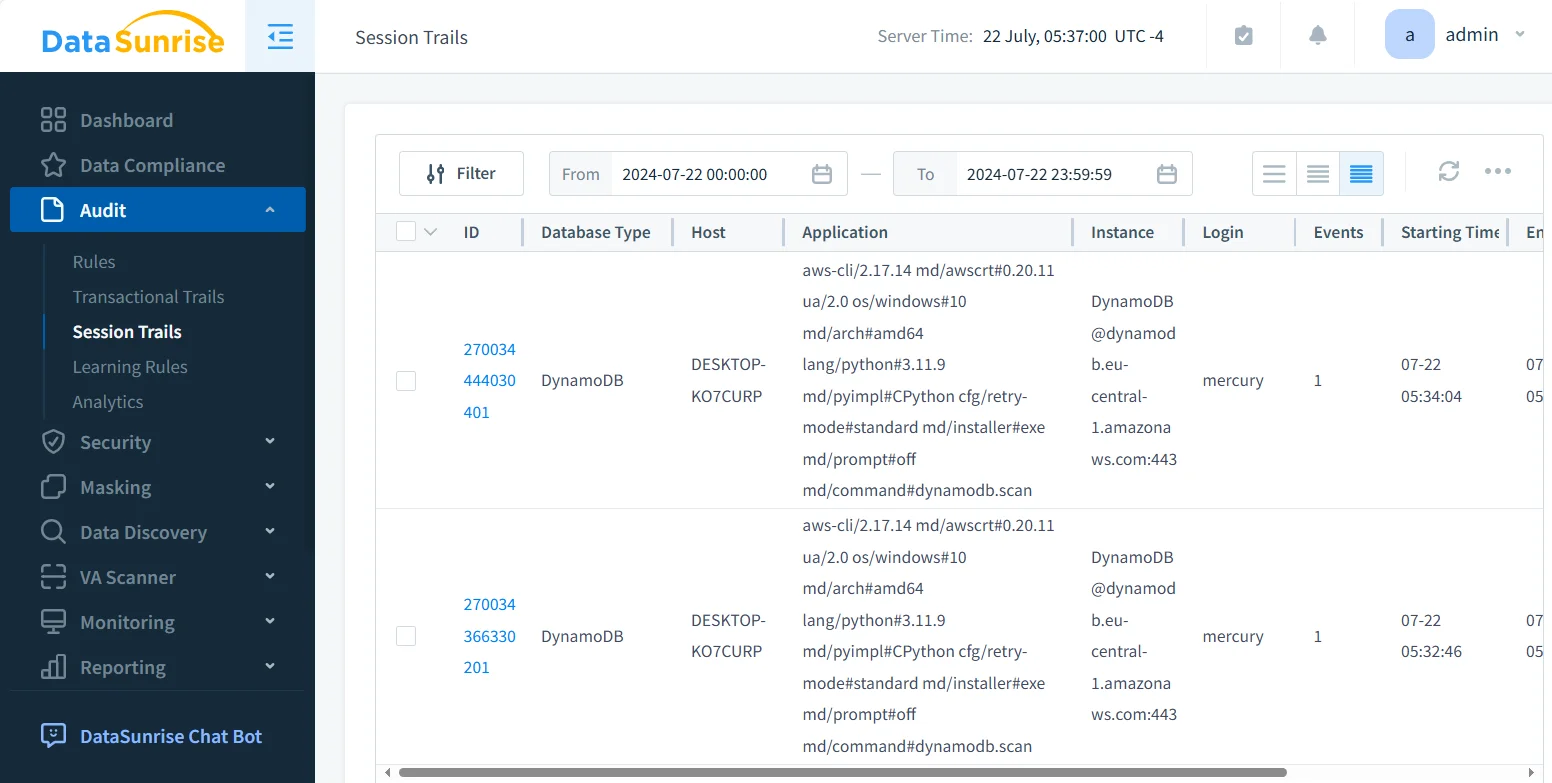
DataSunrise extends DynamoDB’s native logging ecosystem by consolidating activity records, security events, and compliance metrics into a single unified console. It merges CloudTrail, Streams, and CloudWatch data to form a comprehensive view of who accessed what, when, and through which method.
Unified Activity Correlation
This centralization makes it possible to view the entire activity landscape—from API calls and table updates to configuration changes—within one dashboard. Analysts can easily trace who accessed data, when, from where, and through which API or tool.
DataSunrise also correlates these records automatically:
- A developer modifies an item in DynamoDB.
- DataSunrise links the CloudTrail API record with the actual item changes from Streams and contextual metrics from CloudWatch.
- The unified view simplifies investigations and enhances accountability.
Granular Audit Rules
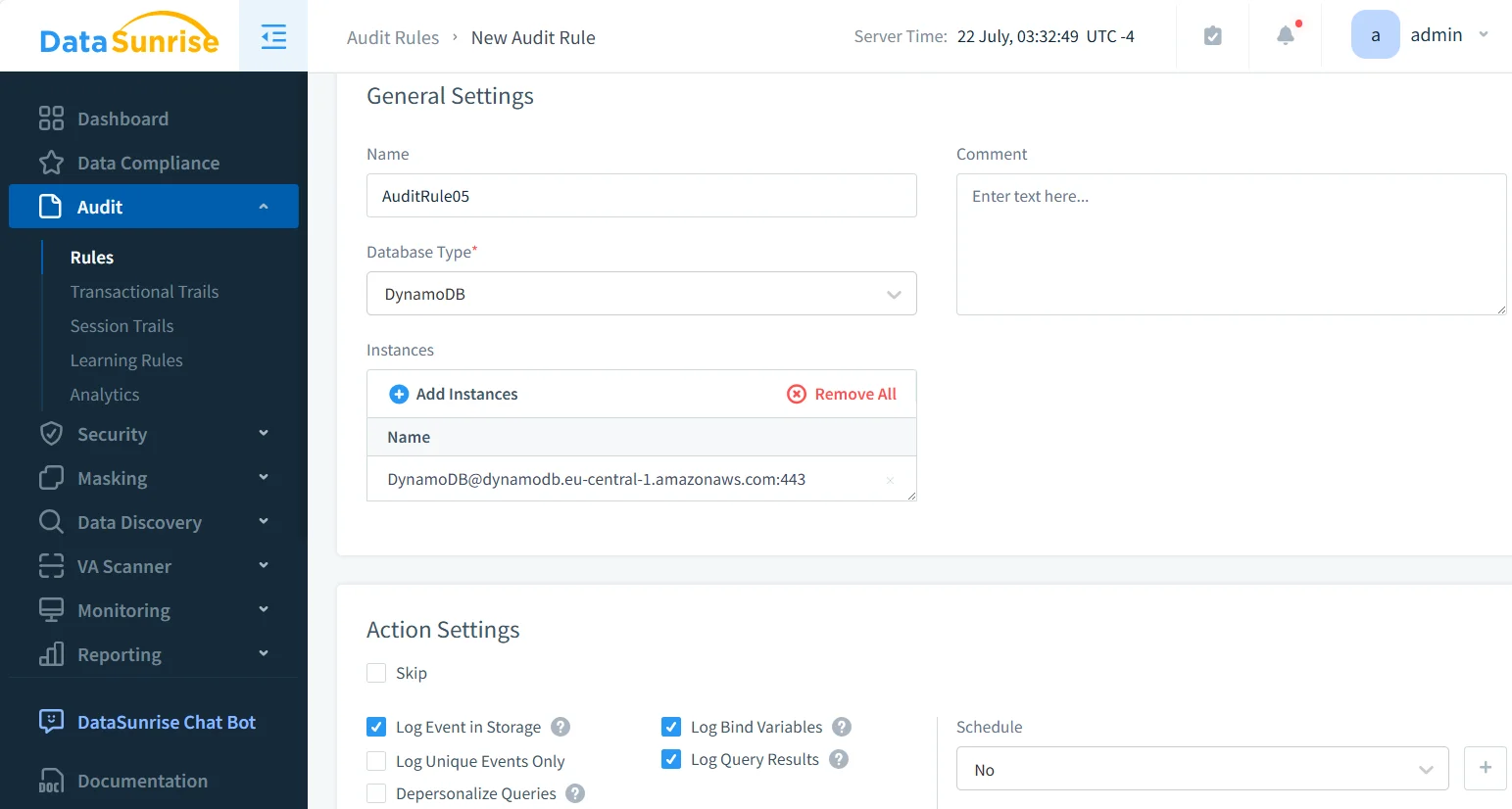
Administrators can define audit conditions with high precision—filtering by user, table, or operation type.
For example, an audit rule might log only DeleteItem and UpdateItem operations on the CustomerRecords table.
- Enables targeted activity tracking for sensitive data operations.
- Supports conditional auditing per IAM user, API action, or resource group.
- Reduces noise by filtering out low-priority events and focusing on critical activities.
Real-Time Alerts and Masking
DataSunrise generates real-time notifications through Slack, Teams, or SIEM channels. Alerts can be aligned with GDPR, HIPAA, or PCI DSS requirements to detect unauthorized access immediately.
To maintain compliance with privacy laws, DataSunrise applies dynamic data masking so that sensitive attributes (e.g., SSNs, tokens) are hidden in logs or reports.
- Supports multi-channel alert delivery for instant visibility.
- Customizable thresholds trigger notifications for abnormal or suspicious access.
- Dynamic masking ensures sensitive fields remain protected even during audits.
Automated Compliance Alignment
Using the Compliance Manager, DataSunrise automates mapping DynamoDB audit events to regulatory frameworks such as GDPR, SOX, and HIPAA.
It continuously validates configurations, flags compliance drift, and produces ready-to-submit audit reports for external assessments.
- Automatically correlates audit events with compliance controls for faster verification.
- Reduces manual workload in maintaining compliance documentation.
- Delivers standardized, auditor-ready reporting across frameworks and geographies.
Extended Integration Scope
Beyond DynamoDB, DataSunrise offers centralized database activity monitoring across more than 40 data platforms.
Organizations can manage their relational, NoSQL, and cloud storage audit policies in one place, ensuring consistent governance across AWS, Azure, and GCP environments.
- Provides unified visibility across hybrid and multi-cloud infrastructures.
- Simplifies security management through cross-database rule orchestration.
- Ensures consistent compliance posture across diverse data storage technologies.
Business Impact
Implementing DataSunrise for DynamoDB data activity history offers measurable operational and compliance advantages:
| Benefit | Description |
|---|---|
| Operational Efficiency | Consolidates logs from CloudTrail, Streams, and CloudWatch, reducing manual correlation efforts. |
| Compliance Assurance | Automates audit evidence collection and reporting for major regulatory frameworks. |
| Enhanced Security Visibility | Correlates identity, event, and data layers to detect insider and external threats faster. |
| Data Privacy Enforcement | Applies dynamic masking and anonymization to audit records for GDPR/HIPAA alignment. |
| Scalability and Flexibility | Works seamlessly across AWS native, hybrid, and multi-cloud setups. |
Conclusion
While AWS provides essential monitoring and auditing mechanisms, they operate independently and require manual integration to deliver a complete picture of database activity.
DataSunrise bridges this gap with unified data activity history management for Amazon DynamoDB. Through correlated logs, real-time alerts, and automated compliance reporting, it transforms scattered operational data into actionable intelligence—empowering organizations to maintain full transparency, meet compliance standards, and protect sensitive data across distributed cloud infrastructures.
Protect Your Data with DataSunrise
Secure your data across every layer with DataSunrise. Detect threats in real time with Activity Monitoring, Data Masking, and Database Firewall. Enforce Data Compliance, discover sensitive data, and protect workloads across 50+ supported cloud, on-prem, and AI system data source integrations.
Start protecting your critical data today
Request a Demo Download Now