Amazon DynamoDB Audit Trail
As organizations increasingly adopt cloud-native databases, maintaining visibility and accountability across data operations has become a core compliance requirement. Amazon DynamoDB—a fully managed NoSQL database service by AWS—offers scalability and speed, but like all mission-critical data platforms, it requires a reliable audit trail to track access and modifications.
This article explores native DynamoDB audit capabilities and how they can be enhanced with DataSunrise for unified monitoring, real-time alerts, and regulatory alignment. It also includes configuration examples to help you implement a comprehensive audit framework for DynamoDB.
What is an Audit Trail?
An audit trail is a chronological record of database operations that captures who accessed the system, what actions were performed, when they occurred, and how the data was affected. It functions as a verifiable evidence chain for both security and compliance purposes.
In practical terms, audit trails help organizations:
- Detect unauthorized access or abnormal activities.
- Investigate data breaches and system incidents.
- Maintain accountability by associating every action with a user identity.
- Prove compliance with standards like GDPR, HIPAA, PCI DSS, and SOX.
Within DynamoDB, audit trails are created by aggregating logs from CloudTrail, CloudWatch, and DynamoDB Streams, which together form the event and data modification history of each table. While these native mechanisms provide strong visibility, large-scale enterprises often integrate additional solutions like DataSunrise to unify audit records, enforce rules automatically, and maintain audit-readiness across all environments.
Native Audit Trail Capabilities in DynamoDB
DynamoDB integrates closely with other AWS services to deliver event logging, access tracking, and compliance auditing. These native mechanisms include AWS CloudTrail, CloudWatch Logs, and DynamoDB Streams, each playing a specific role in data activity tracking.
1. Using AWS CloudTrail for Audit Events
AWS CloudTrail captures all API calls made to DynamoDB—whether from the AWS Management Console, SDKs, or CLI. It provides the who-did-what-and-when details essential for compliance.
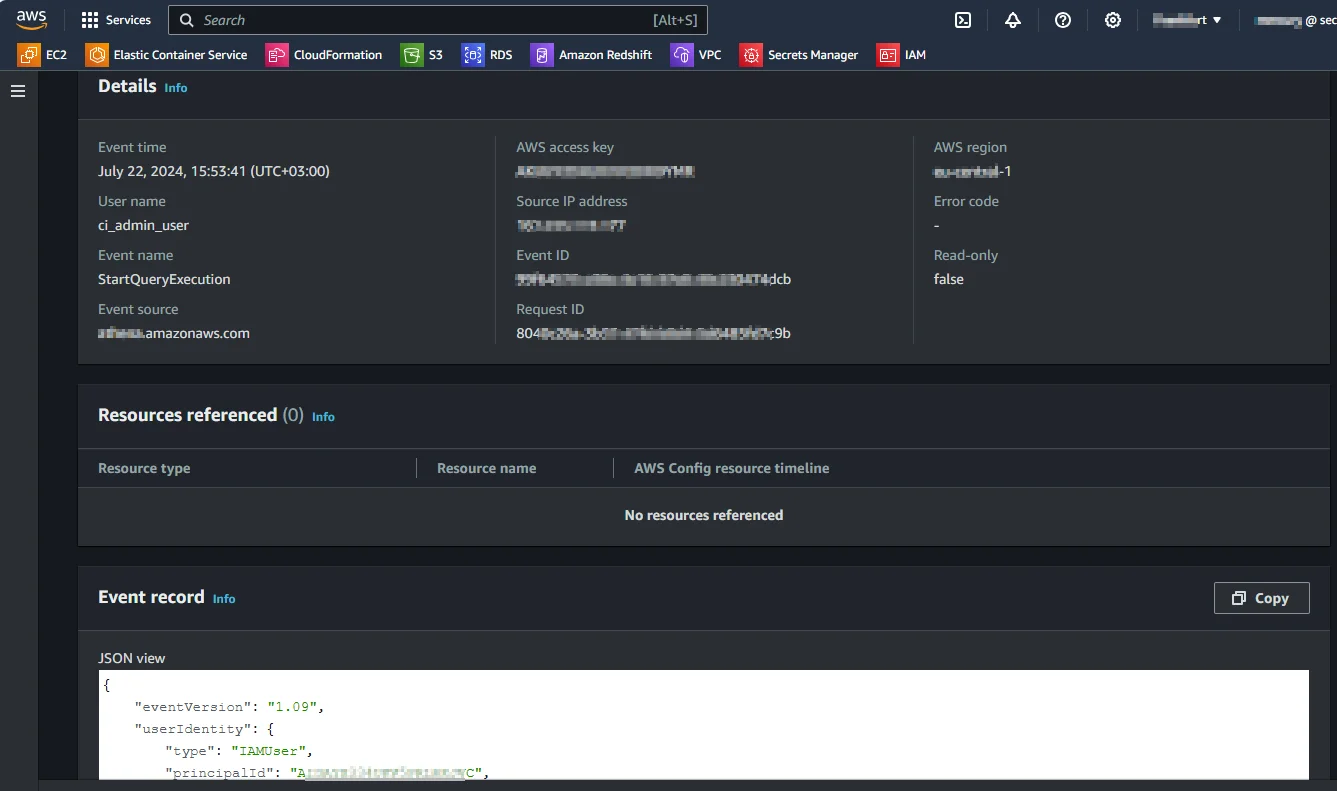
To enable CloudTrail logging for DynamoDB:
aws cloudtrail create-trail --name DynamoDBTrail \
  --s3-bucket-name my-dynamodb-audit-bucket \
  --include-global-service-events
aws cloudtrail start-logging --name DynamoDBTrail
After setup, each PutItem, UpdateItem, or DeleteItem request appears in your CloudTrail logs with contextual metadata:
{
  "eventSource": "dynamodb.amazonaws.com",
  "eventName": "PutItem",
  "userIdentity": {"type": "IAMUser", "userName": "db_admin"},
  "requestParameters": {"tableName": "CustomerRecords"},
  "sourceIPAddress": "203.0.113.15"
}
This audit trail allows administrators to trace unauthorized access, identify changes to critical tables, and meet internal security review requirements.
2. Monitoring Operations with CloudWatch
Amazon CloudWatch complements CloudTrail by providing operational metrics such as read/write capacity, throttled requests, and error counts. Administrators can create alarms or dashboards to detect anomalies that may indicate misuse or policy violations.
Example command to track throttled write requests:
aws cloudwatch get-metric-statistics \
  --namespace AWS/DynamoDB \
  --metric-name ThrottledRequests \
  --dimensions Name=TableName,Value=CustomerRecords \
  --start-time 2025-10-20T00:00:00Z --end-time 2025-10-22T23:59:59Z \
  --period 3600 --statistics Sum
3. Capturing Data Changes via DynamoDB Streams
For fine-grained data-level auditing, DynamoDB Streams record every modification (INSERT, MODIFY, REMOVE). You can view before-and-after images of updated items and process them through AWS Lambda for additional storage or analysis.
Example configuration snippet:
aws dynamodb update-table \
  --table-name CustomerRecords \
  --stream-specification StreamEnabled=true,StreamViewType=NEW_AND_OLD_IMAGES
Once enabled, changes can be retrieved through:
aws dynamodbstreams get-records --shard-iterator <iterator-value>
Streams thus provide a continuous, immutable audit log of data evolution—ideal for forensic review or feeding into a SIEM.
Limitations of Native DynamoDB Auditing
While AWS provides robust mechanisms for logging and monitoring, native auditing in DynamoDB has several constraints that can affect scalability, compliance automation, and cross-platform visibility.
| Limitation | Description |
|---|---|
| Distributed Logs | CloudTrail, CloudWatch, and Streams maintain separate data stores, making it necessary to manually correlate records for end-to-end visibility. |
| Retention Complexity | Log retention depends on S3 and CloudWatch policies, which require manual lifecycle configuration and versioning to ensure compliance continuity. |
| Limited Cross-Platform Integration | AWS-native logs are not easily synchronized with external or hybrid systems, complicating audits for organizations managing multi-cloud databases. |
| No Centralized Rule-Based Auditing | Fine-grained event rules and conditional alert logic must be implemented using AWS Lambda or custom scripts, increasing administrative overhead. |
To overcome these limitations, integrating DataSunrise introduces an enterprise-grade compliance layer with centralized auditing, real-time analysis, and autonomous rule enforcement.
Enhanced DynamoDB Audit Trail with DataSunrise
DataSunrise transforms DynamoDB auditing from fragmented logging into unified, intelligent compliance monitoring. Its zero-touch deployment ensures smooth integration with AWS environments while extending audit coverage beyond native boundaries.
Unified Audit Management
Unified Audit Management consolidates multiple AWS audit data sources—including CloudTrail, DynamoDB Streams, and CloudWatch—into one cohesive view. Instead of managing separate logs across services, DataSunrise automatically collects, normalizes, and indexes these records.
This unified approach provides:
- A single dashboard where administrators can search and filter events by user, table, or action.
- Cross-service correlation—for instance, connecting a CloudTrail API call with its related data change in DynamoDB Streams.
- Centralized retention policies, ensuring all records comply with long-term audit requirements.
The result is a more efficient workflow for compliance teams and a complete audit history accessible within seconds.
Granular Audit Rules
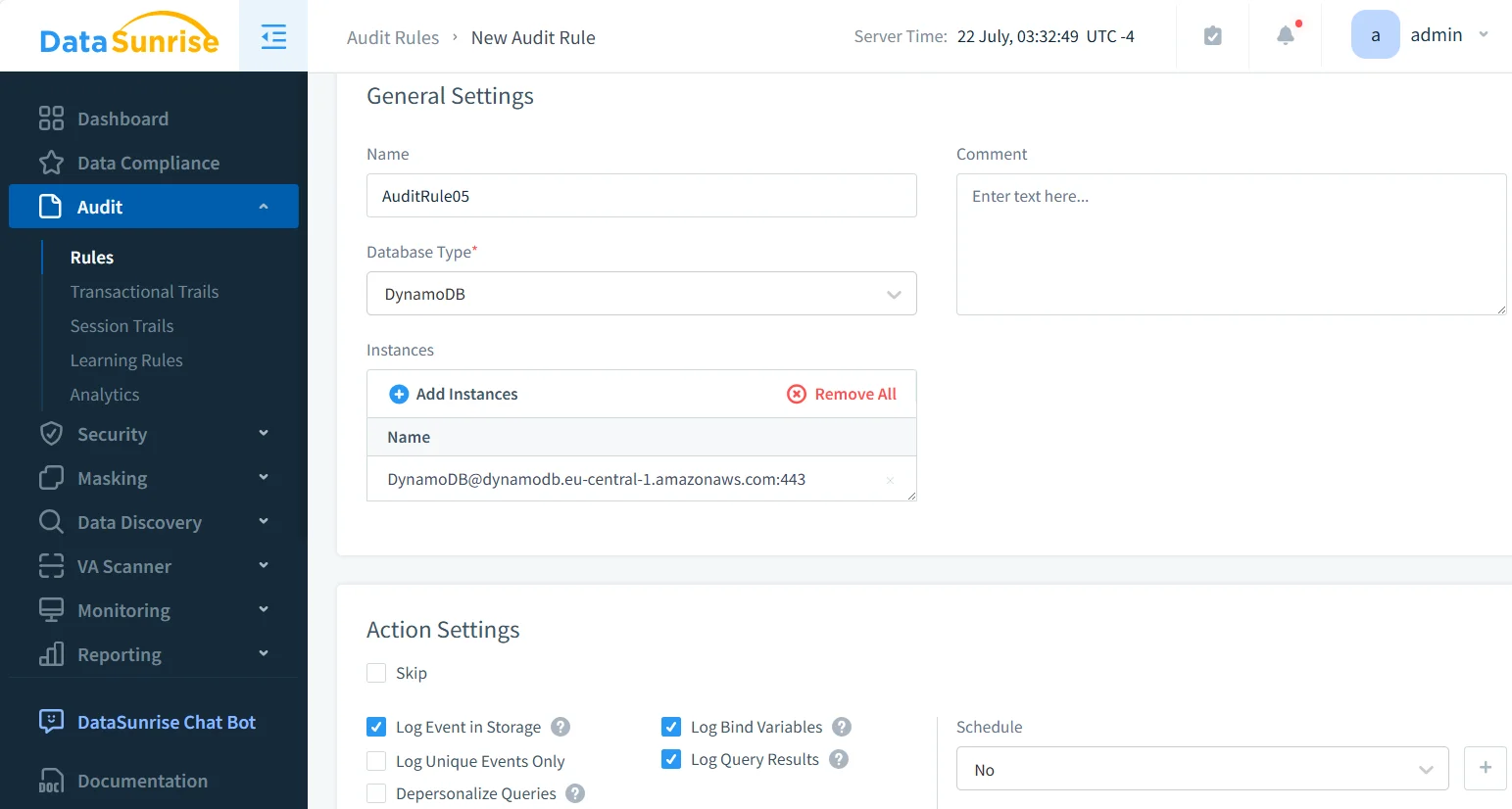
Granular Audit Rules allow security teams to precisely define what gets logged. Administrators can tailor audit coverage to specific users, operations, or data objects, minimizing noise and performance overhead.
For example:
- Log only modifications (
UpdateItem,DeleteItem) in critical tables such asCustomerRecords. - Track activity exclusively for high-privilege IAM roles or administrative sessions.
- Exclude low-risk events like read-only queries to focus on sensitive operations.
Such customization ensures that audit trails remain both lightweight and meaningful, while still meeting compliance standards.
Real-Time Alerts
Real-Time Alerts enable instant notification when sensitive or suspicious activities occur. DataSunrise integrates directly with collaboration and security tools like Slack, Microsoft Teams, or SIEM platforms.
You can configure alerts for:
- Unauthorized table creation or deletion.
- Unexpected access to sensitive customer data.
- Excessive write operations suggesting data exfiltration attempts.
Each alert can be automatically mapped to compliance frameworks such as GDPR or PCI DSS, ensuring that incidents trigger immediate response workflows and that all notifications are logged for audit evidence.
Automated Compliance Reporting
Automated Compliance Reporting simplifies the process of generating audit-ready documentation. Instead of manually exporting logs and building reports, DataSunrise provides templates and auto-generated summaries tailored to specific regulations.
It automatically:
- Aggregates audit data from DynamoDB into formatted compliance reports for GDPR, HIPAA, SOX, and PCI DSS.
- Highlights policy violations and configuration drift detected during monitoring.
- Produces time-stamped, verifiable audit records suitable for submission during external inspections.
By reducing manual reporting tasks, organizations achieve faster audits and maintain continuous compliance posture.
Machine Learning Audit Rules
Machine Learning Audit Rules apply advanced analytics to identify abnormal patterns in DynamoDB usage. Using machine learning, DataSunrise builds a behavioral baseline for each user and continuously compares ongoing activity to detect deviations.
Practical use cases include:
- Identifying insider threats performing unusual read/write operations.
- Detecting anomalous batch updates or unauthorized data exports.
- Recognizing automated attacks attempting to exploit database APIs.
These intelligent rules evolve with time, automatically refining their accuracy and reducing false positives—creating a self-improving audit and security ecosystem for DynamoDB environments.
Business Impact
Implementing an audit trail with DataSunrise for DynamoDB yields measurable outcomes:
| Business Outcome | Description |
|---|---|
| Reduced Compliance Overhead | Automated data collection and one-click reporting simplify regulatory tasks, reducing manual workloads for audit teams. |
| Improved Visibility | Centralized dashboards eliminate blind spots across AWS services and hybrid environments, offering complete visibility into database activity. |
| Enhanced Security Posture | Continuous monitoring detects configuration errors, policy violations, and suspicious access in real time to prevent data exposure. |
| Operational Efficiency | Non-intrusive proxy or sniffer deployment modes ensure minimal performance impact while maintaining full coverage of data operations. |
| Audit Readiness | Rapid evidence generation supports smooth compliance inspections and accelerates response during regulatory reviews. |
Conclusion
Amazon DynamoDB’s native tools provide strong foundations for audit logging, but enterprises managing complex, multi-environment infrastructures need a unified, intelligent approach.
DataSunrise extends native capabilities with adaptive audit rules, automated compliance reporting, and dynamic data masking—all within a centralized framework that scales across cloud and hybrid systems.
Protect Your Data with DataSunrise
Secure your data across every layer with DataSunrise. Detect threats in real time with Activity Monitoring, Data Masking, and Database Firewall. Enforce Data Compliance, discover sensitive data, and protect workloads across 50+ supported cloud, on-prem, and AI system data source integrations.
Start protecting your critical data today
Request a Demo Download Now