Data Anonymization in MySQL
MySQL runs behind customer-facing apps, internal reporting, and analytics pipelines—so it inevitably collects sensitive data. Names, email addresses, phone numbers, passport IDs, payment details, and even HR fields like salary tend to spread across environments as soon as teams start troubleshooting or building new features. The biggest leaks rarely come from spectacular attacks. They come from everyday operations: production snapshots copied into dev/test, datasets shared with vendors, and broad SQL queries exported from BI tools.
Data anonymization is the discipline of transforming sensitive values so they can’t be tied back to real individuals, while keeping the dataset useful for development, QA, and analysis. In MySQL environments, anonymization is commonly implemented with data masking—especially static masking, which produces a permanently sanitized copy of data for non-production use.
Anonymization vs. Masking: What Teams Mean in Practice
Strictly speaking, “anonymization” implies the data can’t reasonably be re-identified. In real-world database programs, teams often use the term to describe a practical outcome: non-production datasets that are safe to share internally and externally. That outcome is usually achieved through a combination of:
Static masking for dev/test copies (copy + transform).
Dynamic data masking for production read access (mask at query time). See dynamic data masking.
In-place masking for datasets that must be permanently de-identified in a specific environment. See in-place masking.
Even when you focus on static masking for anonymization, you still want strong access boundaries and monitoring. That broader control layer is part of a complete database security program.
Step 1: Find Sensitive Columns Before You Transform Anything
Start by locating what you need to protect. Manual reviews miss fields, especially free-text columns where PII gets embedded. Use automated data discovery to identify and classify sensitive data across schemas and tables.
For most organizations, the first pass is PII—full names, emails, phone numbers, addresses, government identifiers, and customer IDs that link to real people. After that, include business-sensitive fields like salary, internal notes, and account states that can expose confidential context.
Run discovery on the same schedule as schema changes. New columns appear quietly, and “temporary” debug fields have a habit of becoming permanent.
Step 2: Decide What Must Stay Functional After Anonymization
Static masking works when it protects data without breaking the system that consumes it. Before selecting masking methods, identify columns that affect application behavior:
Join keys: if tables join on a value, the masked output must preserve relationships.
Unique fields: if a column has a UNIQUE constraint, masked outputs must remain unique.
Format-dependent data: validation rules often expect emails, phone formats, or fixed-length identifiers.
These constraints usually determine whether you use substitution, shuffling, partial reveal, or format-preserving approaches. For a practical overview of transformation options, see masking types.
Step 3: Build a Policy Layer for Consistent Results
Anonymization fails when it becomes “different per team.” Central policy helps avoid drift and ensures consistent results across environments. DataSunrise supports masking policies for MySQL that can be applied consistently and audited as your environment grows.
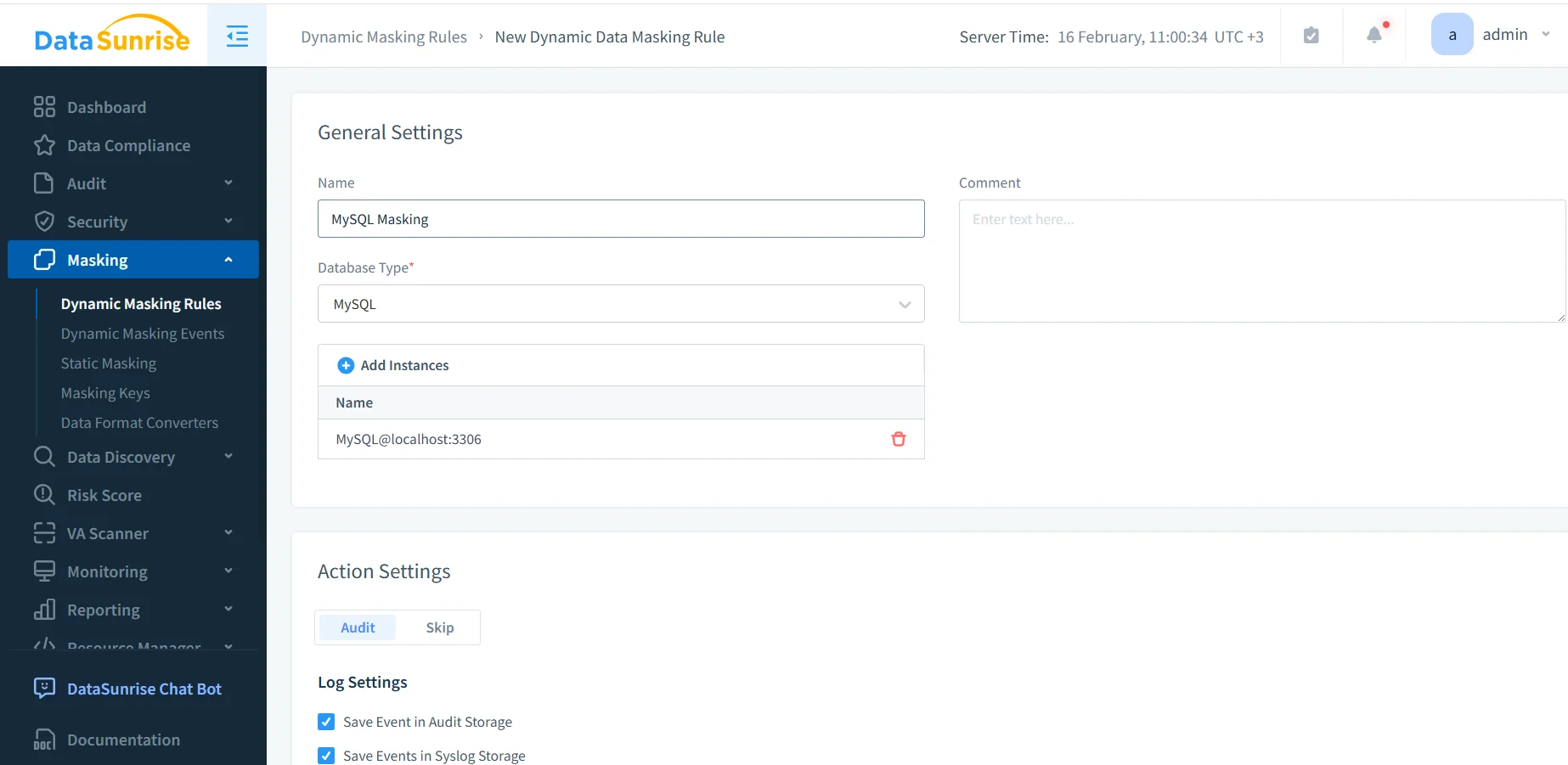
Create a MySQL masking rule to define scope and enforcement settings.
Even if your immediate goal is static masking for dev/test, defining scope and sensitive objects in one place simplifies operations and governance. In many deployments, DataSunrise works as a reverse proxy, helping apply consistent controls across SQL clients, BI tools, and automation without rewriting applications.
Step-by-Step: Static Masking for MySQL Anonymization
Static masking creates an anonymized copy of your MySQL dataset. This is typically used for development, QA, training environments, or analytics sandboxes. When implemented as a repeatable workflow, static masking becomes part of test data management rather than a one-time project.
Step 1: Configure a static masking task
Define a safe target database or schema for the anonymized dataset, separate from production. Use access controls so the target is reachable only by the teams that need it. Governance should include RBAC and explicit access controls, guided by the principle of least privilege.
For baseline MySQL security practices (accounts, permissions, hardening), MySQL’s official Security Guidelines provide a helpful checklist.
Step 2: Assign masking methods per column
Select the sensitive tables and columns identified during discovery and assign the appropriate masking method to each one. This is where you balance privacy with usability: keep formats consistent when applications validate strings, preserve relationships when joins matter, and maintain uniqueness where required.
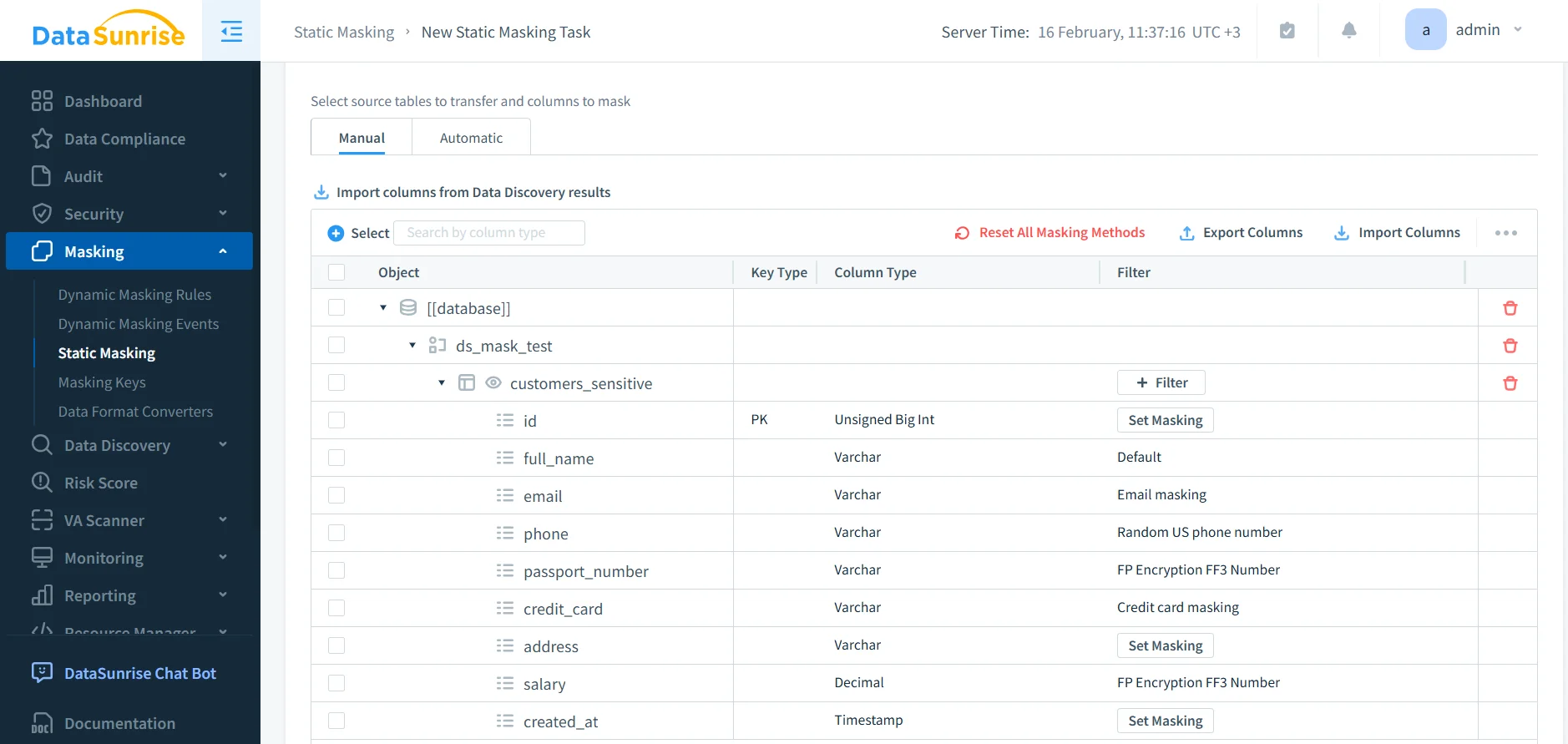
Assign masking methods per column to preserve usability and constraints.
If your tests rely on consistent identities across tables, use methods that preserve referential integrity. Random replacements that break joins create “bugs” that vanish in production and waste everyone’s time.
Step 3: Validate before and after results
Validation should be concrete: run the same query against the source and the anonymized target. Confirm that sensitive fields are transformed and that schema shape remains intact so applications don’t break.
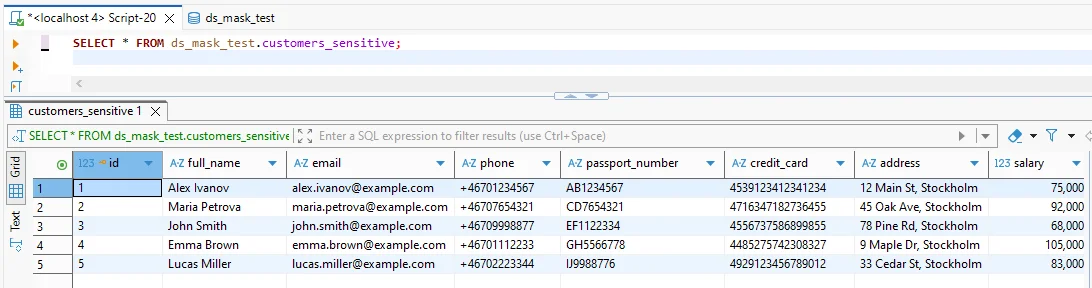
Before masking: sensitive fields are visible in clear text.
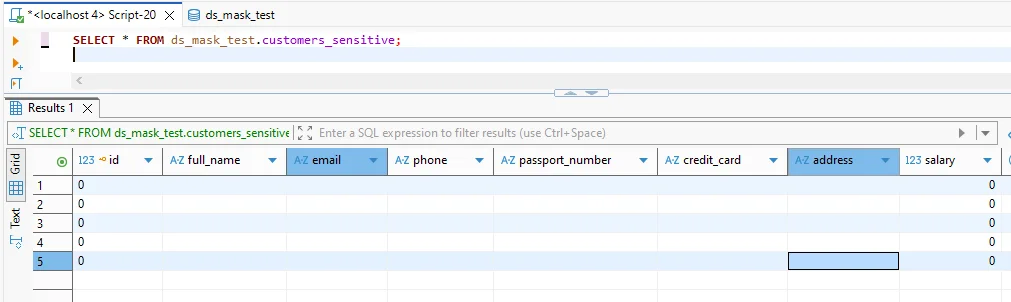
After masking: sensitive columns are anonymized while preserving table structure.
If you need to standardize access patterns at the MySQL layer, refer to MySQL’s official documentation on roles to keep permissions consistent across teams.
Static masking produces permanent changes in the target dataset. Never run static masking tasks against production schemas, and never treat “target” as a playground without backups and isolation.
Make Anonymization Provable: Monitoring, Auditing, and Governance
Even anonymized datasets need governance. Organizations commonly pair static masking with continuous monitoring and evidence collection:
Auditability: enable audit logs and structured data audit workflows to track who accessed what and when.
Behavior visibility: use database activity monitoring to detect unusual query patterns, bulk extraction attempts, and access outside expected hours.
Encryption: protect stored datasets and backups with database encryption, especially when targets live in shared infrastructure.
To reduce exploitation risk, many teams add a database firewall and tuned security rules against SQL injections. Preventing privilege drift and configuration mistakes is also easier with regular vulnerability assessment.
For long-lived environments, continuous data protection helps keep controls consistent and reduces “set it and forget it” failures.
Compliance Alignment Without the Chaos
Compliance requirements typically focus on outcomes: limit exposure, restrict access by purpose, and keep evidence. Use data compliance regulations mapping to align anonymization controls with your environment’s obligations. Many teams operationalize reporting and evidence using the DataSunrise Compliance Manager and automate artifacts via report generation.
If you operate across multiple database engines, consistent anonymization gets easier when your tooling supports a broad surface area. DataSunrise lists coverage across 40+ data platforms, which can reduce policy fragmentation across teams.
Conclusion
Data anonymization in MySQL is most effective when it is repeatable, validated, and paired with governance. Start with discovery, design masking methods around constraints, apply static masking to produce safe non-production datasets, and verify outcomes with real queries. Then strengthen the program with monitoring, auditing, encryption, and preventive controls.
Protect Your Data with DataSunrise
Secure your data across every layer with DataSunrise. Detect threats in real time with Activity Monitoring, Data Masking, and Database Firewall. Enforce Data Compliance, discover sensitive data, and protect workloads across 50+ supported cloud, on-prem, and AI system data source integrations.
Start protecting your critical data today
Request a Demo Download Now