Data Masking Tools and Techniques for Apache Cloudberry
Implementing robust data masking for Apache Cloudberry has become essential for data security. According to IBM's 2024 Cost of a Data Breach Report, organizations with comprehensive data masking reduce breach costs by $1.82 million and detect incidents 76% faster.
Apache Cloudberry, an open-source MPP database built on PostgreSQL, offers native protection features. However, organizations often require sophisticated solutions to satisfy compliance requirements and protect personally identifiable information effectively.
This guide explores Cloudberry's native masking capabilities and demonstrates how DataSunrise enhances protection with Zero-Touch Data Masking.
Understanding Data Masking for Apache Cloudberry
Data masking for Apache Cloudberry protects sensitive information while maintaining data utility for analytics and development. As a distributed MPP database, Cloudberry presents unique masking challenges:
- Distributed Processing: Consistent masking across multiple nodes
- High-Volume Operations: Performance-optimized techniques required
- Complex Queries: Format-preserving methods for aggregations
- Multi-Tenant Access: Role-based protection levels
- Compliance Requirements: GDPR, HIPAA, PCI DSS, SOX adherence
Native Apache Cloudberry Data Masking Techniques
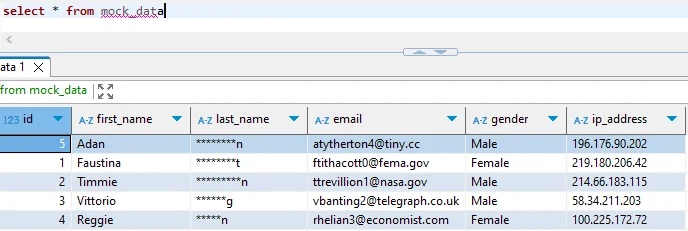
Cloudberry inherits PostgreSQL-based masking capabilities that provide foundational protection using SQL functions and views. These native features offer basic data protection but may lack the sophistication required for complex security policies.
1. Column-Level Masking with SQL Functions
-- Create a masked view for customer data
CREATE OR REPLACE VIEW customers_masked AS
SELECT
    customer_id,
    CONCAT(LEFT(email, 2), REPEAT('*', LENGTH(email) - POSITION('@' IN email) - 2),
           SUBSTRING(email FROM POSITION('@' IN email))) AS email,
    CONCAT('****-****-****-', RIGHT(credit_card, 4)) AS credit_card,
    CONCAT('***-**-', RIGHT(ssn, 4)) AS ssn,
    first_name, last_name
FROM customers;

GRANT SELECT ON customers_masked TO analyst_role;
2. Row-Level Security
ALTER TABLE financial_transactions ENABLE ROW LEVEL SECURITY;

CREATE POLICY analyst_access ON financial_transactions
    FOR SELECT TO analyst_role
    USING (transaction_date >= CURRENT_DATE - INTERVAL '90 days');
Limitations of Native Cloudberry Data Masking
While native capabilities provide basic protection, they present challenges for organizations with advanced database security needs:
| Native Feature | Key Limitation | Business Impact |
|---|---|---|
| SQL-Based Masking | Manual implementation per table | High administrative overhead |
| View-Based Protection | Limited masking algorithms | Inadequate protection for complex data |
| Row-Level Security | Performance impact on queries | Reduced analytics efficiency |
| Static Configuration | No automated data discovery | Critical data may remain unprotected |
| Manual Management | Complex distributed maintenance | Increased configuration errors |
Enhanced Data Masking with DataSunrise
DataSunrise enhances Cloudberry protection through Autonomous Compliance Orchestration designed for MPP environments, delivering enterprise-grade dynamic data masking with Zero-Touch implementation.
Setting Up DataSunrise for Apache Cloudberry
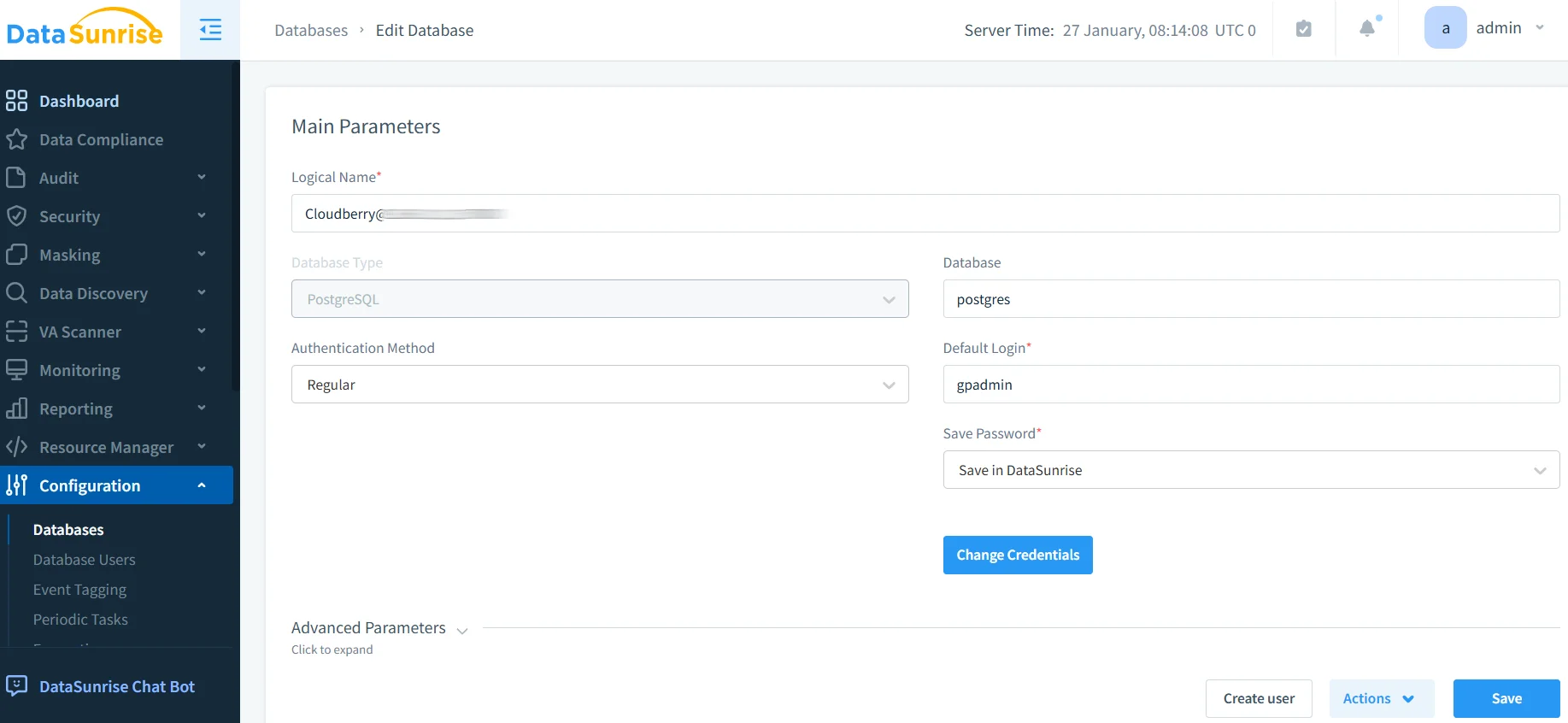
1. Connect to Apache Cloudberry Instance
Establish a secure connection through DataSunrise's administrative interface, supporting direct connections and proxy-mode deployment.
2. Configure Auto-Discovery for Sensitive Data
Leverage Auto-Discover & Mask engine to automatically identify sensitive data using NLP-powered algorithms and pattern recognition for compliance mapping.
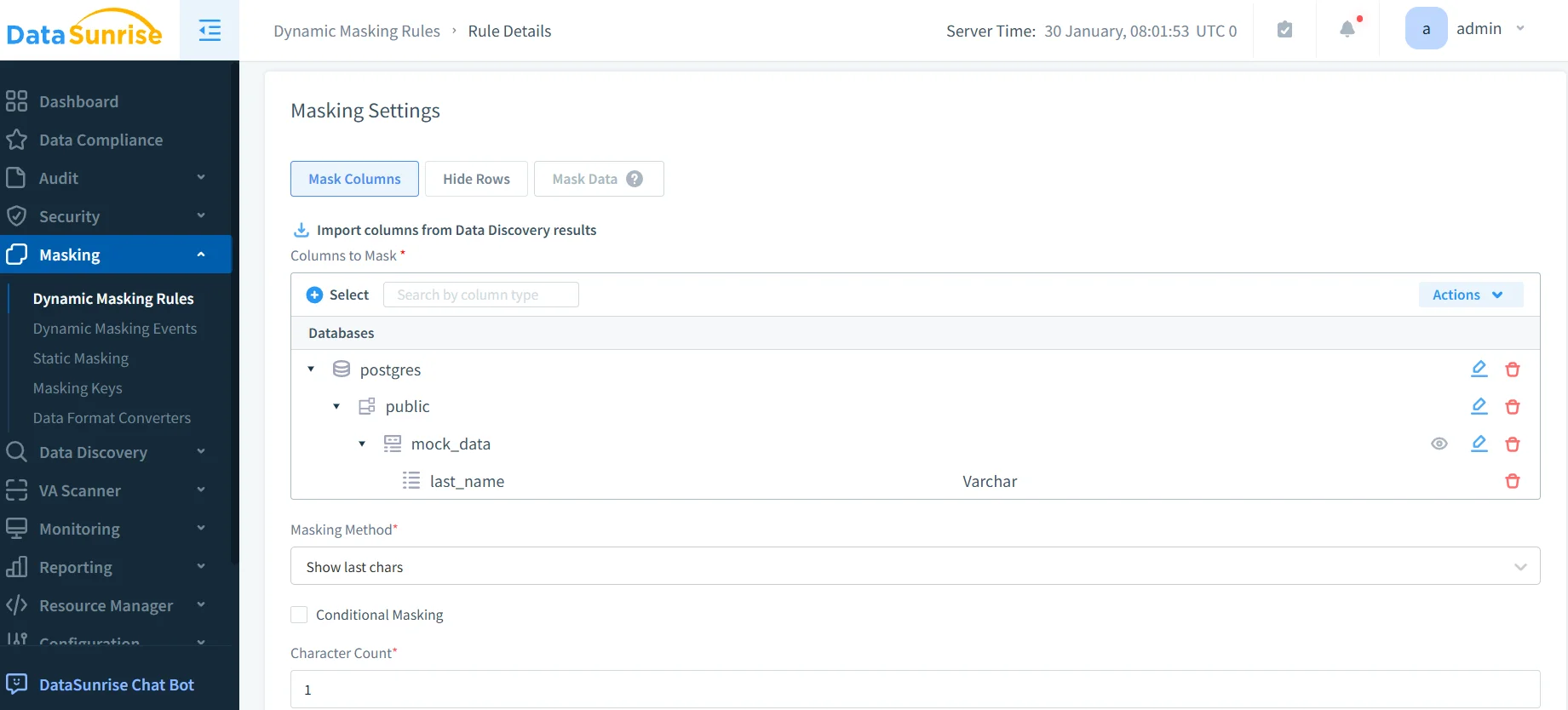
3. Create Dynamic Masking Rules
Configure policies through No-Code Policy Automation with granular controls for tables, columns, users, and masking algorithms.
4. Monitor Masked Data Access
Access comprehensive audit trails with real-time monitoring and compliance reporting.
Key Advantages of DataSunrise for Apache Cloudberry
Auto-Discover & Classify: Automatically scan Cloudberry databases to identify sensitive information, providing up to 95% greater coverage than manual approaches.
Surgical Precision Masking: Advanced masking types including dynamic, static, and in-place masking, format-preserving encryption, tokenization, and shuffling.
Context-Aware Protection: Intelligent masking adapts to user roles and access levels, ensuring authorized access while protecting sensitive information.
Zero-Touch Policy Automation: No-Code interface reduces implementation time from weeks to hours with consistent enforcement across distributed segments.
Real-Time Notifications: Immediate alerts for suspicious patterns with configurable channels (email, Slack, MS Teams).
User Behavior Analysis: ML algorithms establish baselines and detect anomalies, transforming masking into proactive threat detection.
Cross-Platform Visibility: Unified console with support for over 40 platforms ensures consistent data security policies.
Best Practices for Apache Cloudberry Data Masking
1. Data-Centric Security Strategy
Conduct comprehensive data discovery to classify sensitive information. Apply detailed masking to high-risk data while using lighter protection for metadata. Ensure masking preserves referential integrity across distributed segments.
2. Performance Optimization
Align masking with Cloudberry's distributed processing. Apply dynamic masking based on user roles and use static masking for test data management in non-production environments to eliminate runtime overhead.
3. Compliance Framework Integration
Leverage DataSunrise's Compliance Autopilot for automated regulatory mapping to GDPR, HIPAA, PCI DSS, and SOX. Generate automated compliance reports demonstrating regulatory adherence.
4. Enhanced Implementation with DataSunrise
Deploy comprehensive security combining masking with database firewall and threat detection. Utilize flexible deployment modes and implement role-based access controls with granular access controls for Zero-Trust architecture.
Conclusion
As organizations rely on Apache Cloudberry for data warehousing, implementing robust data masking has become essential. While Cloudberry's native capabilities provide foundational protection, organizations benefit from enhanced solutions like DataSunrise.
DataSunrise provides Zero-Touch Data Masking with Auto-Discover & Classify capabilities, Surgical Precision Masking, and Continuous Compliance Alignment. Unlike solutions requiring constant tuning, DataSunrise delivers Autonomous Compliance Orchestration that dynamically adjusts protection across distributed segments.
Protect Your Data with DataSunrise
Secure your data across every layer with DataSunrise. Detect threats in real time with Activity Monitoring, Data Masking, and Database Firewall. Enforce Data Compliance, discover sensitive data, and protect workloads across 50+ supported cloud, on-prem, and AI system data source integrations.
Start protecting your critical data today
Request a Demo Download Now