Data Obfuscation in MySQL
MySQL powers customer applications, internal analytics, BI dashboards, and operational tools—so it naturally becomes a magnet for sensitive data. The real-world problem is not only attackers. It’s normal engineering behavior: production snapshots copied into dev/test, datasets shared with vendors, and ad-hoc exports created to “debug one issue.” Data obfuscation is how you keep those workflows possible without leaking real identities and regulated values.
In practice, obfuscation in MySQL usually means applying data masking techniques that replace sensitive values with safe substitutes while preserving schema structure and data utility. For non-production environments, the most reliable approach is static data masking, which produces a permanently sanitized copy of your database.
What “Data Obfuscation” Means in a MySQL Context
Data obfuscation is an umbrella term for transforming sensitive data so it can’t be used to identify a person or expose confidential details. In MySQL programs, it typically includes:
Static masking (copy + transform): best for dev/test refreshes, training, and analytics sandboxes.
Dynamic masking (mask at query time): best for production access where some users should see partial or masked values. Learn more at dynamic data masking.
In-place masking (transform in the original location): used when a dataset must be de-identified permanently in a given environment. See in-place masking.
Obfuscation is not a replacement for broader database security. It works best as one layer in a defense-in-depth model that also includes access control, monitoring, auditing, and encryption.
Step 1: Identify What Must Be Obfuscated
You can’t protect what you can’t find. Start with automated data discovery to locate sensitive columns across schemas and tables. Most organizations begin with PII such as full names, email addresses, phone numbers, passport IDs, and physical addresses. Then extend the scope to internal data like salary, contract values, or free-text notes that frequently contain embedded personal details.
Treat discovery as a recurring process, not a one-time scan. Schemas evolve, new columns appear, and “temporary” fields have a habit of becoming permanent.
Step 2: Choose the Right Obfuscation Mode for Each Environment
A practical MySQL obfuscation program uses different methods depending on where the data is going and who will use it:
Production: use masking only when needed and keep raw data intact for approved workflows. Dynamic masking is often preferred for read-only and support users.
Dev/Test: use static masking to produce a safe dataset that engineers can work with freely.
Analytics sandbox: use static masking with methods that preserve distributions and formats so analytics still behave realistically.
When you build repeatable refresh pipelines, static masking naturally fits into test data management, where the goal is consistent, safe, production-like datasets delivered on schedule.
Step 3: Define Obfuscation Policy (What Gets Masked and How)
Obfuscation is only “safe” when it is consistent. DataSunrise provides centralized controls that let you define what should be masked across MySQL instances and clients. Many teams start by defining a baseline policy (sensitive schemas/tables/columns) so the same scope can be applied across environments.
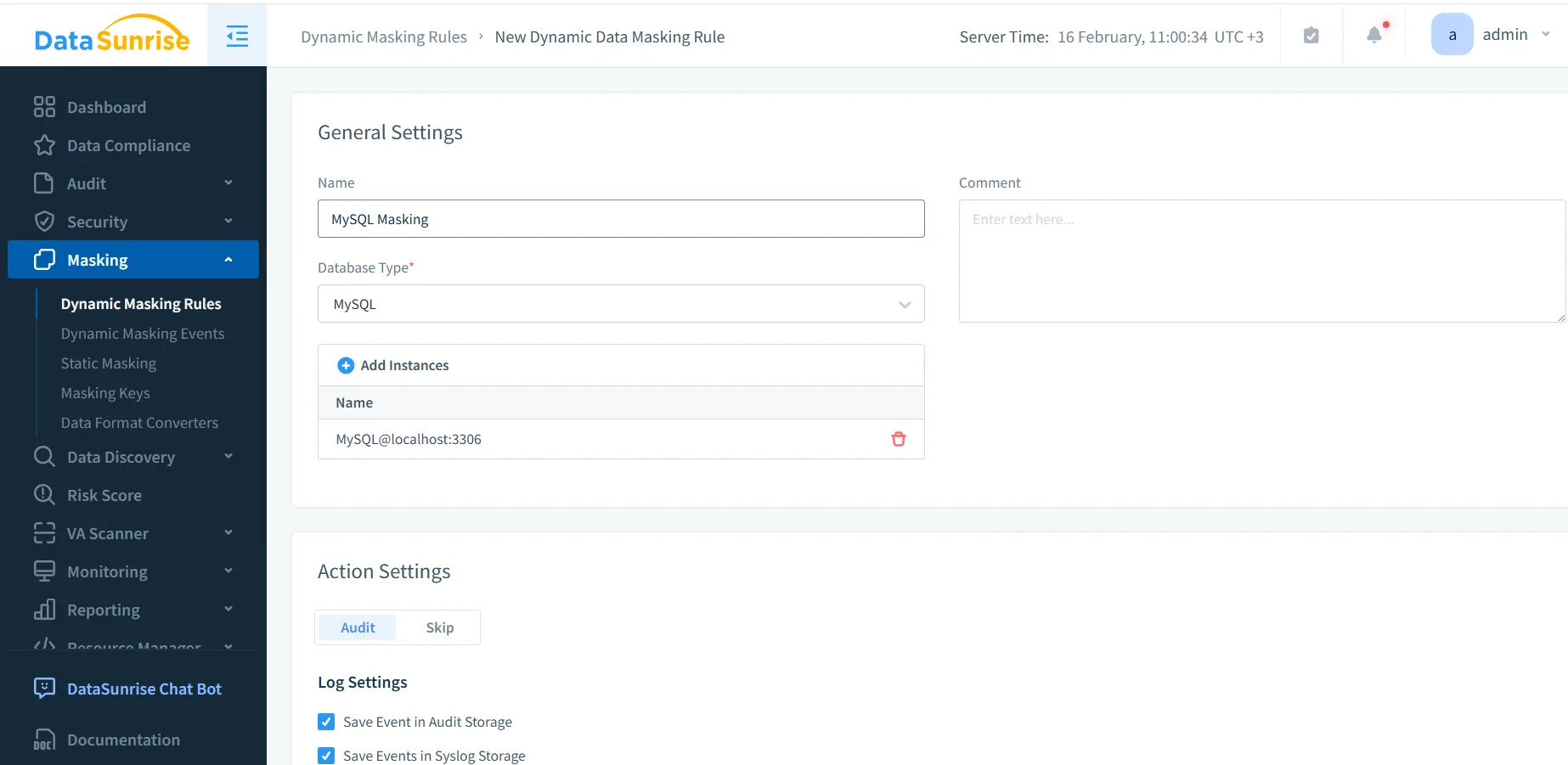
Create a MySQL masking rule in DataSunrise to standardize obfuscation scope and policy.
Even if your immediate goal is static masking, establishing policy centrally makes it easier to keep rules aligned across teams. In many deployments, DataSunrise operates as a reverse proxy, which helps apply controls consistently across SQL clients, BI tools, and automated jobs.
Step 4: Select Columns and Assign Masking Methods
After defining scope, select the actual MySQL objects to obfuscate. This step is where most mistakes happen—either teams mask too little (leaving gaps) or mask too aggressively (breaking applications).
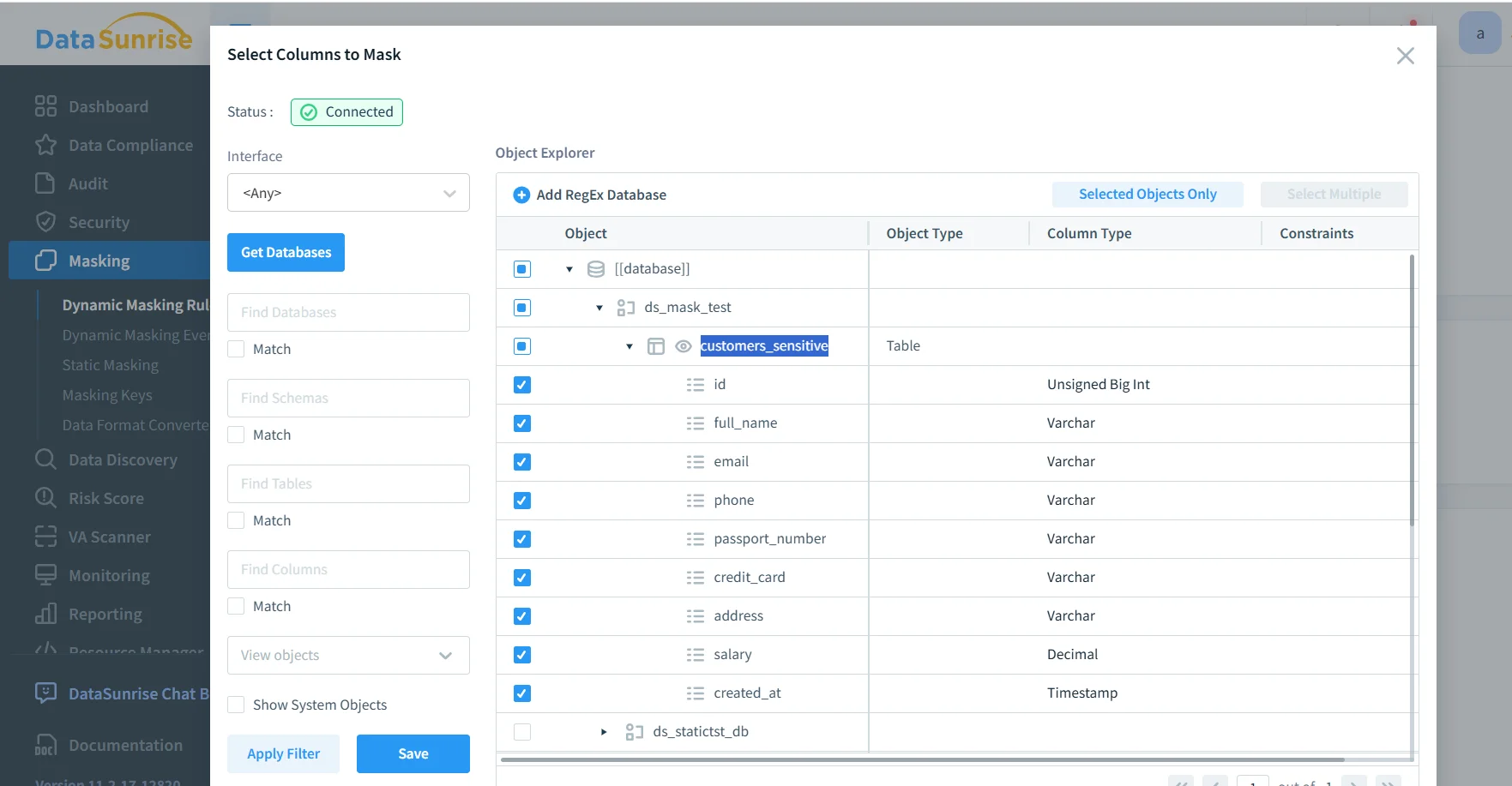
Pick masking methods that preserve usability. If a field must remain unique, ensure the output stays unique. If an application validates formatting (email/phone/card-like strings), use format-aware methods. For a quick reference on transformation options and when to use them, see masking types.
Obfuscation should also be paired with strong governance controls. Use access controls and RBAC to ensure only approved roles can access sensitive objects, and apply the principle of least privilege so accounts can’t “accidentally” see more than they should.
Step 5: Run Static Masking to Produce a Safe MySQL Copy
Static masking creates an obfuscated target dataset. Operationally, this usually means you copy data from production (or from a staging snapshot) and apply the masking task before distributing it to dev/test or analytics environments. If you use native MySQL tooling for exports, the official mysqldump documentation is a useful reference for common backup/restore patterns.
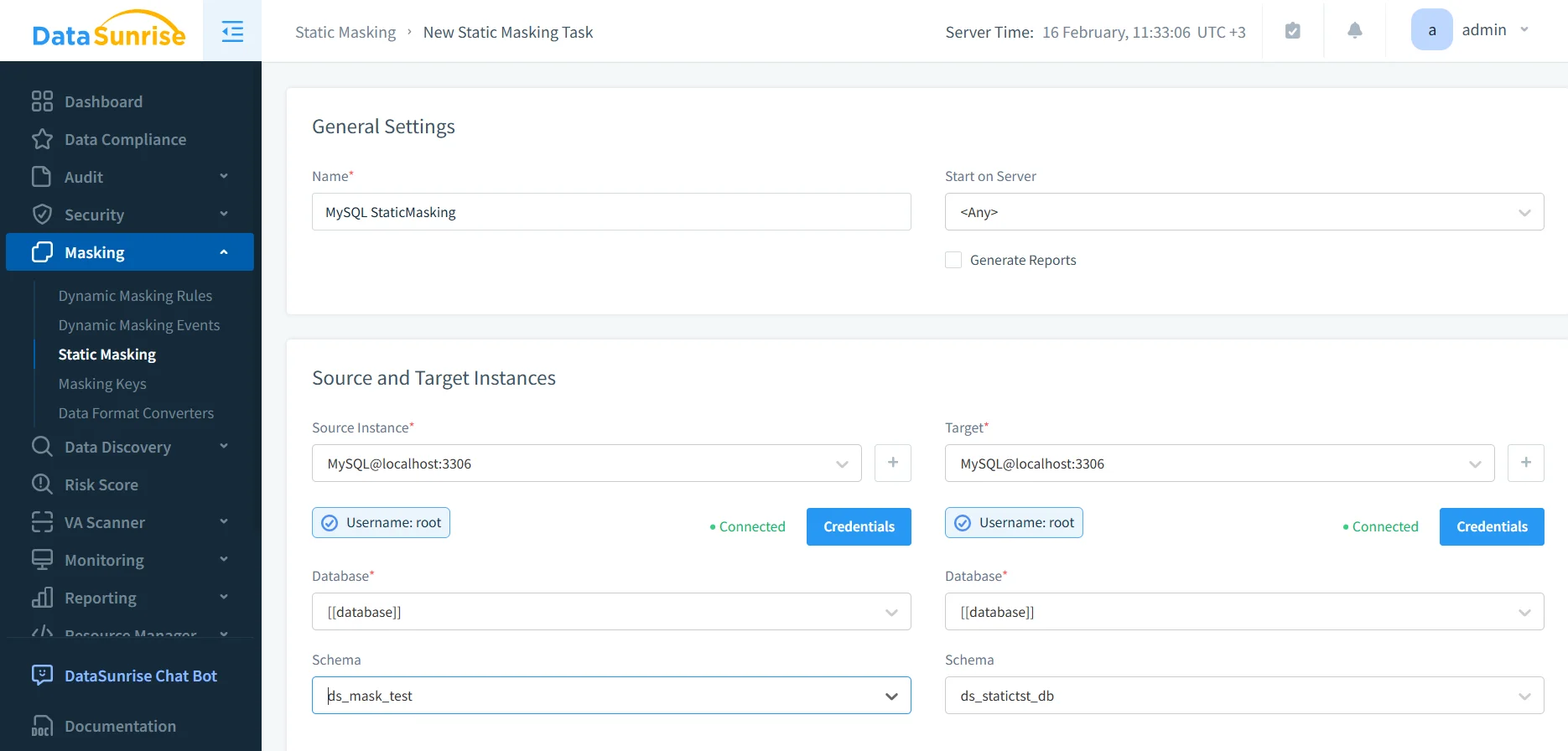
Create a static masking task by defining MySQL source and target instances for the obfuscated dataset.
Static masking is irreversible in the target dataset. Never point a static masking task at production schemas, and don’t run it without validated backups and strict source/target separation.
Step 6: Validate and Prove the Obfuscation Worked
Validation should be boring and systematic. Run representative application queries against the target dataset and confirm three outcomes:
Sensitive values are transformed consistently and according to policy.
Schema shape remains stable so applications and dashboards do not break.
Joins and constraints still behave (especially where uniqueness matters).
Then keep evidence. DataSunrise supports centralized audit logs and a broader data audit workflow so you can demonstrate what was masked, when it was masked, and under which policy. For organizations that need formal documentation, report generation helps standardize compliance-ready outputs.
Defense-in-Depth Controls Around Obfuscated MySQL Data
Obfuscation reduces exposure, but it should not be your only safeguard. Pair it with controls that prevent misuse and detect suspicious behavior:
Monitoring: use database activity monitoring to identify bulk exports, unusual query spikes, and abnormal access patterns.
Encryption: protect stored datasets and backups with database encryption.
Firewalling: reduce attack surface with a database firewall and tuned security rules against SQL injections.
Hardening: identify weak accounts and risky configs using vulnerability assessment.
Continuity: keep controls consistent over time with continuous data protection.
If you need a baseline for securing MySQL configuration and privileges, MySQL’s official Security Guidelines can help reinforce foundational practices.
Compliance Alignment: Turning Obfuscation into an Operational Program
Compliance expectations typically revolve around minimizing exposure, restricting access by purpose, and retaining evidence. Use data compliance regulations mapping to keep controls aligned with common frameworks. For many environments, this includes GDPR, PCI DSS, and financial reporting controls such as SOX. Healthcare and PHI environments often align to HIPAA technical safeguards.
To operationalize controls and reduce manual work, many teams use the DataSunrise Compliance Manager to centralize enforcement, reporting, and evidence collection.
Conclusion
Data obfuscation in MySQL is most effective when it is repeatable, measurable, and paired with enforcement controls. Start with discovery, define a consistent policy, apply static masking for non-production datasets, and validate outcomes with real queries and audit evidence. From there, harden the environment with monitoring, encryption, and firewalling to reduce both accidental exposure and intentional abuse.
DataSunrise supports 40+ data platforms, which helps keep policies consistent as your stack grows. To try it in your MySQL environment, you can start with the DataSunrise download or schedule a guided DataSunrise demo.
Protect Your Data with DataSunrise
Secure your data across every layer with DataSunrise. Detect threats in real time with Activity Monitoring, Data Masking, and Database Firewall. Enforce Data Compliance, discover sensitive data, and protect workloads across 50+ supported cloud, on-prem, and AI system data source integrations.
Start protecting your critical data today
Request a Demo Download Now