
Dynamic Data Masking in Sybase
DataSunrise Compliance Manager delivers Zero-Touch Data Masking to provide context-aware protection for Sybase environments without modifying schemas or applications. In SAP Adaptive Server Enterprise (ASE), traditional access control defines who can query data, but it does not control how much of that data each user should see. Dynamic data masking fills that gap by transforming sensitive values at query time while leaving the original data untouched.
Sybase environments typically store customer data, financial records, and regulated information in production systems. At the same time, developers, analysts, and support teams require partial access. This creates a constant conflict between usability and security. Dynamic data masking resolves this by exposing only the necessary portion of data depending on context, aligning with modern data masking strategies and regulatory expectations like GDPR.
Native Sybase security features provide a solid foundation, but they do not offer a built-in dynamic masking framework. As a result, teams often rely on manual SQL logic, views, and permissions to simulate masking behavior. That approach works initially but becomes difficult to maintain at scale.
Why Dynamic Data Masking Matters in Sybase
Dynamic data masking ensures that sensitive information is protected during query execution. Instead of restricting access completely, it adjusts the visibility of data based on user roles, application context, or security policies using dynamic data masking techniques.
This approach is especially useful in mixed workloads where production systems serve multiple audiences. For example, support teams may only need partial visibility of customer data, while finance teams require full access. Combined with role-based access control, organizations can enforce precise visibility rules without exposing raw data.
Typical scenarios include:
- displaying only the last four digits of account numbers
- masking personal identifiers such as SSN or phone numbers
- allowing developers to work with realistic datasets without exposing real data using data anonymization approaches
- restricting third-party access to sensitive fields with data audit controls
Dynamic masking also supports compliance requirements such as GDPR, HIPAA, PCI DSS, and SOX by reducing exposure during normal operations and strengthening overall data compliance posture.
Dynamic masking is ideal when users need access to live production systems but should not see full sensitive values. Static masking is better suited for test environments and exported datasets.
Native Sybase Capabilities for Data Protection
Sybase ASE provides a set of security mechanisms that can be combined to approximate data masking. Each of them solves a specific part of the problem, but none of them controls data visibility dynamically at query time.
Object and Column-Level Permissions
At the most basic level, Sybase allows you to grant or revoke access to tables and even specific columns. This lets you strictly control which data elements a user can query.
For example:
GRANT SELECT (customer_id, full_name)
ON customers
TO reporting_role
GO
This approach ensures that users only see approved columns. It is simple and effective for limiting access, but it is also rigid. Access is binary: a user either sees the column or does not. There is no way to partially reveal data, such as displaying only the last four digits of a value or masking sensitive portions dynamically.
As a result, permissions answer the question of who can access data, but they do not address how much of that data should be visible.
Views for Controlled Data Exposure
Views are the most common workaround for masking in Sybase environments. Instead of granting access to the base table, administrators expose a transformed version of the data through a view.
For example:
CREATE VIEW v_customers_masked AS
SELECT
    customer_id,
    full_name,
    '***@***.com' AS email,
    '***-**-****' AS ssn
FROM customers
GO
Users are then granted access to the view rather than the original table. This allows sensitive fields to be masked, truncated, or replaced with static values.
While this method provides a degree of control, it introduces several operational challenges. Each user group may require a different version of the same view, which leads to duplicated logic across schemas. Over time, maintaining these views becomes increasingly complex, especially when business requirements change. Additionally, since the base table still exists, there is always a risk that users or applications may bypass the view and access raw data directly.
In practice, this approach works for small environments but becomes difficult to manage as systems grow.
Role-Based Access Control
Sybase supports role-based access control (RBAC) to simplify permission management. Roles allow administrators to group privileges and assign them to users more efficiently.
For example:
CREATE ROLE analyst_role
GO

GRANT SELECT ON v_customers_masked
TO analyst_role
GO
Roles help reduce administrative overhead and improve consistency in access management. Instead of assigning permissions individually, organizations can manage access through predefined roles.
However, RBAC still operates at the object level. It controls which tables or views a user can access, but it does not influence how the data inside those objects is presented. Users assigned to the same role see identical results, with no variation based on context, environment, or specific use case.
Column-Level Encryption
Sybase provides column-level encryption to protect sensitive data at rest. This ensures that stored values remain secure even if unauthorized access to storage occurs.
For example:
ALTER TABLE customers
MODIFY ssn VARCHAR(11) ENCRYPT
GO
Encryption is an essential component of data security, particularly for compliance. However, it does not function as a masking mechanism. When an authorized user queries encrypted data and has access to the necessary keys, the database decrypts the values automatically.
This means encryption protects how data is stored, but it does not control what users see during query execution.
Here’s your section with a proper, relevant audit example dropped in — not random fluff, but something that actually fits Sybase ASE auditing:
Auditing and Activity Tracking
Sybase includes auditing features that track database activity and user behavior. These logs provide visibility into who accessed specific data, what queries were executed, and when sensitive information was involved.
For example, you can enable auditing for SELECT operations on sensitive tables:
sp_configure 'auditing', 1
GO

sp_audit 'select', 'all', 'all', 'on'
GO
This configuration ensures that all SELECT activity is logged, allowing administrators to monitor access to sensitive data and review query behavior.
This capability is critical for compliance, forensic analysis, and internal monitoring. It allows organizations to reconstruct events and identify potential misuse.
However, auditing is inherently reactive. It records events after they occur rather than preventing exposure in real time. It does not mask sensitive values or restrict how data is displayed to users.
Dynamic Data Masking in Sybase with DataSunrise
DataSunrise introduces a centralized masking layer that operates independently of the database schema. Instead of modifying tables, views, or application queries, it sits between the client and the Sybase database and inspects traffic in real time.
When a query is executed, DataSunrise analyzes it before it reaches the database, and then processes the result set before returning it to the user. At this stage, masking rules are applied dynamically based on predefined policies.
This means the original data in Sybase remains unchanged, while the output is adjusted depending on who is requesting it, from where, and under what conditions.
As a result, organizations avoid rewriting SQL logic, duplicating views, or embedding masking rules into application code. Everything is handled centrally, which is exactly what Sybase itself does not provide out of the box.
How It Works in Practice
The workflow is straightforward, but far more powerful than native approaches:
- DataSunrise connects to the Sybase instance using proxy or sniffer mode, depending on the deployment model.
- Incoming queries are intercepted and analyzed in real time.
- Policies determine whether the request should be allowed, blocked, or modified.
- If masking is required, sensitive fields in the result set are transformed before being returned to the user.
- All activity is logged for auditing and compliance purposes.
This approach ensures that masking happens at the exact point where it matters — the query result — not at storage level and not through static SQL objects.
Key Capabilities
Dynamic Masking at Query Result Level
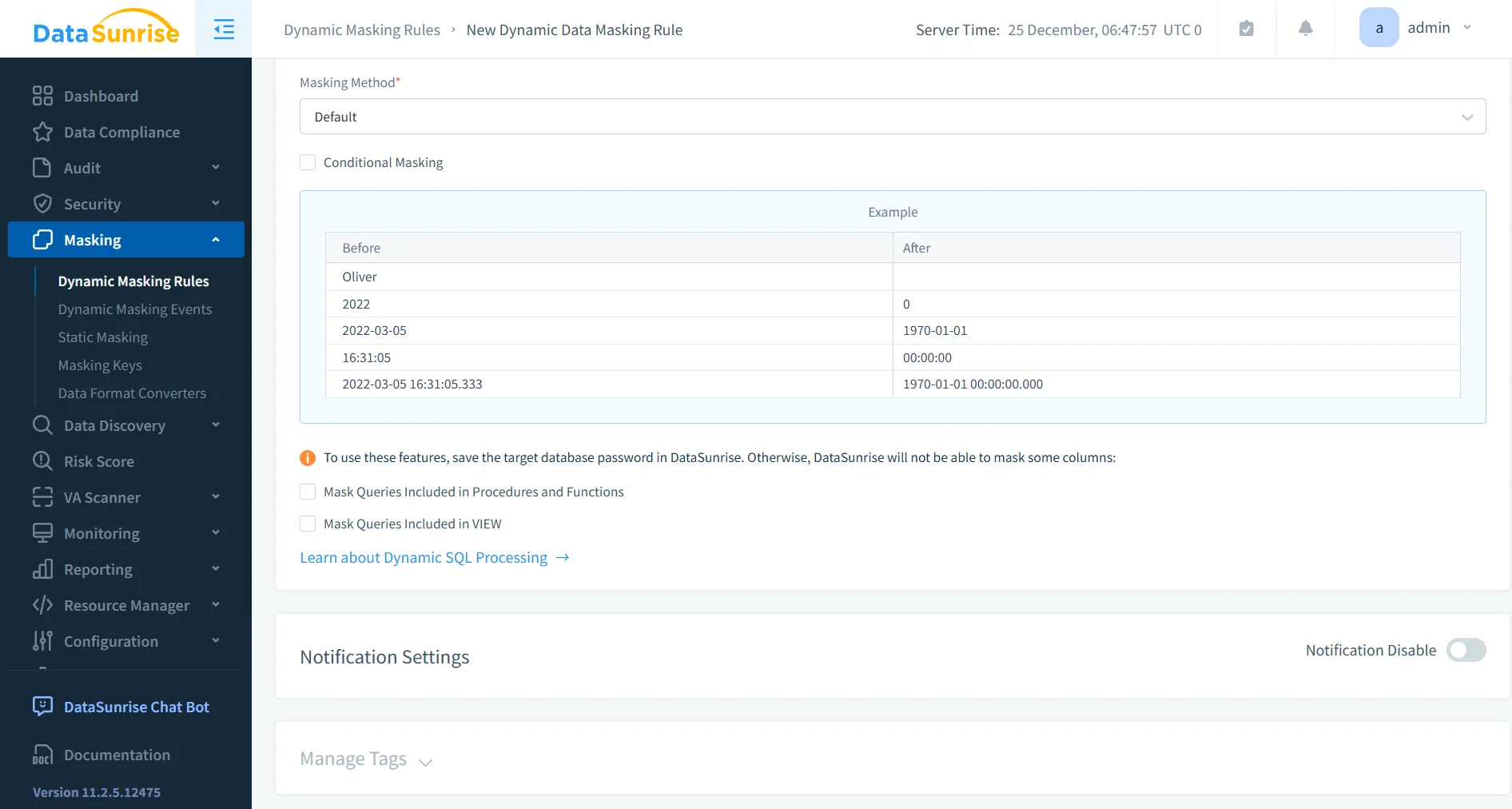
Masking is applied directly to query results, which means different users can see different representations of the same data.
For example:
- a support engineer sees
***-***-1234 - a finance user sees the full value
- a third-party vendor sees completely masked data
All of this happens without modifying the underlying table or creating multiple views.
Centralized Policy Management
Instead of scattering masking logic across views and permissions, DataSunrise allows you to define rules in one place.
Policies can include:
- user or role
- IP address or network zone
- database or schema
- query type or operation
Once defined, these rules apply consistently across the environment. No more hunting down forgotten views or broken permissions.
Automated Sensitive Data Discovery
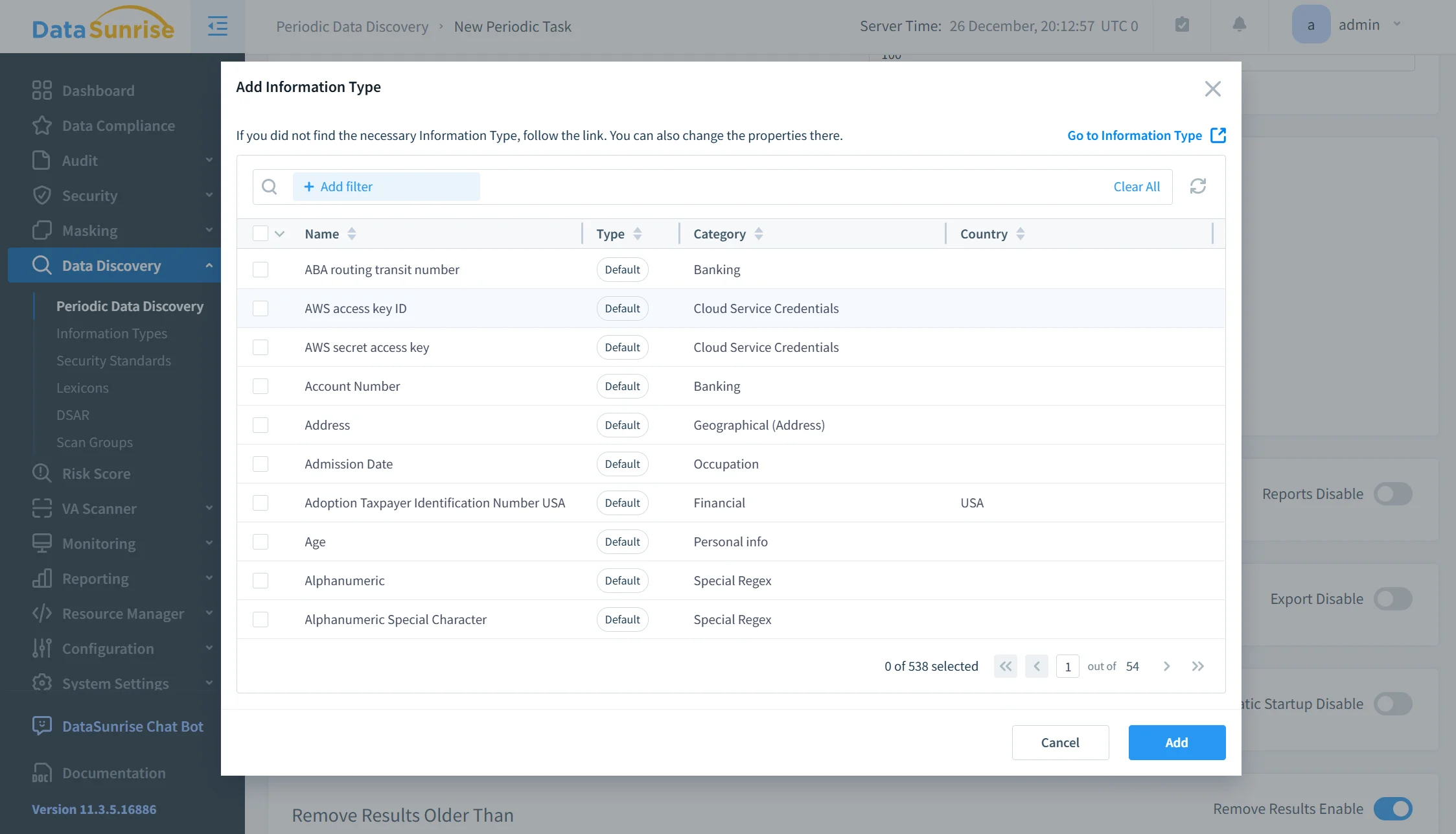
Before you can mask data, you need to know where it lives. That’s usually where things fall apart in real environments.
DataSunrise scans databases to identify sensitive fields such as:
- personal data (PII)
- financial information
- credentials and tokens
- regulated data categories
This removes the need for manual classification, which is error-prone and usually outdated five minutes after you finish it.
Cross-Platform Enforcement
Most environments don’t run just Sybase. There’s usually PostgreSQL, MySQL, maybe some analytics engine thrown in for good measure.
DataSunrise applies the same masking policies across multiple database platforms. That means:
- consistent protection across systems
- no duplicated policy logic
- unified governance
So instead of solving the same problem five different ways, you solve it once.
Real-Time Monitoring and Alerting
Every query, access attempt, and policy action can be monitored in real time.
You can detect:
- unusual access patterns
- privilege misuse
- suspicious query behavior
Alerts can be triggered instantly, which gives security teams visibility before things escalate into incidents.
Audit-Ready Compliance Reporting
All masking actions and access events are logged and structured for reporting.
This is where things get practical:
- you can show exactly who accessed what
- demonstrate that sensitive data was masked
- generate reports aligned with GDPR, HIPAA, PCI DSS, or SOX
Instead of scrambling during audits, you already have the evidence.
Business Impact of Dynamic Data Masking in Sybase
| Business Impact | Description |
|---|---|
| Reduced Exposure | Sensitive data remains hidden during normal query activity through dynamic data masking, reducing the risk of insider misuse and accidental leaks. |
| Faster Compliance | Policies align with regulatory requirements using centralized compliance controls, eliminating manual enforcement across schemas. |
| Lower Maintenance | Centralized rules replace multiple SQL views and scripts, supported by automated data discovery and unified policy management. |
| Safe Data Access | Users can work with production systems without full data exposure, enforced through role-based access control and masking policies. |
| Audit Readiness | All masking and access events are tracked centrally with data audit and monitoring tools, simplifying reporting and investigations. |
Conclusion
Sybase provides strong security fundamentals, but it does not include a native dynamic masking framework. As a result, organizations rely on manual workarounds that become difficult to maintain over time.
Dynamic Data Masking in Sybase becomes significantly more effective when implemented as a centralized control rather than a collection of SQL tricks, especially when using dynamic data masking solutions designed for real-time enforcement.
DataSunrise replaces fragmented logic with automated data discovery, policy-based masking, and unified monitoring through data audit and database activity monitoring. This approach reduces operational overhead while improving data protection and strengthening data compliance.
If the goal is to protect sensitive data without breaking workflows, dynamic masking must move beyond views and permissions into a managed, policy-driven system.
Protect Your Data with DataSunrise
Secure your data across every layer with DataSunrise. Detect threats in real time with Activity Monitoring, Data Masking, and Database Firewall. Enforce Data Compliance, discover sensitive data, and protect workloads across 50+ supported cloud, on-prem, and AI system data source integrations.
Start protecting your critical data today
Request a Demo Download Now