How to Apply Static Masking in Apache Cloudberry
Implementing static masking for Apache Cloudberry has become essential for protecting sensitive information in non-production environments. According to recent research from IBM, the average cost of a data breach reached $4.88 million in 2024, making robust data security practices more critical than ever.
Apache Cloudberry, an open-source MPP database built on PostgreSQL, requires comprehensive data protection strategies to secure sensitive data during development and testing workflows. Organizations can leverage Cloudberry's architecture and data loading features while implementing proper masking techniques.
This guide provides practical steps for implementing static masking using native approaches and explores how DataSunrise automates and enhances data protection for Apache Cloudberry environments.
Understanding Static Masking in Apache Cloudberry
Static data masking creates a sanitized database copy by permanently replacing sensitive data with realistic but fictitious values. Unlike dynamic masking, which masks data in real-time, static masking physically transforms data in a separate database instance.
This approach proves particularly valuable for development and testing with realistic datasets, analytics environments that need to avoid exposing PII, third-party data sharing for integration testing, and training systems requiring representative data without compromising privacy. Organizations implementing static masking should also consider test data management strategies to maximize effectiveness.
Native Static Masking in Apache Cloudberry
Apache Cloudberry inherits PostgreSQL's data manipulation capabilities. While lacking built-in static masking, you can implement effective masking using native PostgreSQL features. However, organizations should be aware of potential security threats when working with sensitive data in non-production environments.
Prerequisites
Before implementing static masking, ensure you have a running Apache Cloudberry instance with administrative privileges, a separate target database for the masked copy, and basic SQL knowledge.
Step 1: Implement Masking Functions
Create custom masking functions for common data types:
-- Mask email addresses
CREATE OR REPLACE FUNCTION mask_email(email TEXT)
RETURNS TEXT AS $$
BEGIN
    RETURN CASE WHEN email IS NULL THEN NULL
           ELSE 'masked_' || md5(email)::text || '@example.com' END;
END;
$$ LANGUAGE plpgsql IMMUTABLE;

-- Mask credit cards (keep first 4 and last 4 digits)
CREATE OR REPLACE FUNCTION mask_credit_card(card_number TEXT)
RETURNS TEXT AS $$
BEGIN
    RETURN CASE WHEN card_number IS NULL THEN NULL
           ELSE substring(card_number from 1 for 4) ||
                repeat('*', length(card_number) - 8) ||
                substring(card_number from length(card_number) - 3) END;
END;
$$ LANGUAGE plpgsql IMMUTABLE;
Step 2: Copy and Mask Data
-- Copy and mask customer table
INSERT INTO cloudberry_masked.customer_data (
    customer_id, email, credit_card
)
SELECT
    customer_id,
    mask_email(email),
    mask_credit_card(credit_card)
FROM cloudberry_production.customer_data;
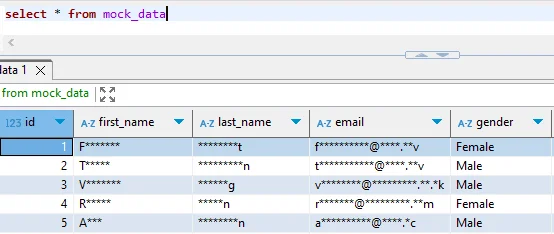
Step 3: Verify Masked Data
-- Compare original and masked data
SELECT customer_id, email FROM cloudberry_production.customer_data LIMIT 3;
SELECT customer_id, email FROM cloudberry_masked.customer_data LIMIT 3;
Limitations of Native Approach
The native approach presents several challenges for organizations with advanced requirements. The manual process requires time-consuming custom SQL for each table, while the lack of automated discovery means sensitive data cannot be identified automatically across schemas. Basic masking functions may not meet compliance regulations needs, and without a comprehensive audit trail, organizations lack tracking of masking operations. Additionally, performance can degrade significantly with large datasets distributed across Cloudberry's MPP architecture.
Enhanced Static Masking with DataSunrise
DataSunrise provides comprehensive data masking that significantly enhances Apache Cloudberry's native capabilities. The platform implements database security best practices while offering advanced features for sensitive data protection.
Key Advantages
- Automated Data Discovery: Identifies sensitive data according to GDPR, HIPAA, and PCI DSS frameworks using advanced data discovery techniques
- Multiple Masking Algorithms: Offers various masking types including randomization, substitution, and format-preserving encryption
- No-Code In-Place Masking: Configure and execute masking without complex SQL scripts
- Referential Integrity: Automatically maintains foreign key relationships and table relations across masked tables
- Comprehensive Audit Trail: Logs all masking operations for compliance requirements
- Cross-Platform Support: Apply uniform policies across over 40 database platforms
Implementation Steps with DataSunrise
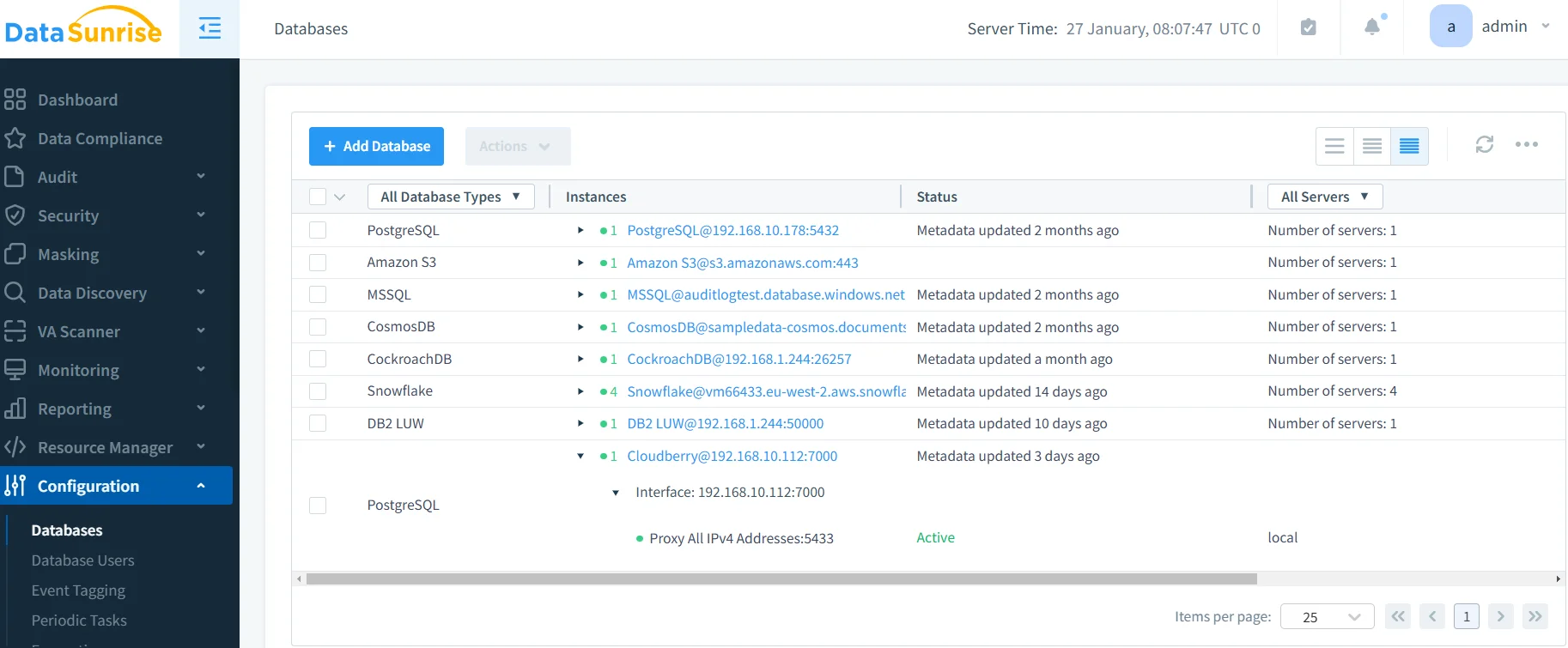
1. Connect Apache Cloudberry Instance
Connect your database through DataSunrise's interface with host, port, and authentication credentials.
2. Discover Sensitive Data
Navigate to the Data Discovery module, select your Apache Cloudberry instance, choose regulatory templates (GDPR, HIPAA, PCI DSS), and execute a discovery scan to automatically identify sensitive data.
3. Configure Masking Rules
Select your target database or schema, choose appropriate masking algorithms for each data type, configure referential integrity preservation, and set masking consistency options.
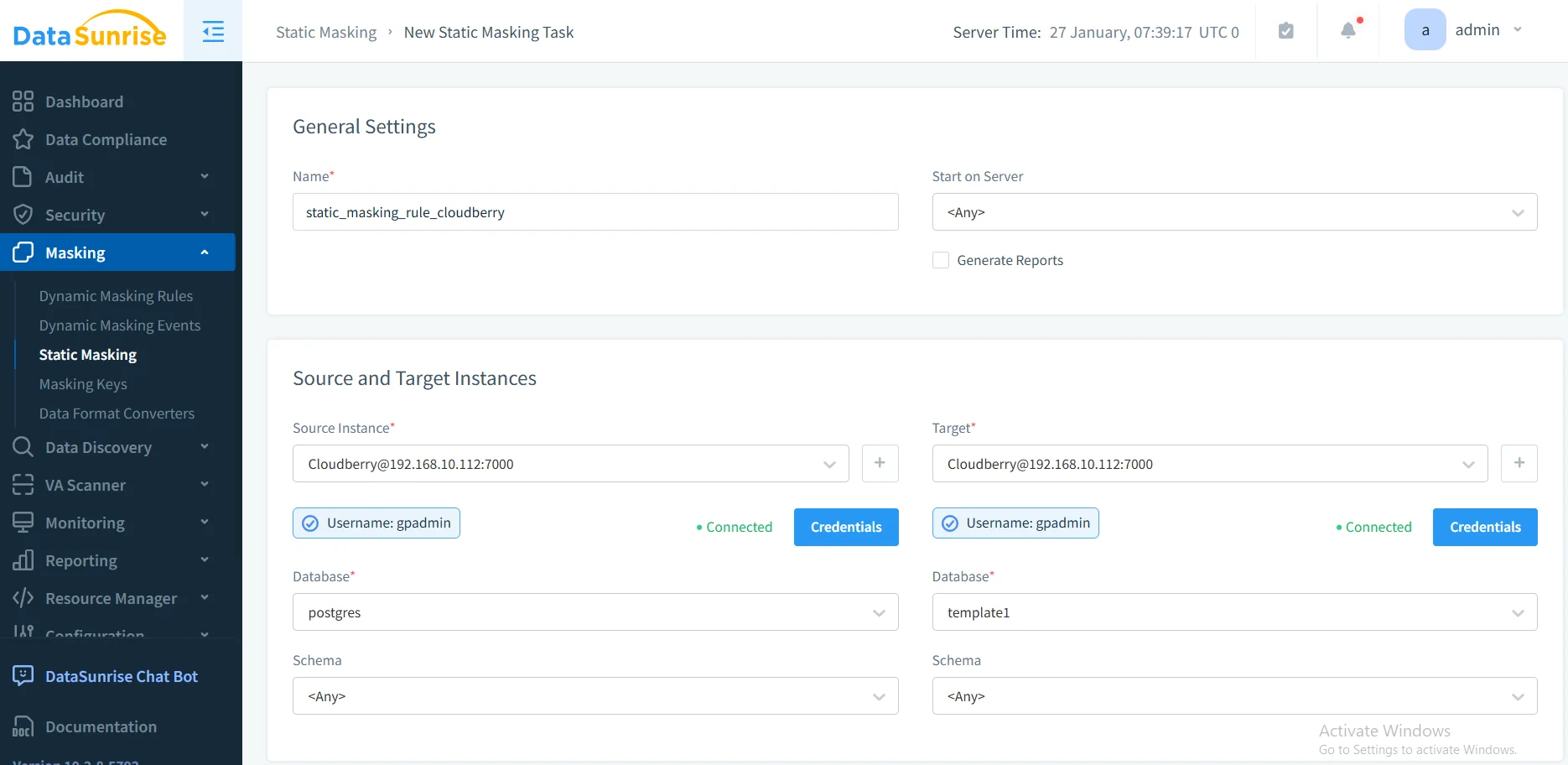
4. Execute In-Place Masking
Select source and target databases, review the masking plan, execute the operation, and monitor progress in real-time through the DataSunrise dashboard.
5. Verify Results
DataSunrise provides validation reports showing records masked, algorithms applied, and compliance coverage metrics.
Best Practices for Static Masking in Apache Cloudberry
| Practice Area | Recommendation |
|---|---|
| Data Classification | Identify all sensitive data across your Cloudberry cluster; prioritize by regulatory requirements and business impact; implement proper access controls and document data flows |
| Algorithm Selection | Use format-preserving masking for application compatibility; choose deterministic masking for consistency or random for security; ensure algorithms meet regulatory requirements and consider database encryption for additional protection |
| Performance Optimization | Process large tables in batches; leverage Cloudberry's MPP architecture for parallel execution; schedule masking during off-peak hours to minimize impact |
| Security & Compliance | Maintain detailed logs of masking activities; restrict access using role-based access controls; establish regular refresh schedules; validate compliance through automated reporting |
Conclusion
While Apache Cloudberry's PostgreSQL foundation provides basic transformation capabilities, native implementations require significant manual effort and lack enterprise features. DataSunrise delivers comprehensive masking through automated discovery, intelligent algorithms, and centralized policy management.
With various deployment options supporting cloud, on-premises, and hybrid environments, DataSunrise provides the flexibility needed for modern data architectures.
Protect Your Data with DataSunrise
Secure your data across every layer with DataSunrise. Detect threats in real time with Activity Monitoring, Data Masking, and Database Firewall. Enforce Data Compliance, discover sensitive data, and protect workloads across 50+ supported cloud, on-prem, and AI system data source integrations.
Start protecting your critical data today
Request a Demo Download Now