How to Ensure Compliance for MariaDB

MariaDB is widely used across industries to manage critical business data, from financial records to healthcare information. As organizations grow, so does the responsibility to maintain data compliance with regulations such as GDPR, HIPAA, PCI DSS, and SOX. Compliance is not just a legal requirement—it protects sensitive data, builds customer trust, and reduces the risk of fines or breaches.
Compliance in databases like MariaDB involves auditing, securing sensitive information, and ensuring governance across distributed environments. For example, organizations processing healthcare data must follow HIPAA security standards, while those handling financial transactions need to comply with PCI DSS requirements. At the same time, global privacy laws like the General Data Protection Regulation (GDPR) demand strong controls over personal information storage and access.
MariaDB itself provides several built-in features to support compliance, but these are often not enough for enterprises with complex environments. That’s where advanced solutions such as DataSunrise add value. For technical reference on MariaDB features, the official MariaDB documentation remains an essential resource.
What is Compliance?
Compliance in database environments refers to meeting the requirements of legal, regulatory, and industry frameworks. It ensures that sensitive data is collected, stored, and processed in a secure and transparent manner.
For MariaDB users, compliance typically includes:
- Protecting sensitive data such as Personally Identifiable Information (PII) and Protected Health Information (PHI).
- Maintaining audit trails to track access and modifications for regulatory inspections.
- Enforcing access controls so users only have the permissions required for their roles.
- Implementing encryption and masking to reduce risks of exposure.
- Staying aligned with global regulations like GDPR, HIPAA, and SOX.
Without compliance, organizations face not only heavy fines but also reputational damage and operational disruption. Therefore, a structured approach that combines MariaDB’s native features with advanced monitoring and automation tools is essential.
For more background, explore what is database security and how compliance integrates with compliance management systems.
Native MariaDB Compliance Capabilities
MariaDB Audit Plugin
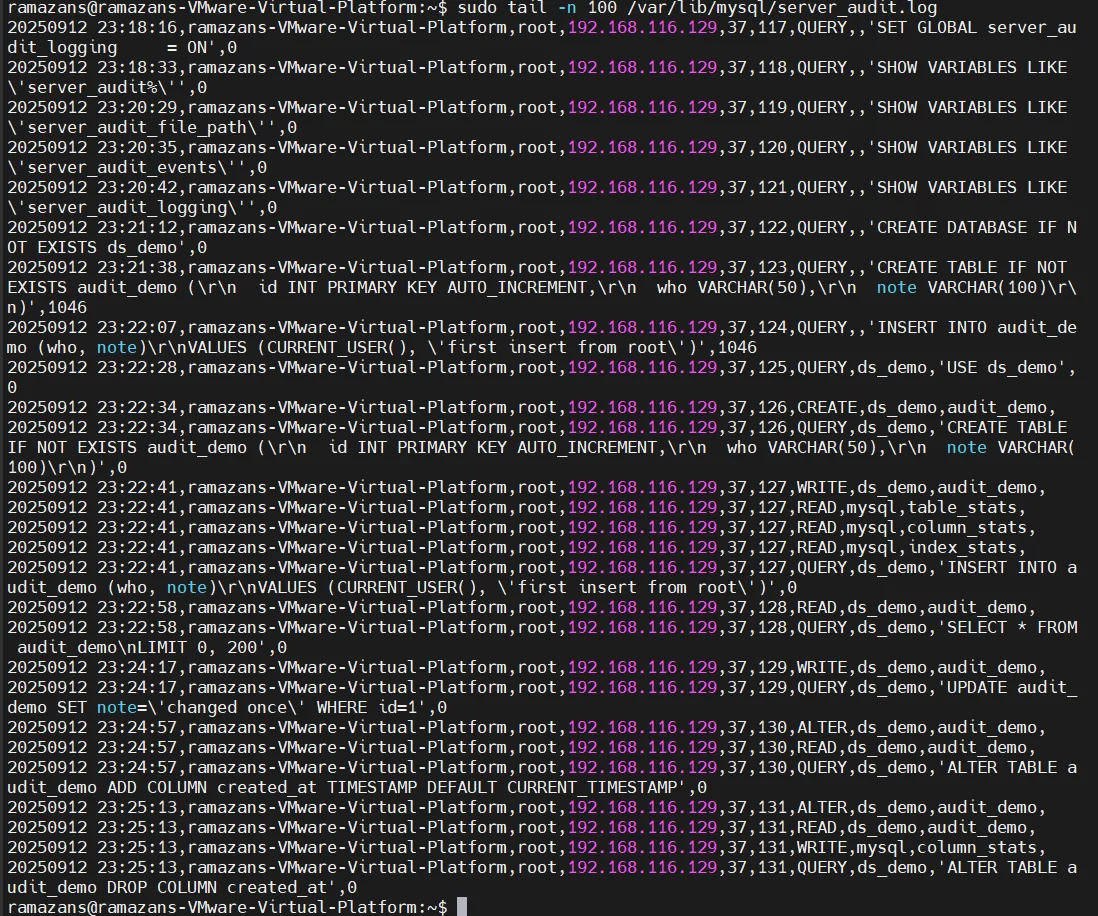
The MariaDB Audit Plugin records queries and user activities. It is essential for building an audit trail that can be reviewed during inspections or forensic analysis. Logs can be written to files or forwarded to syslog for centralized logging.
INSTALL SONAME 'server_audit';
SET GLOBAL server_audit_logging = ON;
SET GLOBAL server_audit_events = 'CONNECT,QUERY,TABLE';
Configure log output to file:
SET GLOBAL server_audit_output_type = 'FILE';
SET GLOBAL server_audit_file_path = '/var/log/mariadb_audit.log';
Redirect logs to syslog for SIEM integration:
SET GLOBAL server_audit_output_type = 'SYSLOG';
SET GLOBAL server_audit_syslog_facility = 'LOG_USER';
SET GLOBAL server_audit_syslog_priority = 'LOG_INFO';
Filter events to reduce log volume:
SET GLOBAL server_audit_events = 'QUERY_DDL,QUERY_DML,CONNECT';
Role-Based Access Control (RBAC)
MariaDB supports role-based access control to simplify privilege management. Instead of granting permissions directly to each user, administrators define roles and assign them. This ensures consistent, auditable, and least-privilege access.
CREATE ROLE compliance_auditor;
GRANT SELECT, SHOW VIEW ON *.* TO compliance_auditor;
GRANT compliance_auditor TO 'auditor1'@'localhost';
SET DEFAULT ROLE compliance_auditor TO 'auditor1'@'localhost';
Activate a role during a session:
SET ROLE compliance_auditor;
Revoke unnecessary privileges:
REVOKE SELECT ON sensitive_schema.* FROM compliance_auditor;
Assign multiple roles with defaults:
CREATE ROLE data_viewer, data_editor;
GRANT data_viewer TO 'user1'@'localhost';
GRANT data_editor TO 'user1'@'localhost';
SET DEFAULT ROLE data_viewer FOR 'user1'@'localhost';
Learn more about best practices in database activity monitoring.
Encryption
Encryption protects data both at rest and in transit. MariaDB provides options for securing files and communications.
Encryption at Rest
Enable encryption plugin:
[mariadb]
plugin_load_add = file_key_management
file_key_management_filename = /etc/mysql/encryption/keyfile.enc
file_key_management_encryption_algorithm = AES_CTR
innodb_encrypt_tables = ON
innodb_encrypt_log = ON
encrypt_binlog = ON
Rotate encryption keys:
ALTER INSTANCE ROTATE INNODB MASTER KEY;
Encryption in Transit
Configure TLS/SSL on the server:
[mariadb]
ssl-ca   = /etc/mysql/certs/ca.pem
ssl-cert = /etc/mysql/certs/server-cert.pem
ssl-key  = /etc/mysql/certs/server-key.pem
Secure client connection:
mysql -u auditor -p --ssl-ca=ca.pem --ssl-cert=client-cert.pem --ssl-key=client-key.pem
Encryption helps ensure compliance with frameworks like PCI DSS. You can also explore database encryption for additional insights.
DataSunrise for MariaDB Compliance
Sensitive Data Discovery
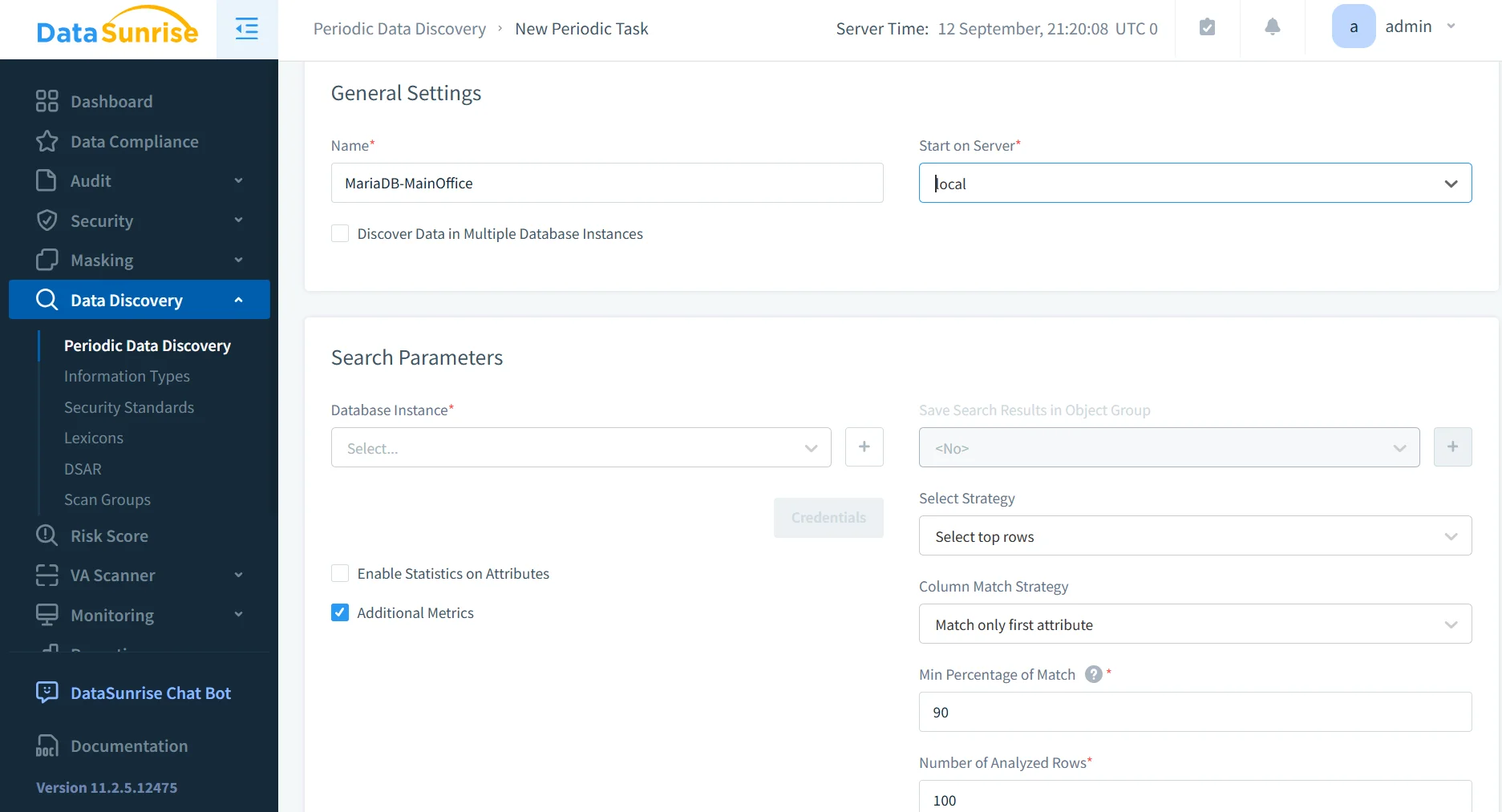
DataSunrise automatically scans MariaDB databases to identify Personally Identifiable Information (PII), Protected Health Information (PHI), and payment card details. Unlike manual searches, it uses contextual analysis, dictionaries, and pattern recognition to locate hidden sensitive data across structured and unstructured sources.
Administrators can schedule recurring discovery tasks to ensure new datasets are classified as soon as they are added. Results are presented in classification reports that can be directly integrated with masking or auditing policies. This proactive detection ensures no compliance blind spots remain.
See how this compares to data discovery methods across other databases.
Dynamic Data Masking
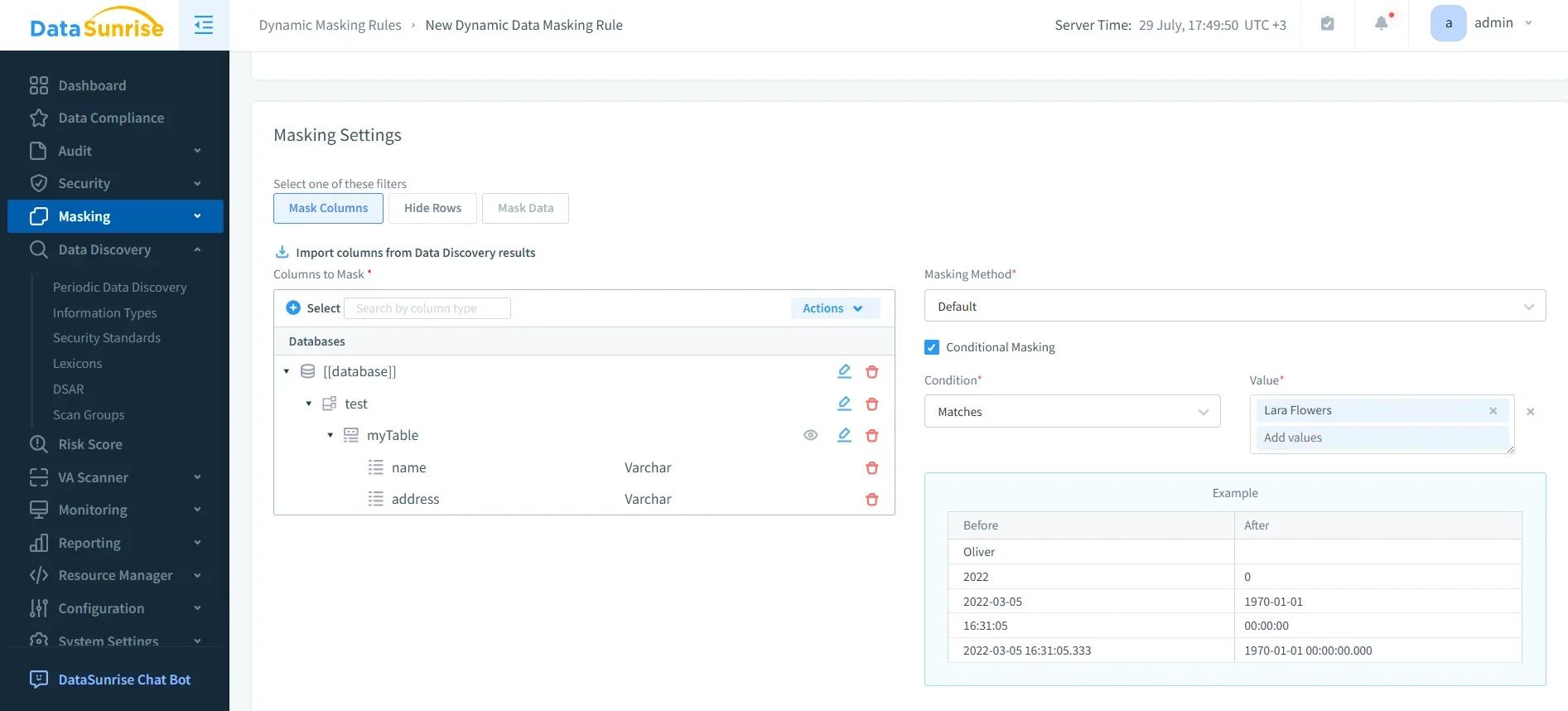
Dynamic masking ensures that unauthorized users cannot view sensitive fields such as credit card numbers, social security numbers, or medical records. Instead of altering stored data, masking applies rules on-the-fly when queries are executed.
For example, a masked query may return ****-****-****-1234 instead of the full card number. Different masking rules can be applied depending on user roles, ensuring that analysts or developers see only obfuscated data while compliance officers retain full visibility.
DataSunrise masking policies are flexible and can be enforced across multiple MariaDB instances simultaneously, making them highly effective for maintaining GDPR and PCI DSS compliance in real time.
For details, see dynamic data masking and static data masking.
Compliance Autopilot
The Compliance Autopilot reduces manual effort by continuously aligning MariaDB configurations with evolving frameworks such as GDPR, HIPAA, PCI DSS, and SOX.
Key features include:
- Automatic enforcement of compliance rules when new users, roles, or database objects are created.
- Continuous monitoring for compliance drift and corrective adjustments in real time.
- Predefined policy templates that align with industry regulations, reducing setup time.
- Audit-ready reporting that simplifies external inspections.
In addition, Compliance Autopilot provides adaptive policy learning by tracking organizational changes and recommending adjustments to meet future regulatory updates. It also supports multi-environment synchronization, ensuring that compliance settings remain consistent across test, staging, and production databases. This guarantees that no environment becomes a weak link in the compliance chain.
This functionality ensures that compliance is not a one-time setup but an ongoing, automated process. Learn more about automated compliance management and compliance automation.
Centralized Monitoring
Instead of monitoring each MariaDB instance separately, DataSunrise provides a centralized console for compliance management.
Capabilities include:
- Unified visibility across multiple MariaDB environments, whether on-premises or in the cloud.
- Real-time alerts on suspicious activities such as failed logins, mass data exports, or abnormal queries.
- Integration with SIEM systems to extend monitoring into enterprise-wide security operations.
- Historical reporting and analytics to analyze trends and strengthen audit preparation.
Beyond these, DataSunrise enables cross-database correlation of events, making it easier to identify threats spanning multiple systems. Administrators can also configure custom alert thresholds to reduce noise and focus on high-risk anomalies. Advanced integration with IT workflows allows alerts to trigger automated responses, such as revoking user access or blocking suspicious queries.
Centralized monitoring reduces complexity, eliminates silos, and ensures compliance teams can act on threats quickly and effectively. This functionality extends the scope of database activity history and supports real-time monitoring.
Business Impact of Ensuring MariaDB Compliance
| Benefit | Impact |
|---|---|
| Reduced audit preparation time | Pre-built compliance reports simplify inspections |
| Lower risk of data breaches | Real-time monitoring and masking reduce exposure |
| Continuous compliance | Automated policy alignment prevents drift |
| Improved operational efficiency | Centralized management across environments |
| Cost savings | Avoidance of regulatory fines and penalties |
| Stronger customer trust | Demonstrates commitment to safeguarding sensitive information |
| Scalability for growth | Compliance processes adapt as databases and regulations evolve |
For broader perspective, review database compliance strategies and the role of DSPM in modern enterprises.
Conclusion
Ensuring compliance for MariaDB requires more than just enabling audit logs or defining access roles. Native features provide a foundation, but advanced protection comes from DataSunrise. With automated discovery, masking, centralized monitoring, and compliance autopilot, organizations can maintain continuous alignment with GDPR, HIPAA, PCI DSS, and SOX while reducing risks and operational burdens.
By combining MariaDB’s built-in capabilities with DataSunrise, businesses can achieve a reliable and scalable compliance strategy that protects sensitive data and ensures audit readiness. Explore more in the knowledge center to understand how DataSunrise strengthens compliance across different databases.
Protect Your Data with DataSunrise
Secure your data across every layer with DataSunrise. Detect threats in real time with Activity Monitoring, Data Masking, and Database Firewall. Enforce Data Compliance, discover sensitive data, and protect workloads across 50+ supported cloud, on-prem, and AI system data source integrations.
Start protecting your critical data today
Request a Demo Download Now