How to Manage Data Compliance for Teradata
Managing data compliance in Teradata environments is critical as enterprises expand their data ecosystems across on-premises, hybrid, and cloud deployments. Regulations such as GDPR, HIPAA, PCI DSS, and SOX demand that sensitive data is protected, auditable, and properly masked when accessed.
Teradata offers built-in compliance capabilities, yet organizations often face challenges around scalability, advanced monitoring, and automated policy alignment. According to the Verizon 2024 Data Breach Investigations Report, human errors and system intrusions remain leading causes of breaches, underscoring the need for robust compliance frameworks. Additionally, Gartner predicts that enterprises adopting automated compliance management will significantly reduce regulatory risks and operational costs.
This guide outlines both native Teradata features and how DataSunrise enhances them with enterprise-grade compliance automation.
What is Data Compliance?
Data compliance refers to the policies, tools, and processes organizations adopt to ensure they meet legal, regulatory, and internal requirements for data protection. It involves safeguarding personally identifiable information (PII), protected health information, financial records, and other sensitive data.
At its core, data compliance ensures three critical outcomes:
- Confidentiality: Protecting sensitive data from unauthorized disclosure with role-based access controls.
- Integrity: Maintaining accuracy and preventing unauthorized modifications through secure database audit trails.
- Availability: Guaranteeing that data remains accessible to authorized users when needed, supported by continuous data protection.
For Teradata users, compliance means configuring access controls, implementing audit rules, and ensuring consistent application of regulatory frameworks like GDPR, HIPAA, and PCI DSS across all environments. Without such measures, organizations risk regulatory fines, reputational damage, and security breaches.
Native Compliance Capabilities in Teradata
Teradata provides administrators with compliance tools designed to track, secure, and audit access to critical datasets. These features allow organizations to align with major regulations, though they require manual setup and ongoing oversight.
Access Logging and Controls
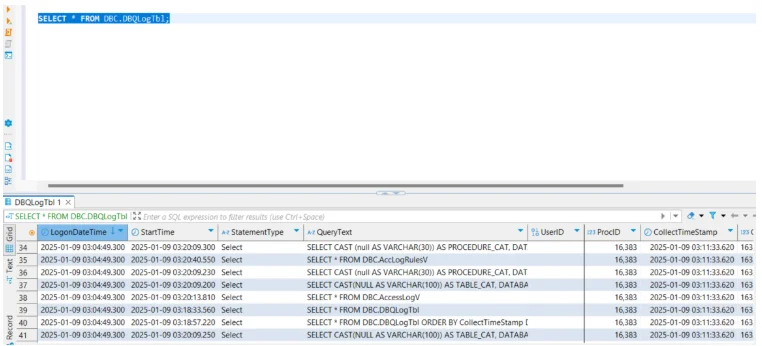
Teradata Database Logging (DBQL) and Access Logging capture user activity, including login attempts, executed SQL statements, and resource consumption.
-- Enable DBQL with detailed logging
BEGIN QUERY LOGGING WITH TEXT, OBJECTS, STEPINFO, SQL ON ALL;

-- Log activity for a specific user
BEGIN QUERY LOGGING WITH SQL, OBJECTS ON user_jane;

-- Track activity at the table level
BEGIN LOGGING ON ALL DBC.TABLES COLUMNS;

-- Example: Stop logging for a user when no longer needed
END QUERY LOGGING ON user_jane;
- DBQL provides performance and query details.
- Access Logging creates event trails for user access to sensitive objects.
- Administrators can filter activity by object type, statement type, or specific users.
-- Log SELECT statements on a sensitive table
BEGIN LOGGING WITH TEXT ON finance_db.customer_accounts;

-- Log failed login attempts
BEGIN LOGGING ON ALL DBC.SESSIONS WHERE EVENT = 'FAILED LOGIN';
Learn more about audit logs and their role in compliance.
Row-Level Security and Roles
Teradata supports granular role-based access controls, ensuring that users only access what is relevant to their role.
-- Create a role for financial analysts
CREATE ROLE role_fin_analyst;

-- Grant role access to specific tables
GRANT SELECT ON finance_db.reports TO role_fin_analyst;

-- Assign the role to a user
GRANT role_fin_analyst TO user_john;

-- Revoke access when no longer required
REVOKE role_fin_analyst FROM user_john;
Row-level security can also be applied using views with filters, which enforce policies directly at the query level.
-- Create a view restricting access to specific department data
CREATE VIEW finance_db.restricted_view AS
SELECT * FROM finance_db.transactions
WHERE department_id = SESSIONUSER_DEPT();

-- Grant access only to the role
GRANT SELECT ON finance_db.restricted_view TO role_fin_analyst;
For additional insights, review how access controls strengthen compliance.
Column-Level Protection
With column-level access controls, administrators can limit which fields are available to specific users. For instance, sensitive identifiers like Social Security Numbers can be restricted from general reporting queries.
-- Restrict access to sensitive column
REVOKE SELECT ON finance_db.customer_data (ssn) FROM PUBLIC;

-- Grant limited access to non-sensitive columns
GRANT SELECT (customer_id, full_name, email) ON finance_db.customer_data TO role_fin_analyst;

-- Masking sensitive fields through views
CREATE VIEW finance_db.masked_customer_data AS
SELECT customer_id,
       full_name,
       'XXX-XX-' || SUBSTRING(ssn FROM 8 FOR 4) AS masked_ssn,
       email
FROM finance_db.customer_data;

GRANT SELECT ON finance_db.masked_customer_data TO role_fin_analyst;
To extend this, you can explore static data masking techniques for compliance scenarios.
Managing Data Compliance in Teradata with DataSunrise
DataSunrise extends Teradata compliance capabilities with advanced automation, cross-platform visibility, and intelligent rule orchestration. Its Compliance Autopilot and Sensitive Data Discovery reduce manual work while ensuring continuous regulatory alignment.
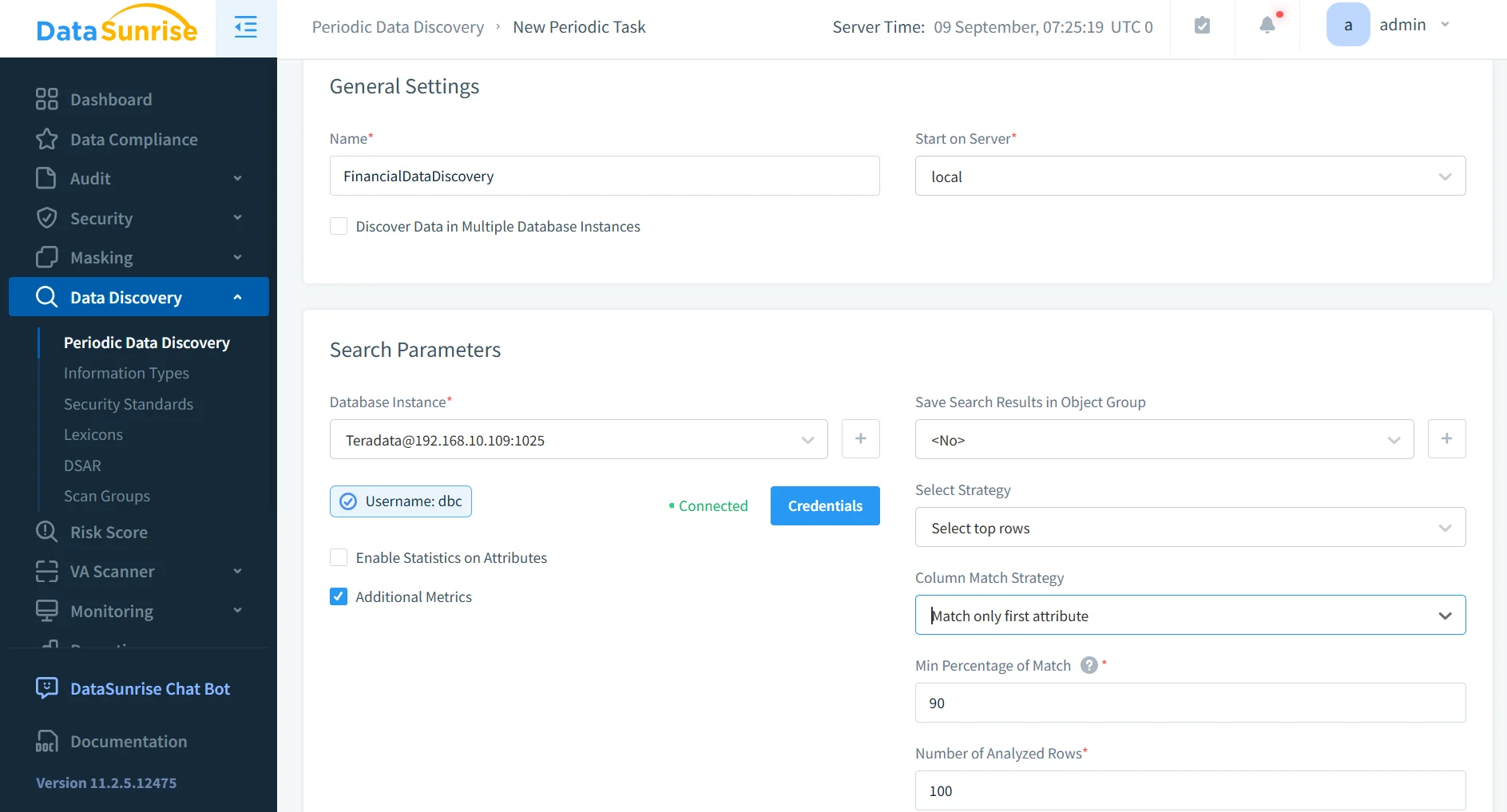
Sensitive Data Discovery
DataSunrise automatically scans Teradata environments to identify sensitive records such as PII, PHI, and financial data. It uses pattern recognition, contextual analysis, and OCR scanning to detect regulated content not only in structured tables but also in JSON fields, logs, and even scanned images.
By mapping where sensitive data resides, administrators can quickly apply data discovery and masking policies before compliance risks emerge. This proactive discovery process helps ensure that no critical dataset is overlooked.
Automated Compliance Reporting
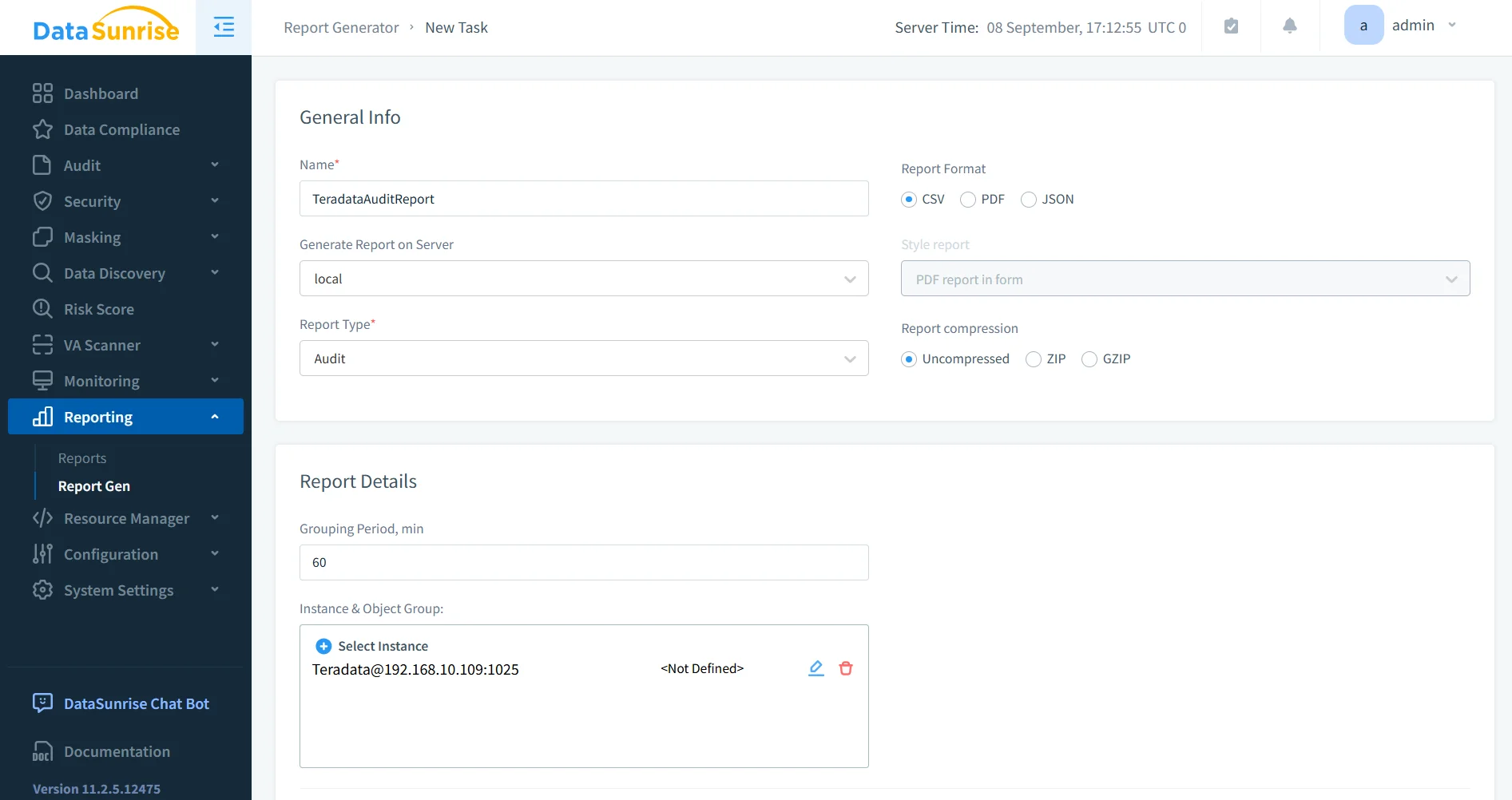
Preparing audit evidence often requires days of manual work. DataSunrise streamlines this with one-click compliance reporting.
- Generate instant reports mapped to GDPR, HIPAA, PCI DSS, and SOX requirements.
- Reports include detailed data activity history, masking activity, and policy enforcement evidence.
- These reports are audit-ready, ensuring regulators and internal stakeholders can quickly verify compliance posture.
To further enhance efficiency, organizations can use report generation tools built into DataSunrise.
Dynamic Data Masking
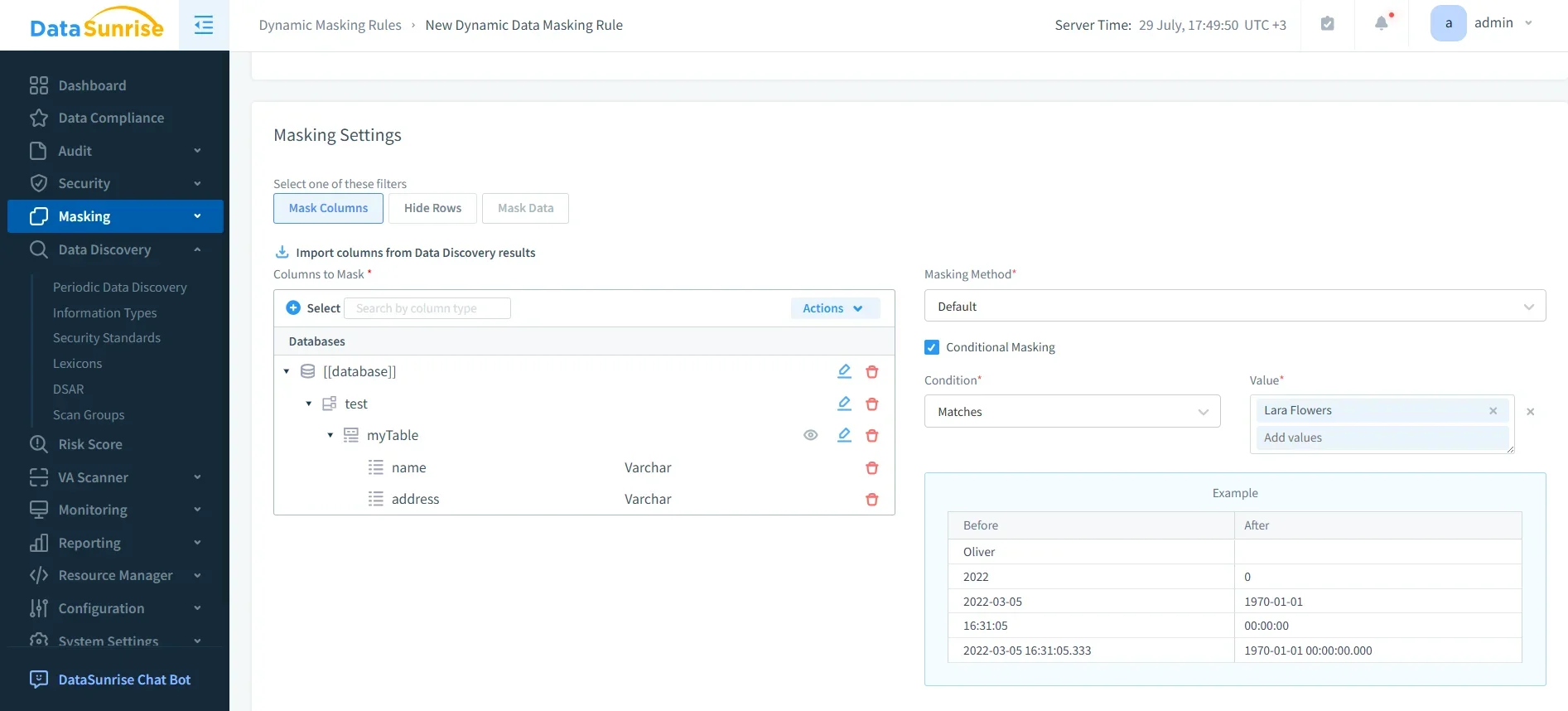
DataSunrise supports real-time dynamic data masking that adapts to user roles and context. Sensitive fields such as SSNs, medical records, or payment card numbers are masked during query execution without altering the underlying data.
- Context-aware rules ensure only authorized personnel see unmasked values.
- Flexible masking formats allow partial, random, or custom obfuscation patterns.
- Masking works seamlessly across BI tools and applications, ensuring usability is preserved while compliance is enforced.
This feature complements database firewall policies for layered security.
Compliance Autopilot
With Compliance Autopilot, DataSunrise continuously aligns governance policies with evolving regulations such as GDPR, HIPAA, PCI DSS, and SOX. Instead of manually adjusting rules, the system performs continuous regulatory calibration, ensuring ongoing compliance.
- Machine Learning audit rules detect when new tables or users are added and automatically apply relevant policies.
- Periodic scans prevent compliance drift, keeping Teradata environments in sync with regulatory frameworks.
- Administrators can rely on predefined compliance templates, reducing the burden of manual policy configuration.
- Integration with existing enterprise systems ensures that compliance policies extend beyond Teradata into connected applications and services.
This is tightly connected to automated compliance reporting, making both functions complementary for long-term compliance assurance.
Centralized Monitoring
DataSunrise delivers a unified dashboard that consolidates monitoring across all Teradata instances and more than 40 supported data platforms.
- Administrators gain cross-database visibility, eliminating siloed compliance management.
- Real-time alerts detect suspicious activity such as mass exports, unusual queries, or failed login attempts.
- Integration with SIEM systems allows seamless incident escalation into enterprise-wide monitoring workflows.
- Behavior analytics can be applied to highlight unusual user activity, improving insider threat detection.
- Custom thresholds enable tuning alert sensitivity, reducing false positives and streamlining incident response.
Learn more about database activity monitoring as part of compliance management.
Business Impact of Managing Teradata Compliance with DataSunrise
| Benefit | Description |
|---|---|
| Reduced Compliance Gaps | Automated discovery and policy calibration ensure regulatory coverage. |
| Operational Efficiency | Eliminates repetitive manual configuration and oversight. |
| Audit Readiness | Instant, audit-ready reports for regulators and stakeholders. |
| Risk Reduction | Real-time alerts and masking minimize chances of breaches or insider misuse. |
| Scalable Protection | Seamless deployment across on-prem, hybrid, and cloud Teradata environments. |
| Improved Data Governance | Centralized monitoring strengthens accountability and transparency. |
| Lower Compliance Costs | Automation reduces the time and expense of meeting regulatory requirements. |
For additional context, explore how database encryption and threat detection contribute to overall compliance.
Conclusion
Teradata’s native compliance features provide a strong foundation, but modern enterprises need advanced automation and centralized oversight to handle complex, multi-environment infrastructures.
With DataSunrise Compliance Manager, organizations can automate compliance for Teradata, accelerate time-to-compliance, and reduce regulatory risks. From discovery to masking, auditing, and reporting, DataSunrise delivers a zero-touch, enterprise-ready compliance framework tailored for both technical teams and business stakeholders.
Protect Your Data with DataSunrise
Secure your data across every layer with DataSunrise. Detect threats in real time with Activity Monitoring, Data Masking, and Database Firewall. Enforce Data Compliance, discover sensitive data, and protect workloads across 50+ supported cloud, on-prem, and AI system data source integrations.
Start protecting your critical data today
Request a Demo Download Now