How to Mask Sensitive Data in Apache Cloudberry
In today's data-driven landscape, protecting sensitive information has become critical. According to the Ponemon Institute's 2024 report, organizations experience an average of 7,343 insider incidents annually, with costs reaching $648,062 per incident—underscoring the importance of robust data masking solutions.
Apache Cloudberry, an open-source MPP database derived from Greenplum, handles large-scale analytical workloads. Organizations storing PII, financial records, or healthcare data require sophisticated masking to protect sensitive information while maintaining data utility. Proper data management practices are essential for maintaining both security and operational efficiency.
This guide explores native masking approaches in Apache Cloudberry and demonstrates how DataSunrise's Zero-Touch Data Masking enhances protection with Autonomous Compliance Orchestration.
Understanding Data Masking in Apache Cloudberry
Data masking transforms sensitive information into fictitious but realistic values, protecting confidential data while preserving format and usability. For Cloudberry's MPP architecture, effective masking must address distributed data across segments, maintain performance at scale, preserve referential integrity, and satisfy regulatory frameworks like GDPR, HIPAA, and PCI DSS. Organizations must implement proper access controls to ensure only authorized users can view unmasked data.
Native Approaches to Masking Data in Apache Cloudberry
Apache Cloudberry provides SQL-based masking methods. These native approaches offer essential functionality for protecting sensitive information. For comprehensive protection, organizations should combine native masking with database security best practices.
1. View-Based Masking
Create database views that apply masking functions to sensitive columns. This approach implements role-based access controls to provide different data visibility levels:
-- Create a view with masked sensitive data
CREATE VIEW customer_data_masked AS
SELECT
    customer_id,
    CASE
        WHEN CURRENT_USER IN ('analyst_role', 'developer_role')
        THEN 'XXX-XX-' || RIGHT(ssn, 4)
        ELSE ssn
    END AS ssn,
    CASE
        WHEN CURRENT_USER IN ('analyst_role', 'developer_role')
        THEN REGEXP_REPLACE(email, '(.{3}).*(@.*)', '\1****\2')
        ELSE email
    END AS email,
    first_name,
    last_name
FROM customers;

-- Grant access to masked view
GRANT SELECT ON customer_data_masked TO analyst_role;
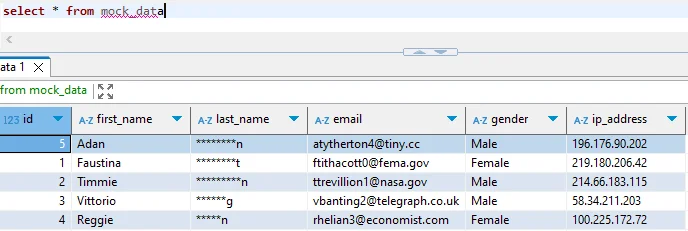
2. Testing Masked Data
Execute sample queries to verify masking:
-- Create test table
CREATE TABLE patient_records (
    patient_id SERIAL PRIMARY KEY,
    full_name VARCHAR(100),
    ssn VARCHAR(11),
    diagnosis TEXT
);

-- Insert sample data
INSERT INTO patient_records (full_name, ssn, diagnosis)
VALUES
    ('Sarah Mitchell', '123-45-6789', 'Type 2 Diabetes'),
    ('David Chen', '987-65-4321', 'Hypertension');

-- Create masked view
CREATE VIEW patient_records_masked AS
SELECT
    patient_id,
    full_name,
    mask_ssn(ssn) AS ssn,
    diagnosis
FROM patient_records;

-- Query masked view
SELECT * FROM patient_records_masked;
Expected output:
patient_id | full_name      | ssn           | diagnosis
-----------+----------------+---------------+-----------------
1          | Sarah Mitchell | XXX-XX-6789   | Type 2 Diabetes
2          | David Chen     | XXX-XX-4321   | Hypertension
Limitations of Native Masking Approaches
While Apache Cloudberry's native SQL-based masking provides foundational capabilities, organizations face several challenges. These limitations can impact compliance regulations adherence and overall data protection strategies:
| Native Feature | Key Limitation | Business Impact |
|---|---|---|
| View-Based Masking | Manual configuration for each table | Time-consuming implementation |
| Function Consistency | No centralized policy management | Inconsistent masking across databases |
| Performance | Masking executed at query time | Potential performance degradation |
| Sensitive Data Discovery | Manual column identification | Critical data may remain unprotected |
| Compliance Reporting | No automated audit trail | Time-consuming documentation |
Enhanced Data Masking with DataSunrise
DataSunrise transforms Cloudberry data masking with No-Code Policy Automation and Surgical Precision Masking. Unlike basic SQL approaches, DataSunrise delivers Comprehensive Sensitive Data Detection with intelligent policy orchestration for MPP environments.
Setting Up DataSunrise for Apache Cloudberry
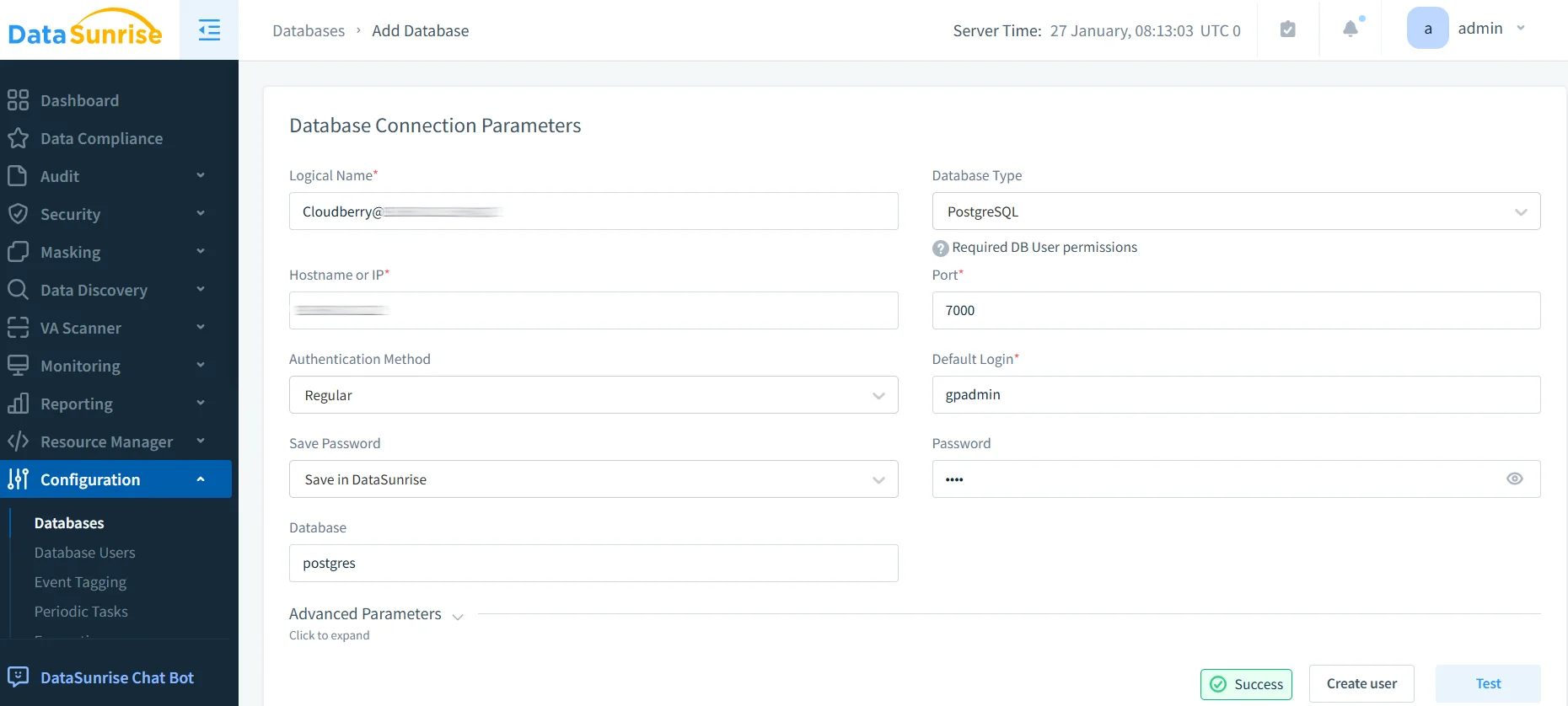
1. Connect to Apache Cloudberry Instance
Establish a secure connection through DataSunrise's interface. DataSunrise automatically detects all database segments for comprehensive coverage.
2. Auto-Discovery of Sensitive Data
DataSunrise's Auto-Discover & Classify engine automatically scans your database using NLP algorithms and machine learning to identify PII, financial data, healthcare information, and custom patterns. This data discovery capability eliminates weeks of manual identification.
3. Configure Dynamic Masking Rules
Create masking policies through DataSunrise's interface without writing SQL. Apply different masking levels based on roles, ensure consistent masking for referential integrity, and maintain data formats for application compatibility. DataSunrise supports multiple masking types including static masking and dynamic masking.
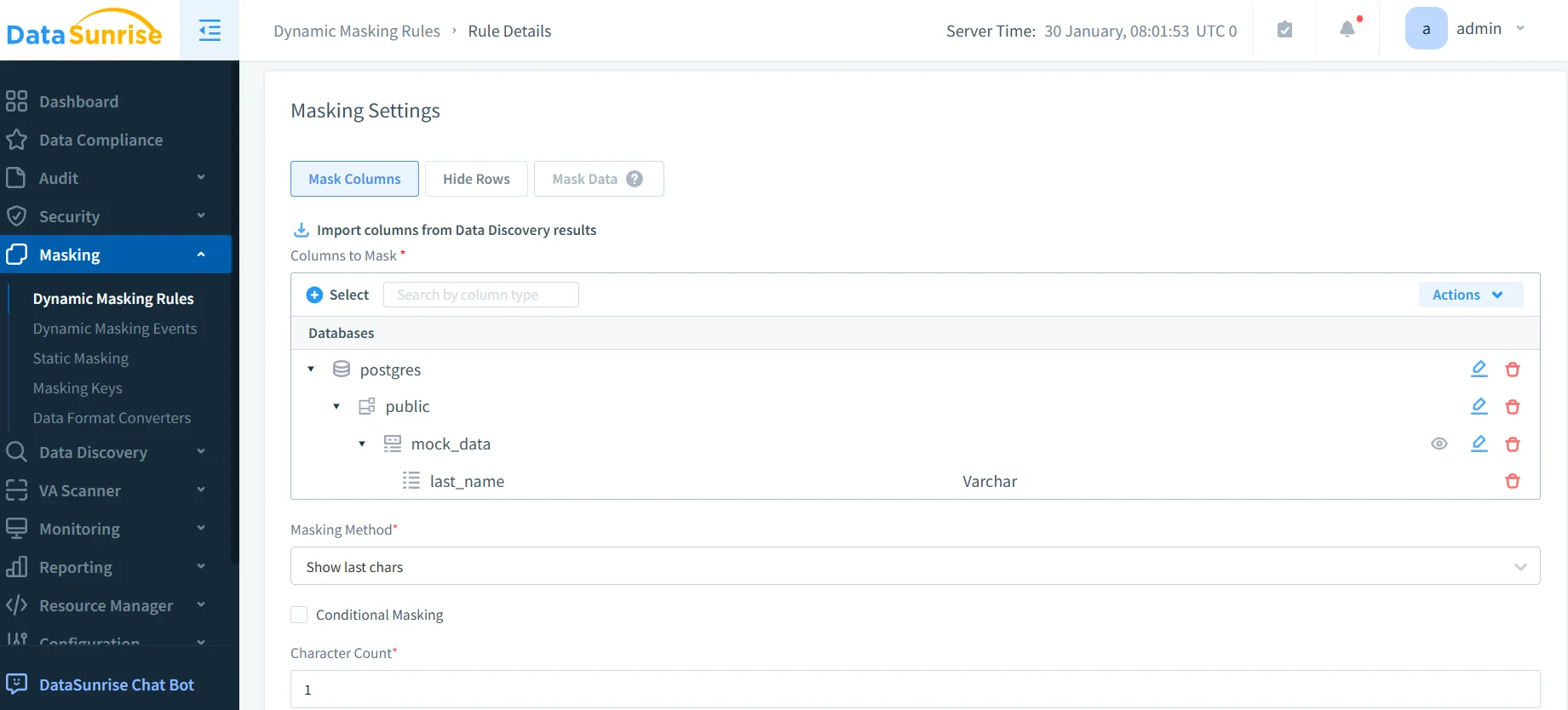
4. Review Masked Data Access
Access comprehensive audit trails through DataSunrise's dashboard with real-time monitoring and detailed event analysis.
Key Advantages of DataSunrise for Apache Cloudberry
Zero-Touch Implementation: Deploy enterprise-grade masking in hours with automated policy generation.
Dynamic Data Masking: Protect sensitive data in real-time without duplicate datasets, maintaining data security.
Centralized Policy Management: Manage policies across multiple clusters and over 40 data storage platforms from a unified console.
Intelligent Policy Orchestration: Machine learning automatically adjusts policies based on classification changes and regulatory requirements.
Automated Compliance Reporting: Pre-configured reports for GDPR, HIPAA, PCI DSS, and SOX.
User Behavior Analytics: Monitor access patterns and detect anomalies using ML algorithms.
Conclusion
As organizations increasingly rely on Apache Cloudberry for business-critical analytics, implementing comprehensive data masking has become essential for protecting sensitive information and maintaining regulatory compliance. While Cloudberry's native SQL-based approaches provide foundational capabilities, organizations with complex security requirements benefit significantly from enhanced solutions like DataSunrise.
DataSunrise provides enterprise-grade data masking designed for MPP environments, offering Zero-Touch Data Masking with Auto-Discover & Mask capabilities, Continuous Compliance Alignment, and Surgical Precision Masking. With flexible deployment modes supporting on-premise, cloud, and hybrid environments, DataSunrise transforms Cloudberry data masking into strategic security assets.
Unlike solutions requiring constant tuning, DataSunrise delivers autonomous protection with No-Code Policy Automation that reduces implementation time from weeks to hours. Suitable for organizations of all sizes—from agile startups to Fortune 500 enterprises—the platform combines user-friendly interfaces with granular controls technical teams demand.
Protect Your Data with DataSunrise
Secure your data across every layer with DataSunrise. Detect threats in real time with Activity Monitoring, Data Masking, and Database Firewall. Enforce Data Compliance, discover sensitive data, and protect workloads across 50+ supported cloud, on-prem, and AI system data source integrations.
Start protecting your critical data today
Request a Demo Download Now