IBM Db2 Audit Log
Introduction
According to IBM’s Cost of a Data Breach Report 2025 — which found the global average cost of a breach dropped to USD 4.44 million — organizations face serious risks from unauthorized access to critical databases. A significant portion of these incidents involves unauthorized access to critical databases. IBM Db2, a cornerstone for many enterprise systems, requires a strong auditing framework to ensure transparency, accountability, and compliance with global data protection laws.
Comprehensive audit logging in IBM Db2 helps track who did what, when, and how. These audit trails are essential for compliance with GDPR, HIPAA, and PCI DSS, ensuring that organizations can demonstrate data access control and maintain operational integrity.
What Is an Audit Log in IBM Db2
An audit log in Db2 captures detailed records of database activity — from user authentication to data access and configuration changes. It provides insight into both successful and failed operations, enabling security teams to investigate anomalies and maintain regulatory compliance.
Key benefits of Db2 audit logs include:
- Visibility into data access and administrative actions
- Accountability through traceable user sessions
- Compliance readiness with evidence-based reporting
- Forensic support for incident response and threat analysis
Native Audit Capabilities in IBM Db2
IBM Db2 offers auditing through its db2audit utility, which provides instance-level and database-level logging. It records activities such as logins, privilege usage, and SQL command execution.
1. Enabling Auditing
To activate auditing for your Db2 instance:
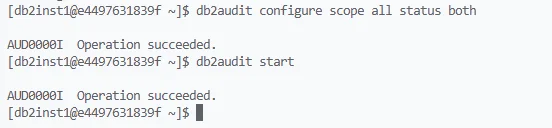
db2audit configure scope all status both
db2audit start
This configuration enables tracking for all auditable events across both instance and database scopes.
2. Capturing and Viewing Logs
You can extract the audit records to a readable format with:
db2audit extract delasc
This command produces a delimited ASCII report summarizing all logged activities, which can then be parsed or imported into analysis tools.
3. Typical Logged Events
- Authentication attempts (success and failure)
- SQL statements executed by users
- Object access (tables, views, indexes)
- Privilege escalation or role assignment
- Configuration and security policy changes
Example: Monitoring Access to a Sensitive Table
To audit access to a sensitive table named customer_data:
Enable auditing for the target database:
db2audit configure scope db status bothConnect and perform monitored actions:
db2 connect to SALESDB user admin using password
select * from customer_data;
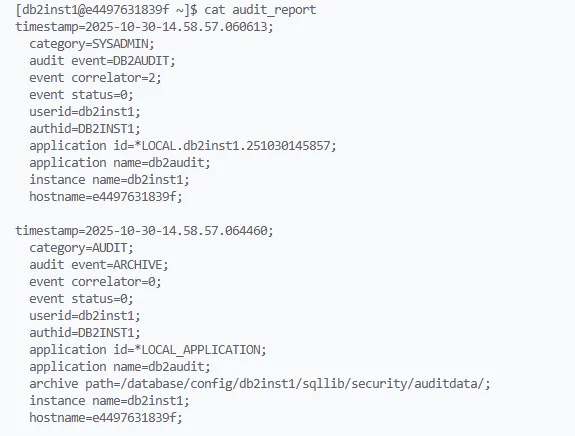
Extract and review:
db2audit extract delasc
more db2audit.delasc
The resulting file will show who accessed the customer_data table and what operations were performed.
Limitations of Native Db2 Audit Logs
While the native db2audit tool is robust, it presents several operational challenges:
| Limitation | Impact |
|---|---|
| Manual extraction required | Increases administrative overhead |
| No real-time alerting | Delays detection of suspicious activity |
| Performance degradation during heavy auditing | Affects production workloads |
| Limited cross-database visibility | Complicates centralized compliance |
| No built-in compliance mapping | Requires manual correlation with GDPR, SOX, HIPAA |
Enhanced Auditing with DataSunrise
DataSunrise Data Audit extends IBM Db2’s capabilities with real-time, centralized, and compliance-aware auditing. It operates in non-intrusive modes (proxy, sniffer, or native log trailing), ensuring minimal performance impact.
Key Advantages
- Real-Time Monitoring — Detects unauthorized access instantly, unlike batch-based native tools
- Unified Dashboard — Consolidates events from multiple Db2 instances and other databases into one interface
- Dynamic Data Masking — Masks sensitive fields during query execution while keeping full audit visibility
- Compliance Autopilot — Maps Db2 audit events directly to frameworks like GDPR, HIPAA, SOX, and PCI DSS for instant regulatory alignment
- Machine Learning Audit Rules — Automatically identify abnormal user behavior or policy drift
Quick Setup
-
Connect Db2 to DataSunrise via proxy or native log trailing mode
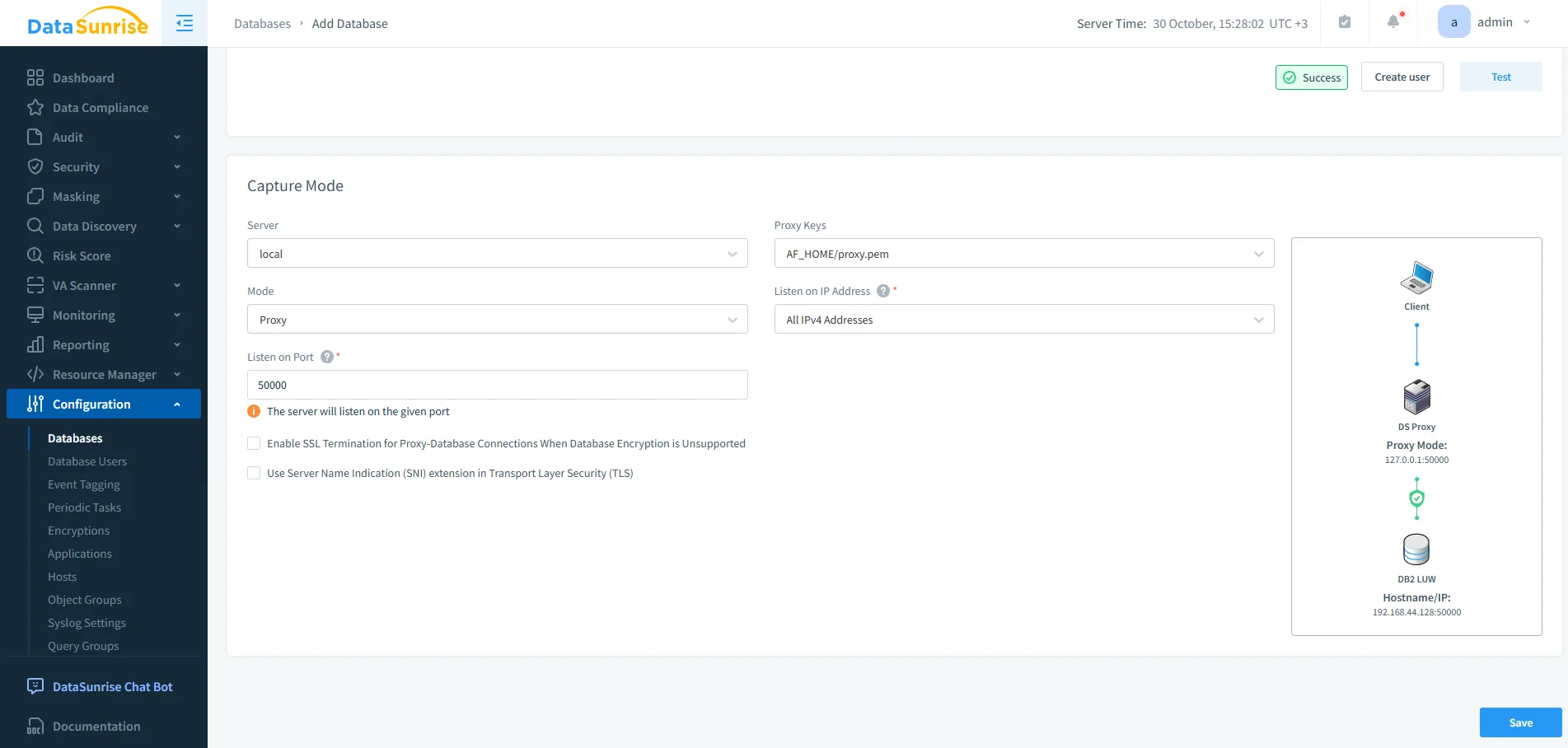
Configuring IBM Db2 in DataSunrise using Proxy mode with a specified listening port and PEM key for encrypted traffic routing. -
Define Audit Rules for users, schemas, or operations
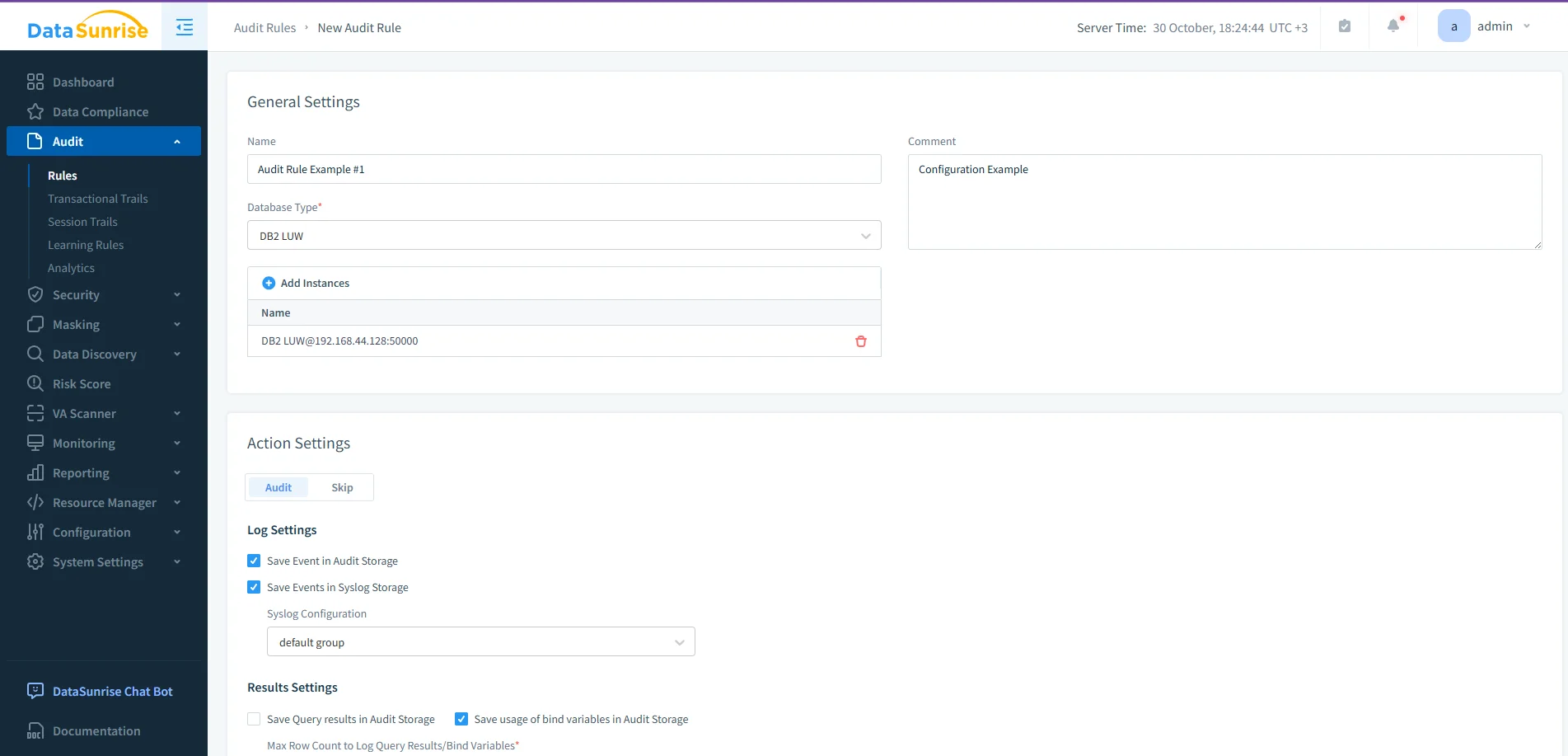
Creating a new audit rule for Db2 LUW in DataSunrise, defining the instance and log storage options for events and Syslog. -
Enable Notifications to Slack, Teams, or SIEM systems for real-time alerts
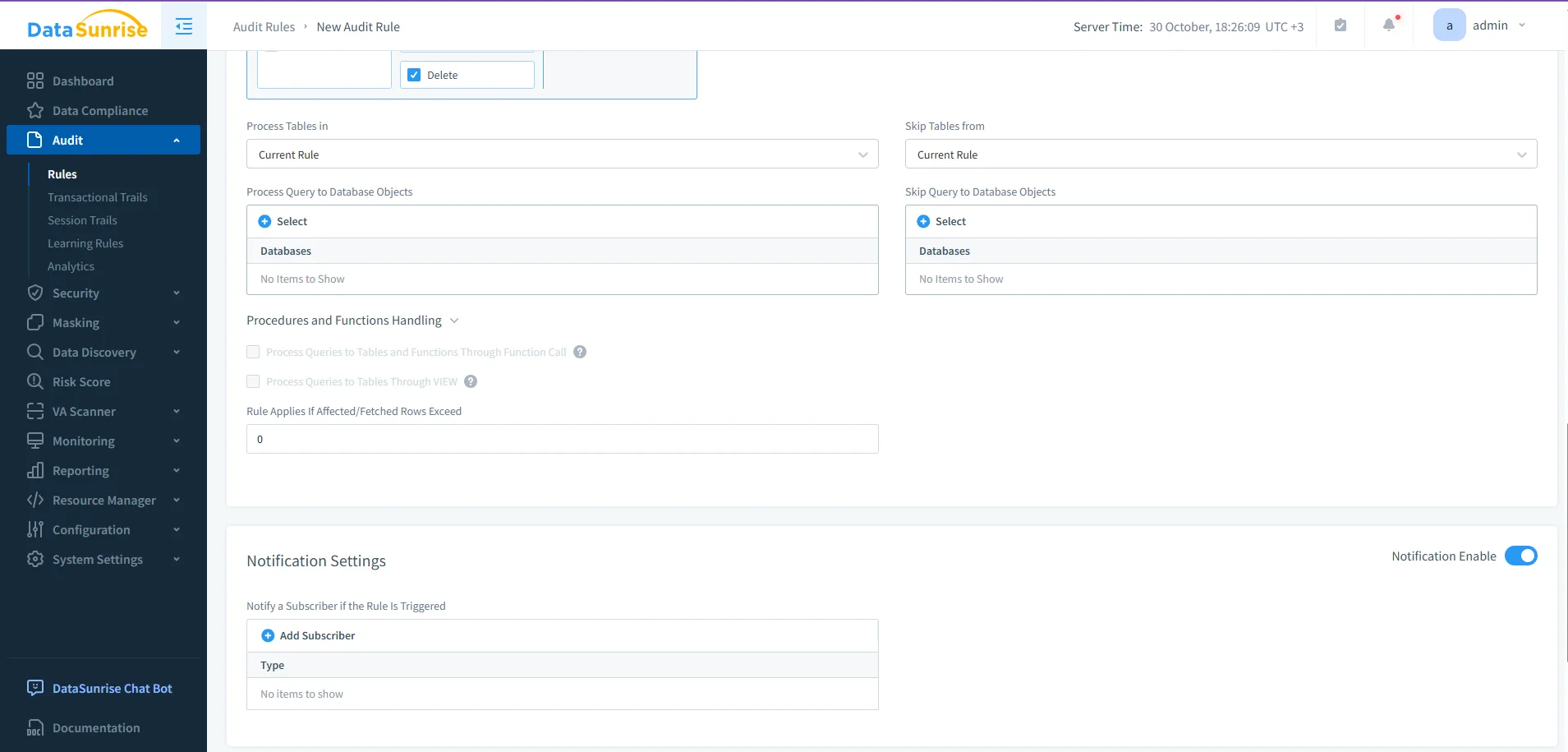
Advanced audit rule configuration in DataSunrise, showing table-level filtering, procedure handling, and notification setup for triggered events. -
Generate Reports through the Compliance Manager for auditor-ready evidence
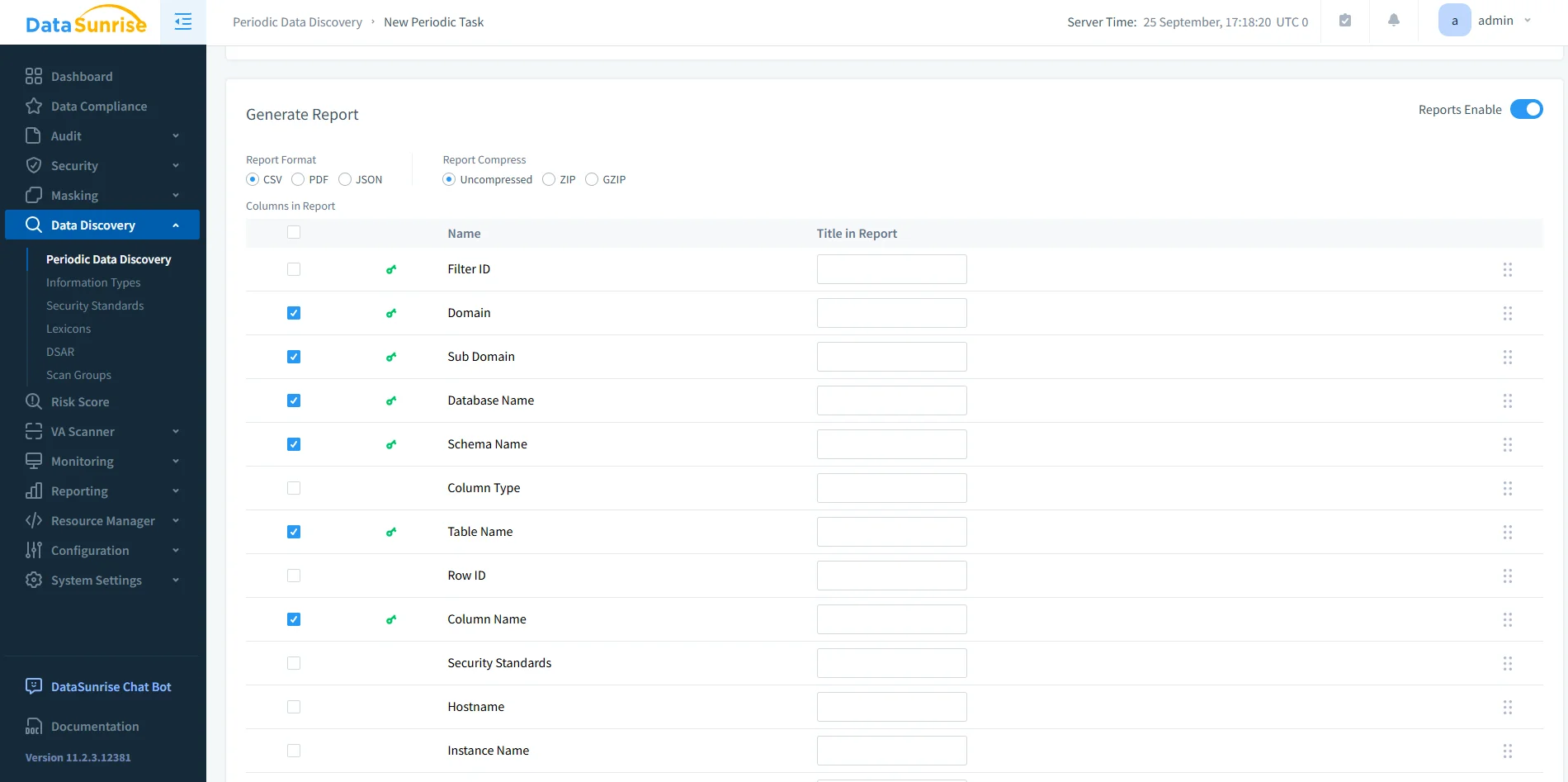
Periodic Data Discovery report configuration in DataSunrise, displaying selectable database metadata columns and export formats for compliance reporting.
Business Impact
| Area | Benefit |
|---|---|
| Regulatory Compliance | Automated evidence collection for GDPR, HIPAA, SOX, PCI DSS |
| Operational Efficiency | Reduces manual log management time by up to 70% |
| Security Posture | Real-time risk detection through ML-based anomaly monitoring |
| Audit Readiness | One-click generation of detailed reports for auditors |
DataSunrise enables enterprises to achieve zero-touch compliance, reducing human error and ensuring continuous protection of Db2 environments.
Conclusion
The native IBM Db2 audit log provides a solid foundation for tracking database activity. However, manual management, limited alerting, and lack of compliance integration make it insufficient for enterprise-scale governance.
By integrating DataSunrise, organizations can centralize audit control, detect anomalies in real time, and automate compliance workflows across hybrid and multi-cloud Db2 deployments.
Protect Your Data with DataSunrise
Secure your data across every layer with DataSunrise. Detect threats in real time with Activity Monitoring, Data Masking, and Database Firewall. Enforce Data Compliance, discover sensitive data, and protect workloads across 50+ supported cloud, on-prem, and AI system data source integrations.
Start protecting your critical data today
Request a Demo Download Now