Teradata Compliance Management

As organizations face stricter regulations like GDPR, HIPAA, and PCI DSS, ensuring compliance within large-scale analytical platforms such as Teradata has become a top priority. Businesses depend on Teradata for mission-critical insights, but without a structured compliance management approach, they risk financial penalties and reputational damage.
According to IBM’s Cost of a Data Breach 2024 Report, the global average cost of a breach has reached $4.9 million, underscoring the importance of strong compliance practices. Meanwhile, healthcare providers must comply with HIPAA safeguards to avoid fines that can reach up to $1.9 million per violation (U.S. HHS). For organizations processing payment data, PCI DSS v4 introduces stricter access control and reporting requirements (PCI Security Standards Council).
This article explains Teradata’s built-in compliance features and demonstrates how DataSunrise Compliance Manager enhances governance, audit readiness, and security in hybrid enterprise environments.
What is Compliance Management?
Compliance management refers to the processes, tools, and policies organizations use to ensure adherence to industry regulations, corporate policies, and security standards. It covers everything from access control and encryption to reporting and audit preparation.
Key aspects of compliance management include:
- Policy Enforcement – Defining and applying rules that govern how sensitive data is accessed and handled.
- Monitoring and Auditing – Continuously tracking user activity, database changes, and potential violations.
- Risk Management – Identifying compliance gaps and remediating them before they become legal or financial issues.
- Reporting – Producing audit-ready documentation for regulators, internal teams, and external auditors.
- Automation – Leveraging tools such as DataSunrise Compliance Manager to reduce manual effort and adapt to evolving regulations.
In the context of Teradata, compliance management ensures that enterprises can maintain security and governance while meeting global regulatory standards such as GDPR, HIPAA, PCI DSS, and SOX.
Native Compliance Features in Teradata
Teradata Vantage provides native controls that help align operations with regulatory mandates. These capabilities include:
Access Controls
Teradata enforces role-based access, allowing administrators to restrict data access by user or group. With fine-grained permissions, enterprises ensure only authorized personnel view sensitive data.
-- Create a restricted role
CREATE ROLE pii_role;

-- Grant SELECT access on sensitive table
GRANT SELECT ON customers TO pii_role;

-- Assign role to a compliance user
GRANT pii_role TO compliance_user;

-- Example: Deny UPDATE access to sensitive fields
REVOKE UPDATE (ssn, credit_card_number) ON customers FROM pii_role;

-- Verify role assignments
SELECT * FROM dbc.RoleGrants WHERE RoleName = 'pii_role';
Logging and Monitoring
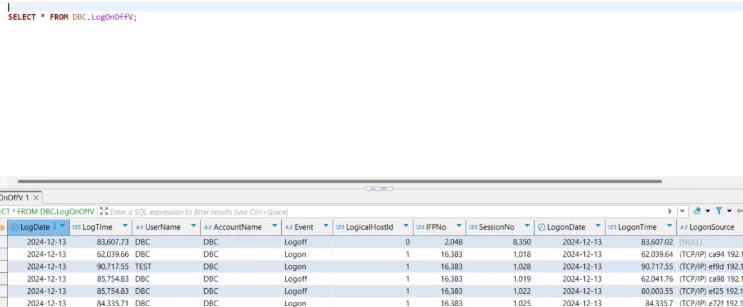
Native logging tracks session activity, queries, and failed login attempts, supporting compliance investigations.
-- Enable DBQL (Database Query Logging) for a user
BEGIN QUERY LOGGING WITH SQL, OBJECTS, STEPINFO ON compliance_user;

-- Check login/logout events
SELECT UserName, LogDate, LogTime, Event
FROM dbc.LogOnOff
WHERE Event IN ('L', 'F')  -- L = Login, F = Failed login
ORDER BY LogDate DESC;

-- Query DBQL logs for compliance user activity
SELECT UserName, StartTime, StatementText
FROM dbc.DBQLogTbl
WHERE UserName = 'compliance_user'
ORDER BY StartTime DESC;

-- Disable DBQL after review
END QUERY LOGGING ON compliance_user;
Encryption and Data Protection
Teradata supports transparent encryption for data at rest and TLS for data in transit.
-- Create an encrypted database
CREATE DATABASE secure_data AS PERM = 10000000 ENCRYPTION = 'AES256';

-- Create an encrypted table
CREATE TABLE secure_data.customers_secure (
    customer_id INT,
    name VARCHAR(100),
    ssn CHAR(11),
    credit_card_number CHAR(16)
) ENCRYPTION = 'AES256';

-- Enable TLS for sessions (set in configuration, example)
MODIFY USER compliance_user AS SECURELOGON = 'SSL';

-- Verify encryption status
SELECT DatabaseName, TableName, ProtectionType
FROM dbc.TableEncryption;
Enhanced Teradata Compliance with DataSunrise
DataSunrise Compliance Manager expands Teradata’s capabilities by centralizing governance and automating regulatory alignment. Below are its core features in detail.
Sensitive Data Discovery
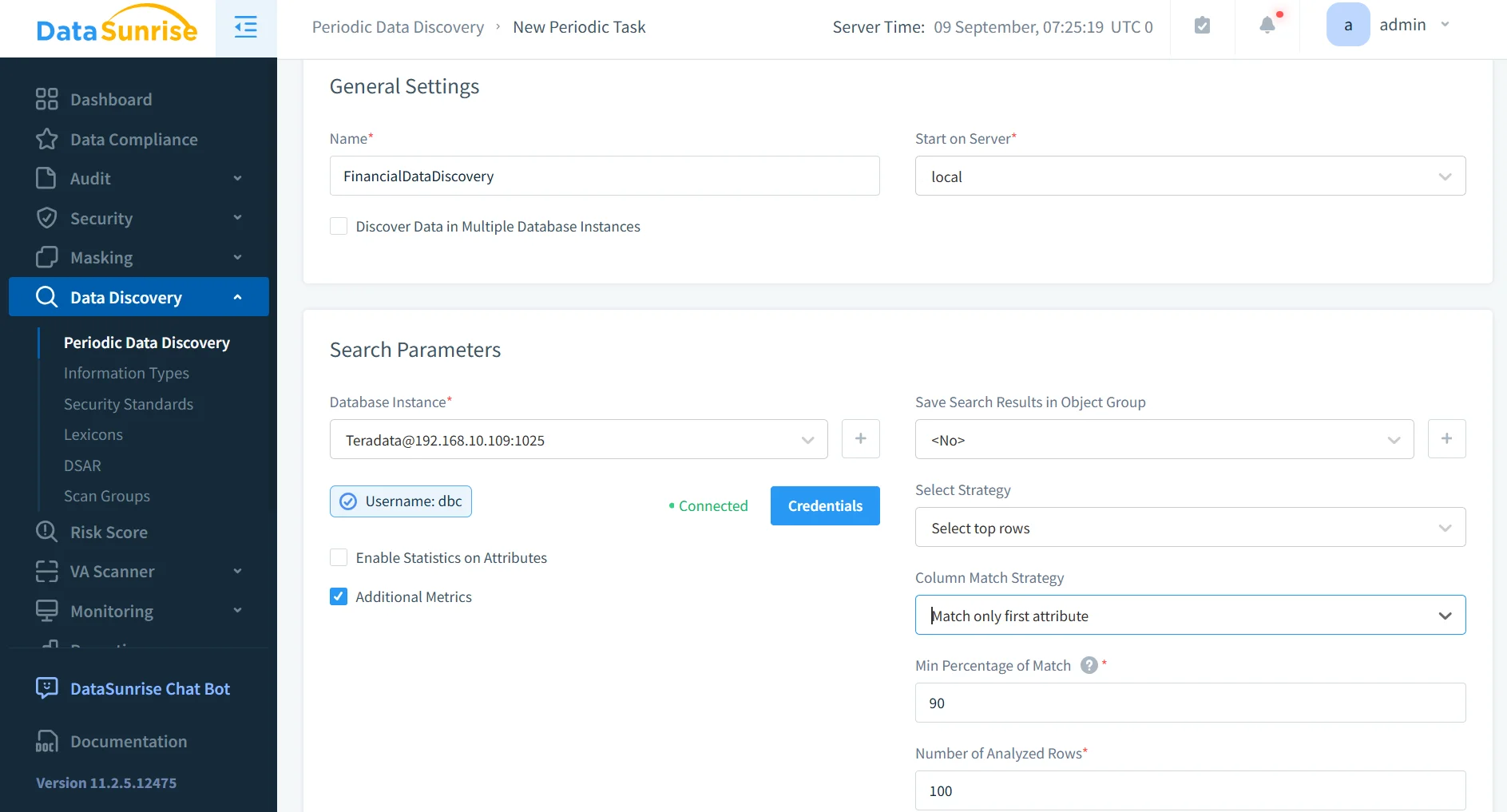
With Sensitive Data Discovery, DataSunrise scans Teradata tables to locate PII, PHI, and other regulated data.
- Uses pattern matching, dictionaries, and contextual analysis.
- Detects hidden sensitive data across structured and unstructured sources.
- Supports hybrid deployments (on-prem, cloud, file storage).
This feature ensures organizations know exactly where their sensitive data resides and can apply the right compliance policies proactively.
Automated Compliance Reporting
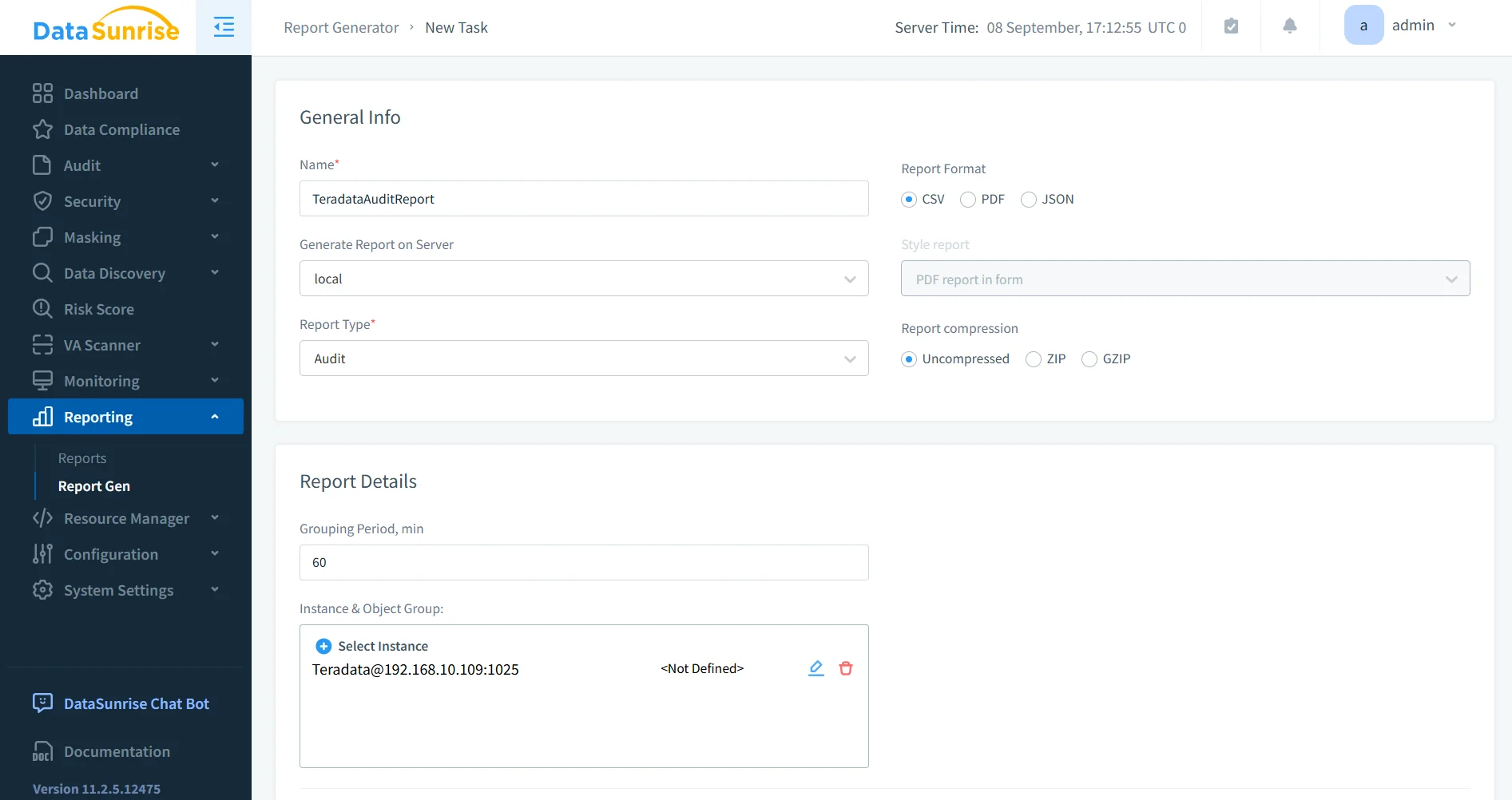
Automated Compliance Reporting streamlines audits by generating regulator-ready evidence.
- Produces GDPR, HIPAA, PCI DSS, and SOX reports instantly.
- Includes access logs, masking history, and data discovery results.
- Provides export in PDF, CSV, or JSON formats for external auditors.
This ensures consistent compliance documentation without lengthy manual processes.
Dynamic Data Masking
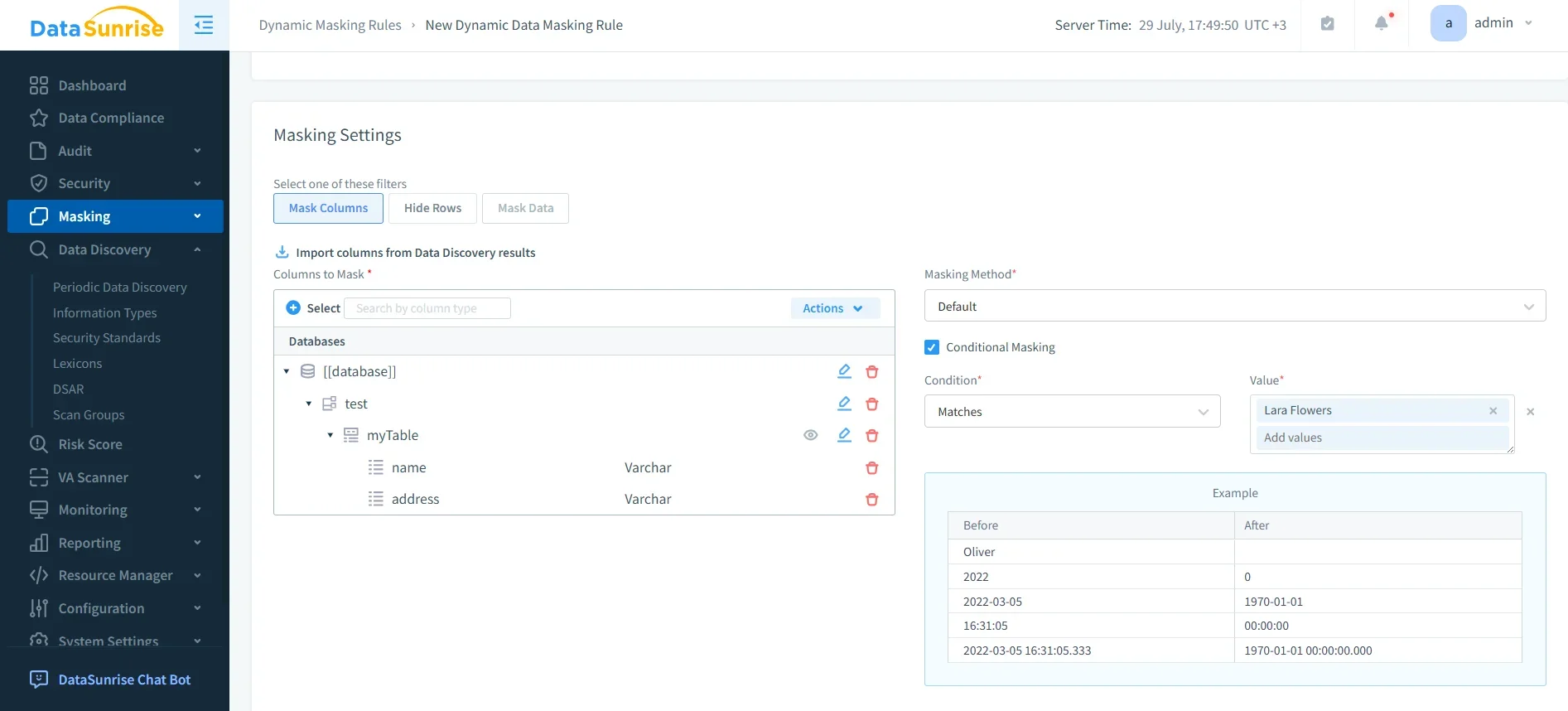
Dynamic Data Masking protects sensitive Teradata data in real time.
- Masks columns based on user roles and permissions.
- Ensures authorized users see full values, while others see obfuscated data.
- Supports rules for PII like SSNs, credit cards, or health records.
This approach helps organizations maintain compliance while still enabling business users to work productively with Teradata datasets.
Unified Monitoring
Unified Monitoring provides a centralized view of Teradata alongside other databases.
- Supports over 40 platforms including Oracle, PostgreSQL, and MongoDB.
- Correlates user activity across heterogeneous environments.
- Integrates alerts into SIEM tools like Splunk, Microsoft Sentinel, and Elastic.
- Consolidates logs into a single dashboard, reducing complexity for compliance officers.
- Provides forensic detail, making it easier to investigate suspicious activity or prove compliance during audits.
Business value: Unified Monitoring reduces the risk of blind spots across hybrid environments and ensures that every Teradata access event is contextualized with broader enterprise activity.
Compliance Autopilot
The Compliance Autopilot ensures Teradata instances stay aligned with evolving regulations such as GDPR, HIPAA, PCI DSS, and SOX.
- Continuously recalibrates rules when standards change (e.g., GDPR updates or PCI DSS v4 requirements).
- Eliminates compliance drift by enforcing policies in real time.
- Provides automated remediation if policies are violated, such as blocking non-compliant queries.
- Schedules periodic scans to detect new sensitive data and update policies dynamically.
- Maintains a “compliance posture dashboard” for auditors to verify readiness instantly.
Business value: Compliance Autopilot minimizes manual overhead, cuts audit preparation time, and ensures Teradata environments remain compliant even as regulations evolve—freeing compliance teams to focus on strategic initiatives.
Comparison Table
| Feature | Teradata Native Tools | DataSunrise Compliance Manager |
|---|---|---|
| Access Control | Role-based access, manual grants/revokes | Granular rules with centralized policy orchestration across multiple databases |
| Logging & Monitoring | DBQL and system logs, manual analysis required | Real-time monitoring with dashboards and automated alerts |
| Encryption | Transparent encryption, TLS | Adds masking, tokenization, and advanced policy-driven encryption |
| Compliance Reporting | Manual report compilation | Automated, audit-ready reports for GDPR, HIPAA, PCI DSS, SOX |
| Sensitive Data Discovery | Limited to database schema | Automated discovery across SQL, NoSQL, files, and cloud storage |
| Regulatory Alignment | Requires manual updates to meet new standards | Compliance Autopilot with continuous regulatory calibration |
| Cross-Platform Coverage | Focused on Teradata only | Supports 40+ databases and storage systems (cloud, hybrid, on-prem) |
Conclusion
While Teradata includes native compliance capabilities such as access controls, logging, and encryption, organizations often require more robust, automated, and scalable solutions. DataSunrise strengthens Teradata environments with Compliance Autopilot, sensitive data discovery, automated reporting, and dynamic masking.
The result is a unified compliance management framework that ensures adherence to GDPR, HIPAA, PCI DSS, SOX, and other global standards—minimizing risks and accelerating time-to-compliance.
Protect Your Data with DataSunrise
Secure your data across every layer with DataSunrise. Detect threats in real time with Activity Monitoring, Data Masking, and Database Firewall. Enforce Data Compliance, discover sensitive data, and protect workloads across 50+ supported cloud, on-prem, and AI system data source integrations.
Start protecting your critical data today
Request a Demo Download Now