Vertica Audit Tools
Vertica includes several powerful mechanisms for tracking what happens inside the database, from executed SQL statements to user sessions and internal system events. These native capabilities form the foundation of an audit environment, but they often live in different places and require manual work to interpret. To build a complete, centralized audit trail, many organizations combine Vertica’s built-in tools with the DataSunrise Audit Platform. This article walks through both sides: the native tools Vertica provides, and the extended tooling DataSunrise adds on top.
Along the way, we reference related concepts including Audit Logs, Database Activity Monitoring, and Compliance Manager. For engine-level details or system configuration, you can consult the official Vertica documentation.
Native Vertica Audit Tools
Vertica spreads its audit-relevant information across the v_monitor schema and engine log files. Together, these components give DBAs insight into executed SQL, session activity, and low-level engine events. The most useful native auditing pieces include:
v_monitor.query_requests— the main source for SQL history, recording user names, request types, SQL text, timestamps, and execution status.v_monitor.sessions— session information such as session ID, client host, start time, and session state.- Engine log files — authentication attempts, errors, privilege changes, and other internal events saved by the Vertica engine.
- DBeaver — frequently used as the front-end tool for browsing these views and filtering Vertica audit data.
Below is an example of Vertica’s native SQL history extracted from v_monitor.query_requests using DBeaver. This kind of output helps identify who executed which queries, on which node, and at what point in time.
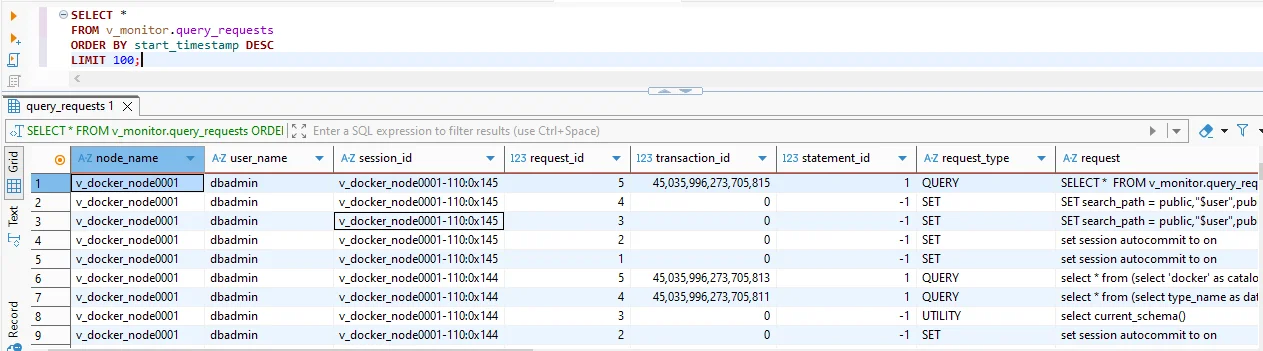
v_monitor.query_requests using DBeaver.
Native Vertica activity extracted from v_monitor.query_requests using DBeaver. It offers a clear view of executed SQL along with user identity and timing information.
This native toolkit is reliable and extremely detailed, but it has limits. Retention is controlled by log rotation, each cluster stores its own history, and there’s no built-in way to correlate or report on events across environments. That’s where extended auditing tools become valuable.
Limitations of Native Vertica Audit Tools
Vertica’s built-in tools are great for inspection and troubleshooting, but not ideal for long-term or large-scale auditing. Some of the common challenges include:
- No central audit repository. Each Vertica cluster holds its own audit history, making multi-cluster review difficult.
- Shorter retention windows. Native history depends on table size and log rotation settings.
- Lack of audit policies. There’s no built-in concept of “audit rules” or schema-based auditing.
- No alerts or automated workflows. Everything requires manual SQL queries or custom scripts.
- Limited reporting. Exporting and formatting audit data is fully manual.
To overcome these challenges, teams often introduce a dedicated auditing platform—one that understands Vertica traffic, normalizes events, and stores them centrally.
DataSunrise Audit Tools for Vertica
DataSunrise Audit augments Vertica by capturing SQL traffic in real time. It can run in proxy mode (where applications connect through DataSunrise) or in sniffer mode (where DataSunrise listens to mirrored network traffic). Regardless of mode, it reads SQL before Vertica executes it, enriches events with metadata, and records them using consistent audit rules.
DataSunrise provides several audit-focused tools designed specifically for Vertica environments:
- Audit Rules — define which users, schemas, tables, and SQL operations get logged.
- Transactional Trails — a centralized event stream showing query text, user identity, timestamps, rows, and rule matches.
- Session Trails — chronological tracking of login, logout, and session-level activity.
- SIEM integrations — forward audit events to Splunk, QRadar, Sentinel, and similar tools.
- Long-term retention — audit history stored outside Vertica with configurable retention windows.
The screenshot below shows DataSunrise capturing Vertica audit activity via a configured rule. This kind of trail provides a clearer, cross-platform audit record compared to raw system views.
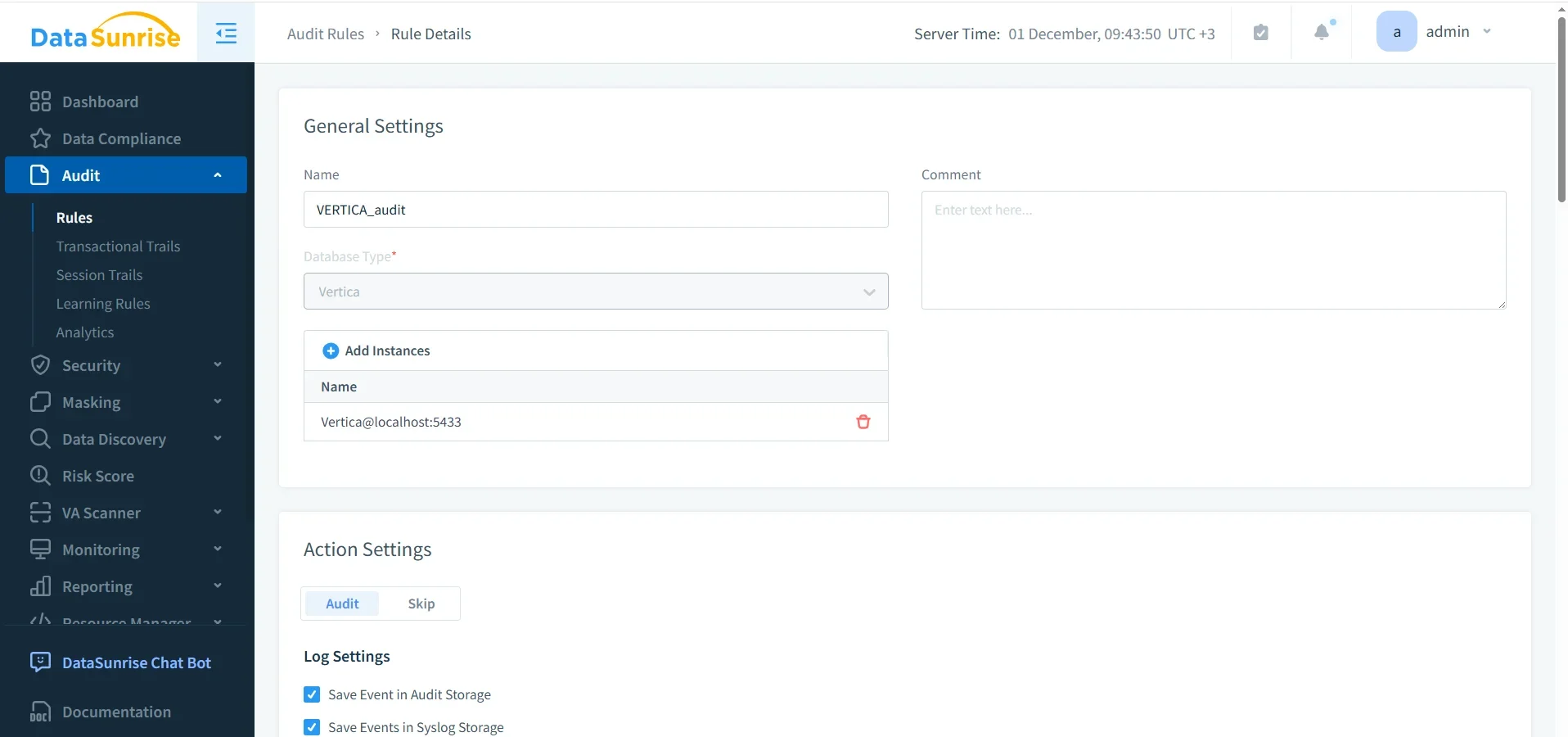
A Vertica audit rule configured in DataSunrise. Once enabled, all matching Vertica operations appear in the centralized audit trail.
Native vs. DataSunrise Vertica Audit Tools
The table below summarizes how Vertica’s native tools compare with DataSunrise’s auditing capabilities.
| Capability | Native Vertica Tools | DataSunrise Audit Tools |
|---|---|---|
| SQL visibility | SQL snippets in system views | Full SQL with enriched metadata |
| Filtering & rules | Manual SELECT queries | Rule-based auditing per schema, table, or user |
| Audit retention | Dependent on Vertica log rotation | Long-term, centralized retention |
| Cross-cluster auditing | No | Yes |
| Reporting | Manual export via DBeaver | Built-in reports + Compliance Manager |
How These Tools Fit Together
Vertica provides accurate, low-level insight into SQL execution and session activity. DataSunrise adds structure, retention, filtering, and cross-platform correlation. By using both together, DBAs and security teams get a clear, high-quality audit trail capable of supporting investigations, compliance requests, and operational reviews.
Conclusion
Vertica’s audit tools give you the core signals needed to understand what happens in the database. DataSunrise builds on this foundation by turning scattered logs and SQL metadata into a centralized audit trail with filtering, reporting, and long-term retention. The combination delivers a robust auditing environment that supports incident response, accountability, and regulatory compliance.
Protect Your Data with DataSunrise
Secure your data across every layer with DataSunrise. Detect threats in real time with Activity Monitoring, Data Masking, and Database Firewall. Enforce Data Compliance, discover sensitive data, and protect workloads across 50+ supported cloud, on-prem, and AI system data source integrations.
Start protecting your critical data today
Request a Demo Download Now