Vertica Audit Trail
A complete Vertica audit trail gives engineers, analysts, and security teams a reliable view of how SQL activity flows through the database. Vertica is often responsible for analytical workloads that inform business-critical decisions, so understanding who executed what query—and how it affected the system— is essential for operational stability. Consequently, many teams build structured auditing around Vertica to support incident analysis, performance tuning, and security monitoring.
Moreover, such an audit layer becomes even more effective when paired with DataSunrise Activity Monitoring, which adds context, normalizes logs, and aggregates events across multiple environments. For details on native capabilities, the official Vertica documentation explains how the database records sessions, queries, and system events. Together with general data compliance practices and regulatory requirements, these resources form a complete picture of system behavior.
Understanding the Purpose of a Vertica Audit Trail
An audit trail in Vertica is not only about proving compliance. Instead, it is a practical operational tool. It helps answer important questions during daily work, such as:
- Which long-running queries were executed during peak hours?
- Which user or service account accessed performance-sensitive tables?
- Did a specific job or BI dashboard cause unexpected cluster load?
- Has any unauthorized or unusual SQL pattern appeared recently?
Because Vertica often processes complex analytical queries, having this kind of historical record allows teams to trace changes, understand their impact, and resolve incidents faster. Therefore, the audit layer becomes a core component of operational excellence.
Native Vertica Audit Trail Components
Vertica provides several native elements that contribute to its internal logging of user and system activity. While these components offer valuable insight, they are typically scattered across system views and diagnostic files.
- Session logs track when users connect to or disconnect from the cluster.
-
v_monitorviews expose detailed history of query execution and performance metrics. - Audit logs store security-related events, including failed logins and permission changes.
Together, these pieces form the foundation of Vertica’s built-in event history. However, they are not centralized, and they lack higher-level correlation between activity, applications, and data sensitivity. Because of this, many organizations choose to extend native logging through external platforms.
Enhancing the Vertica Audit Trail with DataSunrise
DataSunrise adds a unified and consistent audit layer around the database. Instead of relying on system views alone, the proxy captures SQL traffic before it reaches the cluster. This provides a complete picture of both user-driven and application-driven activity.
Connecting Vertica to DataSunrise
To begin building a stronger monitoring pipeline, the first step is connecting Vertica to the DataSunrise proxy. Once configured, DataSunrise becomes the primary entry point for all analytics applications and tools.
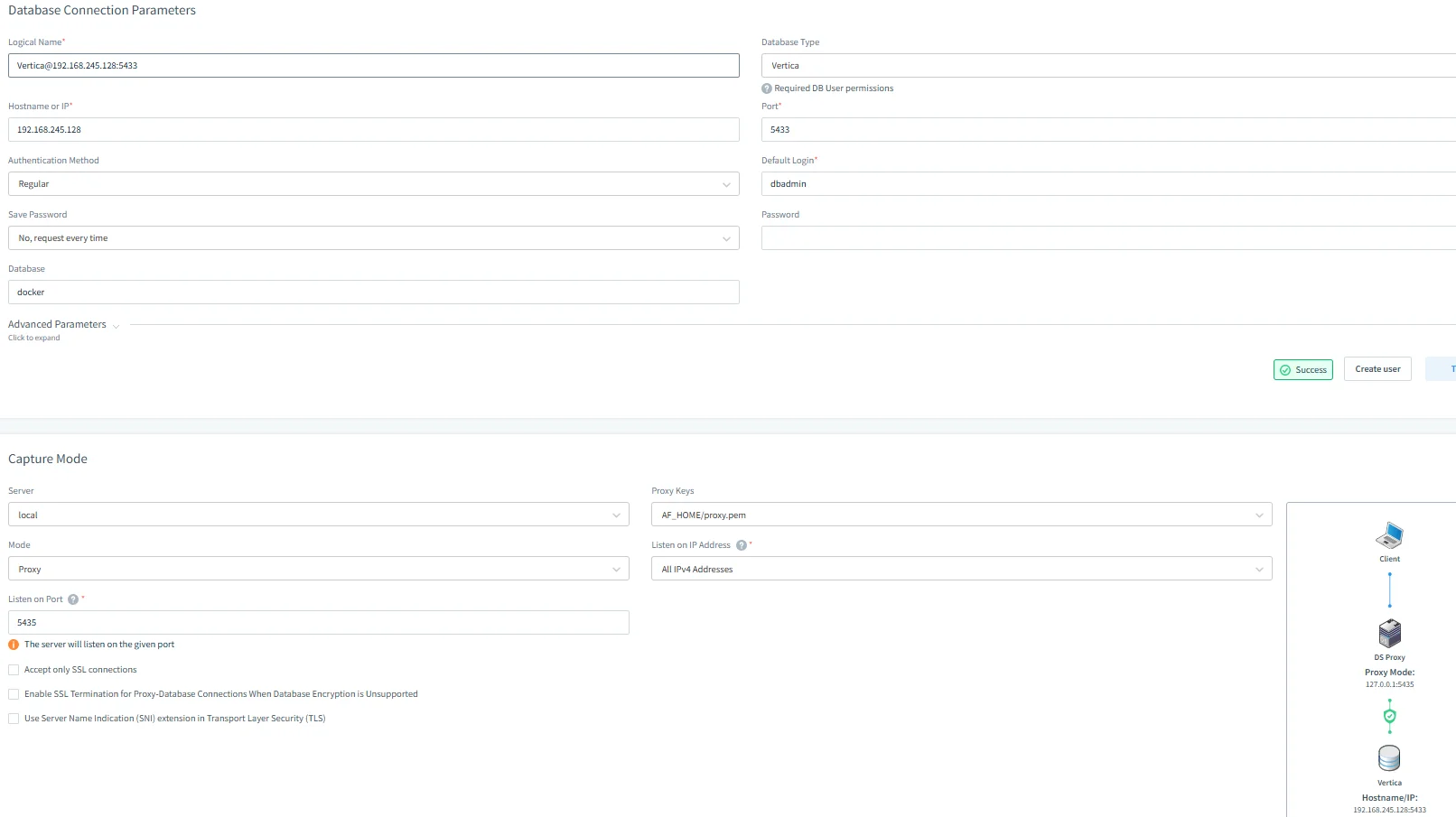
This configuration enables DataSunrise to expose full SQL visibility. Furthermore, proxy mode ensures that all query traffic, including BI queries, ETL operations, and application workloads, is captured consistently.
Creating Targeted Audit Rules
Instead of relying on broad logs, DataSunrise allows teams to create precise rules that capture the operations that truly matter. Policies can target critical tables, sensitive schemas, or specific query types.
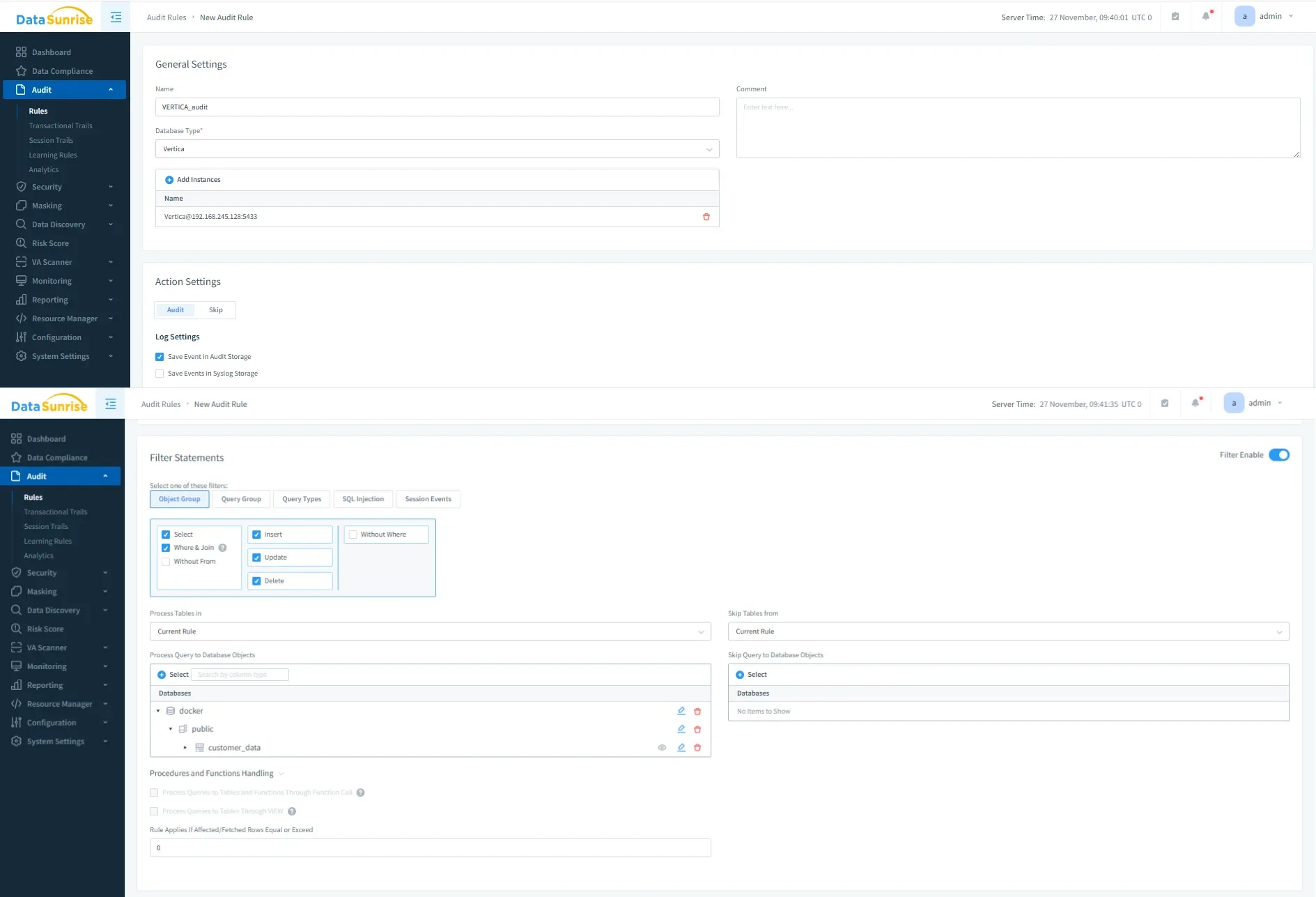
By designing audit rules this way, teams can capture only what is relevant. This approach reduces noise, improves investigation speed, and makes the resulting audit information far more meaningful.
Viewing Vertica Audit Trail Events
Once rules are active, DataSunrise records each event in a centralized repository. The Transactional Trails interface provides a unified timeline of database activity, allowing teams to filter events by user, time window, database, query type, or rule.
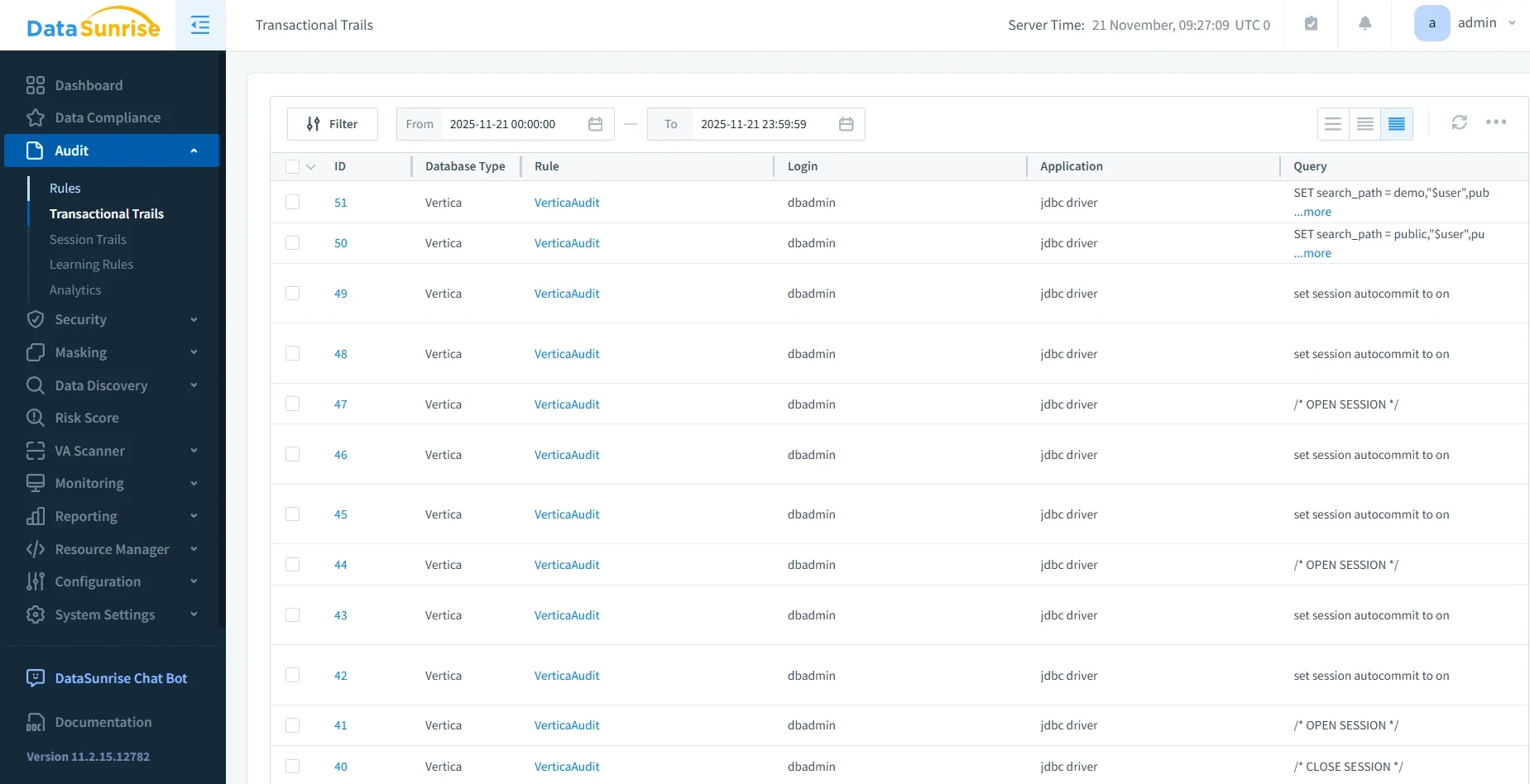
Because DataSunrise stores audit events independently from Vertica, it ensures long-term retention and preserves the monitoring history even during cluster failures or maintenance events.
How a Vertica Audit Trail Helps Operations and Security
A well-maintained logging and monitoring setup brings strong benefits to multiple teams across the organization:
- DBAs use it to detect heavy workloads and troubleshoot slow queries more quickly.
- Security teams rely on recorded events to identify suspicious access patterns and unusual SQL activity.
- Compliance teams depend on clear history to generate audit-friendly records for reviews and certification.
- Engineering teams use this data to validate job schedules, ETL behavior, and application use cases.
Consequently, the monitoring layer becomes much more than a simple log file. It acts as a shared source of truth across departments, strengthening both operational discipline and data governance.
Complementary Resources
For organizations expanding their Vertica auditing practices, the following resources may also be helpful:
Conclusion
A robust Vertica audit trail helps organizations maintain visibility, strengthen operational control, and protect business-critical analytics workloads. While Vertica provides strong native monitoring capabilities, DataSunrise extends them with centralized auditing, real-time visibility, and actionable insights. Together, these tools form a complete solution for monitoring SQL activity, identifying risks, and supporting data-driven decisions with confidence.
Protect Your Data with DataSunrise
Secure your data across every layer with DataSunrise. Detect threats in real time with Activity Monitoring, Data Masking, and Database Firewall. Enforce Data Compliance, discover sensitive data, and protect workloads across 50+ supported cloud, on-prem, and AI system data source integrations.
Start protecting your critical data today
Request a Demo Download Now