What is a CSV File?
Introduction: The Humble CSV File
CSV files date back to the early days of computing and remain a reliable format for data exchange. In the 1970s and early 1980s, IBM’s Fortran 77 language introduced the character data type, enabling support for comma-separated input and output. These simple yet powerful files have stood the test of time.
We previously described DataSunrise’s capabilities for handling semistructured data in JSON. If you’re dealing with structured or unstructured datasets, be sure to check out our coverage of its data protection features.
With DataSunrise, you can mask and discover sensitive information inside CSV-formatted files stored locally or in Amazon S3. Below is an example of applying masking to a CSV file during processing.
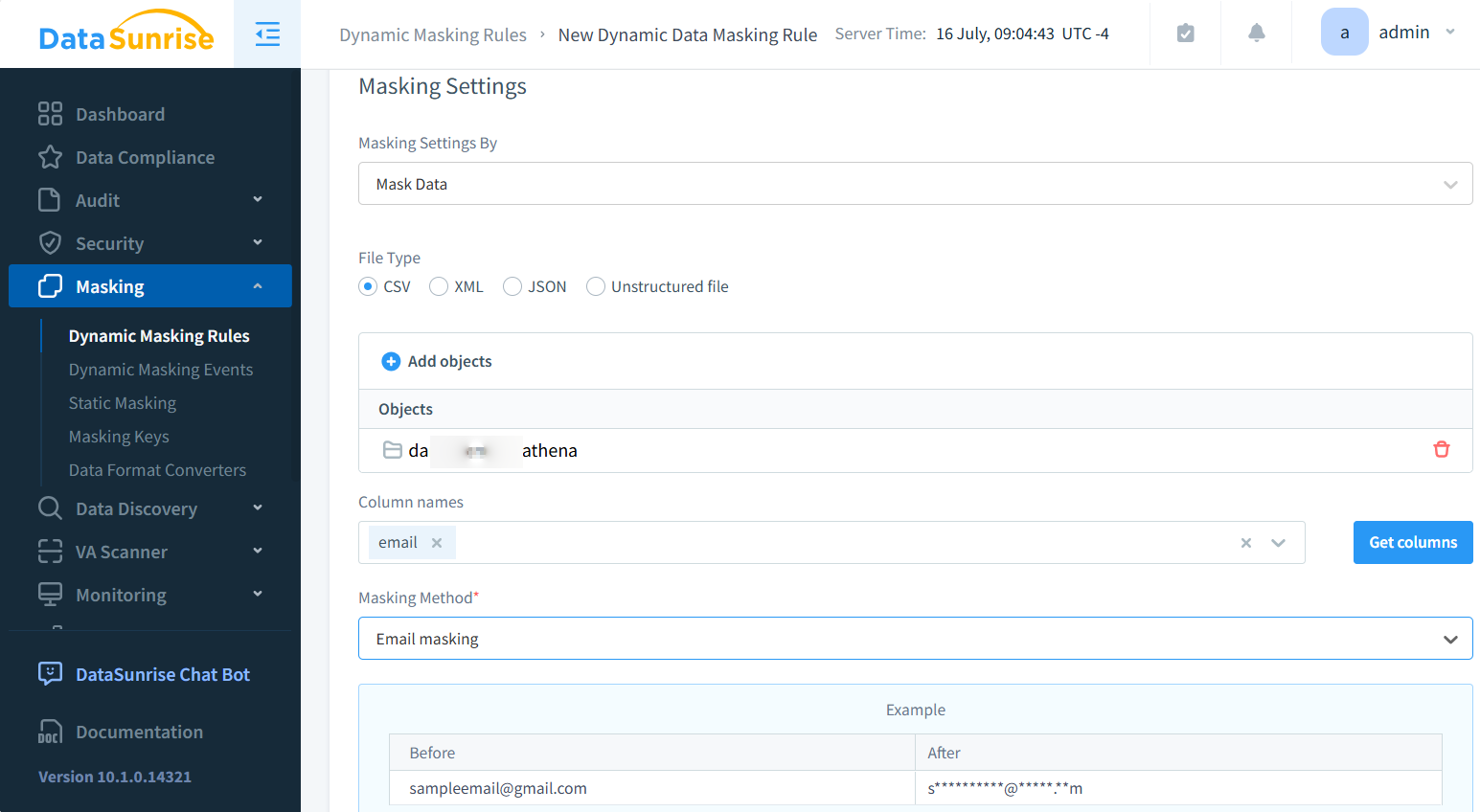
After a simple setup, the masked file can be accessed via DataSunrise’s S3 proxy using clients like S3Browser. Be sure to configure proxy settings correctly to view the masked content, as shown below:

In the broad landscape of data formats, the CSV file stands out for clarity and portability. It stores tabular data in a simple structure where each line represents a row and values are separated by commas. That simplicity allows the format to remain compatible across platforms and systems.
What is a CSV File?
Used to represent rows and columns in plain text, a CSV file provides a lightweight way to store and exchange structured data. Each line contains a row, and commas divide the fields within it. The result is a format that’s easy to read and generate programmatically.
Files typically use the “.csv” extension—examples include “contacts.csv” or “report_data.csv”. Open them in a text editor, and you’ll see a list of comma-separated values. Spreadsheet tools like Excel or Google Sheets interpret the content as structured tables.
While commas are standard delimiters, semicolons, tabs, or pipes may appear in some regional or custom implementations. Including a header row is optional but recommended, especially when the dataset contains multiple fields.
Unlike more sophisticated formats, this one lacks support for embedded formulas, styles, or nested data. That trade-off makes it ideal for clean exports but unsuitable for complex reports.
Why Use CSV Files?
This format remains popular due to its simplicity and versatility:
- Simplicity: Easy to read, even for users without technical experience.
- Compatibility: Supported by virtually all spreadsheet tools and databases.
- Data exchange: Useful for transferring data between systems with different formats.
- Size efficiency: Smaller than binary formats, which helps with storage and performance.
CSV Example
Here’s a basic example to illustrate how data appears in a CSV file:
Name, Age, City
John Doe, 30, New York
Jane Smith, 25, London
Bob Johnson, 35, Paris
Each record is on a separate line, with commas separating individual fields. This structure is consistent across most CSV files.
Working with CSV Files in Python
Python offers built-in libraries that make working with CSV files straightforward. The csv module is often used for reading and writing such files in basic scripts.
import csv

# Reading a file
with open('data.csv', 'r') as file:
    csv_reader = csv.reader(file)
    for row in csv_reader:
        print(row)

# Writing to a file
with open('output.csv', 'w', newline='') as file:
    csv_writer = csv.writer(file)
    csv_writer.writerow(['Name', 'Age', 'City'])
    csv_writer.writerow(['Alice', '28', 'Berlin'])
Using Pandas
For more advanced workflows, the pandas library is often preferred. It allows developers to load CSV files, manipulate them using rich DataFrame structures, and export clean results.
import pandas as pd

# Reading
df = pd.read_csv('data.csv')
print(df.head())

# Writing
df.to_csv('output.csv', index=False)
Tasks like filtering, sorting, and aggregating data are far easier with pandas. The library also makes it simple to save modified datasets back into CSV format for sharing or storage.
The Pros and Cons of Comma-separated Files
Advantages
- Human-readable: Files can be opened and interpreted manually
- Lightweight: Minimal overhead compared to binary formats
- Universally supported: Works in almost every data-related tool
Disadvantages
- Limited complexity: Doesn’t support nested or rich data types
- No enforced schema: Column order and types are loosely defined
- Integrity risks: Lacks built-in checks for validation or error handling
CSV Files in Data Exchange
This file format is used in many fields and workflows:
- Business intelligence: Moving reports between tools like Tableau and SQL-based warehouses
- Scientific research: Publishing datasets for reuse and validation
- Web apps: Letting users export data for backup or analysis
- IoT and sensor logging: Simple format for capturing readings
CSV Files in Enterprise Settings
Many enterprise systems still use CSV files for data imports, exports, and audits. Financial institutions generate transaction summaries in this format. Healthcare systems rely on secure CSV transfers to share patient data. For migrations, CSV often acts as the bridge between legacy and modern systems.
CSV Files in the Big Data Field
Despite the rise of Parquet and Avro, CSV files haven’t vanished from the Big Data world. They still serve key purposes in certain pipelines.
- Ingestion: Data often arrives as a CSV before transformation
- Legacy compatibility: Many upstream systems output plain text
- Exporting results: CSV makes data easy to share or archive
However, limitations around schema, compression, and parsing make it less suited for large-scale analytics. That’s where binary formats tend to shine.
When to Use a CSV File vs Binary Format
| Use Case | Best Format | Why |
|---|---|---|
| Cross-system data exchange | CSV | Simple, human-readable, supported everywhere |
| Large-scale analytics | Parquet / Avro | Schema support and high-performance compression |
| Daily exports or logs | CSV | Easy to automate and review manually |
Conclusion: The Enduring Value of CSV Files
Even with the rise of modern data formats and complex storage systems, CSV remains one of the most versatile and reliable components of today’s data ecosystem. Its simplicity, universal compatibility, and human-readable structure make it an essential format for data exchange, quick analysis, prototyping, and long-term archiving.
In enterprise environments, tools like DataSunrise further enhance the practicality of CSV files by adding critical capabilities such as dynamic or static data masking, detailed audit logging, data classification, and automated discovery of sensitive fields. These features help organizations safely manage CSV-based workflows, reduce operational risks, and meet compliance obligations across frameworks like GDPR, HIPAA, and PCI DSS. If your teams work with sensitive CSV datasets, consider exploring DataSunrise’s security solutions—visit the platform overview or schedule a demo to learn how to streamline protection and governance.