Data Anonymization in PostgreSQL
Data anonymization in PostgreSQL is how you keep sensitive data useful for the business without turning every database user, export, or staging refresh into a privacy incident. Production PostgreSQL systems routinely store Personally Identifiable Information (PII) (names, emails, phone numbers), financial identifiers (bank accounts, IBANs), and HR or health-related records. If that data flows into Dev/Test, analytics sandboxes, or vendor tools without protection, you’re effectively distributing production secrets as “sample data.”
In practice, anonymization is achieved through a combination of techniques—masking, tokenization, hashing, and synthetic replacements—implemented in ways that preserve application behavior. DataSunrise supports these approaches through data masking and a broader set of controls that help you secure both production access and non-production copies.
Anonymization, Pseudonymization, and Masking
Let’s clear up the terminology, because teams misuse “anonymization” all the time:
- Anonymization means data can’t be tied back to an individual in a practical way. No “secret mapping table,” no easy re-identification.
- Pseudonymization replaces identifiers with consistent substitutes (tokens/hashes) so you can still correlate records. It reduces risk, but it’s not the same as true anonymization.
- Masking transforms output (dynamic) or stored values in a copy (static). It’s often the most operationally practical method for “anonymizing” data used outside production.
If you can reverse the transformation (or re-identify users by combining fields), your dataset is not truly anonymous. Treat it as sensitive and protect it accordingly.
Step 1: Identify What Needs Anonymization
Before you anonymize anything, you need to know where sensitive fields live. PostgreSQL environments tend to grow quickly—new schemas, new microservices, new analytics tables. Manual inventories drift out of date fast.
Start with automated discovery using Data Discovery. This helps you locate sensitive columns across schemas and prioritize what to protect first (customer identifiers, financial fields, HR data, and high-risk free-text columns).
Build anonymization scope from discovery results and real query usage, not guesses. You’ll get better coverage and fewer “why did you mask that?” complaints.
Step 2: Choose the Right Anonymization Technique
The best anonymization technique depends on how the data will be used. DataSunrise outlines common approaches in masking types. Use this as a practical starting point:
| Data type | Recommended technique | Why it works |
|---|---|---|
| Email / phone | Partial masking or tokenization | Keeps format usable while removing direct identifiers |
| Government IDs | Redaction or strong hashing | High-risk identifiers should never be exposed |
| Bank account / IBAN | Partial masking (last 4) or tokenization | Supports customer support workflows without full disclosure |
| Addresses / names | Format-preserving replacements | Prevents real-world exposure while keeping tests realistic |
| Free text (notes) | Redaction + targeted detection | Often contains hidden PII and requires strict handling |
| Dev/Test realism | Synthetic data | Use synthetic data generation to keep datasets believable but safe |
Dynamic Anonymization for Production PostgreSQL
When you need to protect data in production without changing what’s stored, dynamic anonymization is the best operational move. It transforms sensitive values at query time using Dynamic Data Masking, so restricted users see anonymized output while privileged users can still access full values when justified.
This model is most effective when paired with strong access governance: RBAC defines what roles should see, and the principle of least privilege ensures users don’t accumulate unnecessary permissions over time.
How to Configure Dynamic Masking in DataSunrise
Before creating rules, make sure your deployment approach fits your environment using Deployment Modes of DataSunrise. Then implement masking rules with clear scope and conditions.
- Create a rule: Navigate to Masking → Dynamic Masking Rules and start a new rule for PostgreSQL.
- Select scope: Choose the database instance and the tables/columns containing sensitive data.
- Assign transformations: Apply redaction, partial masking, or tokenization-style methods appropriate for each column.
- Set conditions: Define who gets anonymized output based on user/role/app context and access controls.
- Test like a real user: Validate using the same BI tools, applications, and service accounts used in production.
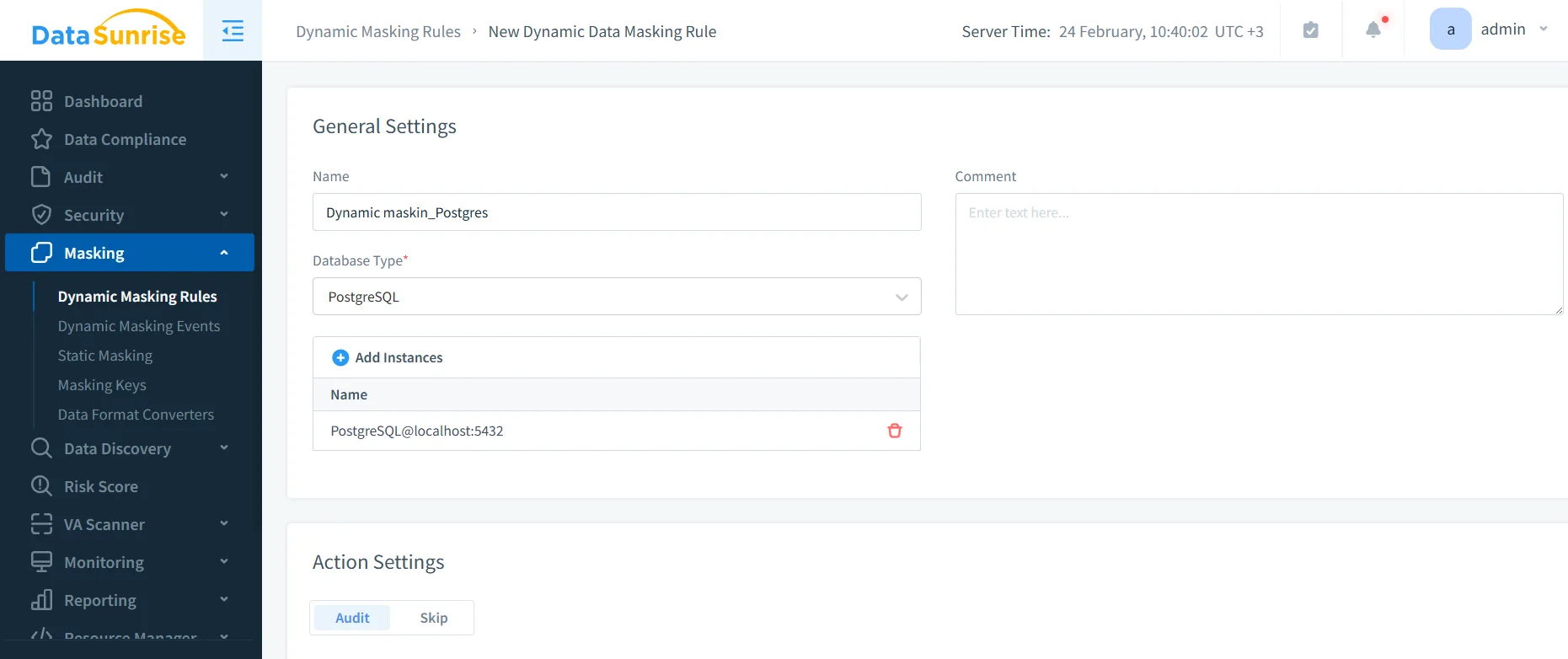
The interface above shows the rule editor where PostgreSQL masking policies are defined and applied in DataSunrise.
If you also use row-level restrictions, keep them consistent with your anonymization model; PostgreSQL Row Level Security is documented here: PostgreSQL Row Security Policies.
Start with your highest-risk columns (IDs, banking fields, emails), then expand coverage using discovery findings and audit evidence. This prevents over-masking and reduces exceptions.
Static Anonymization for Non-Production Copies
Dynamic masking protects production reads. Static anonymization protects everything that leaves production: Dev/Test refreshes, training environments, analytics sandboxes, and vendor-shared datasets. With Static Data Masking, sensitive values are permanently transformed in a target schema or database, creating a safer dataset that can be used without runtime enforcement.
How to Configure a Static Masking Task
- Define source and target: Use a protected source (a production clone) and a separate target (masked schema/database).
- Apply masking rules: Use deterministic methods for relationship fields and format-aware masking for application-facing columns.
- Run and monitor: Execute the job and confirm completion in the Tasks panel.
- Validate output: Verify anonymization results and ensure joins/constraints still behave.
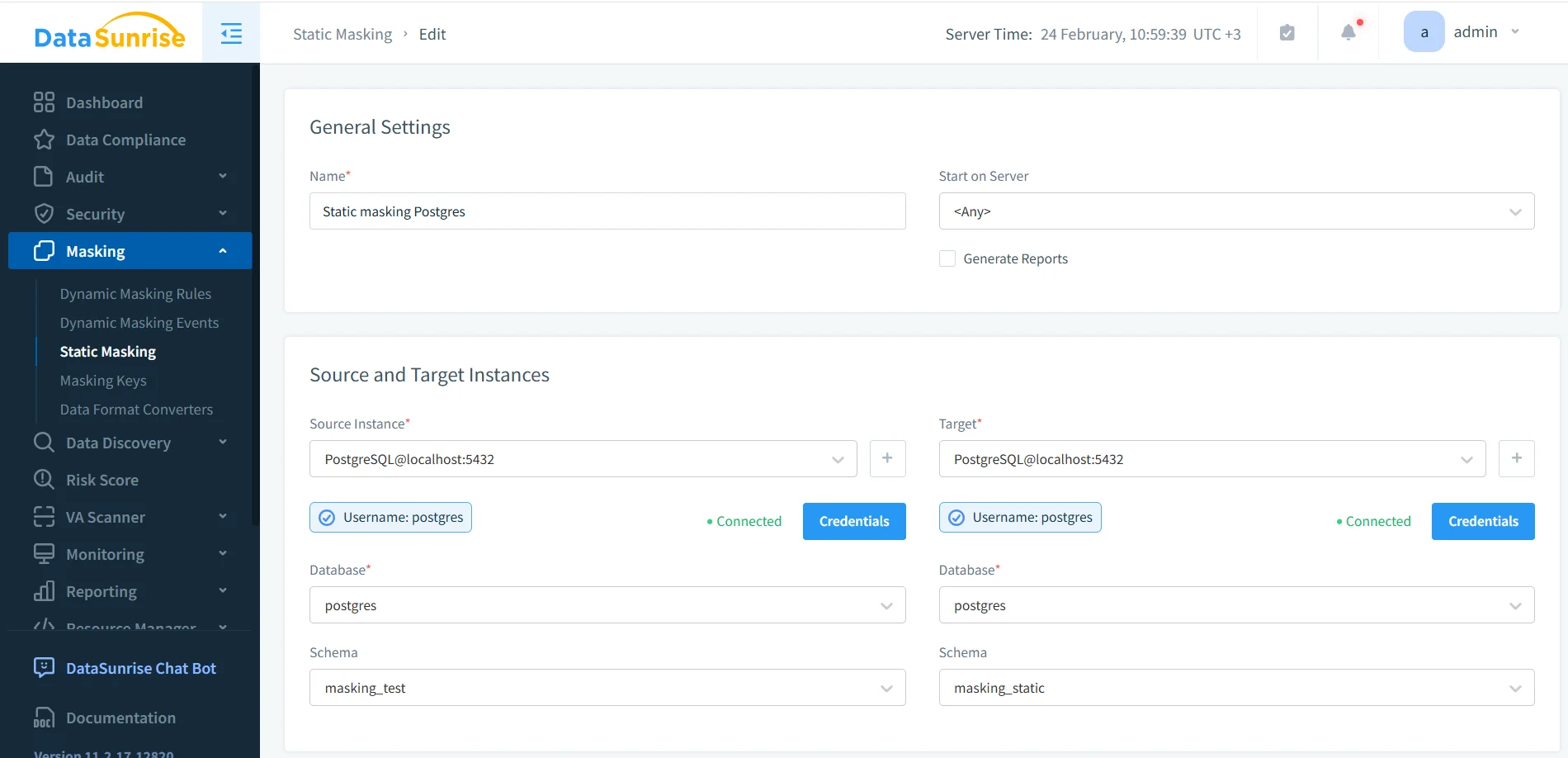
Static masking task setup with PostgreSQL source and target schemas.
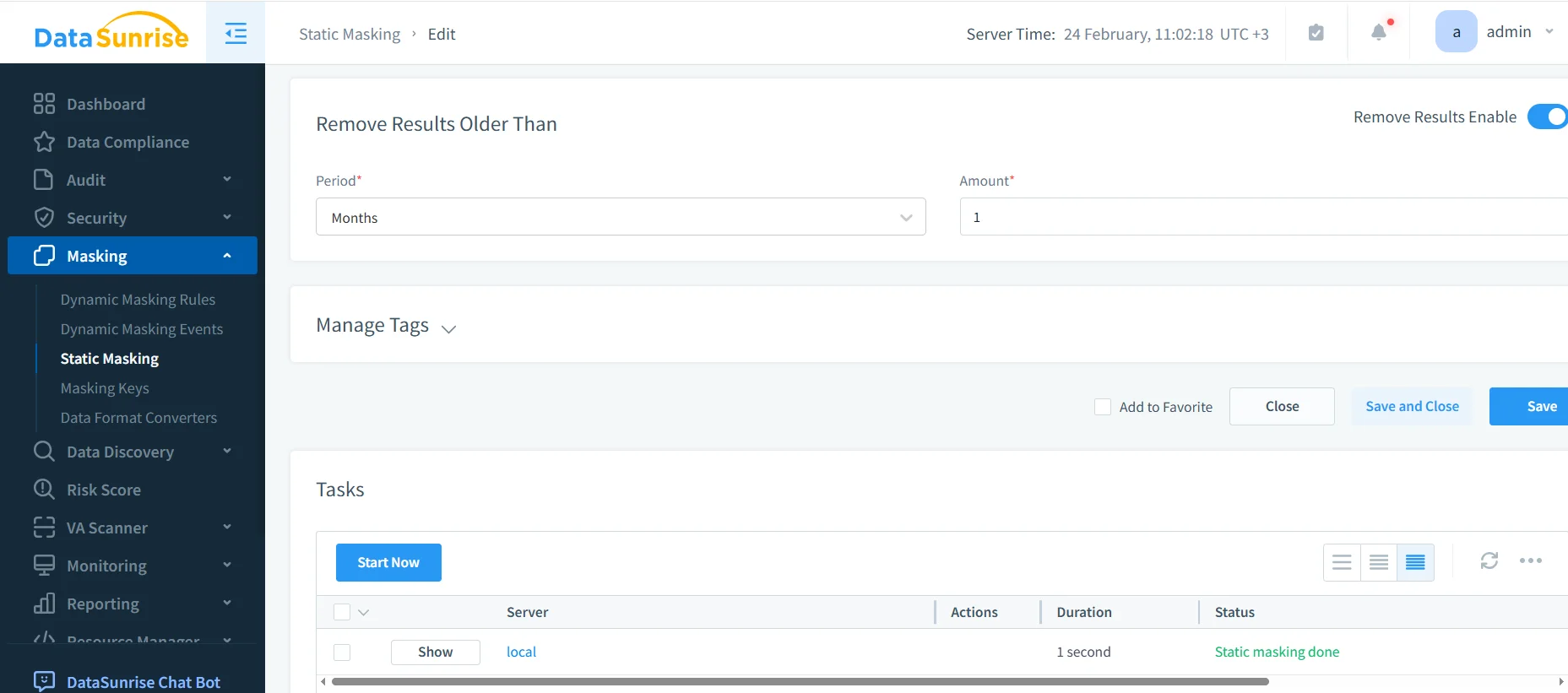
Task execution view confirming “Static masking done.”
For repeatable refresh pipelines, generate the target dataset from an export/restore cycle before masking. PostgreSQL’s pg_dump reference is here: PostgreSQL: pg_dump.
Validate Anonymized Output with SQL
SELECT * FROM masking_static.employee_sensitive

Masked query results showing anonymized values in sensitive columns.
If your anonymized dataset breaks joins or constraints, it’s not useful—so teams will bypass it. Preserve relationships with deterministic transformations where needed.
Static Anonymization in MySQL
Many organizations anonymize PostgreSQL production data and then distribute masked datasets into MySQL-backed staging, analytics, or legacy systems. The core rules are the same: anonymize a copy, preserve integrity, and validate behavior at scale.
To keep datasets both safe and testable, treat anonymized data as part of Test Data Management and ensure it supports realistic data-driven testing. This is where format-preserving masking and synthetic replacements matter: your goal is “safe and realistic,” not “random and broken.”
For MySQL Dev/Test, preserve formats (email patterns, phone lengths, valid dates) so app validation still passes. An anonymized dataset that fails basic validation wastes everyone’s time.
Monitoring, Enforcement, and Compliance
Anonymization is strongest when you can prove it’s working and detect when it’s bypassed. In DataSunrise, that means combining logging, monitoring, and preventive controls:
- Audit Logs to capture evidence of access and policy outcomes
- Database Activity Monitoring to spot risky behavior patterns and unusual access
- Audit Guide for structuring audit coverage and retention
- Database Firewall to enforce safe query behavior at the perimeter
- Security rules against SQL injections to reduce common exploit paths
- Vulnerability Assessment to continuously identify weak configurations
From a governance standpoint, anonymization supports regulatory expectations by reducing exposure outside authorized contexts. Use data compliance regulations guidance to map controls to requirements, and operationalize reporting through the DataSunrise Compliance Manager.
Conclusion
Data anonymization in PostgreSQL is most effective when it’s implemented as a system: discover sensitive data, apply dynamic anonymization for production access, use static anonymization for every non-production copy, and back it all with monitoring, auditing, and enforcement. Done correctly, you reduce risk without slowing delivery—and you stop leaking production identities into places they never belonged.
Protect Your Data with DataSunrise
Secure your data across every layer with DataSunrise. Detect threats in real time with Activity Monitoring, Data Masking, and Database Firewall. Enforce Data Compliance, discover sensitive data, and protect workloads across 50+ supported cloud, on-prem, and AI system data source integrations.
Start protecting your critical data today
Request a Demo Download Now