Data Audit for ClickHouse
ClickHouse has become one of the fastest-growing analytical databases thanks to its real-time performance and column-oriented architecture. However, high-speed ingestion and distributed execution also increase the need for accurate and repeatable auditing. Organizations in regulated industries — finance, healthcare, telecom, government — must maintain complete visibility into who accessed analytical datasets, which queries ran, and how operations affected sensitive records.
This guide explains how to configure native ClickHouse auditing capabilities and then shows how DataSunrise extends them into a comprehensive, compliance-ready audit framework. Internal knowledge links included for deeper coverage across audit rules, audit logs, audit trails, data security, data activity history, and more.
Importance of Data Audit
A structured data audit is essential for maintaining trust, transparency, and operational integrity in environments powered by ClickHouse. Analytical workloads frequently include sensitive business records, customer identifiers, behavioral logs, and financial metrics, so organizations must be able to trace how this data is accessed and used.
A reliable audit trail ensures alignment with compliance frameworks such as GDPR, HIPAA, PCI DSS, and SOX, while also supporting investigations, detecting unauthorized activity, strengthening governance, and reducing long-term compliance overhead.
Native ClickHouse Auditing Capabilities
1. System Query Log and Query Thread Log
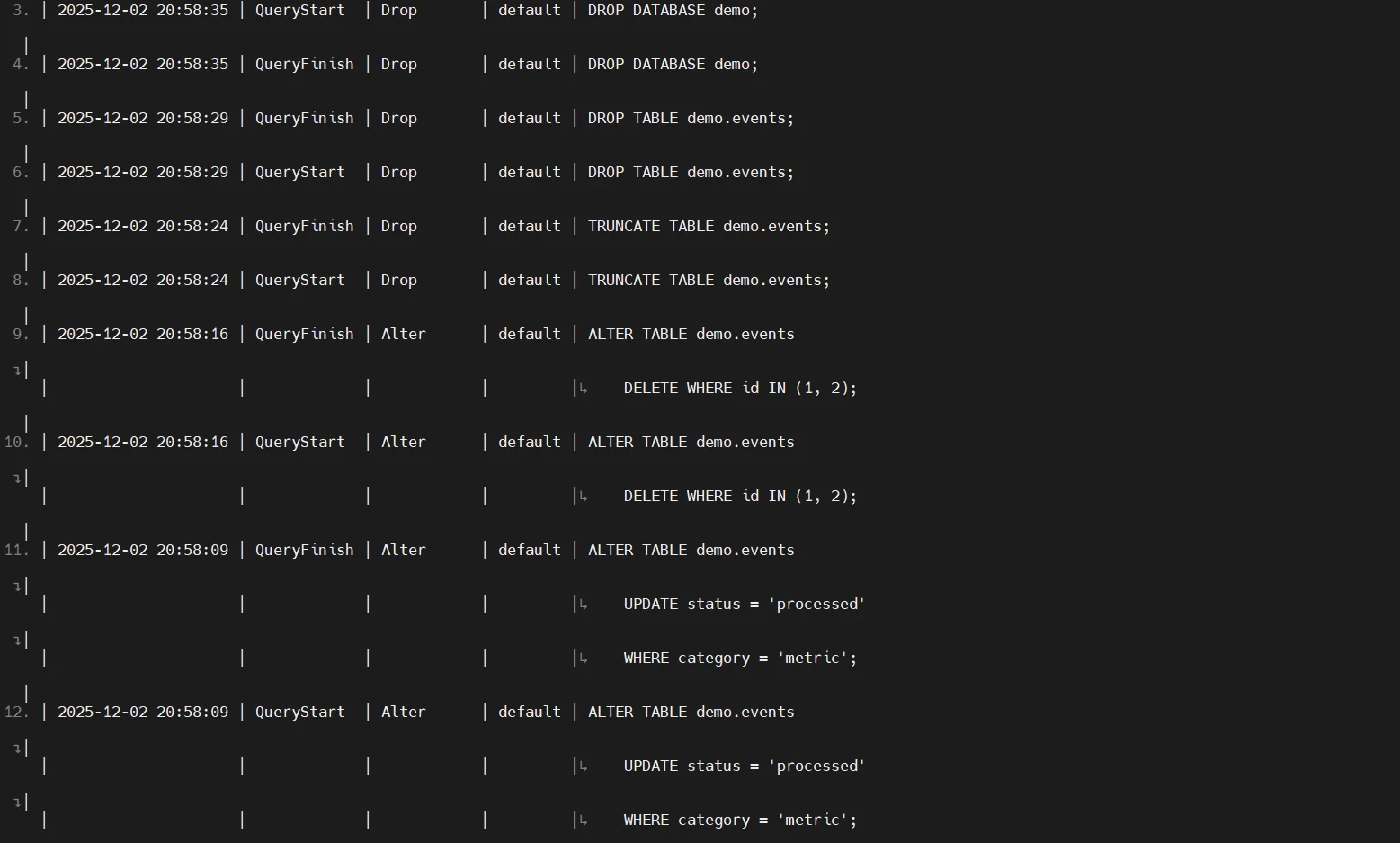
ClickHouse exposes detailed execution metadata through internal tables like system.query_log, system.query_thread_log, and system.part_log. These contain query text, execution statistics, client metadata, timings, and part-level changes.
Enable logging:
SET log_queries = 1;
SET log_query_threads = 1;
Query recent entries:
SELECT event_time, query_kind, user, query
FROM system.query_log
ORDER BY event_time DESC
LIMIT 50;
2. Access Control & Authorization Logging
Role-based access control (RBAC) generates audit-relevant signals including failed authentication attempts, privilege checks, role assignments, and unauthorized access attempts. These appear in system.query_log and server logs.
Example RBAC setup and privilege auditing:
-- Create a user with password authentication
CREATE USER analyst IDENTIFIED WITH sha256_password BY 'StrongPassword123';

-- Grant read permissions on a sensitive table
GRANT SELECT ON db.sensitive_table TO analyst;

-- Revoke permissions if needed
REVOKE SELECT ON db.sensitive_table FROM analyst;

-- Show access-related log entries
SELECT event_time, user, type, query
FROM system.query_log
WHERE type IN ('Exception', 'QueryStart', 'QueryFinish')
ORDER BY event_time DESC;
Example failed authorization detection:
SELECT event_time, user, exception, query
FROM system.query_log
WHERE exception LIKE '%AccessDenied%'
   OR exception LIKE '%not enough privileges%';
3. Server Logs for Operational Events
Server logs capture operational metadata including DDL statements, configuration updates, replication events, and cluster-level actions. Logging can be configured in config.xml.
Example ClickHouse server logging configuration:
<yandex>
    <!-- Enable query logging -->
    <query_log>
        <database>system</database>
        <table>query_log</table>
        <flush_interval_milliseconds>7500</flush_interval_milliseconds>
    </query_log>

    <!-- Enable thread-level query logging -->
    <query_thread_log>
        <database>system</database>
        <table>query_thread_log</table>
    </query_thread_log>

    <!-- Enable part-level operational logging -->
    <part_log>
        <database>system</database>
        <table>part_log</table>
    </part_log>
</yandex>
Example DDL activity review:
SELECT event_time, query_kind, query
FROM system.query_log
WHERE query_kind = 'DDL'
ORDER BY event_time DESC;
Enhanced ClickHouse Data Audit with DataSunrise
DataSunrise augments ClickHouse with a structured, centralized, compliance-ready audit framework. It transforms ClickHouse logs into unified audit records enriched with identity context, object metadata, behavioral analytics, and policy-based controls. These capabilities integrate seamlessly with dynamic masking, threat detection, and automated compliance workflows.
DataSunrise Data Audit Tools for ClickHouse
DataSunrise provides a unified audit architecture that extends ClickHouse’s native capabilities with deeper visibility, richer context, and centralized governance. The tools below work together to capture user activity, protect sensitive data, streamline compliance workflows, and strengthen security across distributed analytical environments.
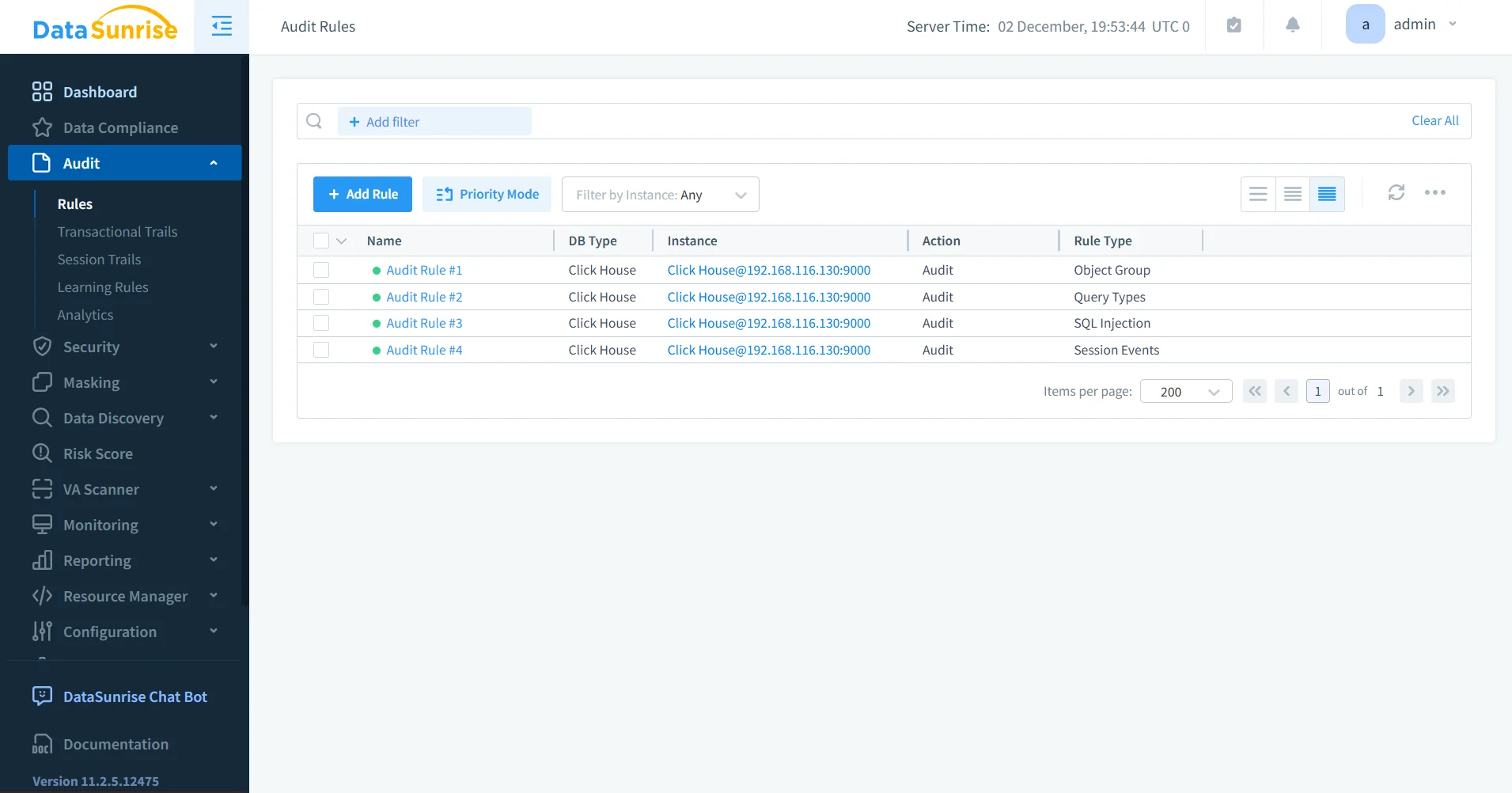
1. DataSunrise Audit Rules
Audit Rules define which ClickHouse operations should be logged. They allow organizations to scope auditing by users, roles, applications, tables, databases, clusters, and operation types such as SELECT, INSERT, DELETE, ALTER, and DROP. Rules can target sensitive datasets such as PII or financial information and detect risky SQL patterns. Learn more at Audit Rules and Rules Priority.
2. Centralized Audit Log Storage
DataSunrise consolidates ClickHouse events into a structured audit repository designed for long-term retention, efficient filtering, multi-platform normalization, and compliance-friendly storage.
Additional details:
- Ensures consistent audit formats across heterogeneous environments
- Supports high-volume analytical workloads
- Enables long-term retention for regulated industries
- Allows fast filtering and correlation for investigations
- Supports secure export for auditing and external review
More information:
Audit Logs
Audit Storage Optimization
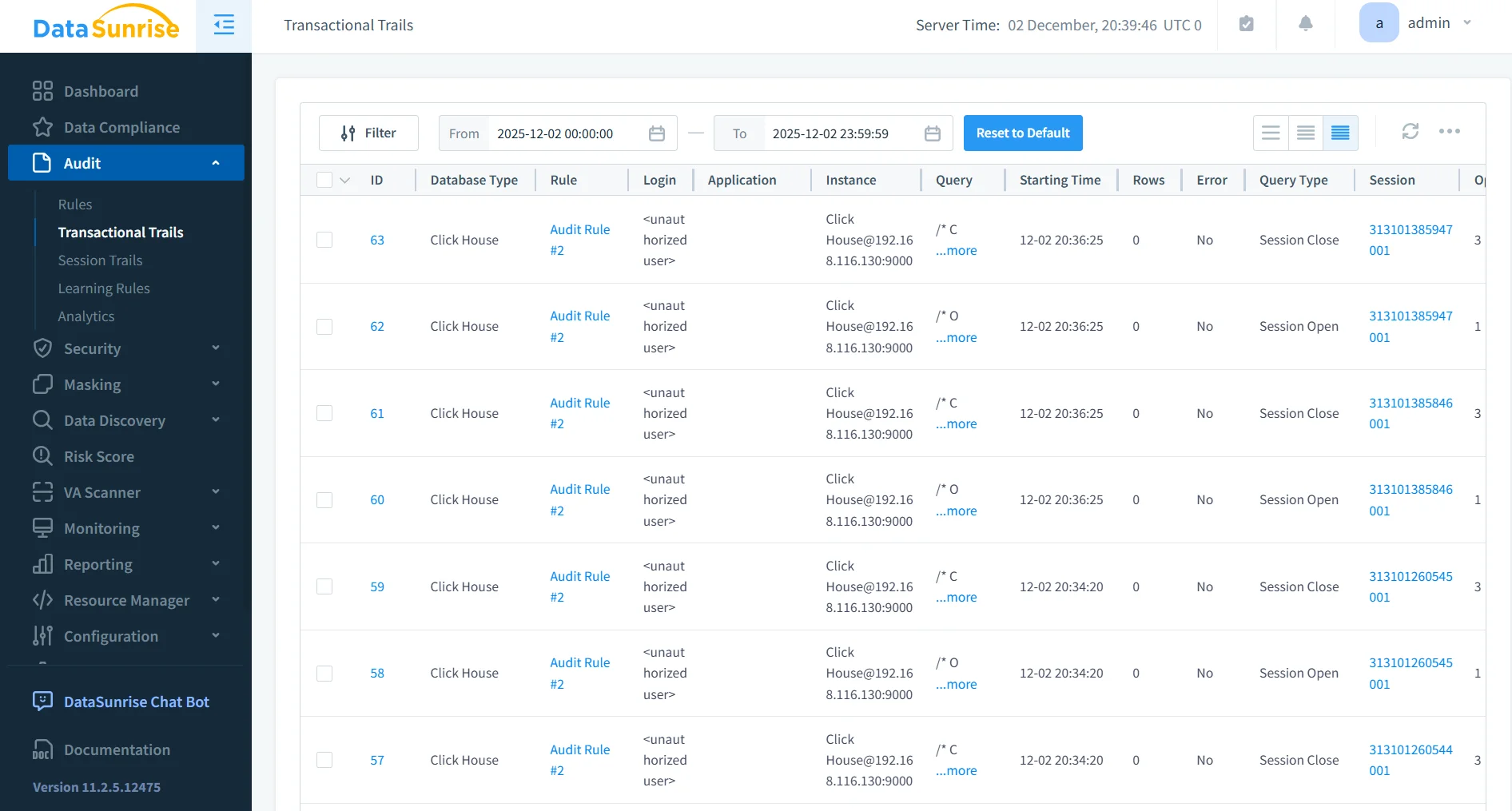
3. Transaction and Activity History
DataSunrise records ClickHouse activity at a granular level, including object access, query execution details, mutation operations, and behavioral patterns over time.
4. Real-Time Alerts & Notifications
Security and audit events can immediately trigger notifications via email, Slack, Microsoft Teams, SIEM systems, and webhook integrations.
Additional details:
- Enables rapid response to policy violations
- Integrates with SOC monitoring pipelines
- Supports anomaly-based trigger thresholds
- Eliminates the need for manual log reviews
- Facilitates continuous monitoring in large environments
Learn more:
Real-Time Notifications
5. Dynamic Data Masking Integration
Dynamic masking prevents sensitive fields from appearing in query results, audit logs, or reports — essential for privacy and compliance.
Additional details:
- Masks sensitive data for unprivileged users
- Ensures logs never contain exposed personal data
- Reduces privacy risks during audit reviews
- Policies apply consistently across all environments
- Fully compatible with ClickHouse analytical workloads
Learn more:
Dynamic Masking
6. Behavior Analytics & Anomaly Detection
DataSunrise analyzes user behavior to detect suspicious patterns, unusual access timing, repeated scanning, high-risk SQL behavior, and insider threat indicators.
Additional details:
- Builds behavioral baselines for all users
- Detects deviations from normal query behavior
- Identifies slow reconnaissance and privilege misuse
- Helps distinguish human activity from script-driven threats
- Enables automatic remediation rule creation
Learn more:
User Behavior Analysis
Threat Detection
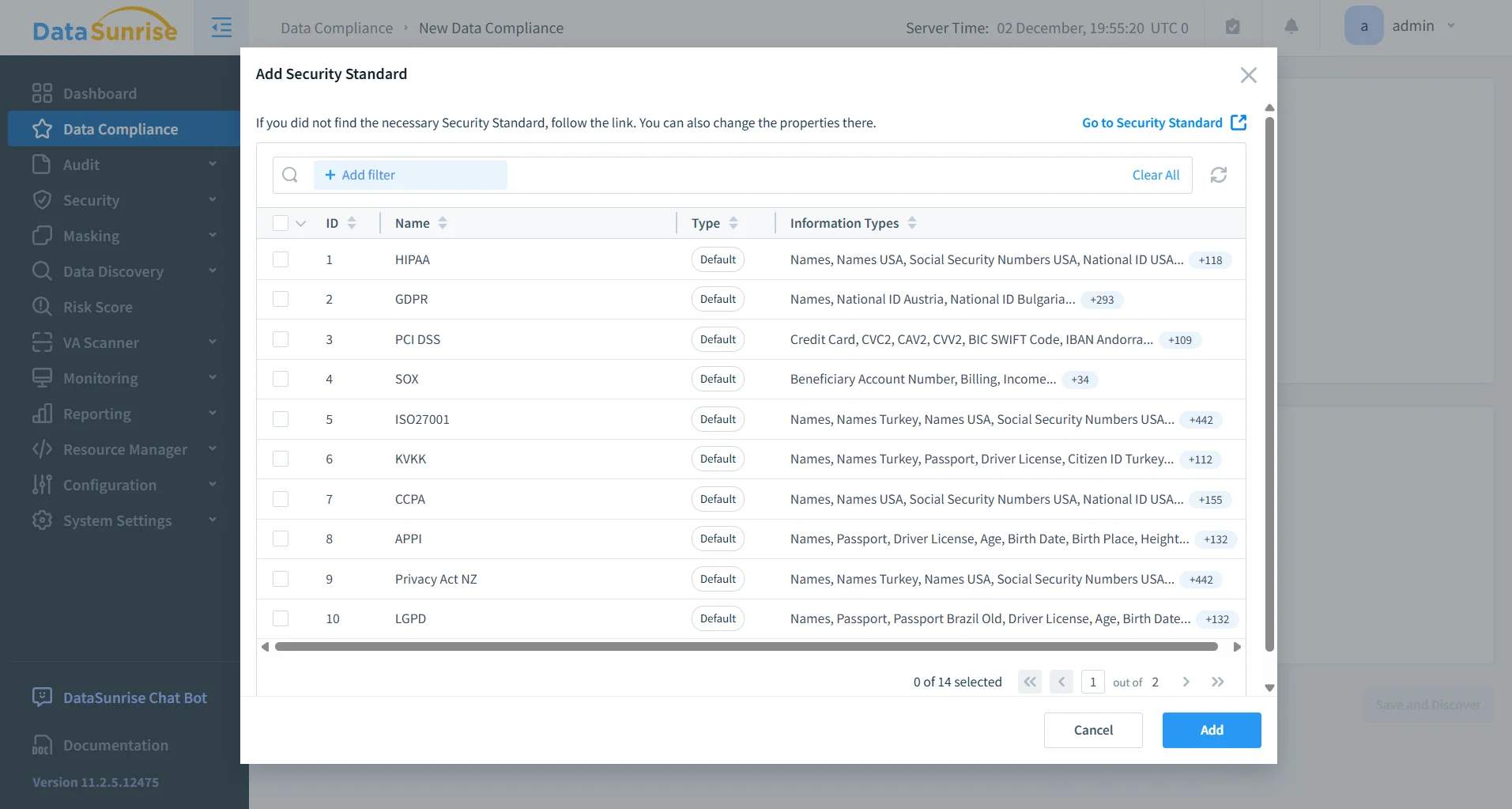
7. Automated Compliance Reporting
DataSunrise generates ready-to-submit reports for GDPR, HIPAA, PCI DSS, SOX, and other frameworks.
Business Benefits of ClickHouse Auditing with DataSunrise
| Benefit | Description |
|---|---|
| End-to-End Visibility | A unified audit framework across all ClickHouse clusters and nodes ensures consistent observability. |
| Reduced Compliance Effort | Automated reporting for GDPR, HIPAA, PCI DSS, and SOX reduces manual review workload. |
| Lower Operational and Security Risk | Real-time monitoring and behavior analytics help identify unauthorized or unsafe user activity. |
| Built-In Sensitive Data Protection | Dynamic masking prevents exposure of sensitive information during analytics or audit inspection. |
| Unified Multi-Platform Governance | Consistent audit policies across platforms using Database Activity Monitoring and Data Activity History. |
Conclusion
ClickHouse’s native logging features provide a strong foundation for audit visibility. However, organizations requiring granular audit policies, long-term compliance, and centralized governance benefit significantly from DataSunrise.
DataSunrise enhances ClickHouse with structured auditing, dynamic masking, behavioral analytics, real-time alerts, and automated compliance workflows — delivering transparency, governance, and security across all analytical environments.
Protect Your Data with DataSunrise
Secure your data across every layer with DataSunrise. Detect threats in real time with Activity Monitoring, Data Masking, and Database Firewall. Enforce Data Compliance, discover sensitive data, and protect workloads across 50+ supported cloud, on-prem, and AI system data source integrations.
Start protecting your critical data today
Request a Demo Download Now