Data-Inspired Security
The Data Audit stage is a critical foundation for any analytics workflow. But how can this process be made more efficient? DataSunrise streamlines it through its Event Tagging feature—an approach that links raw audit events to meaningful security context. Best practices referenced in the OWASP Database Security guidelines highlight the value of enriching audit data to strengthen threat detection and compliance readiness.
With Event Tagging, users can assign labels to audit events that reflect the type of data affected by a query. This added context dramatically speeds up analysis, enabling security and compliance teams to extract important insights from transaction logs without manually reviewing each entry.
In addition to expanding audit visibility, DataSunrise utilizes tagged information across its dynamic masking engine, Audit Rules, and Security Rules. This article explores two key capabilities: Event Tagging and data-driven rule automation. It also explains how Dynamic Masking Rules operate and details the role of the Data Filter by Information Type across both the Audit and Security modules.
Event Tagging and Information Types
Let’s begin with Information Types, which are defined in Data Discovery—an essential first step. DataSunrise relies on these Information Types to distinguish different kinds of data in query results.
Information Types describe the nature of the data, making it easier to locate specific information during the discovery process. But their role goes further. The same Information Types from Data Discovery are used to tag or label data within Audit Transaction Trails. Later, you can export logs containing these tagged records. As mentioned earlier, the Dynamic Data Masking feature can also apply masking rules based on these data types.
Here is how the tagged data appears in the downloaded CSV report:

Note the line containing “DI_Email” Information Type.
In summary, having the correct Information Type is essential for effective Event Tagging. In the next section, we’ll explain how to create an Information Type.
Event Tagging — Summary, Setup, and Quick Checks
Summary
- Purpose: enrich audit trails by labeling results with Information Types (e.g., DI_Email, DI_CreditCard).
- Outcome: faster investigations, tag-based masking/rules, exportable evidence.
- Scope: works with Data Discovery, Audit Rules, Security Rules, and Dynamic Masking.
Setup Steps (7)
- Create/verify an Information Type (e.g., DI_Email) in Data Discovery; test pattern match.
- Enable Event Tagging for the target instance; select the Information Type.
- Create an Audit Rule and enable Log Query Results (scope to sensitive objects if needed).
- Generate traffic (e.g., SELECT with emails) and confirm tags in Transactional Trails.
- (Optional) Configure a Dynamic Masking Rule → Masking Settings = Data Filter → choose the same Information Type.
- (Optional) In Security Rules, use the same Information Type in Data Filter to block or alert.
- Export tagged logs (CSV) or stream to SIEM for correlation and reporting.
Tags → Actions (at a glance)
| Information Type | Audit | Masking | Security |
|---|---|---|---|
| DI_Email | Filter/export email access events | Redact/local-part masking | Alert on bulk reads |
| DI_CreditCard | Evidence for PCI DSS req. 10 | Show BIN+last4 only | Block unapproved queries |
| DI_PHI | Trace PHI access (HIPAA) | De-identify identifiers | Escalate to SOC |
Quick Checks
- No tags appear: Confirm source=RESULT_SET in the attribute, regex matches real data, and Log Query Results is on.
- Masking not firing: Masking rule must use Data Filter with the same Information Type on the same instance.
- High overhead: Sample large result sets; narrow attributes; offload cold logs to object storage/SIEM.
- Compliance ask: Filter on
info_type(e.g., DI_Email) and export last 90 days for auditors.
Real-World Scenario: Faster Threat Investigation
Imagine a compliance officer reviewing suspicious activity logs across a MySQL environment. Without Event Tagging, they must manually decode each SQL result to determine if sensitive data was involved. With Event Tagging tied to Information Types, it becomes instantly clear which queries exposed PII, like emails or credit cards—slashing investigation time and reducing risk exposure in live environments.
Auditors don’t want a haystack of raw SQL—they want proof. Event Tagging turns noisy trails into evidence, showing not only what ran, but what data type was touched. Translation: hours to answer audit questions, not weeks.
Compliance alignment: Tagging + masking mapped to GDPR (pseudonymisation), HIPAA (access logging), and PCI DSS (PAN masking) makes “show me” requests trivial. For execs: this is risk converted into metrics, not vibes.
Ops benefit: Analysts pivot to tags like DI_Email / DI_CreditCard instead of spelunking every SELECT *.
False positives go down; MTTR goes down; morale goes up.
Before Event Tagging
- Manual log parsing per environment
- Unclear if PII/PHI was exposed
- Audit evidence assembled by hand
After Event Tagging
- Query trails enriched with info types
- Masking auto-triggers on match
- One-click export of tagged evidence
Do
- Start with 2–3 high-signal info types (Email, PAN, PHI)
- Enable “Log Query Results” only where needed
- Route tagged trails to SIEM for correlation
Avoid
- Storing full sensitive payloads—prefer tags
- Unbounded regex (catastrophic backtracking)
- Tagging every column in hot paths (noise & latency)
Common gotchas (and quick fixes)
- No tags appearing? Verify the attribute’s source is
RESULT_SETand your regex matches real data. - Latency spikes? Sample large result sets and batch writes; narrow the info-type scope.
- Masking not firing? Ensure Dynamic Masking uses Data Filter with the same info type on the same instance.
Information Type in a Nutshell
Navigate to Data Discovery and select Information Types. Here, you’ll find all available Information Types in DataSunrise. Keep in mind that many are complex and may not suit your specific needs. That’s why, for this discussion, we recommend creating a simple, custom Information Type.
An Information Type is defined by its attributes, and it can have multiple attributes. Matching any of these attributes links query data to the Information Type. For our example, we’ll create the simplest Information Type with just one attribute (DI_EmailAttribute) — data in the query results containing an email string like [email protected].
# Create DI_Email Information Type via REST API
curl -X POST https://ds.example/api/infoTypes \
  -H "Authorization: Bearer $TOKEN" \
  -H "Content-Type: application/json" \
  -d '{
        "name":"DI_Email",
        "description":"Email addresses (regex)",
        "attributes":[{
          "name":"DI_EmailAttribute",
          "pattern":".*@.*",
          "source":"RESULT_SET"
        }]
      }'
Skip the UI and script onboarding in seconds.
We won’t go into too much detail here. The screenshot below shows how the attribute is set up.
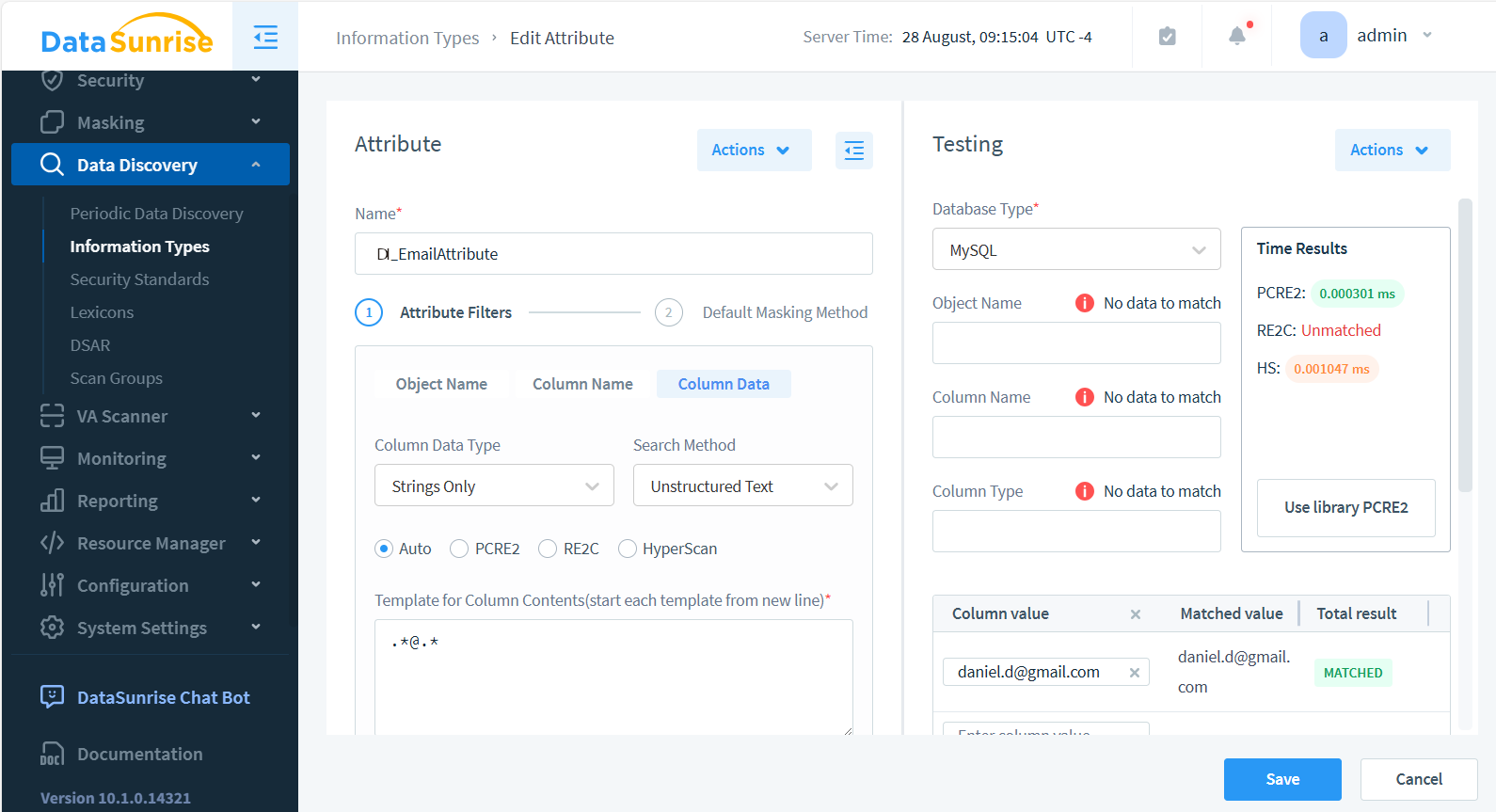
Take note—you can test attribute matching in the panel on the right. For example, we tested the string [email protected] against the regular expression .*@.*, which is set in the column’s data Attribute Filter.
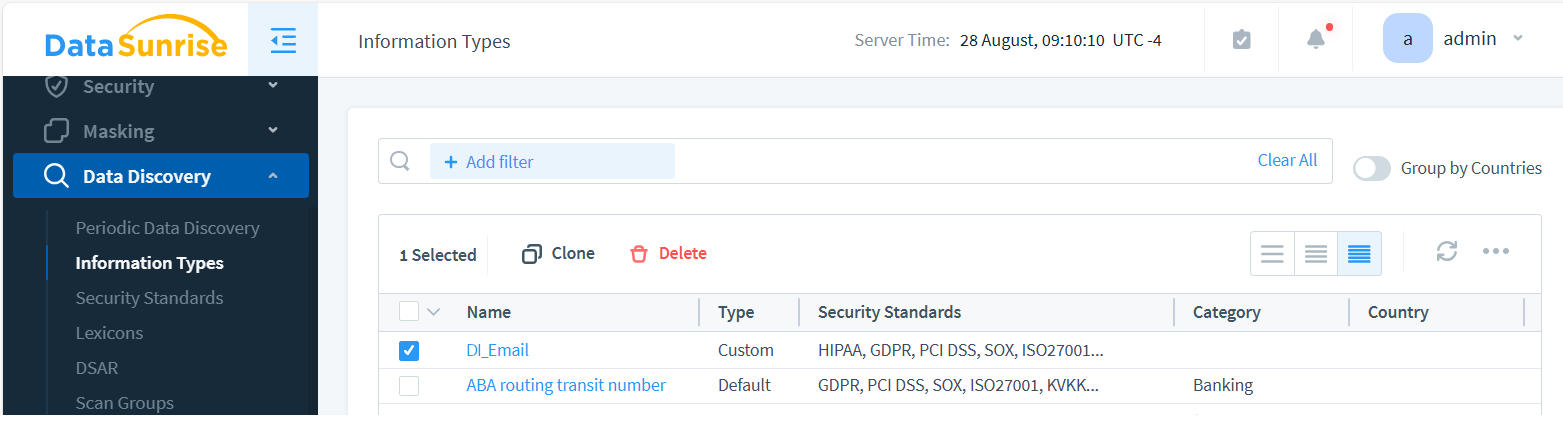
As a result, we’ve created the custom DI_Email Information Type with a regex-based attribute named DI_EmailAttribute. This is shown below:
Once a query enters the proxy with Event Tagging enabled, the system labels the data. This valuable information can then be utilized in Audit, Security Rules, and Dynamic Masking.
Keep in mind that for both tagging and dynamic masking in data-inspired security, the Information Type feature works exclusively with data-based attributes.
Event Tagging in Audit
Event Tagging is an intelligent auditing feature that adds valuable context to Transactional Trails logs. It allows administrators and security teams to label each audit record with specific tags describing the type of data involved in the event. This capability simplifies analysis, enhances compliance reporting, and eliminates the need to manually parse complex query results.
- Context and classification: Each audit event can include tags representing data categories such as PII (Personally Identifiable Information), Financial Data, or Healthcare Records. This contextual labeling helps quickly identify which types of data were accessed or modified.
- Faster analysis: Instead of manually reviewing logs, users can filter and group audit records by tags. This drastically reduces investigation time and supports faster incident response.
- Compliance reinforcement: Tagging simplifies demonstrating compliance with standards such as GDPR, HIPAA, and PCI DSS. It provides clear evidence of which data types were impacted and how they were handled.
- Integration with Data Discovery: Before enabling Event Tagging, ensure that the Information Type classification is configured and functioning properly. You can verify this by running a Data Discovery task, which scans databases to identify sensitive elements such as personal identifiers or financial records.
- Automation and consistency: Once Event Tagging is enabled, all future audit events are automatically labeled with the relevant tags. This ensures a consistent audit structure across environments and simplifies reporting, analytics, and compliance verification.
Ultimately, Event Tagging turns traditional audit logging into a data-aware security control—empowering organizations to maintain continuous visibility, improve regulatory alignment, and make faster, data-driven security decisions.
Add Event Tagging for The Instance
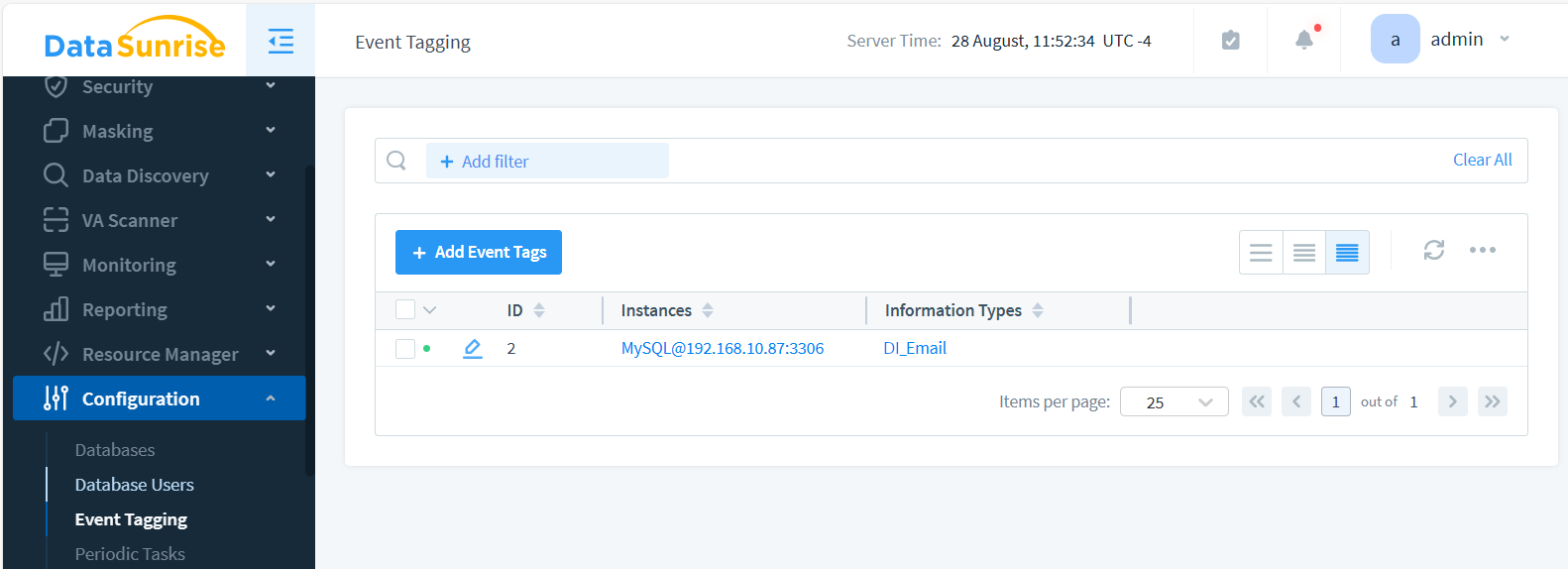
Navigate to Configuration > Event Tagging and click the +Add Event Tags button. Select the checkboxes next to the database instance(s) where you want to audit the data, as well as the Information Type. Since we created the DI_Email Information Type earlier, we’ll use it to create the Event Tag. After saving, your list of tags should look like this:
Audit Rule to Generate Tagged Audit Log
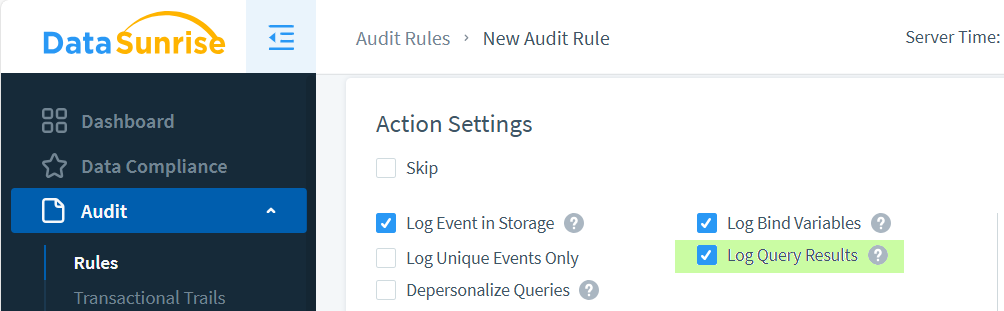
Navigate to ‘Audit’ > ‘Rules’ > ‘+ Add New Rule’ to create an Audit Rule. Name it ‘EmailAuditRule’. Enable ‘Log Query Results’ and select the Instance where you previously configured Event Tagging.
We’re ready to test Event Tagging.
Make a request for email data to the instance. Now, when query results are saved in audit trails, you’ll see this tag in the Transactional Trails:
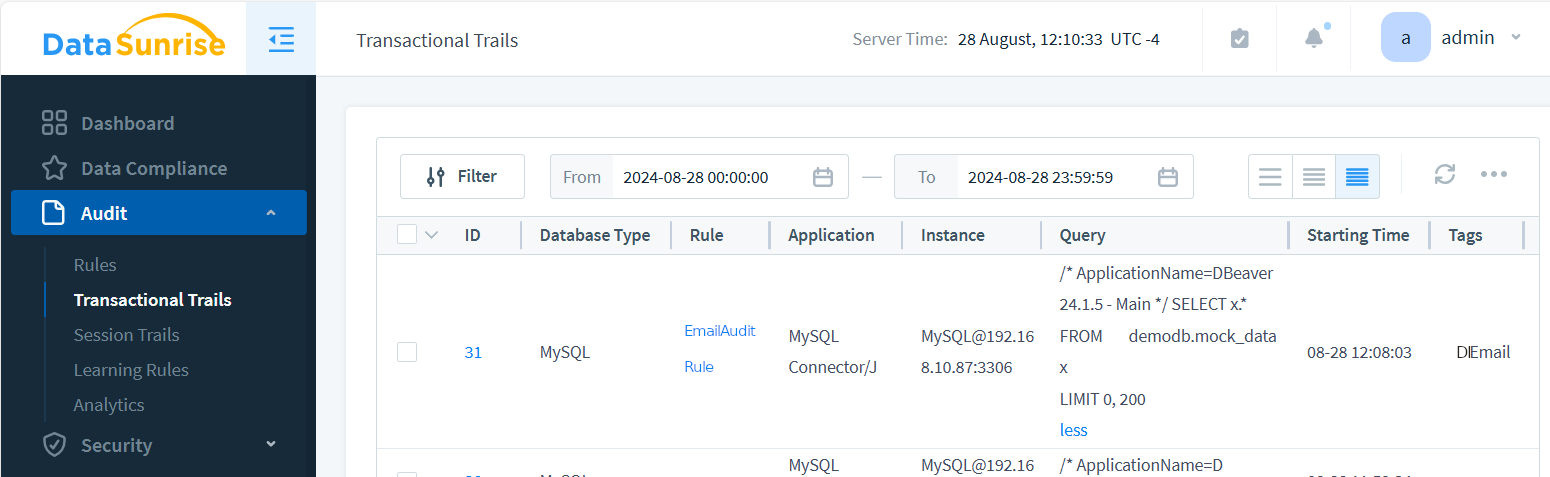
The image above shows EmailAuditRule triggered by a SELECT * query to [email protected] instance. This query returned emails among other data from the mock_data table, so the audit event is tagged with the DI_Email Event Tag we created.
Important note: If the data-inspired masking rule discussed below is enabled, the event tag will not label the audit trail event.
Event Tagging in Compliance Frameworks
By enriching audit trails with Information Types, Event Tagging transforms raw logs into compliance-ready evidence. Here’s how it maps to major regulations:
| Framework | Requirement | Event Tagging Alignment |
|---|---|---|
| GDPR | Art. 32 — pseudonymisation and accountability | Tags queries touching PII, enabling pseudonymisation checks and proof of access history. |
| HIPAA | §164.312 — audit controls for PHI | Labels PHI queries with info types (e.g., DI_PHI) to demonstrate access traceability. |
| PCI DSS | Req. 10 — link each PAN access to a user | Event Tags highlight PAN queries and trigger masking rules to prevent leakage. |
| SOX | §404 — maintain integrity of financial record changes | Tagged logs reveal when regulated financial fields are queried or modified. |
With Event Tagging, DataSunrise ensures compliance reporting becomes a side effect of runtime controls — turning audit prep from a manual effort into an automated, provable process.
Analyzing Tagged Audit Data
Once Event Tagging is active, one can filter the logs enriched with Information Types directly in SQL or stream them to SIEM platforms. This shortens investigation time and helps correlate suspicious events.
PostgreSQL Example: Filter by Information Type
-- Show last 20 audit events involving emails
SELECT event_time, actor, action, object, info_type
FROM ds_audit_trails
WHERE info_type = 'DI_Email'
ORDER BY event_time DESC
LIMIT 20;
Splunk Search Example
index=datasunrise_audit info_type=DI_CreditCard status=success
| stats count by actor, object, src_ip
SIEM Alert Rule (Sigma)
title: Bulk Export of PII
logsource:
  product: database
detection:
  sel:
    info_type: DI_Email
    affected_rows: '>1000'
  condition: sel
level: high
By pivoting on info_type, analysts can zero in on sensitive data access without parsing raw SQL. This makes it easy to answer compliance questions like “Who queried PHI last week?” or trigger automated alerts when thresholds are crossed.
Masking for Data-Inspired Security
In the previous chapter, we set up an audit rule and observed how a tag was assigned to an event when it matched our custom DI_Email Information Type. However, tagged data has far more valuable applications beyond simple audit reports.
Now, let’s explore another use of event tagging. When the DI_Email Information Type is detected by the proxy, you can configure various rules to use this as input. Audit, Security, and Masking rules can all be triggered or filtered using these additional tags. In this section, we’ll explain how DataSunrise masks labeled data on the fly, returning masked emails to the database client.
To achieve this, you simply need to create a Dynamic Masking Rule with a Data Filter in the Masking Settings. Let’s walk through the details.
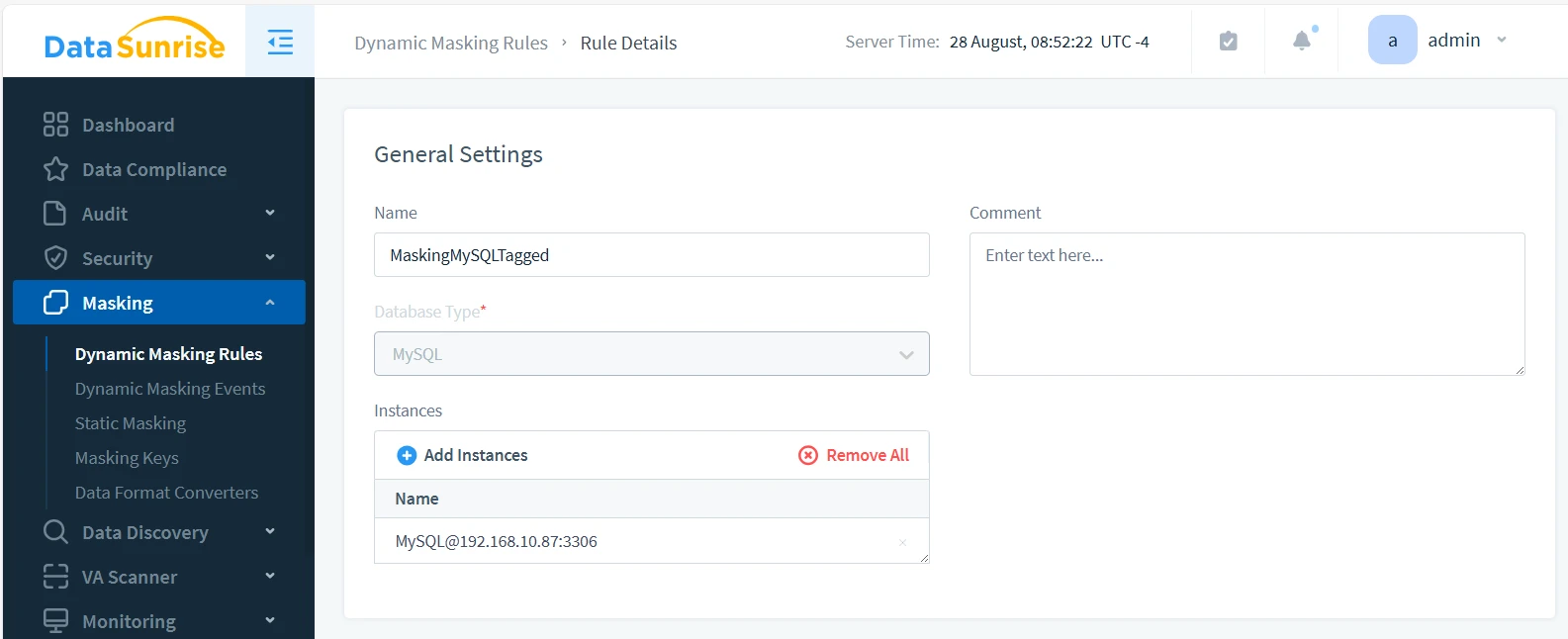
Create the rule as you normally would on the Masking > Dynamic Masking Rules page. Select the database instance where you set up Event Tagging — [email protected] in this case. Enable the ‘Log Event In Storage’ checkbox.
In the Masking Settings shown below, we’ve set the Masking Settings By dropdown selector to Data Filter. This allows us to use Information Types for masking.
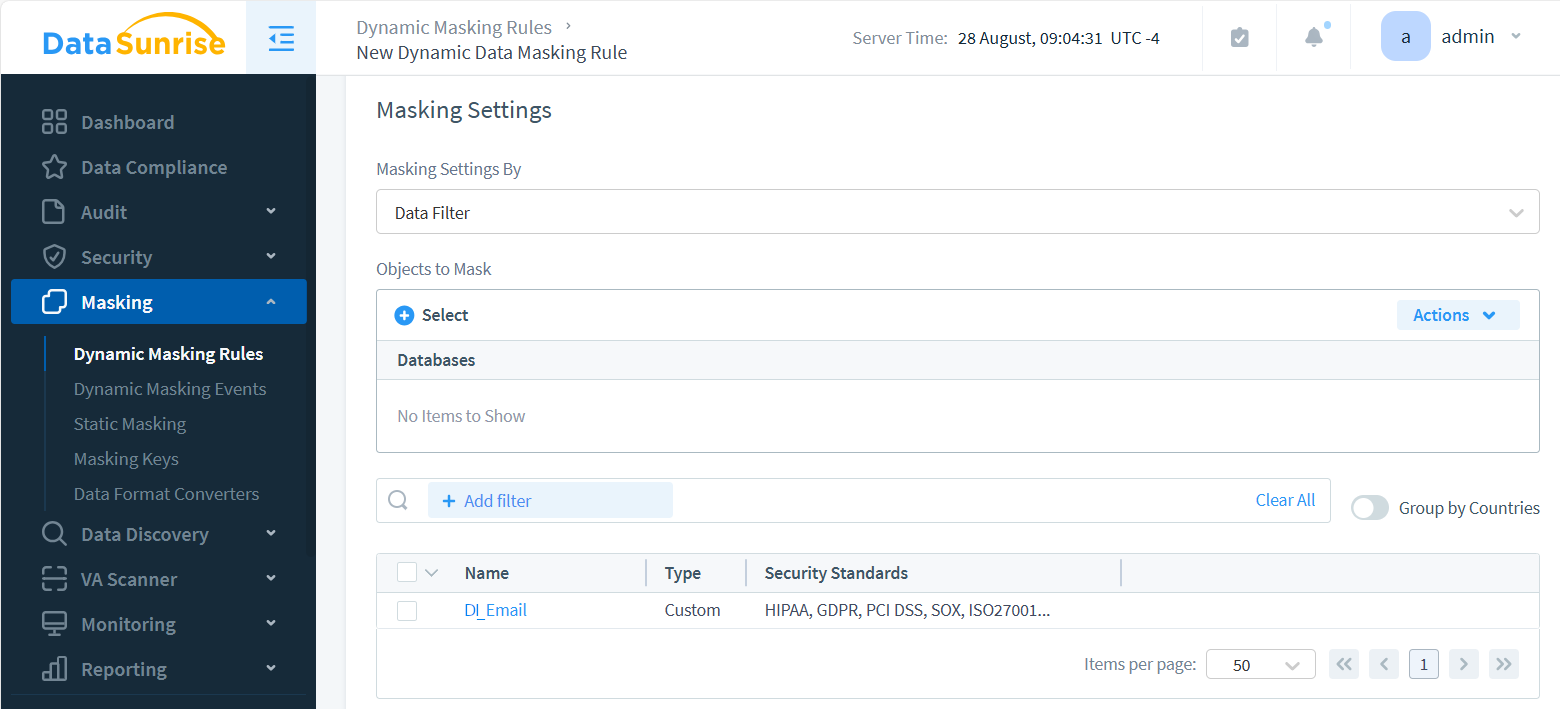
Notice that the Objects to mask selector is left empty. This means that all objects queried from the masked instance are checked for a match with DI_EmailAttribute. If they match, DataSunrise masks them. Use the Object Selector to add specific database objects as additional conditions for masking operations.
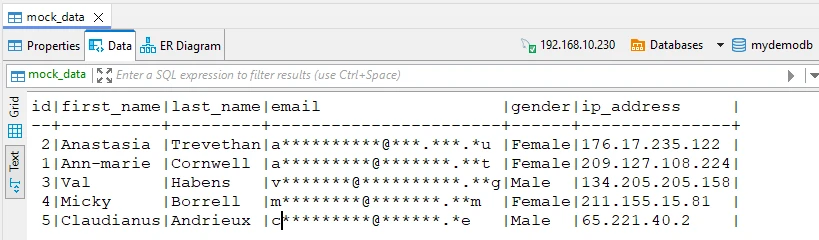
The illustration below shows the result. We queried the data through the proxy using the DBeaver database client application. DataSunrise automatically detected and masked the emails in the response based on the Information Type found in the query results:
Common Pitfalls & Fixes
No tags in audit trail?
Verify the Information Type regex matches actual result sets and that “Log Query Results” is enabled in the Audit Rule.
Masking not triggering?
Ensure the Dynamic Masking Rule targets the same instance where Event Tagging is configured and that “Data Filter” is set to the correct Information Type.
High query latency?
Switch Event Tagging to sampling mode or batch log writes, then retest CPU/memory footprint.
Data-Inspired Security for Audit and Security Rules
With DataSunrise, you can leverage Information Types and Event Tags within Audit Rules and Security Rules to determine whether a query should be audited or blocked. The images below show how to set up Data Filtering for both Audit and Security rules.
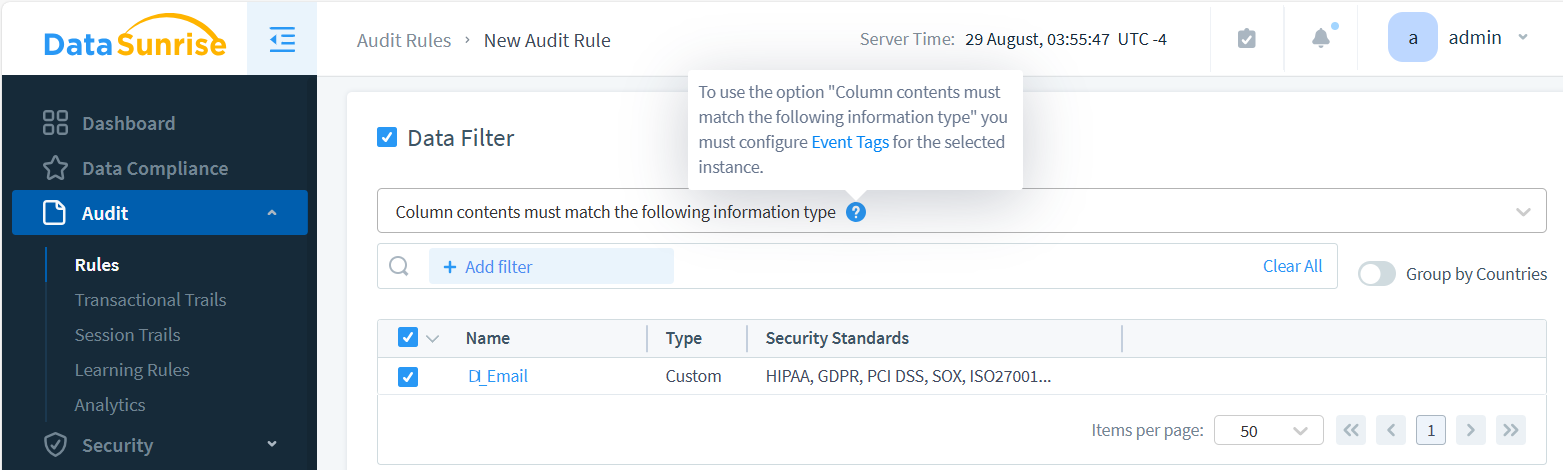
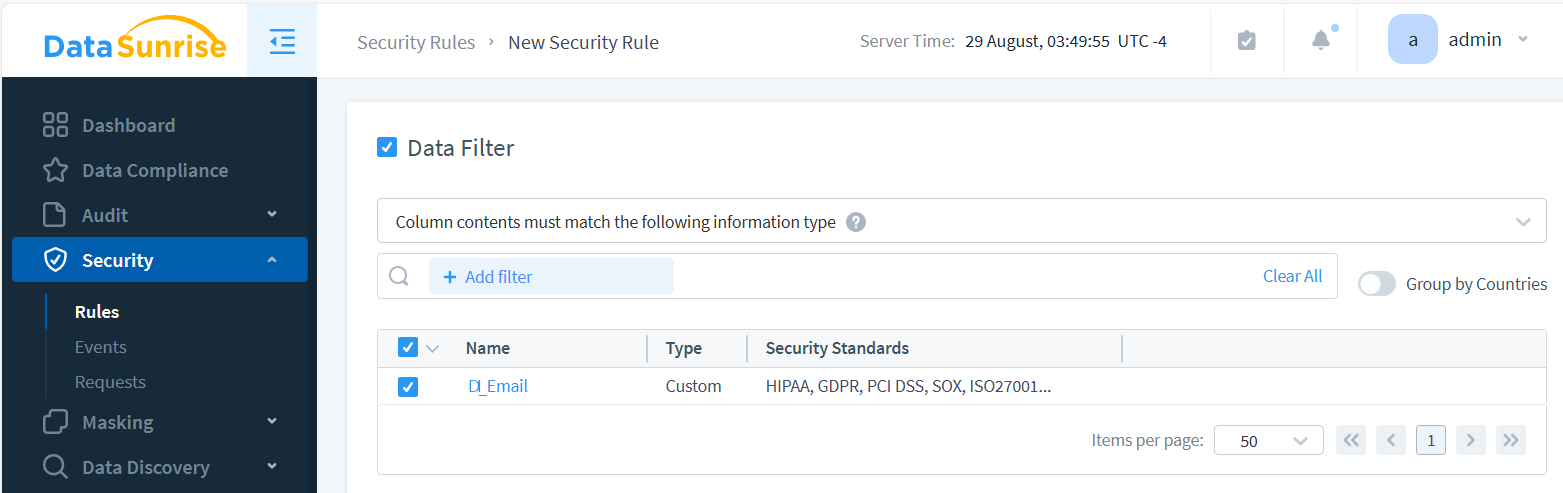
Note that if Event Tagging isn’t configured for the selected database instance, the Information Type option won’t be available in the Data Filter section. Enable the ‘Log Event In Storage’ checkbox in the security rule, as this is required for the data-inspired feature to function.
Data-Inspired Security FAQ
What is Event Tagging in DataSunrise?
Event Tagging attaches labels (Information Types) to queries and their results in audit trails. It highlights whether sensitive data such as emails, credit card numbers, or PHI was touched, simplifying investigations and compliance reviews.
How does Event Tagging help with compliance?
By tying queries to Information Types, Event Tagging makes it easy to prove compliance with GDPR (pseudonymisation), HIPAA (access logging), and PCI DSS (masking cardholder data). Logs show not only what ran, but what kind of data was involved.
What is the difference between Event Tagging and Dynamic Masking?
Event Tagging enriches audit logs with labels for sensitive data. Dynamic Masking acts at runtime to replace those values with obfuscated surrogates, ensuring unauthorized users never see the original data.
What are common pitfalls when using Event Tagging?
- No tags appear: verify regex patterns match actual data.
- Masking not triggering: confirm Dynamic Masking rules reference the same Information Type and instance.
- Latency: use sampling or offload log storage to reduce overhead on high-volume queries.
Can Event Tagging feed other security rules?
Yes. Data with tag can trigger Audit Rules, Security Rules, and Masking Rules. This enables automatic decisions such as blocking queries or masking results whenever sensitive types like DI_Email or DI_CreditCard are detected.
Industry Applications of Event Tagging
Event Tagging is more than a technical feature—it directly accelerates compliance and risk management in regulated industries:
- Finance: Tagging credit card fields supports PCI DSS audits and SOX reporting by linking SQL queries to sensitive PAN access.
- Healthcare: Audit trails labeled with PHI types simplify HIPAA reviews, reducing manual evidence prep.
- SaaS & Cloud: Prove tenant isolation by tagging cross-tenant queries, ensuring GDPR-aligned transparency.
- Government: Deliver tamper-evident logs with information-type context to meet strict accountability standards.
- Retail: Tag customer PII and purchase history for fraud detection and privacy-by-design analytics pipelines.
By contextualizing audit logs with Event Tagging, organizations can transform compliance from a costly manual burden into an automated proof mechanism.
The Future of Data-Inspired Security
Event Tagging and Information Type classification represent only the foundation of a broader evolution toward intelligent, adaptive data security. The next generation of data-inspired protection will merge machine learning, behavior analytics, and automated policy orchestration to predict and neutralize risks before they materialize. Rather than simply reacting to exposed or misused fields, advanced platforms such as DataSunrise will dynamically correlate user intent, query context, and sensitivity labels in real time—continuously refining access decisions, applying context-aware masking, and autonomously suspending anomalous activity. Features like Dynamic Data Masking already demonstrate this shift toward real-time, adaptive control.
This proactive paradigm transforms data protection into a self-optimizing system, where security measures evolve in tandem with user behavior and infrastructure changes. By leveraging continuous learning models, platforms can anticipate insider risks, privilege escalation attempts, and policy violations across hybrid and multi-cloud environments. The ability to automatically enforce security posture adjustments without human intervention ensures that governance is not a periodic task but an ongoing, adaptive process.
As enterprise architectures grow increasingly complex, this shift will redefine compliance from a static checklist into a living, automated framework. DataSunrise’s vision aligns with this future—where global standards such as GDPR, HIPAA, and PCI DSS are enforced continuously through intelligent automation, ensuring privacy, accountability, and trust remain integral to every data interaction.
Conclusion
In today’s distributed data architectures, real security begins with deep visibility at the earliest point of interaction — the proxy layer. By applying Event Tagging to every client-to-database request, organizations gain precise, contextual insights into each query, transaction, and user action. These enriched metadata points form structured audit records that feed seamlessly into analytics, monitoring, and compliance workflows. On top of this foundation, dynamic data masking enhanced with Information Type validation delivers adaptive, context-aware protection that automatically obscures sensitive fields based on user identity, query logic, business rules, and regulatory standards.
DataSunrise provides a fully integrated data security ecosystem that unifies auditing, intelligent masking, SQL injection prevention, and compliance automation in one platform. Its advanced capabilities extend further into real-time data discovery, risk assessment, vulnerability scanning, and privacy controls designed for AI and large language model (LLM) workloads—where securing both input and output data flows is increasingly crucial. By combining event-level intelligence with masking logic, behavioral analytics, and automated enforcement, DataSunrise elevates security from passive observation to active, self-adjusting defense.
Organizations can explore these capabilities through an interactive demo or by downloading a free evaluation of the DataSunrise Security Suite. See how your data infrastructure can evolve from basic protection measures to intelligent, automated governance that strengthens compliance, improves transparency, and ensures resilience across on-premises, hybrid, and multi-cloud environments.
Next