Data Masking in MySQL

Introduction
MySQL powers everything from customer-facing applications to analytics pipelines and internal reporting. But the same convenience that makes MySQL easy to adopt also increases the risk of sensitive data exposure. This is especially true when production datasets are copied into dev/test, shared with contractors, or accessed through BI tools and support consoles. Data masking reduces that risk by transforming sensitive values into safe substitutes, while keeping the dataset usable for day-to-day work.
At a high level, data masking helps you protect Personally Identifiable Information (PII), payment details, and regulated records. It does this without blocking legitimate workflows like debugging, analytics, and QA. The goal isn’t to “hide everything,” but to reveal only what’s needed—consistently, predictably, and with clear governance.
In MySQL environments, masking usually falls into three operational modes. These include dynamic data masking (mask at query time), static masking (create a masked copy), and in-place masking (transform data in the original location). The right choice depends on your risk level and performance needs. It also depends on whether you can allow any sensitive values to exist outside production.
The Core Data Masking Challenges in MySQL Environments
MySQL deployments often look “simple” at first. That changes once you map out who can query what, where copies of data live, and which tools touch production. Common challenges include:
-
Data sprawl across environments
Teams frequently replicate MySQL databases for testing, staging, and troubleshooting. Without a structured data discovery process, sensitive columns (emails, passport numbers, credit cards) can spread into places with weaker controls and less monitoring. -
Over-privileged access for convenience
A single “read-only” MySQL account can still expose full customer records if it can access raw tables. Enforcing least-privilege using role-based access control (RBAC) and scoped permissions is essential. Many environments drift over time. -
Third-party tools and shared queries
BI dashboards, ORM-based apps, and ad-hoc SQL clients can all surface sensitive data in exports, screenshots, logs, and cached results. Masking needs to be consistent regardless of the client. It should also align with your organization’s data security policy. -
Compliance evidence and auditability
Regulations and internal policies increasingly require not only controls, but proof. When you process sensitive data in MySQL, you typically need documented controls aligned with compliance regulations. You also need traceable logs of who accessed what and when.
Choosing the Right Masking Approach for MySQL
Different MySQL use cases benefit from different masking strategies:
-
Dynamic masking: best when you must keep production data intact, but want to restrict what certain users see at query time (for example, support engineers seeing masked emails). This is ideal when you need “one database, many views of the truth.” It can vary depending on user, role, application, or network context.
-
Static masking: best when you need to deliver a non-production dataset (dev/test, analytics sandbox) with minimal risk. This pairs naturally with test data management practices.
-
In-place masking: best when regulated data must be de-identified permanently in a given environment (for example, legacy archives). Because it changes data at rest, it should be handled carefully. It is usually combined with backups, validation, and strong change control.
Masking is not a replacement for cryptography. You’ll often combine it with database encryption to reduce both “data-at-rest” and “data-in-use” exposure. This is especially important when MySQL data is replicated or backed up outside the primary production boundary.
Start with discovery and classification, then apply dynamic masking to production read access and static masking for dev/test copies. This reduces risk quickly without breaking workflows.
Native MySQL Techniques: What You Can Do Without a Masking Gateway
If you want to implement masking directly in MySQL, there are several approaches—each with trade-offs:
1) View-based masking (simple, but easy to bypass)
You can expose masked values via SQL views and grant access to the views instead of base tables. This works well for stable reporting use cases. However, it becomes hard to maintain when schemas change, and it fails if users can still access underlying tables.
-- Example: expose a masked projection instead of the raw table
CREATE VIEW v_customers_masked AS
SELECT
  id,
  CONCAT(LEFT(full_name, 1), '***')                            AS full_name,
  CONCAT(LEFT(email, 1), '***@', SUBSTRING_INDEX(email,'@',-1)) AS email,
  CONCAT('***', RIGHT(phone, 2))                               AS phone,
  CONCAT('XXXX-XXXX-XXXX-', RIGHT(credit_card, 4))             AS credit_card,
  address,
  salary,
  created_at
FROM customers_sensitive;

-- Grant SELECT on the masked view, not the raw table
GRANT SELECT ON v_customers_masked TO 'report_user'@'%';
REVOKE SELECT ON customers_sensitive FROM 'report_user'@'%';
2) Enterprise masking functions (powerful, edition-dependent)
Some organizations use MySQL’s enterprise features for data masking and de-identification functions. This can be effective when you standardize on Oracle MySQL Enterprise, but it may not fit community-only environments. If you go this route, use the official documentation as your source of truth: MySQL data masking and de-identification functions.
3) Application-layer masking (flexible, but inconsistent)
Masking in the application code can be context-aware, but it’s also easy to implement differently across services. Over time, this leads to inconsistent outputs and missed edge cases. It also creates duplicated security logic, especially if multiple apps and BI tools query the same MySQL instance.
Implementing Dynamic Data Masking for MySQL with DataSunrise
For many teams, the main requirement is straightforward: keep MySQL production data accurate, but ensure non-privileged users never see raw PII. DataSunrise addresses this by enforcing masking rules in a centralized policy layer. It also integrates with broader database security controls.
Because DataSunrise can be deployed as a reverse proxy, it can apply masking consistently across MySQL clients (BI tools, admin consoles, scripts). It does this without requiring changes to every application. It also enables centralized access controls so policies stay uniform as teams and tools evolve.
Step 1: Create a MySQL dynamic masking rule
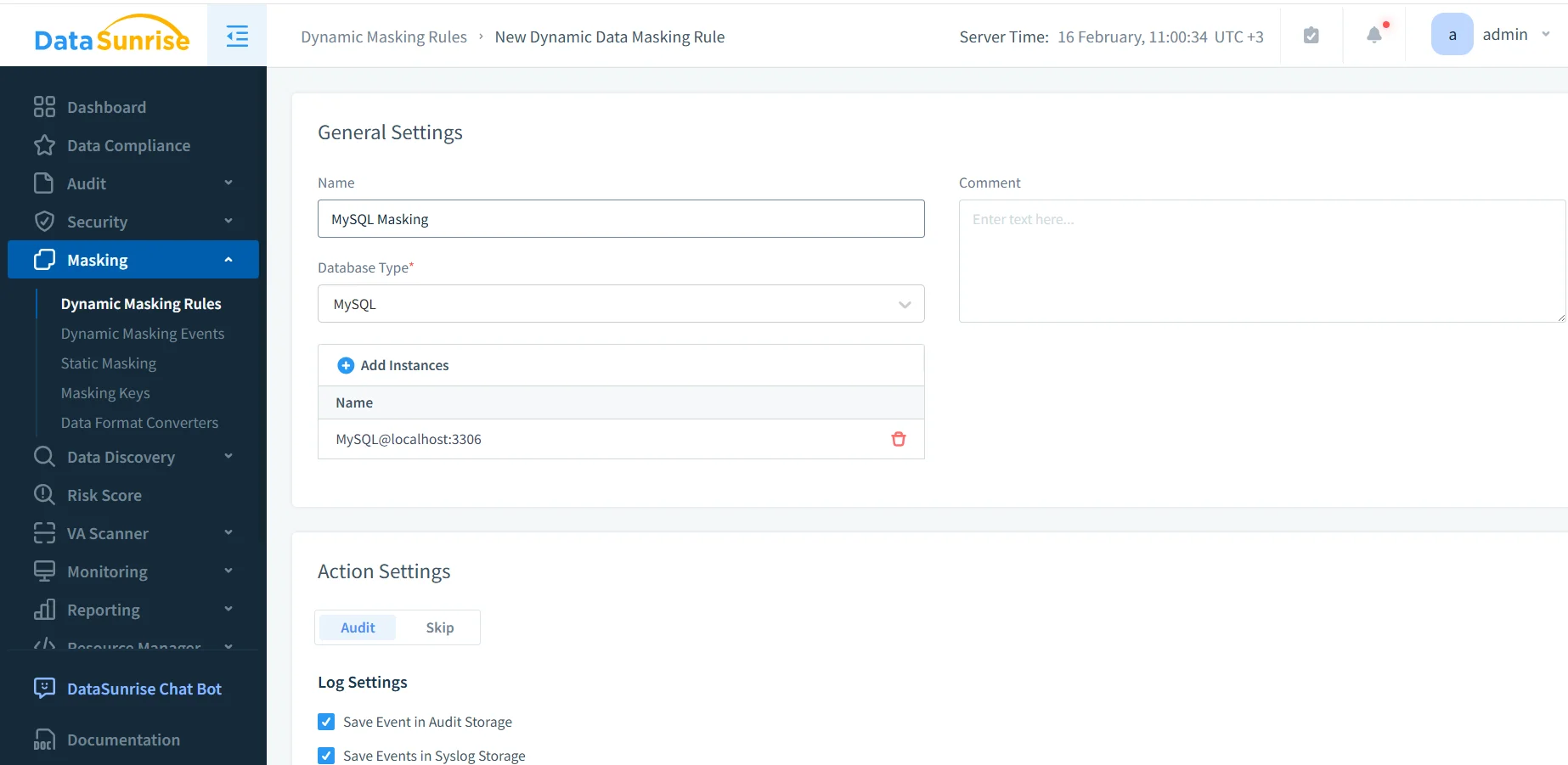
Creating a new dynamic masking rule for MySQL: naming the rule, selecting the database type, and attaching the MySQL instance that will be protected.
In the DataSunrise UI, you define a new dynamic masking rule for MySQL and attach one or more MySQL instances. You also decide what should happen when the rule is triggered. In practice, many organizations enable auditing alongside masking. This helps them prove enforcement later using audit logs and a centralized data audit program.
Step 2: Select schemas, tables, and columns to mask
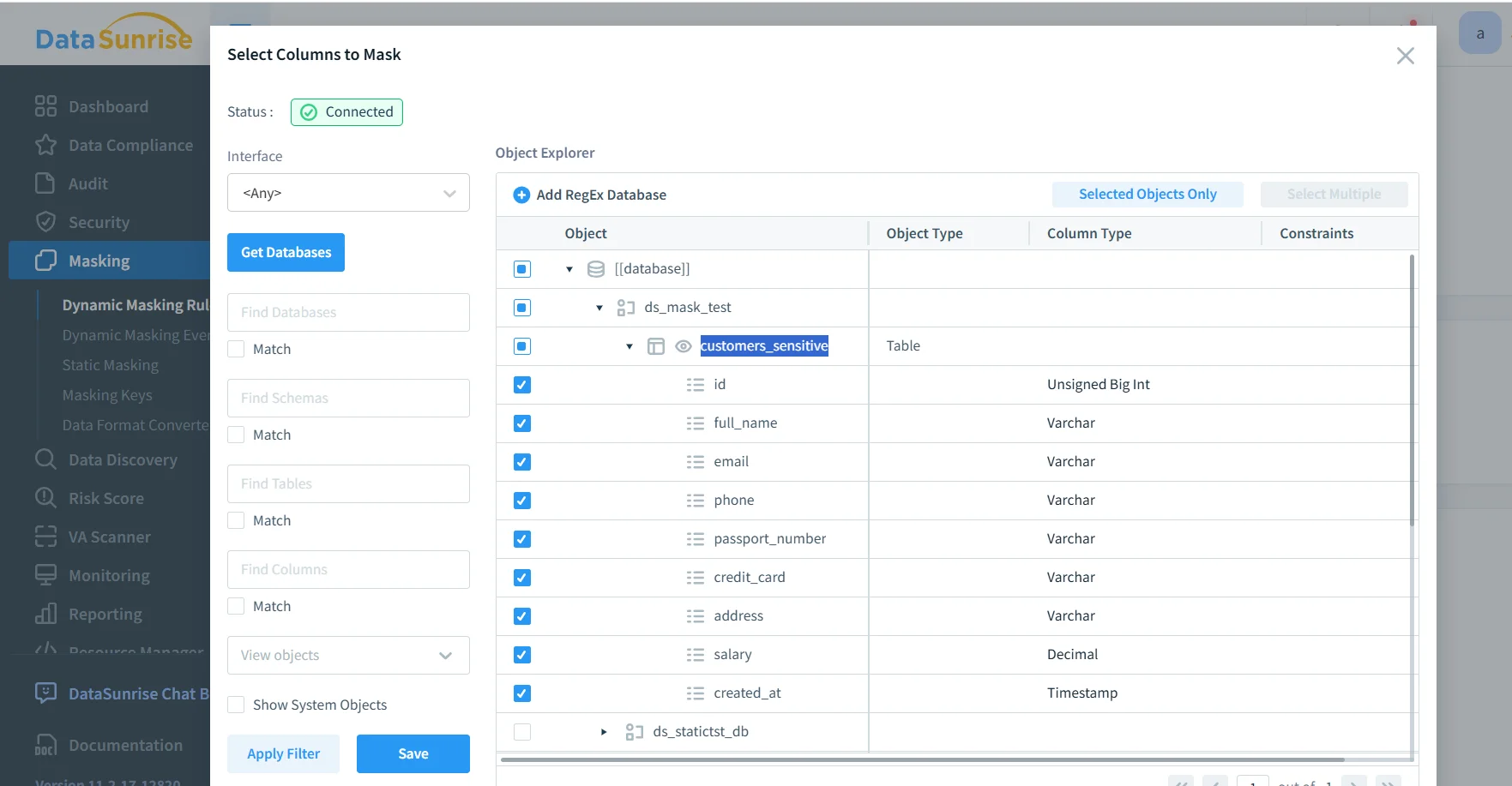
Selecting a MySQL database, table, and sensitive columns (email, phone, passport number, credit card, address, salary) to include in the masking scope.
This is where you decide the masking scope (which tables and columns) and align masking behavior with actual data categories such as PII. The most common pattern is to mask identifiers (email/phone), credentials or government IDs, and financial data. At the same time, you leave operational fields intact so the dataset remains useful.
To reduce “policy drift,” it’s also a good idea to pair masking with database activity monitoring so you can detect unusual query patterns (bulk exports, repeated SELECTs on sensitive tables, access outside business hours). For proactive hardening, teams often run vulnerability assessment. This helps identify weak MySQL privileges, risky accounts, or misconfigurations that could bypass intended controls.
Step 3: Validate masking behavior from a client query
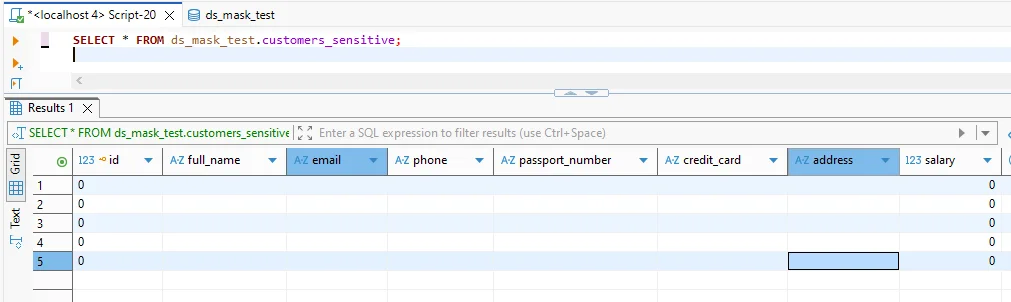
Validation query showing masked output for sensitive fields while keeping the query structure and column set intact for application and reporting compatibility.
After the rule is enabled, test with the same SQL your users run. The key success criteria are: (1) sensitive values are consistently transformed, (2) applications don’t break due to unexpected schema changes, and (3) privileged users can still access raw data where required and approved. In parallel, you can strengthen the protection layer with a database firewall and security rules against SQL injections. This helps reduce the risk of attackers using crafted queries to exfiltrate data.
Do not treat masking as your only control. If attackers gain privileged access, they can still extract sensitive data. Combine masking with least-privilege access, monitoring, encryption, and continuous auditing.
Operational Best Practices for MySQL Masking Programs
-
Define who should see what—and why
Map roles (support, analysts, developers) to allowed visibility levels, then enforce that mapping with policy and governance. -
Centralize evidence collection
Use consistent logging and retention so audits aren’t a scramble. Many programs align this with continuous data protection practices. -
Harden the MySQL attack surface
Even perfect masking can’t help if a database is misconfigured. Use a security baseline aligned with your security guide. Ensure controls are continuously reviewed.
The Compliance Imperative
Regulatory expectations often determine how strict your MySQL masking must be, what evidence you must keep, and how quickly you must respond to incidents. The table below maps common frameworks to practical masking outcomes:
| Regulation | MySQL Requirement | Practical Masking Approach |
|---|---|---|
| GDPR | Minimize exposure of personal data and restrict access by purpose | Dynamic masking for non-privileged reads + auditable access controls |
| HIPAA | Protect PHI and document safeguards around access and disclosure | Mask PHI columns, monitor access patterns, and retain audit evidence |
| PCI DSS | Limit exposure of cardholder data and reduce data leakage risk | Mask PAN values at query time, restrict export paths, and log access |
| SOX | Ensure controlled access to financial data and reliable audit trails | Mask sensitive financial fields and maintain immutable audit records |
To make compliance operational (not a one-time project), many teams adopt centralized automation via the DataSunrise Compliance Manager. This helps keep controls, reporting, and evidence collection consistent across systems and stakeholders.
Conclusion: Implementing Defense-in-Depth Data Masking in MySQL
Data masking in MySQL is most effective when it’s treated as part of a broader security strategy, not an isolated feature. A practical defense-in-depth model includes: (1) discovering sensitive fields, (2) applying the right masking mode for each environment, (3) enforcing least privilege and monitoring access, and (4) maintaining audit-ready evidence for compliance and incident response.
Protect Your Data with DataSunrise
Secure your data across every layer with DataSunrise. Detect threats in real time with Activity Monitoring, Data Masking, and Database Firewall. Enforce Data Compliance, discover sensitive data, and protect workloads across 50+ supported cloud, on-prem, and AI system data source integrations.
Start protecting your critical data today
Request a Demo Download Now