Data Masking Tools and Techniques for Amazon OpenSearch
Data masking tools and techniques for Amazon OpenSearch are not a “nice-to-have.” OpenSearch is where logs, traces, security telemetry, and application payloads go to live forever — which means it quietly becomes a storage layer for emails, phone numbers, IP addresses, auth tokens, customer IDs, and other PII. If users can query those indices, they can exfiltrate sensitive values — even if your dashboards “only needed it for troubleshooting.”
AWS runs the managed platform for Amazon OpenSearch Service, but the compliance and exposure risk still belongs to you. OpenSearch doesn’t automatically know what’s sensitive, and once a query is allowed, it can return raw data. That’s why masking matters: it keeps OpenSearch useful for investigations and analytics while reducing what people can actually see in results.
This article breaks down practical masking techniques for OpenSearch, the tooling you need to enforce them, and how DataSunrise implements dynamic masking at query time to support regulated environments.
Why OpenSearch Is a High-Risk Target for Sensitive Data
OpenSearch behaves differently than traditional relational databases. It’s flexible, document-oriented, and commonly fed by pipelines that are optimized for speed — not governance. As a result, sensitive values often appear in unexpected places:
- Nested JSON fields (user objects, request metadata, device fingerprints)
- Free-text “message” fields that include raw payloads
- Index templates that evolve without security review
- Dashboards and incident workflows that require broad read access
Once regulated data lands in an index, you’re in scope for internal governance programs and external data compliance regulations. Masking becomes one of the fastest “defensible” controls because it reduces exposure without blocking operational use cases.
Where Masking Fits: Enforce at Query Time, Not After an Incident
Masking fails when it’s bolted on as a downstream cleanup step. The only reliable strategy is to enforce masking on the access path — meaning queries go through a control point that can inspect requests, apply policy, and rewrite results when necessary.
DataSunrise supports multiple deployment modes, which letss means you can place enforcement in a way that matches your OpenSearch topology (managed service, VPC access, hybrid layouts) and your operational tolerance for change.
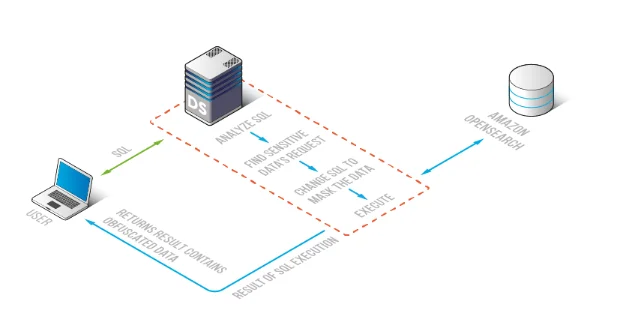
Enforcing masking on the query path: DataSunrise inspects OpenSearch requests and returns obfuscated results when policy requires.
Core Data Masking Techniques for Amazon OpenSearch
In OpenSearch, masking must preserve operational usefulness. People still need to search, correlate events, and investigate incidents — just without seeing raw sensitive values. That’s why dynamic, role-aware masking is the default strategy for OpenSearch environments.
With dynamic data masking, masking is applied at query time based on identity, role, policy context, and the fields being returned. You can keep OpenSearch functional while minimizing exposure.
| Technique | What it does in query results | Best OpenSearch use case |
|---|---|---|
| Full redaction | Hides entire sensitive values (e.g., “****”) | Dashboards and broad-read roles that never need raw identifiers |
| Partial masking | Reveals only a portion (e.g., last 2–4 characters) | Support workflows where confirmation is needed without full exposure |
| Consistent substitution | Replaces values while keeping them stable across results | Analytics that require grouping/correlation without plaintext values |
| Role-based conditional masking | Shows raw values only for approved roles; masks for everyone else | Security investigations that require escalation-based access |
The key point: in OpenSearch, masking must be compatible with search and analysis — otherwise teams will bypass it “temporarily” (which is how temporary becomes forever).
Tooling Checklist: What You Need for Masking That Holds Up in the Real World
A masking rule alone is not a masking program. Production-grade masking needs supporting controls that keep policies accurate, enforceable, and auditable:
- Discovery and classification: use data discovery to identify which indices/fields contain sensitive values.
- Role-aware governance: enforce visibility using RBAC and centralized access controls.
- Least-visibility enforcement: apply the principle of least privilege to what users can see, not just what they can query.
- Deterministic outcomes: avoid policy collisions using rules priority so masking results are predictable.
- Continuous assurance: track usage and anomalies with database activity monitoring.
How DataSunrise Implements Dynamic Masking for OpenSearch
DataSunrise applies masking policies centrally, so teams don’t have to rewrite dashboards, patch every client, or build custom “masking logic” into queries. The practical workflow looks like this:
1) Identify sensitive fields and define scope
Start by scanning your OpenSearch environment and confirming where sensitive fields actually live. Discovery results should feed governance decisions: which indices require masking, which fields are high-risk, and which roles should see masked vs. raw values.
2) Build role-aware policies
Masking policies should be aligned with business intent. Example: analysts need trends, not identities; keep identifiers masked by default. Incident responders might need raw values only after escalation. This is where governance and enforcement meet — and why centralized policy management matters.
3) Create a dynamic masking rule
Define which fields are protected and which masking method is applied. In DataSunrise, you can import sensitive fields from discovery results, scope to the relevant objects, and assign a masking method so enforcement is consistent across access paths.
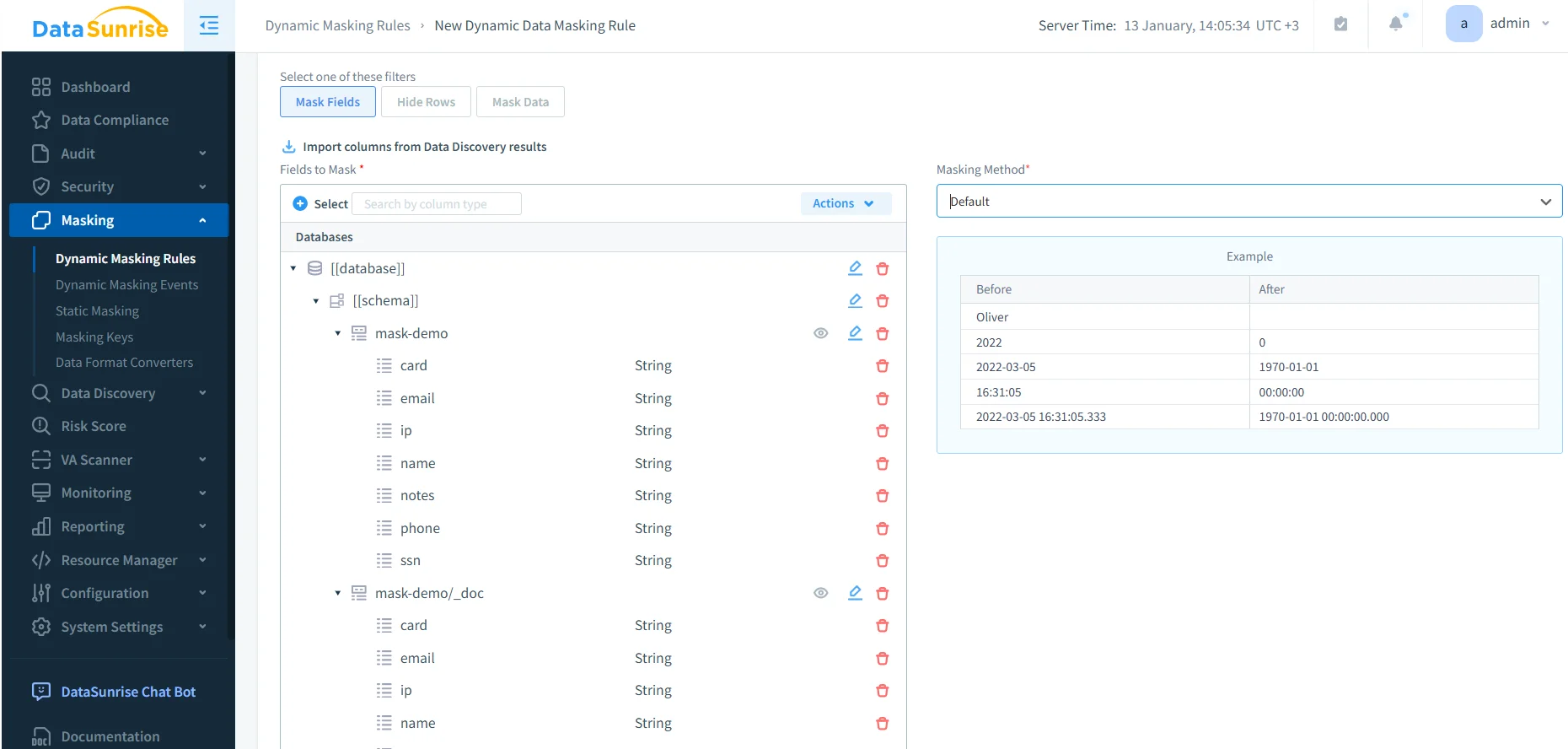
Creating a dynamic masking rule: select sensitive fields and apply a masking method to protect OpenSearch query results.
4) Validate results using before/after queries
Don’t validate masking with screenshots alone. Validate it like an engineer: run the same query with the same role before and after enabling the rule. Your acceptance criteria is simple: sensitive values must not appear in the response when policy says “mask.”
Auditability: Proving Masking Was Enforced
Masking without evidence is a liability. Auditors, security reviews, and incident investigations all demand traceability: who accessed which index, what query ran, and what controls were applied.
DataSunrise supports audit and evidence collection through:
- Data Audit for centralized auditing controls
- audit logs suitable for compliance reviews and investigations
- audit trails for immutable accountability
AWS also provides service-level logging as a baseline reference: Amazon OpenSearch audit logs. In practice, many organizations want a consistent evidence plane across environments so controls and reporting don’t vary by data platform.
Hardening Masking: Prevent Bypass and Control Drift
Masking reduces exposure — but it doesn’t stop abuse if users can bypass the control path or if configurations drift. Strong deployments pair masking with preventive guardrails:
- Database firewall rules to block suspicious query patterns
- Vulnerability assessment to catch misconfigurations and security gaps
- Continuous data protection to keep policies effective as indices and pipelines evolve
- Report generation to produce repeatable evidence for audits and internal reviews
Start with the highest-risk OpenSearch fields (email, phone, IP, customer IDs, auth-related attributes). Validate with real queries, then expand coverage based on audit evidence and actual usage patterns — not guesses.
If users can query OpenSearch directly (bypassing the enforcement path), masking is effectively a demo feature. Lock down direct access, enforce the controlled route, and keep auditing always-on — especially for indices fed by logs and application payloads.
Conclusion
The best data masking tools and techniques for Amazon OpenSearch are the ones that survive real operations: dynamic masking at query time, role-aware policies, continuous discovery, deterministic rule priority, and audit evidence that proves enforcement. Done correctly, masking becomes a quiet control that reduces exposure every day — without breaking dashboards or slowing investigations.
Protect Your Data with DataSunrise
Secure your data across every layer with DataSunrise. Detect threats in real time with Activity Monitoring, Data Masking, and Database Firewall. Enforce Data Compliance, discover sensitive data, and protect workloads across 50+ supported cloud, on-prem, and AI system data source integrations.
Start protecting your critical data today
Request a Demo Download Now