Data Masking Tools and Techniques for TiDB
TiDB handles transactional workloads, analytics, and reporting in the same distributed SQL environment, which is great for engineering speed and slightly less great for keeping sensitive data on a short leash. Once BI tools, support teams, service accounts, and test workflows start touching the same tables, raw emails, payment fields, addresses, and internal notes can spread far beyond the application that originally needed them.
The fix is not one feature or one magic checkbox. It is a combination of data masking tools and masking techniques that match the way people actually use TiDB. Some controls protect live query results through dynamic data masking. Others create safe copies with static data masking. A narrower set of use cases may even justify in-place masking. The point is simple: keep the structure and business value, but strip away the sensitive truth that should never travel unchecked.
This guide breaks the problem into two parts: the tools that help you discover, enforce, monitor, and audit masking in TiDB, and the techniques that determine how each sensitive value gets transformed. For extra platform context, the official TiDB GitHub repository is worth keeping nearby.
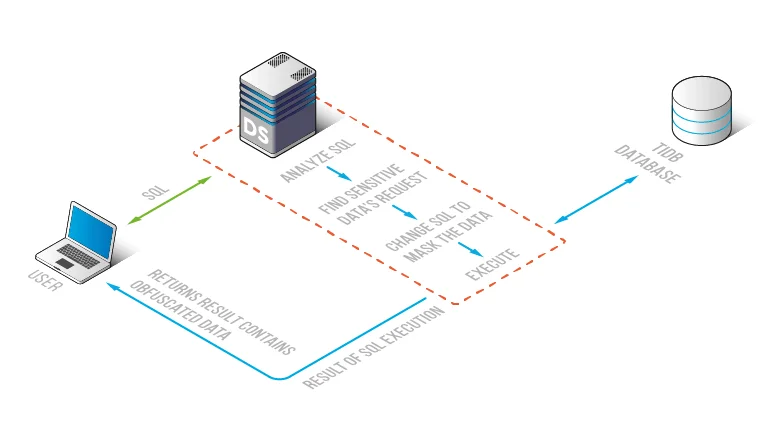
The essential masking toolbox for TiDB
A practical TiDB masking program usually starts with discovery. Use data discovery to find high-risk columns, then map those findings to PII and the relevant compliance regulations. This step catches the obvious fields such as email and card data, but it also exposes the messy columns that teams forget about, like free-text notes, address fragments, and custom metadata.
Once the sensitive fields are known, policy controls come next. Strong access controls, sensible role-based access control, and the principle of least privilege decide who should see what. Masking then refines the result by changing the value itself instead of relying only on all-or-nothing table access.
From there, the supporting tools matter just as much as the masking rule. Teams need database activity monitoring to watch how users and services query the data, audit logs to record enforcement events, and a defensible audit trail to explain what happened later when the awkward questions begin. If you want a formal review model, the audit guide helps turn masking from a one-off rule into an actual operational process.
Masking also works better when it sits inside a broader security program. The security guide, database firewall, targeted security rules against SQL injections, and vulnerability assessment capabilities help prevent the classic failure mode where a masked field is protected in one path but exposed somewhere else through weak query filtering or sloppy environment design.
Technique guide: which masking pattern fits which TiDB field?
Different fields need different techniques. Treating every value the same is one of the fastest ways to break application logic, destroy test realism, or leave sensitive data more recognizable than intended. The small matrix below is a better starting point than brute-force redaction everywhere.
| Field or Use Case | Recommended Technique | Why It Works |
|---|---|---|
| Email addresses | Pattern-preserving substitution | Keeps realistic formatting for testing without exposing the original address |
| Phone numbers | Template-based replacement | Supports validation and UI checks while removing real contact data |
| National identifiers | Full redaction | Eliminates direct exposure of highly sensitive identity data |
| Card numbers | Format-preserving masking | Retains structure for application flows without leaking payment details |
| Addresses and locations | Generalization or substitution | Preserves geography logic while reducing privacy risk |
| Note fields and comments | Conditional masking | Helps catch sensitive fragments hidden inside free text |
| Cross-table test data | Deterministic substitution | Keeps joins and relationships stable across the masked dataset |
For a broader overview of transformation patterns, DataSunrise also documents several masking techniques that teams can adapt to different TiDB workloads.
Choose the masking technique based on the target workload, not just the field name. A developer sandbox, BI dashboard, QA test run, and vendor validation environment rarely need the same representation of the same column.
A practical DataSunrise workflow for TiDB
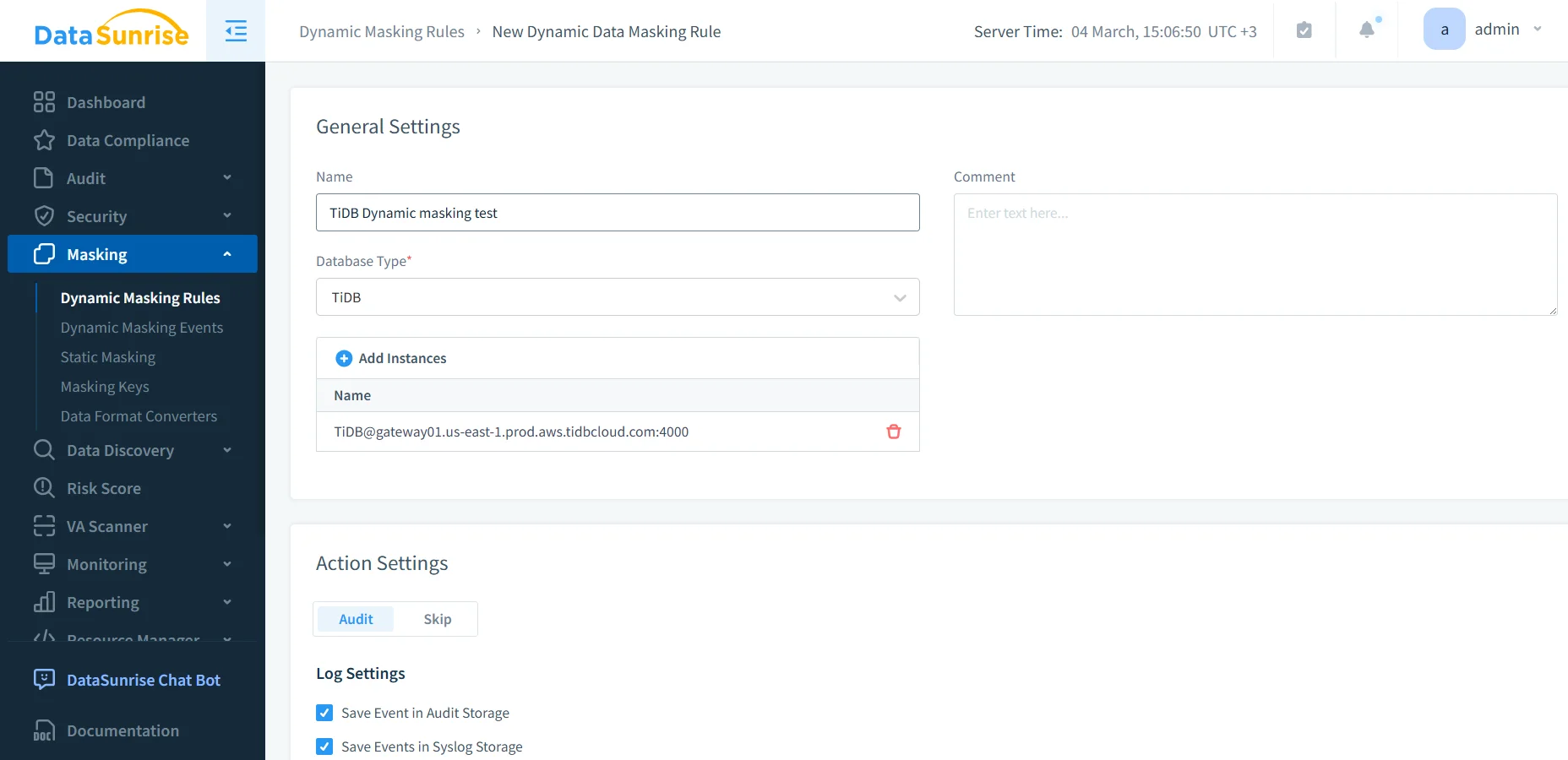
The screenshots below use the dynamic masking interface because it shows the policy workflow clearly: create the rule, attach the TiDB instance, and select the columns that need protection. Even if your end goal is broader than runtime masking, the same discovery and column-level decision process still applies.
1. Create the rule and connect the TiDB instance
Start by creating a masking rule, choosing TiDB as the database type, and attaching the target instance. This stage establishes where the policy will operate and whether related auditing actions should run alongside it.
2. Select the sensitive columns and map them to masking methods
After the rule exists, choose the exact objects and fields that carry exposure. In the example below, the policy targets a table with full_name, email, phone, national_id, card_number, card_exp, address_line, ip_addr, and notes. That is a very normal production pattern, unfortunately, and also a very good reminder that the dangerous bits rarely live in only one column.
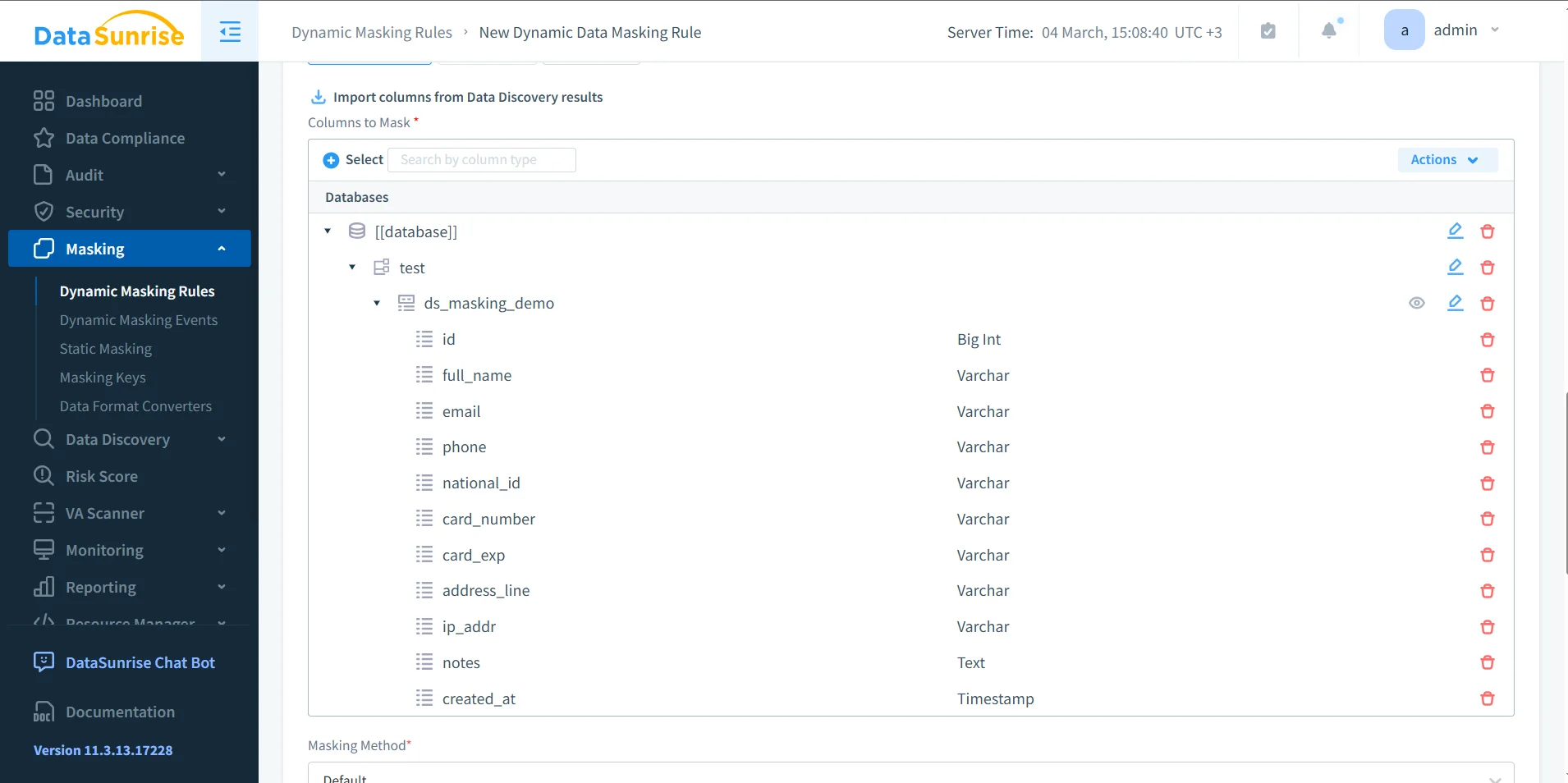
At this point, teams decide whether the field should be partially revealed, fully redacted, replaced with a synthetic value, or handled with a format-preserving rule. That same logic applies when building safe copied datasets, which is where static masking usually enters the picture.
Common mistakes that make masking weaker than it should be
- Masking only the obvious fields. Notes, metadata, and address fragments often leak more than the named identity columns.
- Ignoring referential consistency. If related tables depend on the same identifier, the transformation method must preserve that relationship.
- Testing one query and calling it done. Real validation means dashboards, joins, ETL jobs, QA scripts, exports, and service accounts.
- Treating masking like a separate island. It works much better when the organization also invests in broader database security and governance.
A masking rule can still fail operationally even when it “works” technically. If the transformed values break joins, filters, validation logic, or downstream reporting, the project will either get bypassed or quietly rolled back. Test the masked result with the same tools and workflows people already use.
Compliance payoff and cross-platform value
Data masking is not just a privacy gesture; it is a control that helps contain real operational and regulatory risk. Teams often connect masking policies to Compliance Manager so the same control logic also feeds evidence, reporting, and review cycles. That matters even more when TiDB is only one part of a wider environment and you need masking coverage across supported platforms rather than one database at a time.
| Framework | Why Masking Helps in TiDB | Main Outcome |
|---|---|---|
| GDPR | Limits unnecessary access to personal data in reports, testing, and support workflows | Supports data minimization and controlled disclosure |
| HIPAA | Reduces exposure of sensitive healthcare information in operational systems | Protects health-related data outside the narrowest required use |
| PCI DSS | Prevents payment data from surfacing in raw query results or copied environments | Restricts access to cardholder information |
| SOX | Helps control the spread of financial records across reporting and non-production systems | Improves accountability and governance |
Conclusion
TiDB does not need fewer users; it needs better control over what each user, tool, and environment can see. That is why masking in TiDB works best as a toolbox, not a single feature. Discovery identifies the risky columns. Policy and audit tools enforce and document the control. The masking technique itself determines whether the result stays useful without staying dangerous.
With the right mix of DataSunrise tooling and field-level techniques, teams can protect live query results, build safer copied datasets, and reduce the usual spread of raw production values into places they never belonged. That is the real win: not prettier screenshots, not checkbox compliance, but fewer opportunities for someone to do something catastrophically foolish with sensitive data.
Protect Your Data with DataSunrise
Secure your data across every layer with DataSunrise. Detect threats in real time with Activity Monitoring, Data Masking, and Database Firewall. Enforce Data Compliance, discover sensitive data, and protect workloads across 50+ supported cloud, on-prem, and AI system data source integrations.
Start protecting your critical data today
Request a Demo Download Now