How to Apply Dynamic Masking in ClickHouse
Modern analytical databases such as ClickHouse process massive volumes of data in real time. While this performance advantage makes ClickHouse ideal for analytics workloads, it also means sensitive information may be exposed to analysts, developers, or external systems if proper controls are not implemented.
Dynamic masking helps solve this challenge by transforming sensitive fields at query time. Instead of permanently modifying stored data, masking policies control what users see depending on their privileges and roles. Concepts like dynamic data masking are widely used to ensure sensitive information remains protected without affecting database functionality.
Organizations commonly apply dynamic masking to protect information such as credit card numbers, personal identifiers, email addresses, and financial attributes. These controls help organizations comply with regulations such as GDPR, HIPAA, and PCI DSS while maintaining operational visibility. In many environments, masking policies are also combined with database security strategies to provide layered protection for sensitive data.
This guide explains how to apply dynamic masking in ClickHouse using native SQL capabilities and how centralized platforms such as DataSunrise extend these capabilities with enterprise-grade automation.
What is Dynamic Masking?
Dynamic masking is a data protection technique that hides or transforms sensitive information at query time without modifying the original data stored in the database. Instead of permanently changing values, the database returns masked versions of specific fields depending on user roles, permissions, or security policies.
This approach allows organizations to protect sensitive information while keeping the underlying dataset intact for operational processes. For example, an administrator may see a full credit card number, while an analyst querying the same table receives a masked value such as ****-****-****-1234.
Dynamic masking is widely used to protect information such as personal identifiers, financial records, authentication details, and healthcare data. By applying masking rules dynamically during query execution, organizations can reduce the risk of accidental data exposure while maintaining full database functionality.
Unlike static masking, which modifies stored datasets, dynamic masking operates in real time. This makes it particularly useful in analytical environments where multiple users access the same data but require different levels of visibility.
Many organizations combine dynamic masking with broader security practices such as database security, role-based access control, and dynamic data masking policies to enforce consistent protection of sensitive information across database systems.
Native Dynamic Masking Techniques in ClickHouse
ClickHouse does not provide built-in dynamic masking policies similar to those available in some relational database systems. However, administrators can still implement masking mechanisms using native SQL tools such as transformation functions, views, and access control policies.
These techniques allow organizations to mask sensitive fields dynamically when queries are executed. Instead of modifying stored data permanently, the database transforms the returned values based on query logic or access permissions. In practice, this approach helps organizations protect sensitive information while maintaining analytical usability.
The most common native masking strategies in ClickHouse include SQL transformation functions, masked database views, and role-based access control. Together, these mechanisms allow administrators to control how sensitive data appears in query results and restrict direct access to unmasked records.
Masking with SQL Functions
The simplest masking approach involves applying transformation functions directly within SQL queries. Instead of returning the original values, the query masks sensitive fields using string manipulation functions.
Example:
SELECT
    name,
    concat(left(email,1),'***',substring(email,position(email,'@'))) AS masked_email,
    concat('***-***-', right(phone,4)) AS masked_phone
FROM customers;
Example output:
| name | masked_email | masked_phone |
|---|---|---|
| Alice Brown | a***@example.com | –-4567 |
| Bob Miller | b***@example.com | –-6543 |
This technique works well in controlled analytics scenarios where queries are written manually and masking logic can be applied consistently.
However, as the number of queries grows, maintaining masking logic in every query becomes difficult. Any query that accesses the original columns without masking could expose sensitive information.
Creating Masked Views
A more structured approach involves creating database views that automatically mask sensitive columns. Instead of querying the raw table directly, users interact with the masked view.
CREATE VIEW customers_masked AS
SELECT
    id,
    name,
    concat(left(email,1),'***',substring(email,position(email,'@'))) AS email,
    concat('***-***-', right(phone,4)) AS phone,
    '****-****-****-' || right(credit_card,4) AS credit_card
FROM customers;
Users can now query the masked dataset:
SELECT * FROM customers_masked;
By centralizing masking logic in a view, administrators ensure that sensitive data is consistently transformed before it reaches users.
At the same time, administrators must configure access controls carefully. If users retain direct permissions on the original table, they may bypass the view and retrieve unmasked data.
Role-Based Access Control
ClickHouse also supports role-based access control, which can enforce masking strategies at the permission level.
Administrators can restrict access to raw tables while granting permissions only to masked views.

With this configuration, analysts can query the masked view but cannot access the original dataset.
This approach ensures that sensitive information remains protected while administrators maintain full access to unmasked records.
Role-based controls are typically combined with broader security frameworks such as database security
and role-based access control models
to enforce consistent data protection policies across analytical environments.
Zero-Touch Dynamic Masking with DataSunrise
DataSunrise deploys Zero-Touch Data Masking to deliver dynamic masking for ClickHouse with minimal configuration and centralized governance. Instead of relying on manual SQL transformations, the platform enforces masking policies directly in the data access layer. As a result, organizations can protect sensitive information without modifying queries, rewriting applications, or altering existing database schemas.
This architecture allows security policies to operate transparently between users and the database. When a query is executed, DataSunrise evaluates user permissions and masking rules before returning results. Unauthorized users receive masked values, while privileged users continue to access the original data.
The platform supports multiple deployment architectures, including proxy mode, sniffer mode, and native log monitoring. These flexible deployment options enable seamless integration across on-premise, cloud, and hybrid infrastructures while avoiding intrusive changes to the database environment.
Connect ClickHouse to DataSunrise
After installing DataSunrise, administrators connect the ClickHouse instance through the management console. This connection establishes the monitoring channel that allows DataSunrise to inspect database queries and enforce masking policies.
Once connected, DataSunrise begins analyzing query traffic and identifying sensitive data patterns through automated discovery mechanisms. The platform scans database schemas, columns, and query activity to detect potentially sensitive information.
Sensitive data categories such as Personally Identifiable Information (PII)
can be detected automatically, helping administrators quickly identify fields that require masking policies.
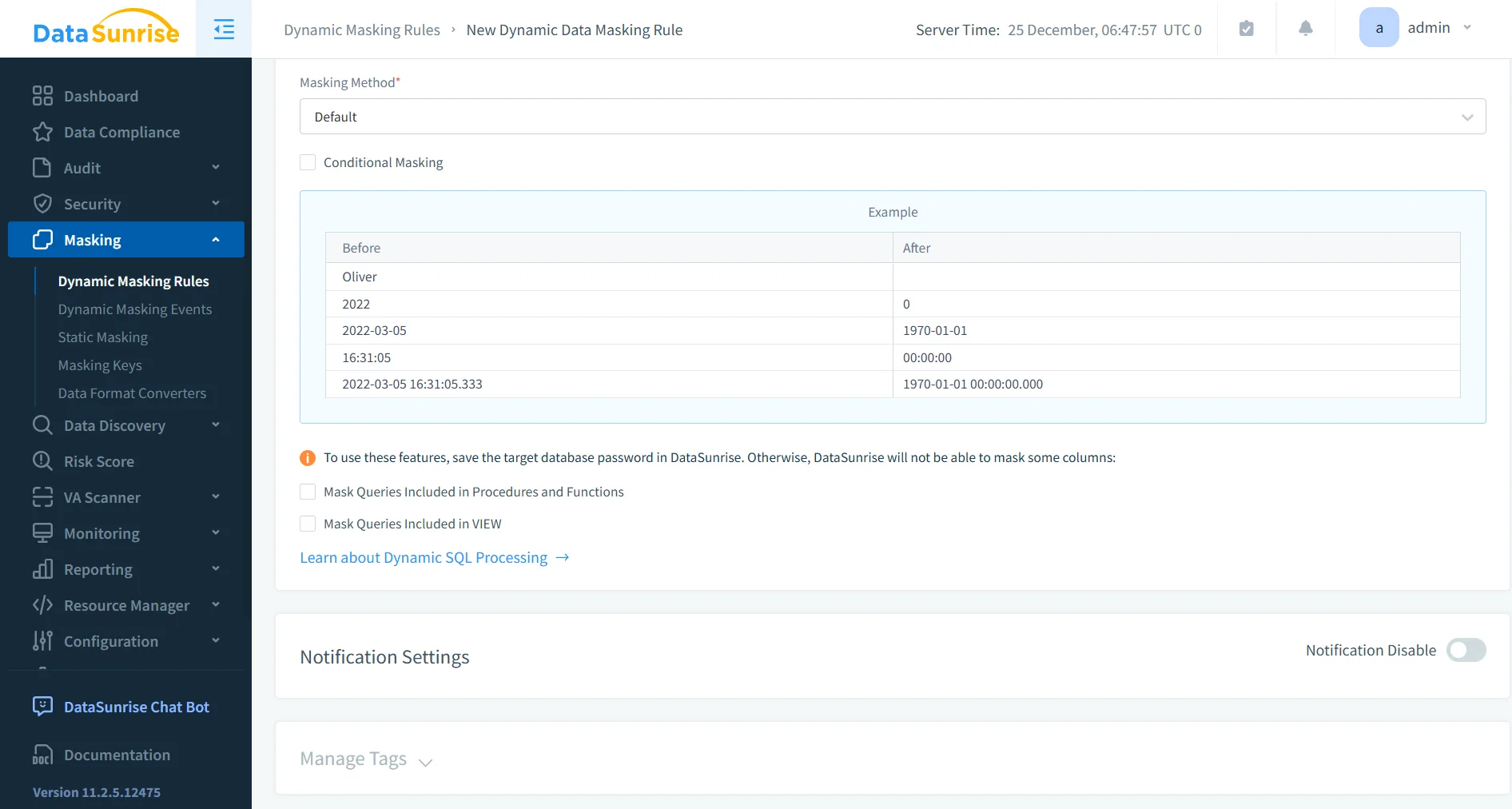
Configure a Dynamic Masking Rule
After identifying sensitive fields, administrators can configure a dynamic masking rule. This rule defines how data should appear when accessed by different users.
Typical rule configuration includes selecting the targeted tables, identifying sensitive columns, defining the masking format, and specifying which user roles are affected by the policy.
Because masking operates dynamically, the original values remain unchanged in storage. Instead, the masking transformation occurs during query execution. Unauthorized users see masked data, while authorized users retain full visibility.
More details about masking strategies and techniques are available in the overview of dynamic data masking.
Monitor Masked Query Results
Once the masking rule is activated, DataSunrise automatically applies the policy whenever a query accesses protected fields. The system evaluates the query, applies the appropriate masking logic, and returns the protected dataset to the requesting user.
Administrators can review these interactions through the DataSunrise monitoring dashboard. The interface provides visibility into executed queries, applied masking policies, and user activity.
These monitoring capabilities integrate with broader security tools such as database activity monitoring and data activity history, allowing organizations to maintain full visibility into database operations while ensuring sensitive information remains protected.
Key Advantages of DataSunrise for ClickHouse
Organizations implementing centralized masking platforms typically gain several operational benefits. The following table summarizes the key advantages of using DataSunrise for ClickHouse environments.
| Advantage | Description |
|---|---|
| Reduced Risk of Data Exposure | Sensitive fields never appear in query results for unauthorized users, preventing accidental disclosure of confidential information. |
| Automated Compliance Alignment | Masking policies help organizations maintain compliance with regulations such as GDPR, HIPAA, and PCI DSS through centralized control and automated enforcement. |
| Simplified Policy Management | Administrators manage masking policies from a single interface instead of maintaining multiple SQL views, scripts, and manual query transformations. |
| Unified Security Platform | DataSunrise integrates masking with data audit, database firewall, and vulnerability assessment capabilities to provide a comprehensive data protection framework. |
Conclusion
ClickHouse delivers exceptional performance for analytical workloads. However, protecting sensitive information remains a critical responsibility for organizations operating modern data platforms.
Native masking techniques using SQL functions, views, and access controls provide basic protection. Yet these approaches require careful management and ongoing maintenance. In many environments, masking must also be combined with broader practices such as database security and continuous database activity monitoring to ensure sensitive information remains protected during query execution.
Platforms such as DataSunrise
extend ClickHouse security with automated masking policies, centralized governance, and real-time monitoring. These capabilities work alongside technologies like dynamic data masking, integrated data audit, and automated data discovery to provide deeper visibility into sensitive data across the environment.
By implementing dynamic masking and automated security controls, organizations can safely leverage ClickHouse analytics while protecting sensitive data across their environments.
Protect Your Data with DataSunrise
Secure your data across every layer with DataSunrise. Detect threats in real time with Activity Monitoring, Data Masking, and Database Firewall. Enforce Data Compliance, discover sensitive data, and protect workloads across 50+ supported cloud, on-prem, and AI system data source integrations.
Start protecting your critical data today
Request a Demo Download Now