How to Apply Static Masking in Apache Hive
Protecting sensitive information in big data environments has become a top priority. Static data masking permanently transforms sensitive values at rest. It is essential for organizations sharing datasets for development, testing, or analytics without exposing personal or financial data.
Apache Hive is a widely adopted data warehouse solution built on Hadoop. It frequently stores massive datasets containing PII, financial records, and other regulated data. According to IBM’s 2024 Cost of a Data Breach Report, the average breach cost reached $4.88 million. This underlines the urgency of robust data protection practices even in big data ecosystems.
This article is a practical guide to applying static masking natively in Apache Hive. It also shows how DataSunrise can extend these capabilities for enterprise-grade compliance.
What Is Static Data Masking and Why Does It Matter for Hive?
Data masking is a broad discipline covering several techniques. Static masking permanently replaces sensitive values in the dataset itself. This differs from dynamic masking, which obscures data on the fly. The result is a safe, masked copy that can be handed to developers, QA teams, or vendors without risk.
For Hive, this matters because tables are often replicated into lower environments with looser access controls. Big data pipelines also regularly export Hive data into external systems where data security policies may not apply. Regulations like GDPR, HIPAA, and PCI DSS often require non-production data to be fully anonymized before use.
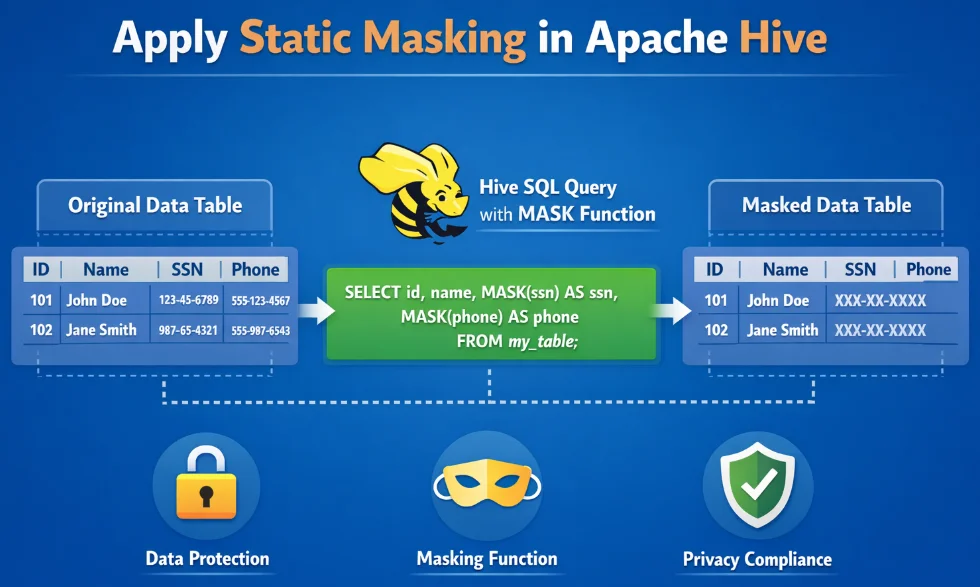
Native Static Masking in Apache Hive
Apache Hive has no dedicated static masking utility. However, its built-in functions—mask(), mask_last_n(), sha2(), SUBSTR(), and CONCAT()—are enough to build a masked table copy. A single CREATE TABLE AS SELECT query is all that is needed:
CREATE TABLE customer_data_masked AS
SELECT
    customer_id,
    mask(full_name)                                    AS full_name,
    CONCAT(SUBSTR(email, 1, 2), '***@',
           SPLIT(email, '@')[1])                       AS email,
    sha2(ssn, 256)                                     AS ssn,
    CONCAT('XXXX-XXXX-XXXX-',
           SUBSTR(credit_card_number, -4))             AS credit_card_number,
    mask_last_n(CAST(date_of_birth AS STRING), 5)      AS date_of_birth,
    account_status
FROM customer_data;
Once the masked table exists, redirect non-privileged roles away from the source:
REVOKE SELECT ON TABLE customer_data FROM ROLE dev_team;
GRANT SELECT ON TABLE customer_data_masked TO ROLE dev_team;
Limitations of Native Hive Static Masking
| Limitation | Detail |
|---|---|
| No centralized policy management | Masking logic lives in ad-hoc scripts, hard to audit or update consistently |
| Manual sensitive column discovery | Administrators must catalogue PII across potentially hundreds of tables by hand |
| No compliance reporting | Hive produces no built-in record of what was masked, when, or by whom |
| Limited masking function variety | Format-preserving or referentially consistent masking requires custom UDFs |
| No cross-database consistency | Separate scripts must be maintained per platform |
These gaps introduce significant security threats. For large Hive deployments under strict compliance regulations, a dedicated solution becomes essential.
Enhanced Static Masking for Apache Hive with DataSunrise
DataSunrise provides a centralized, policy-driven platform. It includes automated sensitive data discovery, No-Code Policy Automation, and built-in compliance reporting. Unlike manual approaches, DataSunrise delivers Continuous Compliance Alignment—automatically adapting masking policies as schemas evolve.
1. Connect Your Hive Instance to DataSunrise
Add your Apache Hive instance in the DataSunrise console by providing the HiveServer2 connection details. DataSunrise establishes a secure connection and catalogues all available tables and schemas immediately. No changes to your Hive configuration or HDFS layout are required.
2. Run Automated Sensitive Data Discovery
Trigger the Auto-Discover & Classify engine to identify sensitive columns automatically. It detects names, SSNs, card numbers, emails, and dates of birth—aligned with GDPR, HIPAA, PCI DSS, and SOX. This eliminates manual cataloguing that exposes organizations to data breach risk.
3. Create a Static Masking Rule
In the Static Masking section, define a masking rule by selecting source and target tables. Then choose a masking function per column from the available library: full replacement, format-preserving masking, hashing, partial masking, nullification, and randomization. No SQL authoring required. DataSunrise’s synthetic data generation can also complement static masking when realistic test data is needed.
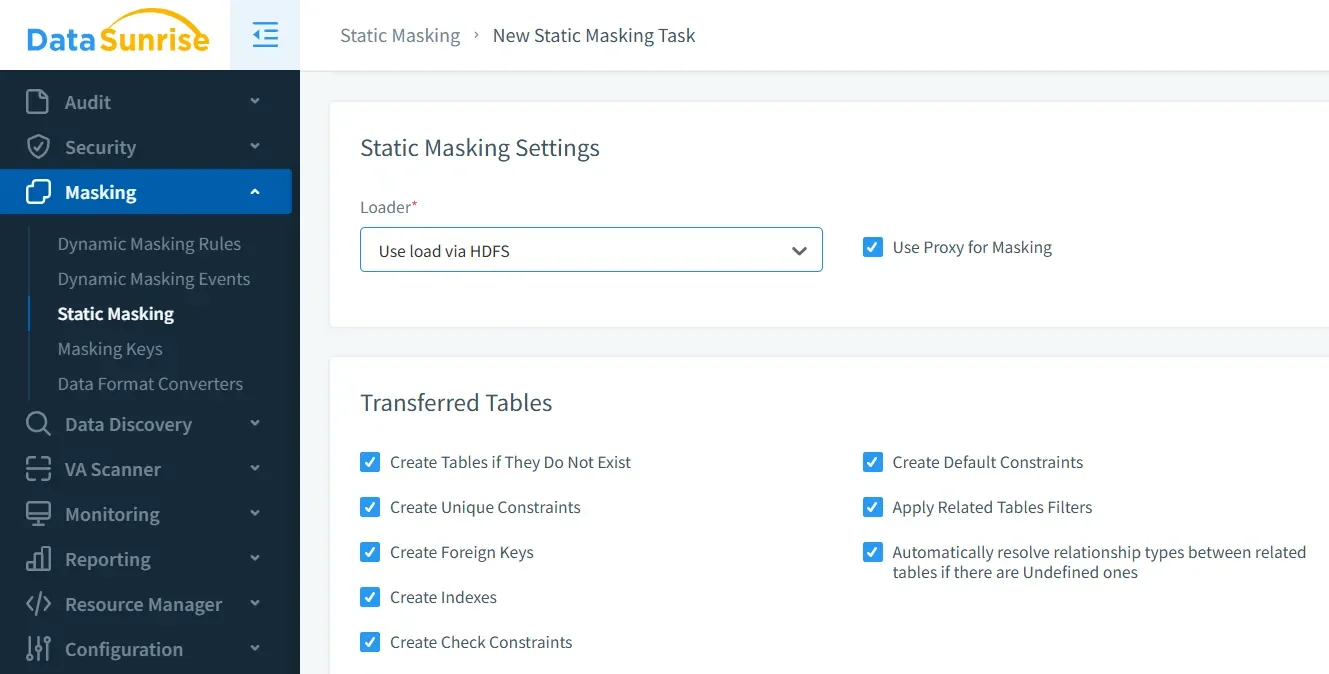
4. Execute and Review the Masking Operation
Execute the job from the DataSunrise console. After completion, the Masking History panel records the processed tables and columns, the applied function, the timestamp, and the executing user. This provides the built-in audit logs that the native approach entirely lacks.
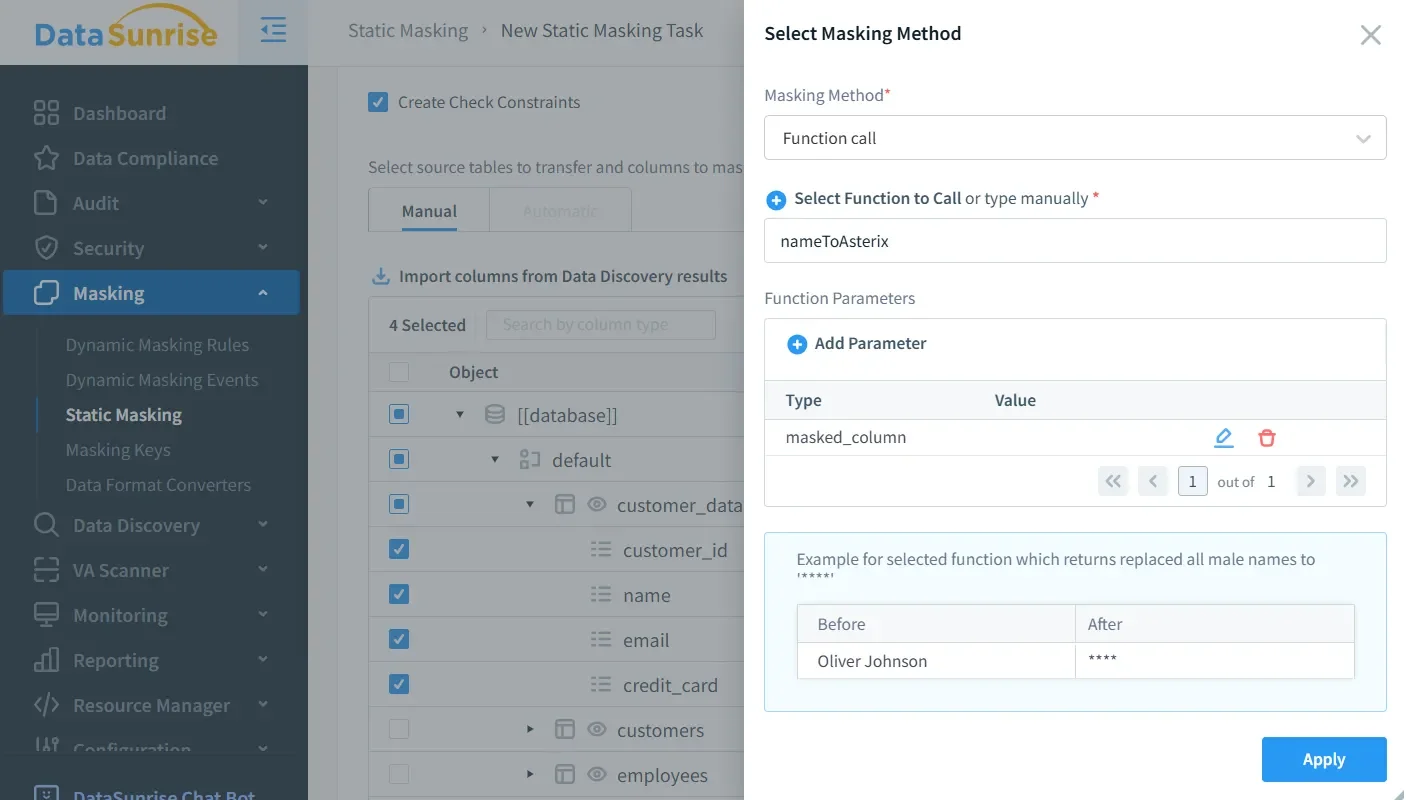
5. Integrate with Compliance Reporting
DataSunrise’s automated compliance reporting maps every masking operation to the relevant regulatory frameworks. Generate one-click evidence reports for GDPR, HIPAA, PCI DSS, and SOX and deliver them directly to auditors.
Key Advantages of DataSunrise for Apache Hive Static Masking
- Sensitive Data Discovery: Locate PII and regulated data across all Hive tables automatically—no manual cataloguing.
- Rich Masking Function Library: Format-preserving masking, hashing, partial masking, nullification, and more—far beyond native Hive functions.
- Centralized Data Security: Govern all masking policies from a single interface, consistent across schema changes.
- Unified Multi-Database Coverage: Consistent masking policies across Hive and 40+ other data storage platforms from a single console.
- Database Activity Monitoring: Real-time visibility into who accesses masked and unmasked data, complementing static masking with continuous oversight.
- Flexible Deployment Modes: On-premises, cloud, or hybrid—without configuration complexity.
- Role-Based Access Controls: Govern who can create, modify, or execute masking rules—a governance layer native Hive entirely lacks.
Conclusion
Apache Hive’s native HiveQL functions are a workable starting point for static masking. However, column discovery, policy maintenance, and compliance documentation require significant manual effort. This makes the native approach difficult to sustain at scale. Without a governed process, masking efforts can leave database security gaps that put regulated data at risk.
DataSunrise transforms static masking for Apache Hive into a governed, automated, and audit-ready process. It closes every gap left by native tooling and extends consistent masking policies across your entire data infrastructure.
Protect Your Data with DataSunrise
Secure your data across every layer with DataSunrise. Detect threats in real time with Activity Monitoring, Data Masking, and Database Firewall. Enforce Data Compliance, discover sensitive data, and protect workloads across 50+ supported cloud, on-prem, and AI system data source integrations.
Start protecting your critical data today
Request a Demo Download Now