Automating Compliance for Amazon DocumentDB
Learning how to automate data compliance for Amazon DocumentDB helps organizations replace fragmented manual checks with repeatable compliance workflows. Automation can continuously assess configurations, collect audit evidence, identify deviations, and initiate corrective actions.
Amazon DocumentDB supports MongoDB-compatible workloads containing customer profiles, payment details, healthcare records, authentication data, and other regulated information. Protecting these documents requires coordinated data compliance controls rather than isolated security settings.
AWS provides services for auditing, encryption, configuration assessment, alerting, backup management, and infrastructure deployment. These capabilities support regulatory compliance across Amazon DocumentDB environments. Organizations can also use native Amazon DocumentDB event auditing to record database operations and export audit events to Amazon CloudWatch Logs.
However, native AWS automation primarily governs infrastructure and service configuration. It does not independently classify sensitive document fields or create data-level protection policies.
This article explains how native AWS services automate Amazon DocumentDB compliance tasks. It also demonstrates how DataSunrise introduces data-aware compliance orchestration.
What Is Data Compliance Automation?
Data compliance automation uses software-driven workflows to continuously apply, monitor, and document regulatory controls across data environments. It replaces repetitive manual tasks with scheduled assessments, policy-based checks, automated evidence collection, and event-driven remediation.
For Amazon DocumentDB, compliance automation typically covers:
- Monitoring database and administrative activity
- Detecting configuration drift and policy violations
- Enforcing encryption, backup, retention, and access requirements
- Identifying collections and fields containing regulated information
- Applying audit, security, and masking policies
- Generating compliance reports and audit evidence
An effective automation framework connects infrastructure controls with data-level protection. Native AWS services can evaluate Amazon DocumentDB configurations, collect logs, and trigger remediation workflows. Data-aware solutions can additionally discover sensitive fields, associate them with regulatory requirements, and apply targeted controls.
This continuous approach helps organizations maintain alignment with GDPR, HIPAA, PCI DSS, SOX, and other compliance regulations as databases, application workloads, and access patterns change.
Native Amazon DocumentDB Compliance Automation
Amazon DocumentDB does not provide a single compliance automation console. Instead, organizations combine several AWS services into a coordinated control framework.
The main components include:
- Amazon DocumentDB event auditing for database activity records
- AWS CloudTrail for administrative API activity
- Amazon CloudWatch for log storage, metrics, and alarms
- AWS Config for configuration assessment
- AWS Security Hub for centralized security findings
- Amazon EventBridge for event-driven workflows
- AWS Lambda for automated remediation
- AWS CloudFormation for repeatable infrastructure deployment
- AWS KMS for encryption key management
- AWS Backup for scheduled backup and retention controls
Together, these services automate important infrastructure-level compliance tasks. Teams can detect configuration drift, standardize deployments, and preserve operational evidence.
1. Automate Amazon DocumentDB Event Auditing
Amazon DocumentDB can record DDL, read, and write operations through its native event auditing capability. Audit events can then be exported to Amazon CloudWatch Logs.
Auditing requires two connected settings:
- Enable the
audit_logsparameter in a custom cluster parameter group. - Enable the
auditCloudWatch Logs export for the cluster.
Missing either setting leaves the pipeline incomplete. A parameter can look beautifully enabled while producing precisely nothing—classic cloud theatre.
Use the following AWS CLI command to enable all supported database audit events:
aws docdb modify-db-cluster-parameter-group \
  --db-cluster-parameter-group-name docdb-compliance-parameters \
  --parameters \
  "ParameterName=audit_logs,ParameterValue=all,ApplyMethod=immediate"
Available values include:
ddlfor structural operationsdml_readfor read activitydml_writefor modification activityallfor all supported database eventsnoneordisabledto stop auditing
The audit_logs parameter is dynamic, allowing supported changes to take effect without rebuilding the cluster.
Next, enable the audit log export:
aws docdb modify-db-cluster \
  --db-cluster-identifier production-docdb \
  --cloudwatch-logs-export-configuration \
  '{"EnableLogTypes":["audit"]}' \
  --apply-immediately
Verify that audit export is enabled:
aws docdb describe-db-clusters \
  --db-cluster-identifier production-docdb \
  --query "DBClusters[0].EnabledCloudwatchLogsExports"
CloudWatch Logs can then retain audit evidence, feed metric filters, and forward events to external analysis platforms.
2. Automate Administrative Activity Collection
DocumentDB event auditing tracks activity inside the database. AWS CloudTrail records actions performed through the AWS console, CLI, SDKs, and APIs.
CloudTrail captures operations such as:
- Creating or deleting clusters
- Modifying parameter groups
- Changing backup settings
- Updating security groups
- Restoring snapshots
- Enabling or disabling log exports
- Modifying encryption-related resources
Organizations can create a trail that stores administrative events in Amazon S3:
aws cloudtrail create-trail \
  --name documentdb-compliance-trail \
  --s3-bucket-name organization-compliance-logs
Enable continuous logging for the trail:
aws cloudtrail start-logging \
  --name documentdb-compliance-trail
Administrators can also search recent Amazon DocumentDB API events:
aws cloudtrail lookup-events \
  --lookup-attributes \
  AttributeKey=EventSource,AttributeValue=rds.amazonaws.com \
  --max-results 50
This creates accountability for administrative changes surrounding the database service. CloudTrail records Amazon DocumentDB API calls made by users, roles, and AWS services.
Organizations can deliver CloudTrail records to Amazon S3 and CloudWatch Logs. Lifecycle policies can automate retention based on internal or regulatory requirements.
A simplified S3 lifecycle policy could resemble:
{
  "Rules": [
    {
      "ID": "ArchiveComplianceLogs",
      "Status": "Enabled",
      "Filter": {
        "Prefix": "AWSLogs/"
      },
      "Transitions": [
        {
          "Days": 90,
          "StorageClass": "GLACIER_IR"
        }
      ],
      "Expiration": {
        "Days": 2555
      }
    }
  ]
}
3. Detect Configuration Drift with AWS Config
AWS Config continuously records supported resource configurations and evaluates them against predefined or custom rules.
For example, the AWS Config managed rule docdb-cluster-encrypted checks whether storage encryption is enabled for Amazon DocumentDB clusters.
The following command creates this managed rule:
aws configservice put-config-rule \
  --config-rule '{
    "ConfigRuleName": "documentdb-cluster-encryption",
    "Description": "Checks whether Amazon DocumentDB clusters use storage encryption",
    "Source": {
      "Owner": "AWS",
      "SourceIdentifier": "DOCDB_CLUSTER_ENCRYPTED"
    }
  }'
For Amazon DocumentDB, teams can assess whether:
- Encryption is enabled
- Clusters use approved security groups
- Backup retention meets policy
- Public accessibility is restricted
- Required tags are present
- Approved parameter groups are attached
- Logging configuration remains enabled
Administrators can retrieve the current compliance status:
aws configservice describe-compliance-by-config-rule \
  --config-rule-names documentdb-cluster-encryption
AWS Config can send noncompliant findings to EventBridge. An EventBridge rule can then invoke Lambda, create a ticket, or notify the security team.
A simplified event pattern could resemble:
{
  "source": ["aws.config"],
  "detail-type": ["Config Rules Compliance Change"],
  "detail": {
    "newEvaluationResult": {
      "complianceType": ["NON_COMPLIANT"]
    },
    "resourceType": [
      "AWS::DocDB::DBCluster"
    ]
  }
}
Create an EventBridge rule for these findings:
aws events put-rule \
  --name documentdb-config-noncompliance \
  --event-pattern '{
    "source": ["aws.config"],
    "detail-type": ["Config Rules Compliance Change"],
    "detail": {
      "newEvaluationResult": {
        "complianceType": ["NON_COMPLIANT"]
      },
      "resourceType": ["AWS::DocDB::DBCluster"]
    }
  }'
This approach transforms periodic configuration reviews into continuous control monitoring.
4. Trigger Automated Remediation
AWS Lambda can remediate selected compliance deviations after AWS Config or EventBridge detects them.
Possible remediation actions include:
- Re-enabling required log exports
- Restoring approved security group assignments
- Applying mandatory tags
- Updating backup retention
- Replacing an unauthorized parameter group
- Sending a high-priority notification
- Opening an incident-management ticket
For example, a Lambda function can inspect a noncompliant cluster and restore audit log exports:
import boto3

docdb = boto3.client("docdb")


def lambda_handler(event, context):
    cluster_id = event["detail"]["resourceId"]

    response = docdb.describe_db_clusters(
        DBClusterIdentifier=cluster_id
    )

    cluster = response["DBClusters"][0]
    enabled_logs = cluster.get("EnabledCloudwatchLogsExports", [])

    if "audit" not in enabled_logs:
        docdb.modify_db_cluster(
            DBClusterIdentifier=cluster_id,
            CloudwatchLogsExportConfiguration={
                "EnableLogTypes": ["audit"]
            },
            ApplyImmediately=True
        )

    return {
        "cluster": cluster_id,
        "audit_export_enabled": True
    }
EventBridge can invoke the function after detecting a compliance change:
aws events put-targets \
  --rule documentdb-config-noncompliance \
  --targets \
  "Id"="DocumentDBRemediation","Arn"="arn:aws:lambda:REGION:ACCOUNT_ID:function:documentdb-compliance-remediation"
Automatic changes should be carefully scoped. High-impact modifications often require approval before execution.
A safer workflow is:
AWS Config detects drift
        ↓
EventBridge receives the finding
        ↓
Lambda validates the resource
        ↓
Approved low-risk change is applied
        ↓
CloudTrail records the action
        ↓
Compliance evidence is retained
For higher-risk changes, the function can send a notification instead of modifying the resource:
import boto3

sns = boto3.client("sns")


def request_manual_approval(cluster_id, finding):
    sns.publish(
        TopicArn="arn:aws:sns:REGION:ACCOUNT_ID:compliance-approvals",
        Subject="Amazon DocumentDB compliance approval required",
        Message=(
            f"Cluster: {cluster_id}\n"
            f"Finding: {finding}\n"
            "Manual approval is required before remediation."
        )
    )
This creates a traceable remediation chain instead of an opaque script wandering through production with administrative privileges.
5. Standardize Deployment with Infrastructure as Code
AWS CloudFormation enables teams to deploy Amazon DocumentDB clusters through controlled templates.
Templates can define:
- Cluster parameter groups
- Audit log exports
- Encryption settings
- Subnet groups
- Security groups
- Backup retention
- KMS keys
- Required tags
- Monitoring resources
A simplified CloudFormation fragment looks like this:
Resources:
  ComplianceParameterGroup:
    Type: AWS::DocDB::DBClusterParameterGroup
    Properties:
      Family: docdb5.0
      Description: Compliance parameters for Amazon DocumentDB
      Parameters:
        audit_logs: all

  DocumentDBCluster:
    Type: AWS::DocDB::DBCluster
    Properties:
      DBClusterIdentifier: production-docdb
      DBClusterParameterGroupName: !Ref ComplianceParameterGroup
      EnableCloudwatchLogsExports:
        - audit
      StorageEncrypted: true
      BackupRetentionPeriod: 14
      Tags:
        - Key: DataClassification
          Value: Restricted
Teams can validate a template before deployment:
aws cloudformation validate-template \
  --template-body file://documentdb-compliance.yaml
Deploy the approved stack:
aws cloudformation deploy \
  --template-file documentdb-compliance.yaml \
  --stack-name production-documentdb-compliance
Infrastructure as code improves repeatability and reduces configuration inconsistencies. Template reviews also provide evidence that required controls were considered before deployment.
Automating Amazon DocumentDB Compliance with DataSunrise
DataSunrise uses autonomous compliance technologies to deliver data-aware protection with minimal manual configuration. Its Compliance Manager combines sensitive data discovery, auditing, masking, reporting, and policy generation within a unified security framework.
Unlike tools that evaluate only AWS resource settings, DataSunrise analyzes the information stored inside Amazon DocumentDB collections. This allows organizations to apply compliance controls according to the sensitivity of actual document fields rather than relying only on infrastructure configuration.
1. Connect the Amazon DocumentDB Cluster
The first step is to register the Amazon DocumentDB cluster in the DataSunrise interface. Administrators specify the cluster endpoint, port, authentication database, credentials, TLS settings, and connection timeout.
Once the connection is established, DataSunrise can inspect the database structure, monitor activity, and apply protection policies. Flexible deployment modes support cloud, hybrid, and heterogeneous environments without requiring extensive changes to existing applications.
2. Discover Sensitive Information Automatically
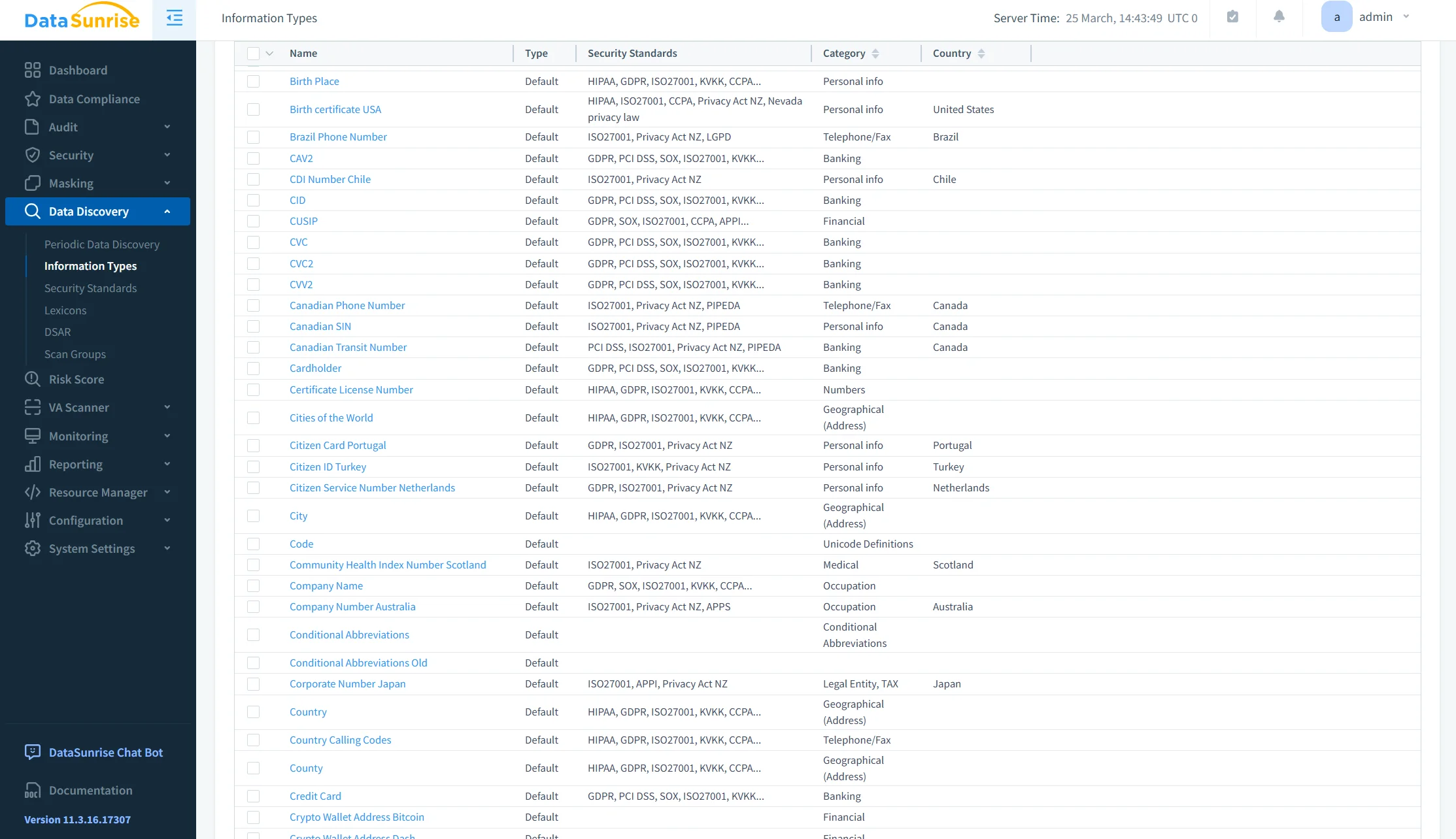
After connecting the cluster, administrators can run Sensitive Data Discovery across selected databases and collections. DataSunrise analyzes document fields and identifies information that may require additional protection.
The discovery process can locate names, contact details, government identifiers, payment card information, financial records, healthcare data, authentication credentials, and custom business-sensitive patterns.
Periodic discovery tasks can scan the environment for newly created collections and emerging sensitive fields. This helps organizations maintain a continuous compliance posture as document structures and application workloads change.
3. Generate Compliance Policies
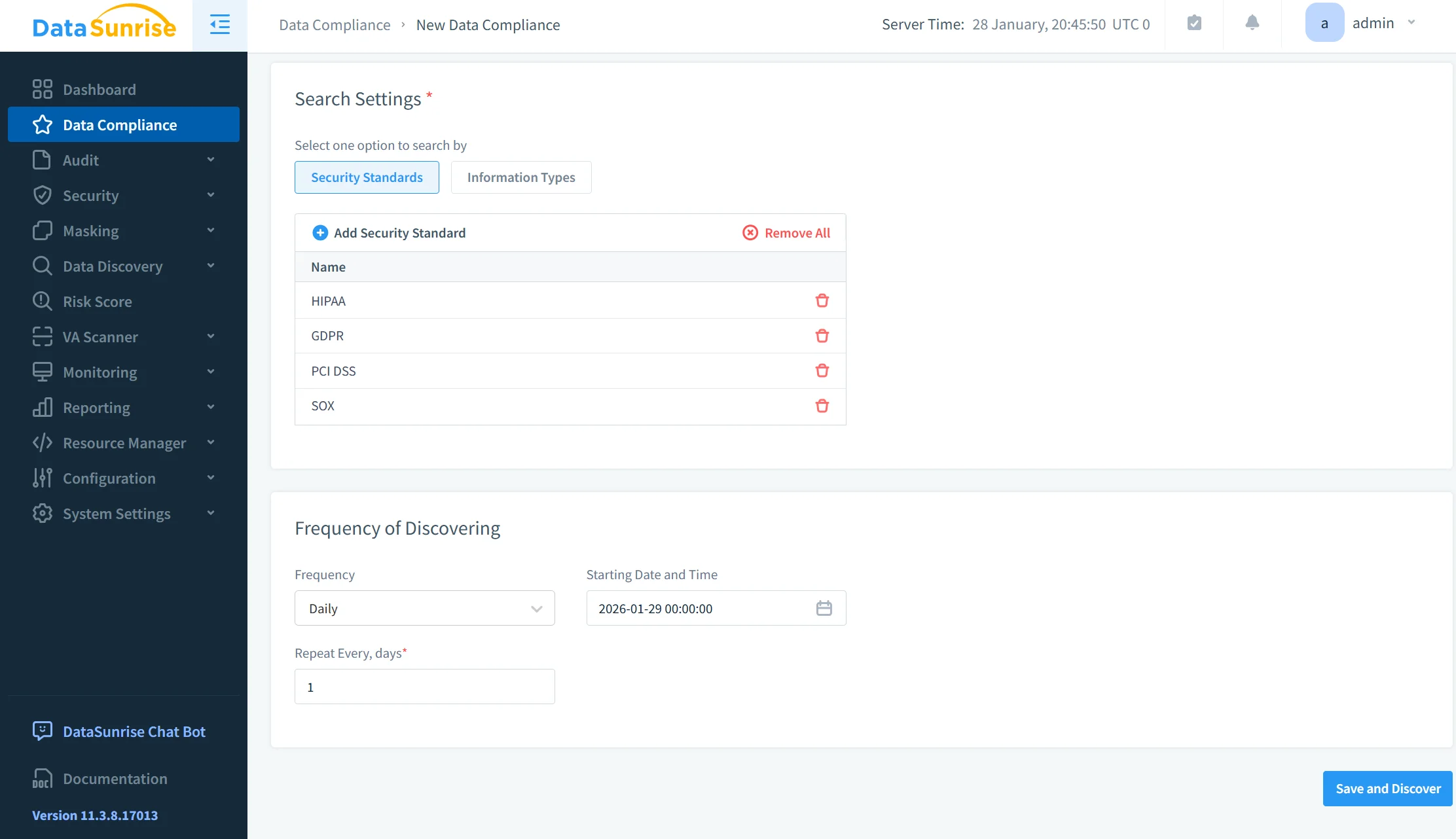
Compliance Autopilot maps discovered sensitive information to regulatory frameworks such as GDPR, HIPAA, PCI DSS, SOX, and CCPA. Based on the discovery results, Automatic Policy Generation can create audit rules, security rules, masking rules, discovery schedules, and compliance reports.
These policies can target specific collections, attributes, users, operations, or access conditions. This no-code policy automation reduces repetitive configuration work and lowers the risk of leaving newly introduced sensitive fields outside existing controls.
Amazon DocumentDB environments rarely remain static. Applications introduce new fields, services change access patterns, and development teams deploy additional collections.
Continuous Regulatory Calibration periodically reassesses the environment to identify newly introduced sensitive attributes, collections outside existing policies, changed user behavior, missing protection rules, compliance drift, and inconsistent controls across environments.
DataSunrise can adjust protection coverage as the data landscape evolves. This reduces the need to rebuild the entire policy set whenever application structures or regulatory requirements change.
5. Protect Sensitive Query Results
Dynamic Data Masking protects regulated values in query results while preserving normal application workflows. The original data remains unchanged inside Amazon DocumentDB, but unauthorized or lower-privileged users receive masked values.
Masking behavior can depend on the database user, application account, source address, collection, sensitive field, session context, and access conditions.
For example, a support operator may receive the following result:
{
  "customerName": "Maria S.",
  "email": "m***@example.com",
  "cardNumber": "****-****-****-4281"
}
An approved financial application can still receive the original values when its access context matches the configured policy.
This context-aware protection limits unnecessary exposure without modifying stored documents or disrupting authorized business processes.
6. Monitor Compliance-Relevant Activity
DataSunrise provides centralized Database Activity Monitoring for Amazon DocumentDB and other supported platforms. It records compliance-relevant activity and presents it through a unified interface.
Monitoring records can include user and session information, executed operations, accessed databases and collections, request timestamps, source applications, errors, authorization failures, applied policies, and rule-triggered actions.
Machine Learning Audit Rules and behavior analytics help identify unusual access patterns that static filters may miss. Examples include unexpected bulk reads, access outside established working hours, new applications querying regulated collections, repeated authorization failures, and sudden increases in exported records.
This continuous visibility helps security teams detect suspicious behavior before it develops into a larger compliance incident.
7. Automate Compliance Evidence
DataSunrise can generate scheduled PDF and CSV reports covering audit activity, security events, discovery results, sessions, and system operations.
Automated compliance reporting reduces the manual work required for internal reviews and external audits. Reports can demonstrate where sensitive data resides, which policies protect it, who accessed regulated collections, what suspicious events occurred, how violations were handled, and whether controls remained active.
This process converts operational telemetry into structured, audit-ready evidence. As a result, organizations can accelerate audit preparation, improve accountability, and maintain a more consistent compliance posture across Amazon DocumentDB and other data platforms.
Business Benefits of Automated Compliance for Amazon DocumentDB
Automated compliance helps organizations replace scattered manual processes with continuous, policy-driven controls. By combining Sensitive Data Discovery, centralized monitoring, masking, and reporting, teams can improve protection while reducing operational overhead.
| Benefit | Business Impact |
|---|---|
| Continuous control assessment | Identifies compliance drift before scheduled audits |
| Automated sensitive data discovery | Locates regulated information as collections evolve |
| No-code policy automation | Reduces repetitive rule configuration |
| Centralized monitoring | Improves visibility across DocumentDB and other platforms through Database Activity Monitoring |
| Dynamic data masking | Limits exposure while preserving application functionality |
| Automated evidence generation | Accelerates internal and external audit preparation |
| Consistent policy enforcement | Reduces gaps between cloud, hybrid, and development environments |
| Lower administrative overhead | Allows security teams to focus on high-risk findings |
| Faster remediation | Shortens the time between detection and corrective action |
| Reduced compliance risk | Strengthens regulatory alignment and accountability |
Conclusion
Amazon DocumentDB provides a strong foundation for compliance automation through event auditing, CloudWatch Logs, CloudTrail, AWS Config, EventBridge, Lambda, CloudFormation, KMS, Security Hub, and automated backup services.
These native capabilities standardize infrastructure, detect configuration changes, collect operational evidence, and trigger remediation workflows. However, they do not independently understand sensitive information stored inside document fields or apply data-level security policies.
DataSunrise extends Amazon DocumentDB compliance automation through Sensitive Data Discovery, Compliance Autopilot, Automatic Policy Generation, Continuous Regulatory Calibration, Machine Learning Audit Rules, Dynamic Data Masking, centralized monitoring, and audit-ready reporting.
The result is a data-aware compliance framework that reduces manual effort, minimizes compliance gaps, and improves regulatory readiness across Amazon DocumentDB and heterogeneous environments.
Protect Your Data with DataSunrise
Secure your data across every layer with DataSunrise. Detect threats in real time with Activity Monitoring, Data Masking, and Database Firewall. Enforce Data Compliance, discover sensitive data, and protect workloads across 50+ supported cloud, on-prem, and AI system data source integrations.
Start protecting your critical data today
Request a Demo Download Now