AI Compliance for Amazon DocumentDB
Amazon DocumentDB supports applications that store customer profiles, financial records, healthcare information, authentication data, and other sensitive content in flexible JSON-like documents. This flexibility helps development teams move quickly. However, it also makes regulated information harder to locate and classify.
Sensitive values may appear inside nested objects, arrays, comments, support messages, or application-generated text. Traditional compliance checks often depend on field names and fixed patterns. Those methods can miss sensitive information when developers use inconsistent schemas or embed personal data inside free-text fields.
NLP, LLM, and ML technologies provide a more adaptive approach. Natural Language Processing identifies regulated information through linguistic context. Machine learning analyzes user behavior and database activity. Large language models assist with security guidance, compliance interpretation, and operational workflows.
Amazon DocumentDB includes native security, auditing, and monitoring services. DataSunrise extends these capabilities with Data Discovery, NLP-based classification, Machine Learning Audit Rules, automated policy generation, and centralized data compliance management.
This article explains how these technologies support intelligent compliance without simply recycling another audit-log walkthrough. Because apparently renaming CloudWatch filters “AI compliance” would have been too easy.
Understanding NLP, LLM & ML Data Compliance
NLP, LLM, and ML technologies address different parts of the data compliance lifecycle.
Natural Language Processing examines the meaning and context of text. It can identify names, addresses, identification numbers, medical details, payment information, and other sensitive values inside unstructured document fields. This improves Sensitive Data Discovery when field names alone provide insufficient context.
Machine learning analyzes historical activity and establishes behavioral baselines. It helps identify unusual access patterns, unexpected data exports, abnormal query volumes, and access outside normal working conditions. These capabilities strengthen user behavior analysis by highlighting deviations from normal database activity.
Large language models can support compliance operations by interpreting natural-language requests, summarizing findings, and providing configuration guidance. Their output should remain connected to controlled policies and verified security data. An LLM should assist compliance teams rather than become an unsupervised policy oracle with excellent grammar and questionable judgment.
Together, these tools can strengthen several compliance processes:
- Sensitive data discovery and classification
- Detection of compliance drift
- Behavioral risk analysis
- Policy recommendation and generation
- Audit-event interpretation
- Compliance reporting and investigation
- Faster configuration and troubleshooting
The project documentation confirms that DataSunrise can apply NLP Data Discovery to unstructured database fields. It also supports periodic searches for newly added sensitive data and automated report generation for audit, security, discovery, and system events.
Native Amazon DocumentDB Compliance Capabilities
Amazon DocumentDB does not include a built-in NLP classification engine or an ML-based compliance policy generator. However, it provides several native security and monitoring controls that can support an intelligent compliance architecture. These capabilities help organizations record database activity, evaluate configuration settings, protect connections, manage identities, and maintain evidence for regulatory reviews.
Event Auditing
Amazon DocumentDB event auditing records authentication events, authorization activity, user management operations, and DDL and DML actions. The service exports audit records as JSON documents to Amazon CloudWatch Logs, where security teams can review them during investigations, use them as compliance evidence, or process them through additional analytics workflows.
Auditing is disabled by default. Administrators can enable it through the dynamic audit_logs parameter in a DocumentDB cluster parameter group. For example, the following AWS CLI command enables all supported audit categories:
aws docdb modify-db-cluster-parameter-group \
  --db-cluster-parameter-group-name docdb-compliance-params \
  --parameters \
  "ParameterName=audit_logs,ParameterValue=all,ApplyMethod=immediate"
The audit_logs parameter supports several values:
ddl
dml_read
dml_write
all
none
enabled
disabled
The ddl value records data definition operations, while dml_read captures read activity and dml_write records write operations. Administrators can use all to enable all supported categories or none to disable them. The values enabled and disabled are also available for broader audit activation or deactivation.
Selective configuration helps reduce unnecessary audit volume. For example, an organization may enable read auditing for collections containing regulated information without recording every unrelated database operation:
aws docdb modify-db-cluster-parameter-group \
  --db-cluster-parameter-group-name docdb-compliance-params \
  --parameters \
  "ParameterName=audit_logs,ParameterValue=dml_read,ApplyMethod=immediate"
The DocumentDB cluster must also be configured to export audit records to CloudWatch Logs. Administrators can enable this export with the following command:
aws docdb modify-db-cluster \
  --db-cluster-identifier production-docdb \
  --enable-cloudwatch-logs-exports audit
Administrators can verify the configured log exports by inspecting the cluster:
aws docdb describe-db-clusters \
  --db-cluster-identifier production-docdb \
  --query "DBClusters[0].EnabledCloudwatchLogsExports"
Once enabled, DocumentDB sends audit events to CloudWatch, where they become available for searching, retention management, alerting, and further analysis.
CloudWatch Log Analysis
Amazon CloudWatch Logs provides search capabilities, metric filters, retention settings, alarms, and connections to downstream analytics services. Security teams can use these features to identify failed authentication attempts, activity performed by privileged users, access to sensitive collections, and unusual database operations.
A basic CloudWatch Logs Insights query may look like this:
fields @timestamp, user, remote_ip, event, param
| filter event like /authenticate|find|update|remove/
| sort @timestamp desc
| limit 100
This query displays recent authentication, read, update, and removal events together with timestamps, users, remote addresses, and event parameters.
Security teams can narrow the results to failed authentication events:
fields @timestamp, user, remote_ip, event, param
| filter event = "authenticate"
| filter param like /failure|failed|unauthorized/
| sort @timestamp desc
Another query can focus on activity involving a sensitive collection:
fields @timestamp, user, remote_ip, event, param
| filter param like /customers|payments|medical_records/
| sort @timestamp desc
| limit 200
Administrators can also set a retention period for the DocumentDB audit log group:
aws logs put-retention-policy \
  --log-group-name "/aws/docdb/production-docdb/audit" \
  --retention-in-days 90
CloudWatch can detect predefined conditions and known event patterns. However, administrators must manually determine which filters, thresholds, and alarms are relevant. CloudWatch does not interpret the semantic meaning of document content. For example, it cannot independently determine that a free-text customer note contains a medical diagnosis, payment-card number, or another regulated value.
AWS Config and Security Hub
AWS Config helps organizations evaluate whether DocumentDB resources follow required configuration policies. The managed DOCDB_CLUSTER_AUDIT_LOGGING_ENABLED rule checks whether a cluster exports audit logs. If the export is not enabled, AWS Config marks the cluster as noncompliant.
Administrators can create the managed AWS Config rule with the AWS CLI:
aws configservice put-config-rule \
  --config-rule '{
    "ConfigRuleName": "docdb-cluster-audit-logging-enabled",
    "Source": {
      "Owner": "AWS",
      "SourceIdentifier": "DOCDB_CLUSTER_AUDIT_LOGGING_ENABLED"
    }
  }'
The compliance status of the rule can then be reviewed with:
aws configservice get-compliance-details-by-config-rule \
  --config-rule-name docdb-cluster-audit-logging-enabled
AWS Security Hub complements this assessment by providing controls for DocumentDB encryption, backups, audit logging, deletion protection, and TLS configuration. These controls help security teams identify infrastructure-level compliance gaps across AWS accounts and regions.
Security Hub findings related to DocumentDB can be retrieved with a filter such as:
aws securityhub get-findings \
  --filters '{
    "ProductName": [
      {
        "Value": "Security Hub",
        "Comparison": "EQUALS"
      }
    ],
    "ResourceType": [
      {
        "Value": "AwsRdsDbCluster",
        "Comparison": "EQUALS"
      }
    ]
  }'
Together, AWS Config and Security Hub provide valuable configuration oversight. However, they primarily evaluate whether technical safeguards are enabled. They do not inspect the contents of DocumentDB collections or automatically determine which fields fall under GDPR, HIPAA, PCI DSS, or other regulatory requirements.
Encryption and Access Management
Amazon DocumentDB supports encryption at rest through AWS Key Management Service. Encrypted clusters use AES-256 encryption, while AWS manages the underlying encryption and decryption operations. This protects stored database data, automated backups, snapshots, and replicas associated with the encrypted cluster.
An encrypted DocumentDB cluster can be created with a customer-managed AWS KMS key:
aws docdb create-db-cluster \
  --db-cluster-identifier compliant-docdb-cluster \
  --engine docdb \
  --storage-encrypted \
  --kms-key-id arn:aws:kms:us-east-1:123456789012:key/example-key-id \
  --master-username docdbadmin \
  --master-user-password 'StrongPasswordExample'
TLS protects connections between applications and DocumentDB clusters. Encryption in transit is enabled by default for newly created clusters, helping prevent unauthorized interception of credentials and database traffic.
A MongoDB-compatible client can connect with TLS enabled as follows:
mongosh "mongodb://docdbadmin@production-docdb.cluster-example.us-east-1.docdb.amazonaws.com:27017/?tls=true&replicaSet=rs0&readPreference=secondaryPreferred&retryWrites=false" \
  --tlsCAFile global-bundle.pem \
  --password
AWS Identity and Access Management controls access to DocumentDB administrative operations. IAM policies can restrict who may create, modify, delete, or inspect DocumentDB resources.
A basic IAM policy that permits read-only access to DocumentDB cluster metadata may look like this:
{
  "Version": "2012-10-17",
  "Statement": [
    {
      "Effect": "Allow",
      "Action": [
        "rds:DescribeDBClusters",
        "rds:DescribeDBInstances",
        "rds:DescribeDBClusterParameterGroups",
        "rds:ListTagsForResource"
      ],
      "Resource": "*"
    }
  ]
}
A more restrictive policy can limit administrative actions to a specific DocumentDB cluster:
{
  "Version": "2012-10-17",
  "Statement": [
    {
      "Effect": "Allow",
      "Action": [
        "rds:ModifyDBCluster",
        "rds:AddTagsToResource",
        "rds:RemoveTagsFromResource"
      ],
      "Resource": "arn:aws:rds:us-east-1:123456789012:cluster:production-docdb"
    }
  ]
}
DocumentDB 5.0 instance-based clusters can also use IAM identities for passwordless database authentication through temporary AWS Security Token Service credentials. This reduces dependence on long-lived database passwords and supports centralized identity governance.
These native controls establish a strong compliance foundation. They protect infrastructure, network connections, stored data, administrative identities, and recorded database activity. Nevertheless, they do not continuously interpret document content, classify sensitive information through linguistic context, analyze behavioral baselines, or automatically map discovered data to regulatory policies.
Intelligent Amazon DocumentDB Compliance with DataSunrise
DataSunrise uses context-aware discovery, automated policy generation, behavioral analysis, and centralized controls to support Amazon DocumentDB compliance with limited manual configuration.
The platform supports Amazon DocumentDB through real-time auditing, database security, Data Discovery, Risk Scoring, Dynamic Data Masking, and Static Data Masking. Instead of managing each compliance function separately, organizations can coordinate discovery, monitoring, protection, and reporting within one policy-driven environment.
1. Connect Amazon DocumentDB
Administrators begin by registering the Amazon DocumentDB cluster in DataSunrise. The connection configuration typically includes the cluster endpoint, port 27017, the authentication database, database credentials, TLS settings, certificate parameters, and connection timeout values.
After the connection is tested successfully, DataSunrise can apply centralized audit, security, masking, and compliance policies to the registered DocumentDB environment. This approach reduces the need to configure each control independently and helps maintain consistent protection across collections.
- Specify the Amazon DocumentDB cluster endpoint and connection port.
- Configure the authentication database and required credentials.
- Enable TLS and provide the appropriate certificate parameters.
- Test the connection before activating monitoring and protection rules.
- Use the registered instance as a centralized target for compliance policies.
2. Run NLP Data Discovery
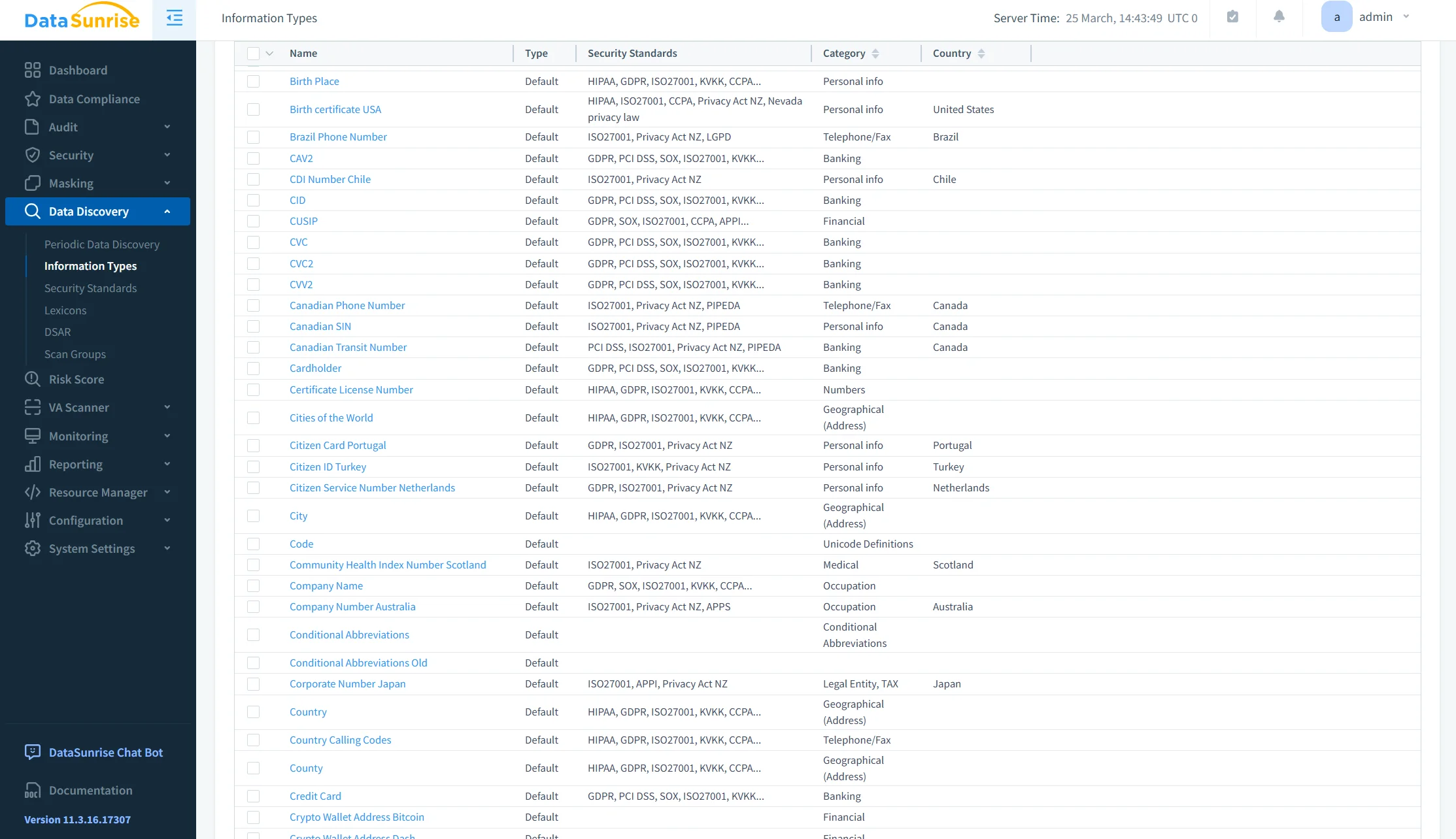
DataSunrise Sensitive Data Discovery scans Amazon DocumentDB collections for regulated and confidential information.
Traditional discovery methods can inspect collection names, field names, data types, dictionaries, and predefined patterns. NLP Data Discovery extends this process by analyzing the meaning and context of text stored inside document fields.
For example, a support-case document may contain an insurance-related subject, a customer email address, and a free-text message describing a person’s medical condition and healthcare provider.
A field-name-based scanner may identify the email address stored in the contact field. However, it may not recognize that the message field also contains a person’s name, medical information, and healthcare-provider details.
NLP analysis can classify this content according to its meaning instead of relying only on predictable field names. This improves sensitive data discovery across customer notes, support conversations, insurance descriptions, medical comments, transaction narratives, application logs, embedded JSON text, and user-generated content.
Periodic discovery tasks can scan newly created collections and recently added documents. This helps organizations identify new sensitive information and detect compliance drift as schemas, applications, and data flows evolve.
- Detect sensitive information inside nested and free-text document fields.
- Combine pattern matching, dictionaries, metadata analysis, and NLP classification.
- Identify PII, PHI, payment data, credentials, and other regulated content.
- Schedule recurring scans for newly created collections and documents.
- Review discovery results before generating protection and compliance policies.
3. Apply Compliance Autopilot
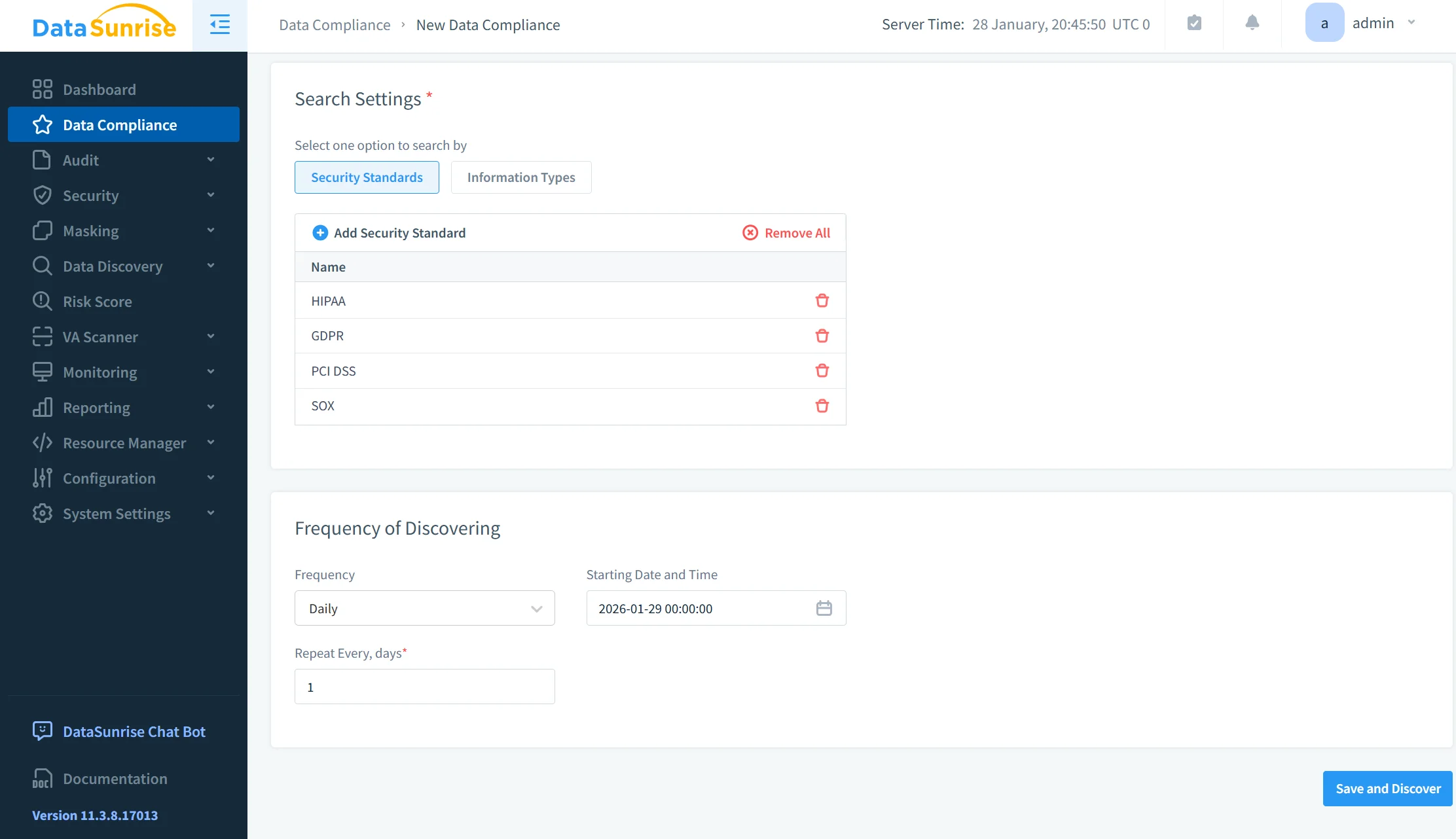
After DataSunrise identifies sensitive information, Compliance Autopilot can map discovered fields and collections to applicable regulatory requirements.
Relevant frameworks may include GDPR, HIPAA, PCI DSS, SOX, CCPA, and ISO 27001. Based on the selected standards and discovery results, Automatic Policy Generation can create targeted audit, security, and masking rules.
These policies can focus on collections that contain regulated information instead of applying identical monitoring settings to every database object. For example, DataSunrise can apply Dynamic Data Masking to customer identifiers, configure detailed auditing for payment collections, restrict access to healthcare documents, generate alerts for bulk reads, and prepare compliance reports for selected regulatory scopes.
This no-code policy automation reduces repetitive configuration while preserving granular control over users, collections, document fields, sessions, and database operations.
- Select the regulations that apply to the DocumentDB environment.
- Map discovered sensitive fields to relevant compliance requirements.
- Generate audit, masking, and security policies automatically.
- Apply stricter controls only to collections containing regulated information.
- Reassess policies when schemas, data locations, or regulatory requirements change.
4. Use Machine Learning Audit Rules
Traditional audit rules identify predefined events and known conditions. Machine Learning Audit Rules add another layer by evaluating database activity against learned behavioral patterns.
The system can establish normal baselines for users, application accounts, frequently accessed collections, typical query volume, update frequency, standard access locations, session duration, working hours, and routine administrative operations.
After these baselines are established, the ML layer can identify deviations. Examples include a service account accessing an unfamiliar collection, a user exporting substantially more documents than usual, repeated activity outside normal working hours, sudden queries against regulated data, unusual administrative changes, or access from an unexpected application or network source.
- Establish normal behavior profiles for users, services, and application accounts.
- Compare current activity with historical query and access patterns.
- Detect unusual export volumes, session times, and collection access.
- Highlight anomalies involving regulated or business-critical information.
- Reduce audit noise by prioritizing events with higher behavioral risk.
5. Protect Discovered Data
DataSunrise can apply Dynamic Data Masking to sensitive Amazon DocumentDB values returned to users and applications.
Masking policies can evaluate the database user, application identity, client address, collection, document field, session context, and access permissions. This allows the platform to determine whether a user should receive the original value or a masked substitute.
Authorized applications continue receiving the information required for legitimate operations. Other users may receive partially hidden, substituted, randomized, or otherwise obfuscated values.
This approach supports least-privilege access while preserving application functionality. It also reduces the risk of exposing regulated information through administrative tools, testing environments, reporting systems, or support workflows.
- Apply masking rules to selected collections and sensitive document fields.
- Define different masking behavior for users, roles, and applications.
- Preserve original values for authorized production workloads.
- Obfuscate sensitive content for support, analytics, and testing users.
- Reduce unnecessary exposure without changing the stored source data.
6. Generate Audit-Ready Evidence
DataSunrise centralizes audit events, discovery results, compliance status, policy activity, and security findings.
The platform can generate PDF and CSV reports covering audit events, discovery results, security incidents, sessions, and operational errors. Compliance teams can use these reports to document where sensitive information resides, which users accessed regulated data, what protection policies were active, whether unusual behavior occurred, how identified risks were addressed, and which collections fall under specific regulatory requirements.
By consolidating this evidence, DataSunrise reduces manual report preparation and improves readiness for internal reviews, external audits, and regulatory assessments.
- Generate reports for audit activity, discovery results, and security events.
- Document which collections and fields contain regulated information.
- Show who accessed sensitive data and which operations they performed.
- Confirm which audit, security, and masking policies were active.
- Export evidence in PDF or CSV format for auditors and compliance teams.
Native AWS Tools vs. DataSunrise
Native AWS services provide essential infrastructure monitoring, configuration assessment, encryption, and audit-log collection for Amazon DocumentDB. DataSunrise extends this foundation with data-level discovery, behavioral analysis, automated policy generation, masking, and centralized compliance reporting. The comparison below highlights the practical difference between assembling separate AWS controls and using a unified compliance platform.
| Capability | Native AWS Services | DataSunrise |
|---|---|---|
| DocumentDB event logging | CloudWatch audit logs | Centralized real-time audit |
| Infrastructure compliance | AWS Config and Security Hub | Data-level compliance management |
| Sensitive data discovery | Requires custom implementation | NLP and pattern-based discovery |
| Behavioral analysis | Requires external analytics | Machine Learning Audit Rules |
| Regulatory mapping | Manual configuration | Compliance Autopilot |
| Policy creation | Separate AWS configurations | Automatic Policy Generation |
| Sensitive data protection | IAM and encryption controls | Dynamic and Static Masking |
| Multi-platform governance | Primarily AWS-focused | Centralized heterogeneous coverage |
| Compliance reporting | Built from multiple AWS services | Consolidated audit-ready reports |
Conclusion
Amazon DocumentDB provides a solid native foundation through event auditing, CloudWatch Logs, AWS Config, Security Hub, IAM, KMS encryption, TLS, profiling, and backup capabilities. These services protect infrastructure, record database activity, and evaluate essential configuration controls.
However, native controls do not independently understand sensitive text, establish behavioral baselines, map discovered document fields to regulatory frameworks, or generate data-level protection policies.
DataSunrise extends Amazon DocumentDB compliance with NLP Data Discovery, Compliance Autopilot, Automatic Policy Generation, Continuous Regulatory Calibration, Machine Learning Audit Rules, centralized database activity monitoring, Dynamic Data Masking, and audit-ready reporting.
Unlike systems that require constant manual rule adjustments, DataSunrise connects discovery, behavioral analysis, policy enforcement, and automated compliance reporting within a unified compliance framework. This approach reduces administrative effort, improves sensitive-data visibility, and strengthens regulatory alignment across cloud, hybrid, and heterogeneous environments.
Organizations can explore DataSunrise’s deployment and compliance capabilities by scheduling a live demonstration.
Protect Your Data with DataSunrise
Secure your data across every layer with DataSunrise. Detect threats in real time with Activity Monitoring, Data Masking, and Database Firewall. Enforce Data Compliance, discover sensitive data, and protect workloads across 50+ supported cloud, on-prem, and AI system data source integrations.
Start protecting your critical data today
Request a Demo Download Now