How to Mask Sensitive Data in PostgreSQL
To mask sensitive data in PostgreSQL without wrecking day-to-day operations, you need controls that protect PII and financial identifiers while keeping datasets usable for support, analytics, and reporting. PostgreSQL sits behind billing, customer, and analytics systems, and those workloads inevitably store Personally Identifiable Information (PII) and regulated identifiers that shouldn’t be visible to every SQL user. Data masking reduces exposure by transforming sensitive fields while keeping workflows functional.
The IBM Cost of a Data Breach Report shows how quickly incident costs escalate. When you mask sensitive data in PostgreSQL, the goal is simple: ensure the right people see the right level of detail—every time, from every client.
This guide covers dynamic data masking in PostgreSQL (real-time masking in production) and practical static masking in MySQL (sanitized data for Dev/Test).
What to Mask When You Mask Sensitive Data in PostgreSQL
Start with fields that create immediate risk: names, emails, phones, national IDs, salary/payroll data, bank account and IBAN values, and full addresses. DataSunrise summarizes common approaches in masking types:
- Redaction for “never show” fields (SSN, passport)
- Partial masking for identifiers that need limited visibility (last 4 digits)
- Hashing/tokenization for “match without reveal” scenarios
In practice, the best masking method protects privacy without breaking workflows. Some teams need matching, others need trends, and almost nobody needs raw identifiers all day.
| Field | Typical risk | Recommended masking approach |
|---|---|---|
| Direct identifier | Partial masking (keep domain) or tokenization | |
| Phone | Direct identifier | Show last 2–4 digits only |
| SSN / Passport | High-impact regulated ID | Full redaction, or hashing when matching is required |
| Salary | Confidential compensation data | Bucket into ranges or replace with safe defaults |
| Bank account / IBAN | Financial identifier | Partial masking (last 4 visible) |
If teams say masked data is “useless,” the policy is probably too blunt. Preserve only what’s needed for the job (format, consistency, or grouping), not the original value.
Don’t randomly mask primary keys or join keys unless you preserve relationships. Breaking referential integrity turns every report into a bug report.
How to Mask Sensitive Data in PostgreSQL with Dynamic Data Masking
Dynamic data masking transforms values at query time. The stored data remains unchanged, but users covered by a policy receive masked output. This works best alongside access controls and RBAC, plus visibility through audit logs and database activity monitoring.
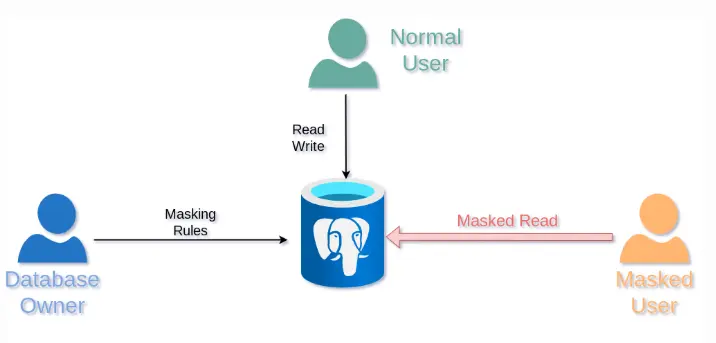
Think in personas. If support engineers only need to confirm “same customer” and “same transaction,” give them masked identifiers that still support matching, not raw PII.
Step-by-Step: Mask Sensitive Data in PostgreSQL with DataSunrise
Before creating rules, confirm your deployment approach (proxy/agent/etc.) using Deployment Modes of DataSunrise. The platform supports 40+ data platforms, so the workflow remains consistent across PostgreSQL and MySQL.
1) Create a Dynamic Masking Rule for PostgreSQL
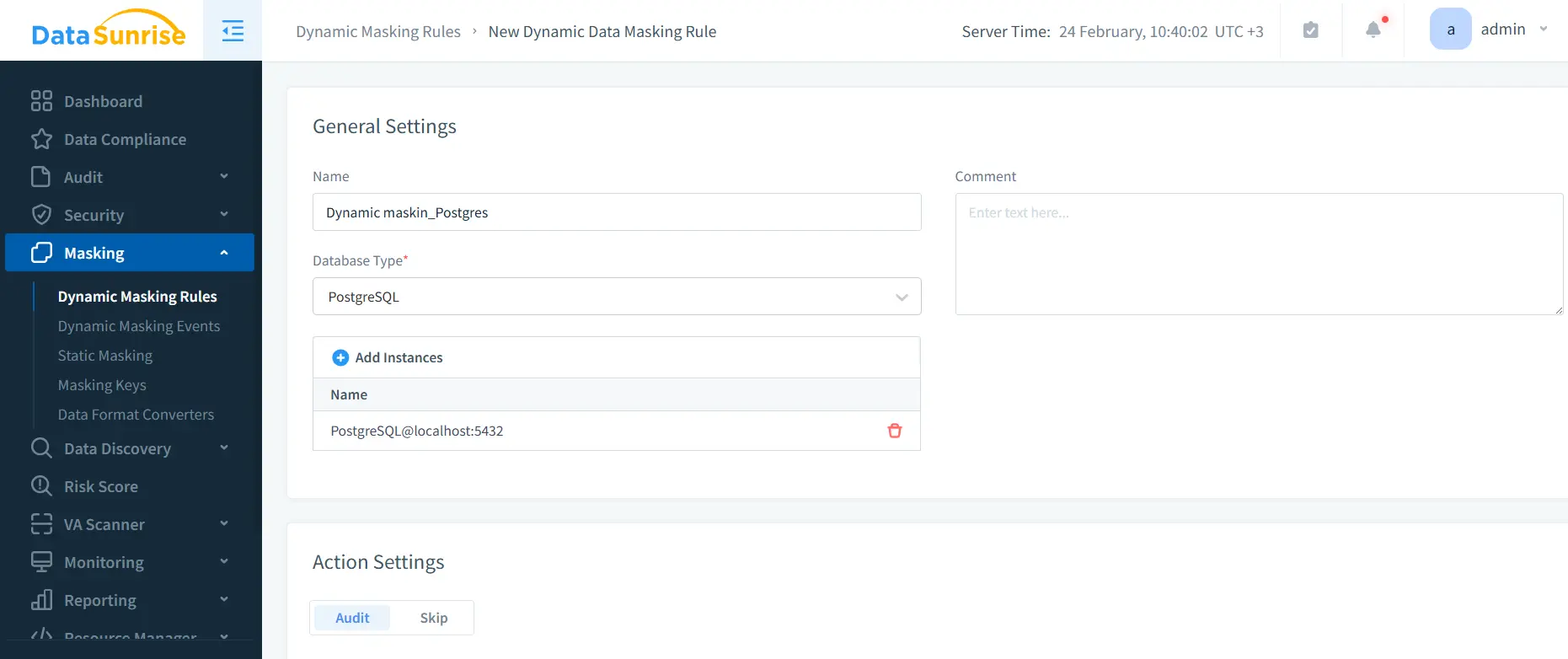
In the UI, go to Masking → Dynamic Masking Rules, create a new rule, choose PostgreSQL, and bind your instance.
2) Select Sensitive Objects and Columns
Use schema/table/column selection to define scope. If you’re unsure where sensitive fields are, run Data Discovery first and build the rule from those findings.
3) Choose Masking Methods and Conditions
Assign transformations per column (redact/partial/hash) and specify who gets masked output (users, roles, apps, networks). Keep the policy aligned with your RBAC model so exceptions are rare.
4) Validate “Before and After” Outputs
Run the same query under different identities and compare results.
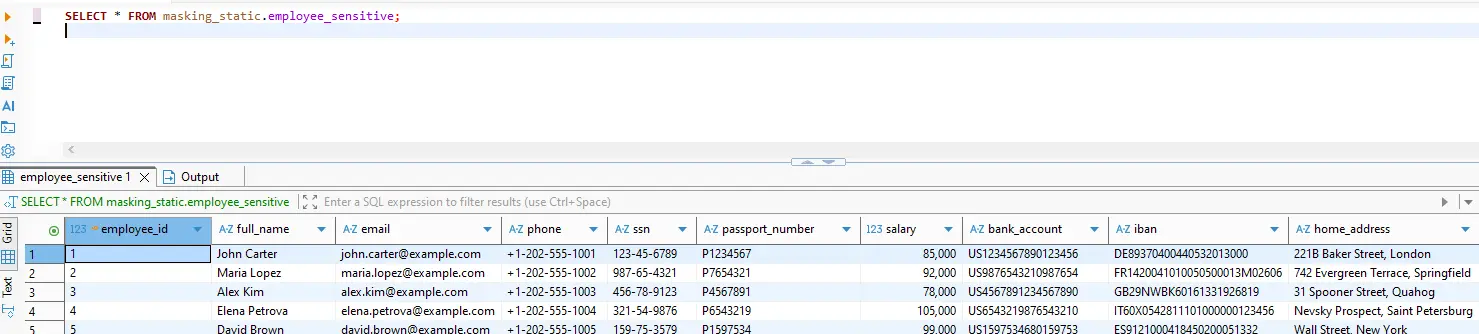
masking_static.employee_sensitive.

masking_test.employee_sensitive after policy enforcement: sensitive fields are transformed.
-- Baseline (unmasked or privileged context)
SELECT * FROM masking_static.employee_sensitive;

-- Masked output (policy applied / restricted context)
SELECT * FROM masking_test.employee_sensitive;
If you use PostgreSQL Row Level Security, keep it consistent with masking policy logic: PostgreSQL Row Security Policies.
Test with the same client context your users actually use (BI tool, ORM, service account). Masking that works in one client but leaks in another is still a leak.
5) Log Access and Keep Evidence
Use the Audit Guide to structure monitoring and retain evidence for investigations and audits. For stronger accountability, maintain a centralized audit trail across data stores.
Static Masking in MySQL: Safer Dev/Test Data
Dynamic masking protects production reads; static masking protects everything downstream. If you copy data into MySQL-based staging, QA, CI, or analytics, static masking creates a safe dataset that can be shared. It supports test data management and makes data-driven testing possible without leaking real customer data.
A practical static masking workflow:
- Stage a copy of the dataset (snapshot/replica/export).
- Apply static masking rules to permanently replace sensitive values.
- Preserve relationships with deterministic transformations for IDs used across tables.
- Use synthetic data generation to keep realism without using real addresses or identifiers.
- If required, use controlled in-place masking to sanitize data where it lives.
Automate static masking as part of environment provisioning. Manual “mask it later” processes always fail—usually right before an audit.
Security and Compliance for PostgreSQL Data Masking
Masking should be reinforced with proactive controls like vulnerability assessment, strong database encryption, and strict alignment to the principle of least privilege, with policy enforcement informed by compliance regulations. DataSunrise helps map masking controls to frameworks such as GDPR, HIPAA, PCI DSS, and SOX—with reporting support via the Compliance Manager.
Conclusion
To mask sensitive data in PostgreSQL effectively: discover what matters, apply dynamic masking for production access, validate results, and audit every access path. Then use static masking for MySQL Dev/Test copies so sensitive data doesn’t escape into lower-trust environments.
Protect Your Data with DataSunrise
Secure your data across every layer with DataSunrise. Detect threats in real time with Activity Monitoring, Data Masking, and Database Firewall. Enforce Data Compliance, discover sensitive data, and protect workloads across 50+ supported cloud, on-prem, and AI system data source integrations.
Start protecting your critical data today
Request a Demo Download Now