How to Mask Sensitive Data in SAP HANA
In today's regulatory landscape, protecting sensitive data in SAP HANA, SAP's in-memory database platform, has become a critical security imperative. Organizations face mounting pressure to implement robust data masking strategies that safeguard personally identifiable information, financial records, and proprietary business data.
According to IBM's 2024 Cost of a Data Breach Report, organizations with comprehensive data masking reduce breach costs by up to 62% and accelerate compliance readiness by 73%. With data breaches averaging $4.88 million in 2024, implementing effective data security measures has become a business imperative.
SAP HANA provides native masking capabilities through its security framework, but organizations often require sophisticated solutions to satisfy compliance regulations for GDPR, HIPAA, and PCI DSS. This guide explores SAP HANA's built-in features and demonstrates how DataSunrise enhances data protection with Zero-Touch Data Masking and Autonomous Compliance Orchestration.
Native SAP HANA Data Masking Capabilities
SAP HANA includes built-in features for implementing data masking through view-based approaches and SQL functions. These native capabilities provide foundational database security for protecting sensitive information during development, testing, and analytical activities.
1. SQL View-Based Masking
Create SQL views with transformation functions to mask sensitive data:
-- Create a masked view for customer data
CREATE VIEW MASKED_CUSTOMERS AS
SELECT
    CUSTOMER_ID,
    CUSTOMER_NAME,
    SUBSTRING(EMAIL, 1, LOCATE(EMAIL, '@')) || '@masked.com' AS EMAIL,
    'XXX-XXX-' || SUBSTRING(PHONE, -4) AS PHONE,
    'XXXX-XXXX-XXXX-' || SUBSTRING(CREDIT_CARD, -4) AS CREDIT_CARD
FROM CUSTOMERS;

GRANT SELECT ON MASKED_CUSTOMERS TO DEVELOPER_ROLE;
2. Testing with Sample Queries
Execute queries to verify masking:
-- Original data
SELECT CUSTOMER_ID, EMAIL, PHONE FROM CUSTOMERS WHERE CUSTOMER_ID = 'CUST12345';
-- Output: CUST12345 | [email protected] | 555-123-4567

-- Masked data
SELECT CUSTOMER_ID, EMAIL, PHONE FROM MASKED_CUSTOMERS WHERE CUSTOMER_ID = 'CUST12345';
-- Output: CUST12345 | [email protected] | XXX-XXX-4567
3. Context-Aware Masking
Implement role-based access controls for masking using session variables:
CREATE VIEW CONTEXT_MASKED_CUSTOMERS AS
SELECT
    CUSTOMER_ID,
    CASE
        WHEN SESSION_CONTEXT('USERROLE') = 'MANAGER'
        THEN EMAIL
        ELSE SUBSTRING(EMAIL, 1, 3) || '[email protected]'
    END AS EMAIL
FROM CUSTOMERS;
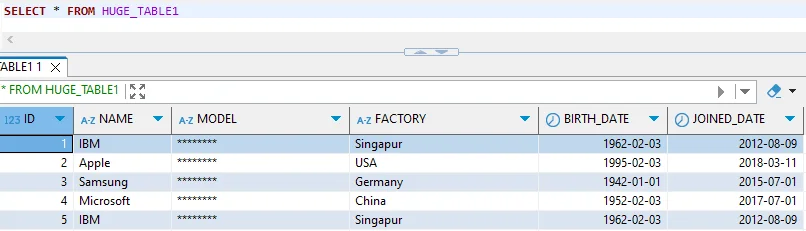
For more information, refer to the SAP HANA Security Guide.
Limitations of Native SAP HANA Masking
While SAP HANA's native capabilities provide essential functionality, organizations often encounter limitations when addressing database threats and compliance requirements:
| Native Feature | Key Limitation | Business Impact |
|---|---|---|
| SQL View-Based Masking | Manual view creation for each table | Significant administrative overhead |
| Static Masking Rules | Requires code changes to modify logic | Delayed response to compliance changes |
| Sensitive Data Identification | Manual classification of columns | Critical data may remain unprotected |
| Performance Impact | View-based approaches affect queries | Potential degradation of workloads |
| Cross-System Consistency | No unified masking across systems | Fragmented protection strategies |
Enhanced SAP HANA Data Masking with DataSunrise
DataSunrise enhances SAP HANA's native capabilities with Surgical Precision Masking and No-Code Policy Automation for enterprise environments. Unlike basic view-based approaches, DataSunrise provides comprehensive data protection with intelligent policy orchestration.
Setting Up DataSunrise for SAP HANA
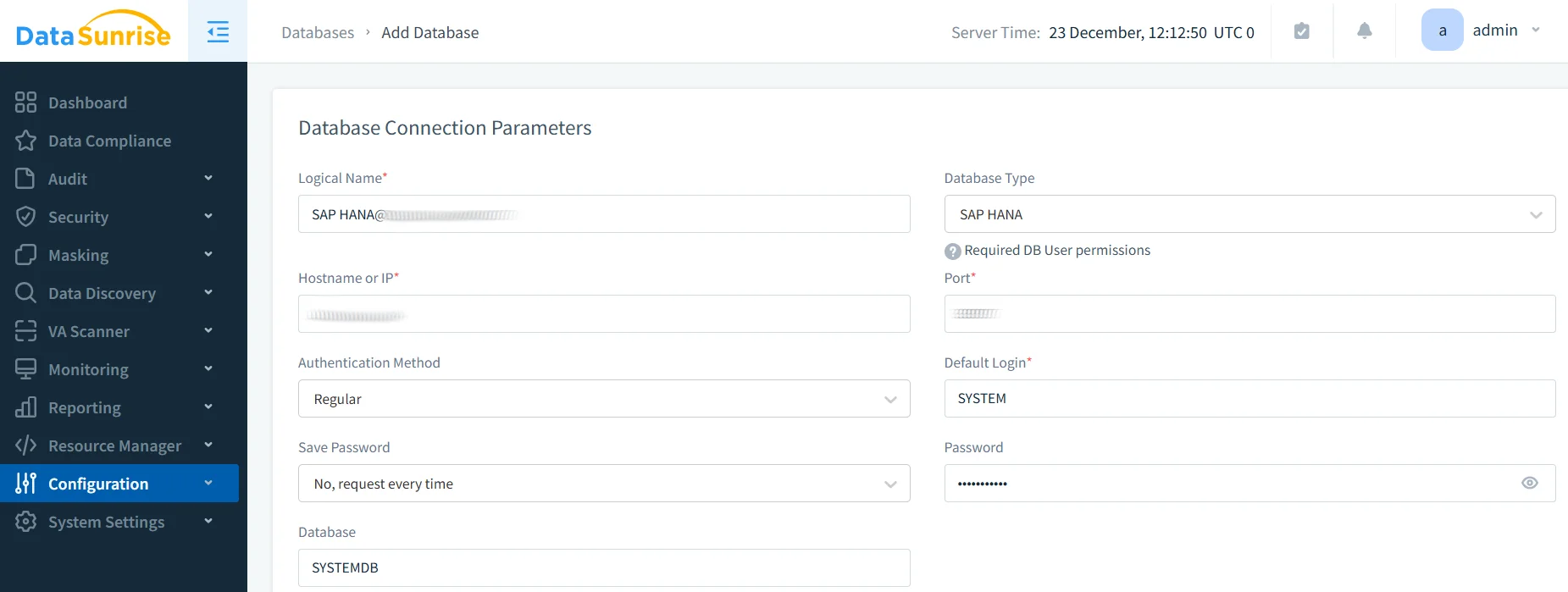
1. Connect to SAP HANA
Connect DataSunrise to your SAP HANA environment through an intuitive interface with minimal configuration.
2. Auto-Discover Sensitive Data
DataSunrise automatically identifies and classifies sensitive data using NLP algorithms through its data discovery capabilities. The system detects PII, financial data, and health records while classifying information based on GDPR, HIPAA, and PCI DSS requirements, providing up to 95% greater coverage than manual approaches.
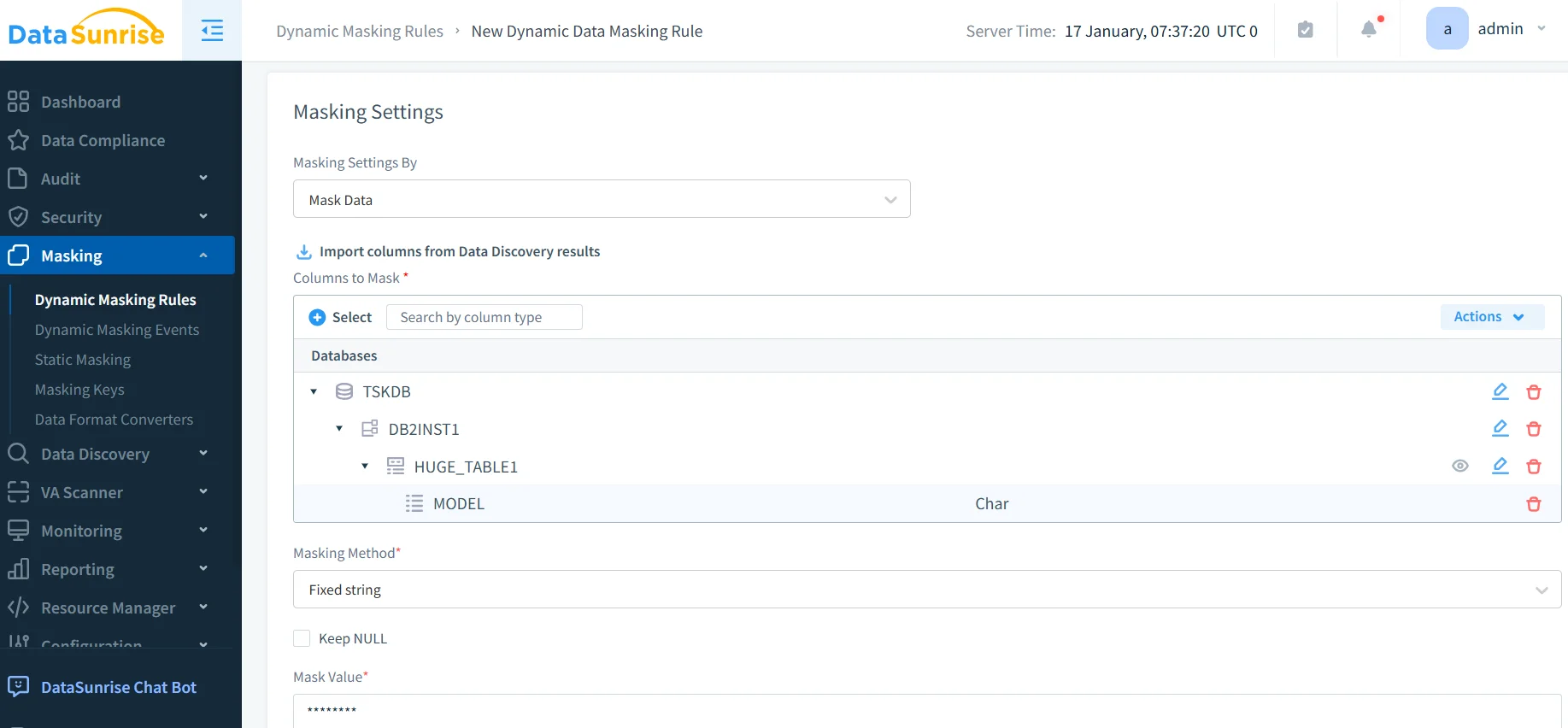
3. Create Masking Rules
Configure policies through a no-code interface. Define masking algorithms including randomization, substitution, and encryption. Apply dynamic masking based on user roles, set conditional rules, and schedule automated masking.
4. Deploy Masking
DataSunrise supports Dynamic Masking for real-time masking in query results, Static Masking for permanent masking of non-production data, and In-Place Masking for direct modification with integrity preservation.
Key Advantages of DataSunrise for SAP HANA
DataSunrise provides significant enhancements over native capabilities through advanced security policies and intelligent automation:
- Auto-Discover & Mask: Machine learning algorithms automatically identify sensitive data and apply appropriate policies with Continuous Regulatory Calibration
- Zero-Touch Policy Enforcement: Autonomous protection that adapts to schema changes without manual maintenance
- Comprehensive Masking Types: Format-preserving encryption, deterministic masking, randomization, substitution, shuffling, and custom algorithms
- Context-Aware Protection: Role-based, application-specific, and query pattern-based masking policies
- Cross-Platform Unified Framework: Consistent masking across over 50 data storage platforms
- Automated Compliance: Pre-configured templates for GDPR, HIPAA, PCI DSS, and SOX with Audit-Ready Reporting through the DataSunrise Compliance Manager
Conclusion
As SAP HANA serves as a strategic data platform for enterprise applications, robust data masking has become essential for maintaining access controls and protecting sensitive information. While SAP HANA's native capabilities provide foundational functionality, organizations with complex requirements benefit from enhanced solutions delivering autonomous protection.
DataSunrise provides comprehensive security for SAP HANA with Zero-Touch Data Masking, Auto-Discover & Mask capabilities, and Continuous Compliance Alignment across GDPR, HIPAA, PCI DSS, and SOX frameworks. With Flexible Deployment Modes supporting on-premise, cloud, and hybrid environments, DataSunrise transforms data masking into a strategic security asset.
Unlike solutions requiring constant maintenance, DataSunrise delivers Autonomous Compliance Orchestration that adapts automatically to changes. The platform's Cost-Effective architecture makes enterprise-grade masking accessible to organizations of all sizes with a Flexible Pricing Policy that scales with growth.
Protect Your Data with DataSunrise
Secure your data across every layer with DataSunrise. Detect threats in real time with Activity Monitoring, Data Masking, and Database Firewall. Enforce Data Compliance, discover sensitive data, and protect workloads across 50+ supported cloud, on-prem, and AI system data source integrations.
Start protecting your critical data today
Request a Demo Download Now